

Key Takeaways
- Wearable integration in parenting apps cuts down on manual logging by automatically tracking activity, sleep and wellness data.
- Wearables can track movement, sleep patterns, heart rate, temperature trends and location. Consumer metrics should stay as wellness estimates, not as medical diagnoses.
- Over time, AI can get a sense of a child’s normal routine, notice changes and offer simple activity ideas based on their age without making parents worry about every small change.
- Key features of kids’ wearable parenting apps include wearable pairing, automatic syncing, child profiles, unified dashboards, trend tracking, notifications, consent controls and wellness reports.
- Behind the scenes, integration involves device APIs, secure data transfer, data normalization, protected storage and AI processing, along with checks for missing or unreliable readings.
- Wearable integration in parenting apps can cost from $60,000 to $280,000+. The estimated cost differentiation depends on device coverage and AI complexity.
Parenting apps have traditionally relied on parents to record a child’s activity, sleep and daily routines. Kids wearable parenting app integration is changing that model by connecting compatible devices that can provide a more continuous view of a child’s day. But having a constant flow of wearable data does not always mean better parenting insights. Without the right context, it can simply add more noise and confusion.
The product challenge is to turn these signals into useful, age-aware guidance that helps parents understand patterns without treating every change as a concern. That requires more than device connectivity. Apps need to interpret data responsibly, account for each child’s developmental stage and protect sensitive information through clear privacy controls.
In this blog, we will talk about kids wearable parenting app integration, key features, data workflows, AI-driven insights and the privacy safeguards needed to build a trusted parenting app that turns everyday wearable data into useful insights without compromising child privacy.
Why Parenting Apps Are Moving Beyond Manual Tracking
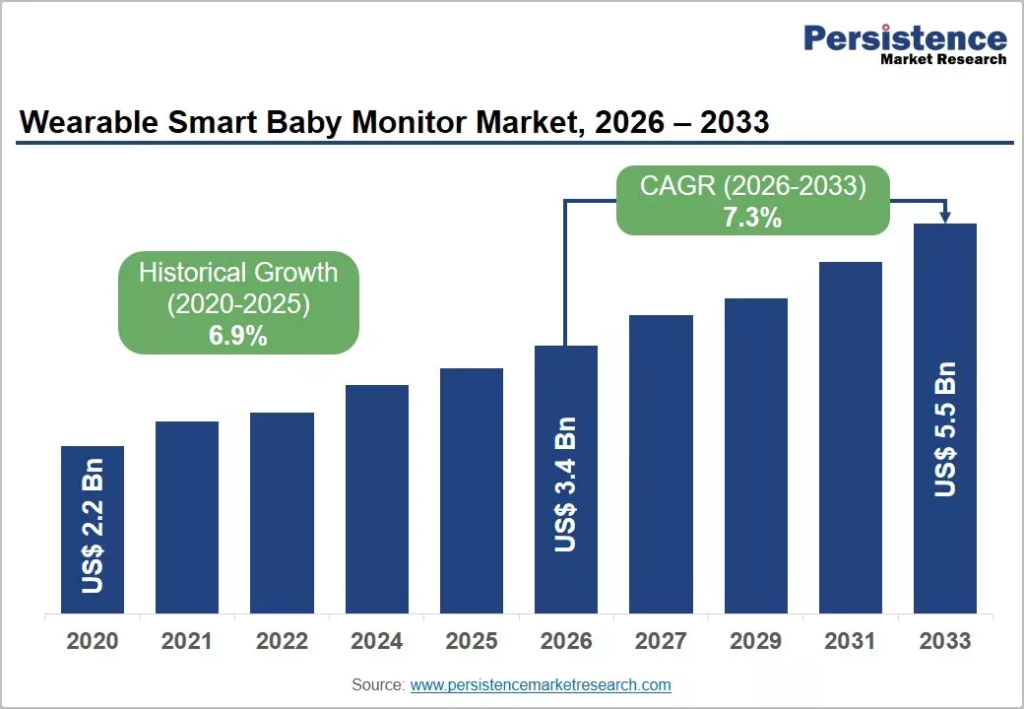
The global wearable smart baby monitor market is valued at $3.4 billion in 2026 and projected to reach $5.5 billion by 2033 at a 7.3% CAGR, driven specifically by AI-assisted sleep analytics and wearable vital sign monitoring replacing manual entry.
This shift is already visible in device adoption. Around 49 percent of parenting apps now integrate wearable devices for real-time baby health monitoring, and 52 percent of new app features focus on sleep tracking analytics, indicating that passive data capture is becoming the category standard rather than a premium add-on.
A. What Manual Parenting Logs Miss About Daily Routines
Manual entry depends on a tired parent remembering to open an app. With 43 percent of US parents using AI weekly for parenting tasks, the expectation has shifted toward systems that produce insight without constant input.
- Incomplete records: Night feeds, short naps, and mid-activity events routinely go unlogged, leaving gaps that make pattern detection unreliable for any AI layer built on top.
- Delayed updates: Entries logged hours later carry inaccurate timestamps, which distorts sleep cycle analysis and feeding interval calculations that depend on precise timing.
- Observer bias: Parents log what they notice, not what happened, so subtle shifts in sleep quality or activity level rarely make it into the record.
- Caregiver inconsistency: Different caregivers log with different granularity and conventions, producing fragmented data that requires normalization before AI analysis.
B. How Wearables Create a More Continuous Picture of Child Wellness
Device-generated data fills the gaps manual logs leave. More than 46 percent of children’s smartwatch units sold in 2024 included heart rate monitoring and sleep tracking, making continuous physiological signals widely available to consumer apps.
- Passive signal capture: Sleep duration, movement, and heart rate are recorded continuously without parent action, closing the coverage gaps manual logging creates.
- Objective baselines: Device data establishes a measurable baseline per child, so the AI flags deviations against that child’s own pattern rather than population averages.
- Complementary, not replacement: Wearable signals tell you what happened physiologically; parent observations supply context like teething, illness, or schedule disruption the device cannot infer.
- Integration pathways: Apple HealthKit, Google Health Connect, Fitbit, Garmin, and infant-specific devices like Owlet each require separate API integration and consent handling.
C. Why Founders Are Exploring Kids Wearable Integration
The device layer is where product differentiation now sits. The kids smartwatch market is projected to grow from $2.94 billion in 2026 to $7.55 billion by 2034 at a 12.50% CAGR, with North America holding the largest regional share.
- Personalized dashboards: Continuous device data supports family-facing dashboards showing trends over weeks, which static logging apps cannot populate credibly.
- Automated summaries: AI-generated daily and weekly reports replace manual review, giving parents interpretation instead of raw charts they have to decode themselves.
- Connected family wellness: Multi-child and multi-caregiver views turn the app into a household platform rather than a single-child tracker, improving retention and subscription value.
- Data as a moat: Longitudinal device data accumulated across users becomes the proprietary dataset that later justifies custom model development and defensible personalization.
- Compliance weight: Device data on a child is regulated personal information under COPPA, so each integration requires its own consent flow, retention policy, and deletion pathway.
What Can Kids’ Wearables Actually Track in Parenting Apps?
Integrating smartwatches, fitness bands, and connected monitors into an AI parenting app transforms raw telemetry into actionable context. However, engineering teams and product leaders must clearly distinguish between lifestyle trend estimation and clinical-grade medical diagnostics.
Consumer hardware allows parenting apps to surface supportive developmental patterns, routine insights, and family safety controls, provided the data is communicated with proper clinical and privacy boundaries.
A. Physical Activity, Steps, and Movement Patterns
Wrist-worn and clip-on devices rely primarily on tri-axial accelerometers and gyroscopes to quantify daily exertion:
- Step Counts and Distance: Accelerometers track gait impacts to estimate steps and distance, powering gamified routines like virtual pet evolutions or story unlocks rather than strict fitness metrics.
- Active Minutes: Acceleration thresholds estimate moderate-to-vigorous physical activity (MVPA), helping apps track age-appropriate activity benchmarks, such as the CDC or WHO recommendation of 60 minutes of daily active play.
- Sedentary vs. Active Periods: Prolonged low-acceleration periods reveal inactivity, enabling AI to suggest dynamic activity transitions, such as outdoor games after extended sedentary afternoons.
- Age-Adjusted Movement Baselines: Apps normalize movement data against developmental stages, accounting for differences between toddlers’ erratic, high-cadence movements and older children’s organized athletic patterns.
B. Sleep Duration, Timing, and Routine Changes
AI-powered parenting apps can use wearable sleep data to track sleep duration, timing and routine changes. By comparing sleep patterns with daytime activity, the app can highlight useful changes in a child’s routine.
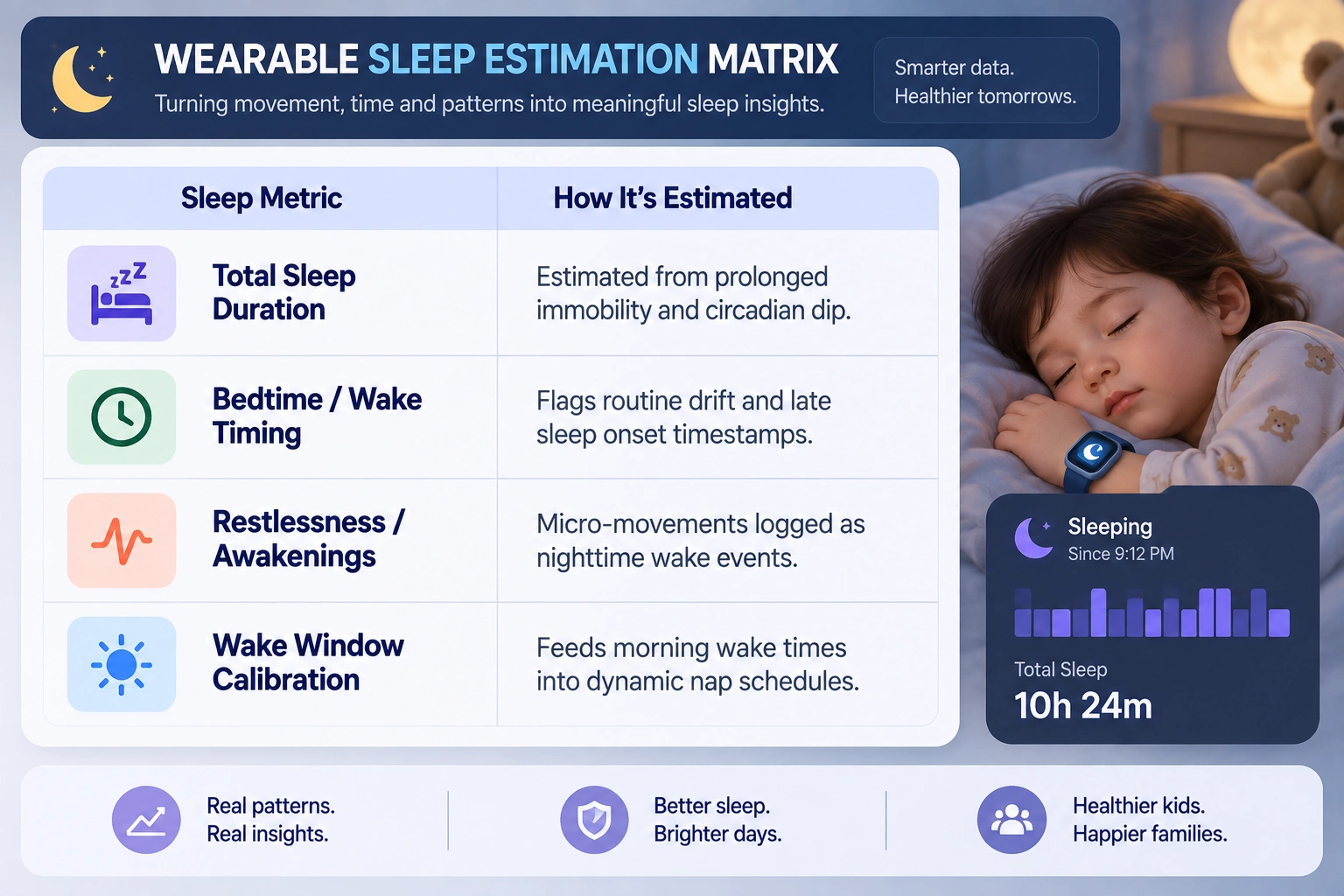
Consumer wearables track sleep via actigraphy, analyzing periods of sustained stillness and subtle nocturnal movements:
- Routine and Latency Tracking: Tracks immobility onset versus sleep onset to identify bedtime resistance and changes in daily routines.
- Correlating Day-Night Cycles: Cross-references sleep latency and daytime activity to show how outdoor play may support easier bedtime settling.
- Clinical Disclaimer Boundary: Wearable sleep metrics are not clinical sleep studies. Actigraphy may mistake quiet wakefulness for deep sleep or normal restlessness for awakening. Apps should clarify that these graphs are wellness estimates, not diagnostic tools for pediatric insomnia, sleep apnea or parasomnias.
C. Heart Rate and Other Available Sensor Signals
Advanced kids’ smartwatches and connected pulse-oximetry bands feature photoplethysmography (PPG) optical sensors:
| Sensor Signal | What It Measures | Parenting App Use | Regulatory & Safety Boundary |
| Resting Heart Rate (RHR) | Optical pulse frequency during prolonged inactivity. | Tracks baseline cardiovascular trends over weeks or during quiet rest. | Non-diagnostic: Not calibrated to detect pediatric arrhythmias or tachycardia. |
| Heart Rate Variability (HRV) | Variations in intervals between consecutive heartbeats. | Provides a proxy for physiological exertion and recovery. | Must not be interpreted as emotional panic, anxiety or medical shock. |
| Skin Temperature Trends | Relative changes from the child’s baseline skin temperature. | Highlights potential sleep-environment changes or overheating under heavy bedding. | Not a fever replacement: Surface temperature is not core body temperature and cannot override a clinical thermometer. |
D. Location, Geofencing, and Connected Safety Features
Wearable location features can help parents monitor a child’s whereabouts through GPS tracking, geofencing and safety alerts. For older children, connected devices can also provide SOS functions and real-time location updates.
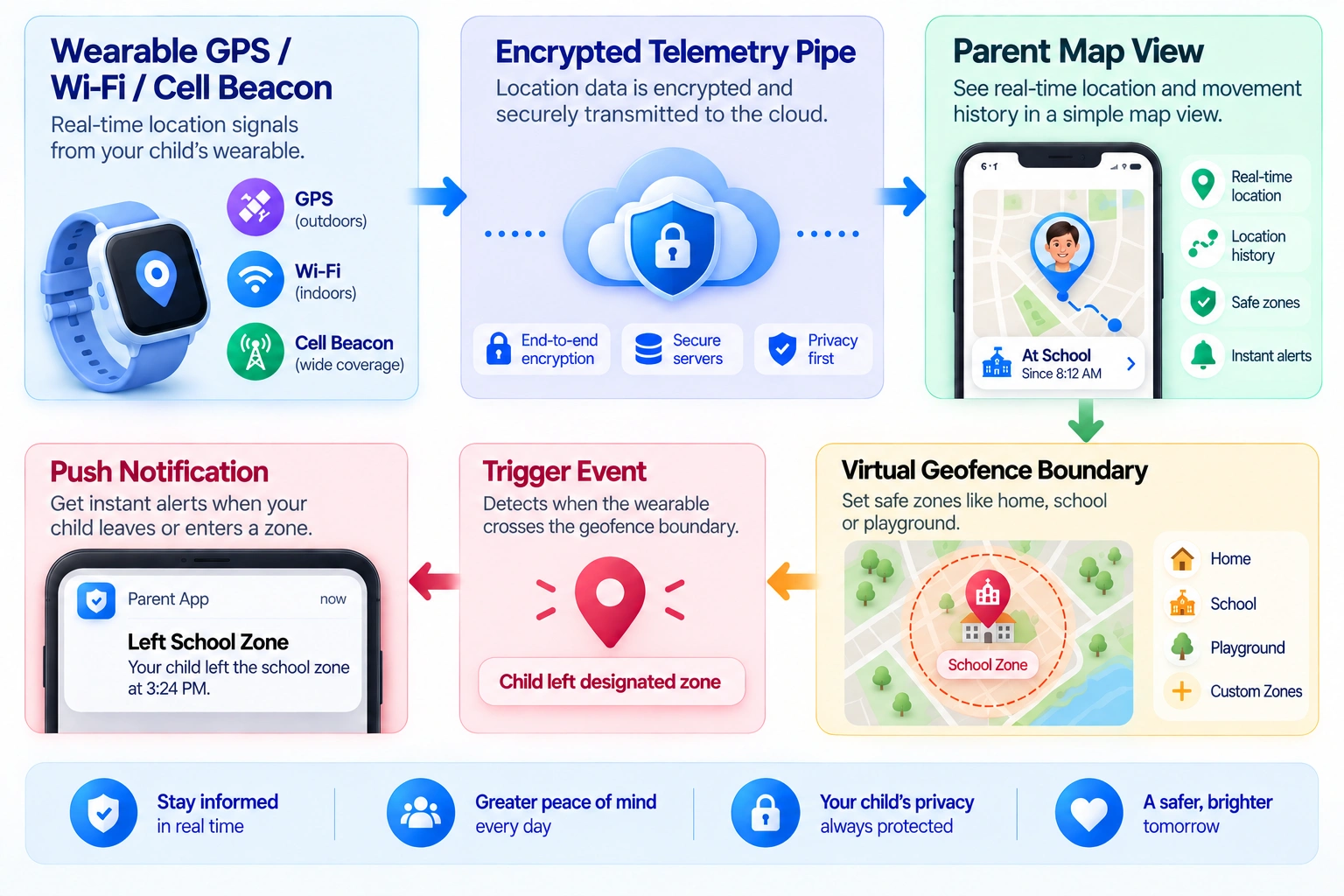
For older kids and pre-teens wearing cellular-enabled GPS smartwatches, safety capabilities rely on continuous location telemetry:
- Real-Time Location & Safe Zones: The app combines GPS, cellular and Wi-Fi triangulation to locate children on interactive maps, letting parents set geofences around home, school and sports practices.
- Automated Boundary Alerts: Geofence crossings trigger push notifications such as “Lucas arrived at school at 8:15 AM,” keeping parents informed without requiring calls or texts.
- Hardware SOS Triggers: Holding the physical emergency button bypasses standard menus to send live GPS coordinates, call pre-approved parent numbers and activate two-way audio.
- Strict Parental Controls & COPPA Governance: Continuous geolocation is covered personal data under COPPA and international privacy frameworks:
- Explicit Opt-In: Location features must be strictly opt-in, gated behind Verifiable Parental Consent (VPC).
- Zero Ad-Tech Leaks: Coordinate logs must never be shared with external third-party SDKs, ad exchanges, or data brokers.
- Short Data Lifespans (TTL): GPS history must auto-expire within 7 to 30 days so long-term movement patterns are not permanently stored in cloud databases.
How AI Turns Kids’ Wearable Data Into Parenting Insights
Raw wearable readings, from accelerometer pulses and body temperature shifts to micro-wake intervals, offer little value without interpretation. Dense charts can fuel confirmation bias and unnecessary parental anxiety.
An AI analytics layer converts fragmented sensor streams into actionable, context-aware family guidance by establishing individual baselines, detecting meaningful lifestyle shifts and generating structured summaries that support informed parenting decisions.
A. Establishing a Baseline From the Child’s Daily Routines
Generic national averages fail to capture childhood individuality. An active 5-year-old in a forest kindergarten has a completely different movement and fatigue profile than an introverted child who reads during recess.
To deliver actionable context, the platform’s machine learning models construct a dynamic personal baseline over a rolling 14-to-30-day window:
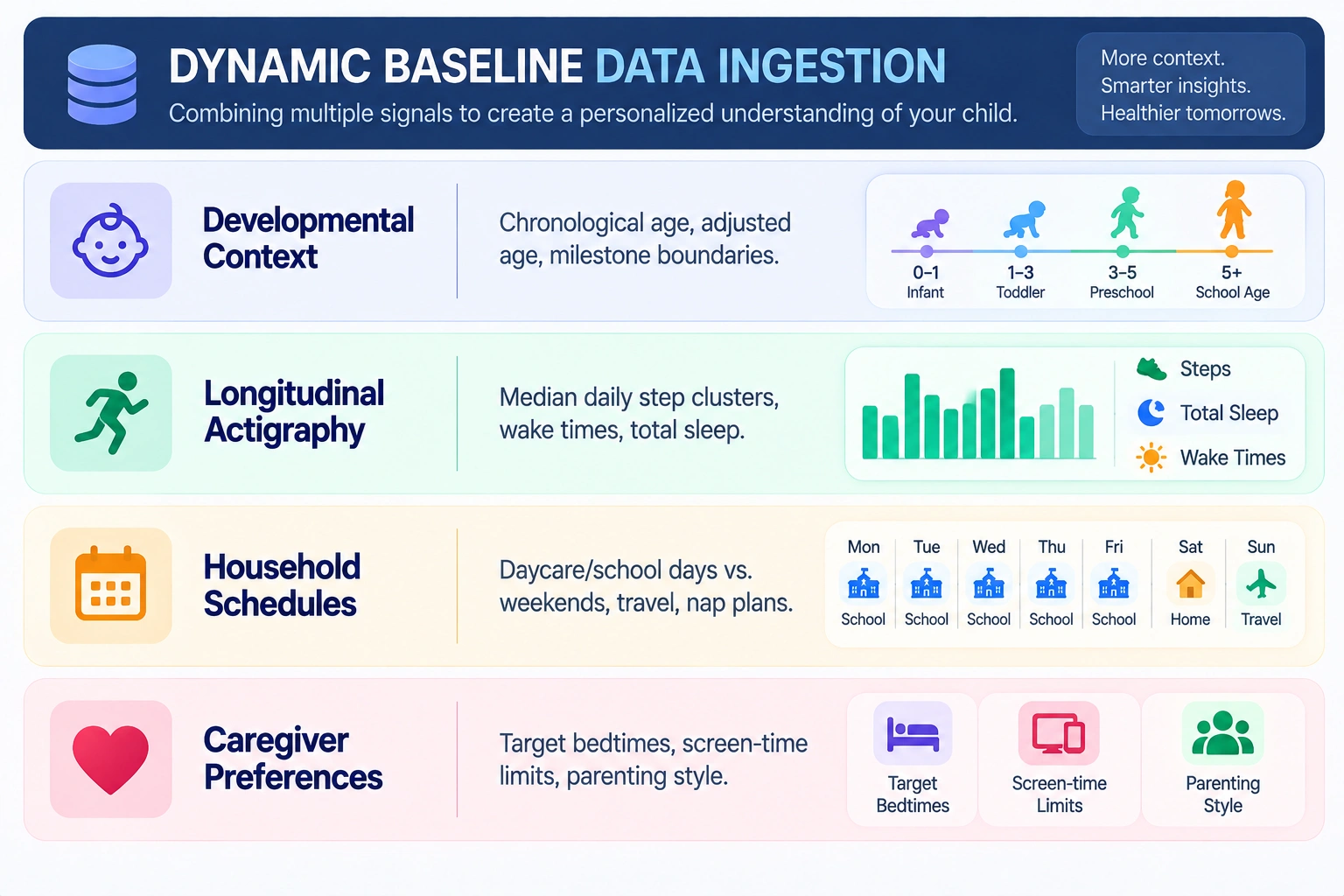
Rather than measuring the child against a hypothetical benchmark, the system learns what “normal” looks like for that specific individual. It tracks typical sleep-onset latency (the time it takes to drift off after lights out), median physical exertion curves throughout the day, and seasonal wake-up variations.
B. Detecting Changes in Activity, Sleep, and Movement
Once a reliable personal reference point exists, anomaly detection algorithms evaluate day-to-day telemetry against the child’s established history.
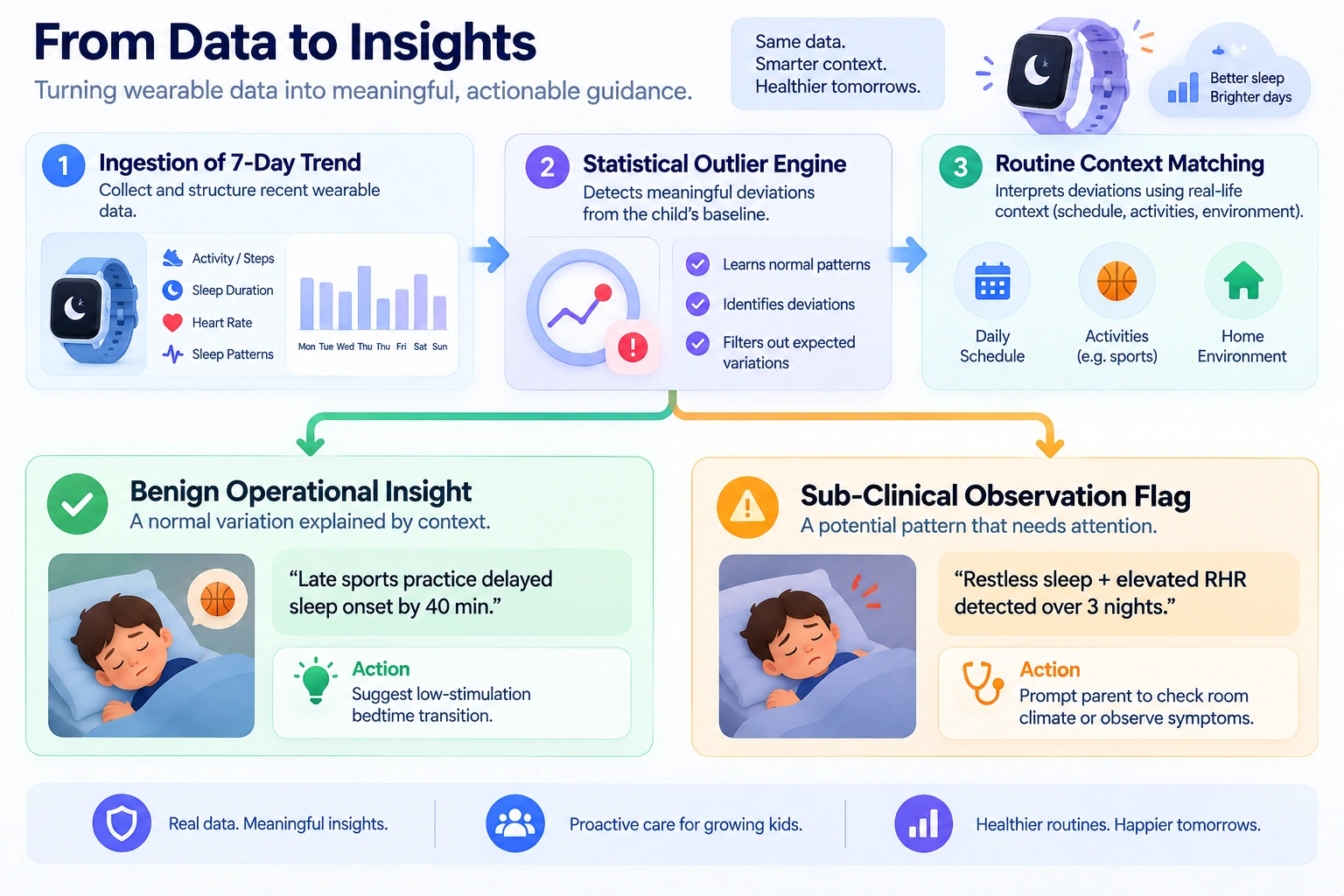
A critical architectural safeguard is ensuring the system detects behavioral deviations without manufacturing medical panic:
- Identifying Meaningful Shifts: Flags significant deviations such as nightly wake episodes exceeding the 30-day moving average or active play dropping sharply for three consecutive days.
- Separating Normal Variance From Disruptions: Accounts for weekday patterns and temporary disruptions such as birthday parties, travel, or growth spurts, preventing one late night from skewing long-term profiles.
- Neutral, Non-Diagnostic Language: Avoids labeling changes as medical conditions. Instead of “Your child’s elevated nocturnal heart rate suggests a viral infection,” it reports: “Liam’s resting heart rate was slightly higher than usual overnight, and his sleep was more fragmented. You might want to monitor how he feels today or ensure he is well-hydrated.”
C. Generating Personalized Activity and Routine Suggestions
Data tracking without actionable follow-through creates cognitive fatigue. An AI parenting app uses current wearable telemetry to generate timely, practical recommendations that fit the family’s day:
| Real-Time Sensor Context | Underlying Pattern | AI-Generated Routine Suggestion |
| High Sedentary Time (low movement by 3 PM) | Unusually prolonged sitting, such as after a rainy school day. | “Maya has had a low-movement day. Before homework, try a 15-minute living-room obstacle course or outdoor scooter ride to burn off energy.” |
| High Daytime Exertion (MVPA 40% above baseline) | Increased physical fatigue following sports or outdoor play. | “Maya had an intense playground day. Consider moving bedtime 20 minutes earlier to help prevent an overtired bedtime battle.” |
| Extended Sleep Latency (4-day rolling delay) | Bedtime routine drift or insufficient wind-down time. | “Maya has taken around 45 minutes to settle this week. Try switching off screens 30 minutes earlier and using an audio story tonight.” |
By pairing parent preferences (such as Montessori principles or screen-free evenings) with immediate child state data, the app offers structured ideas rather than vague reminders.
D. Creating Weekly Summaries Parents Can Actually Use
Parents rarely have the time or interest to inspect daily telemetry graphs. The goal is to turn scattered wearable data into a simple weekly picture of the child’s routines, making it easier for parents to notice meaningful changes without tracking every number.
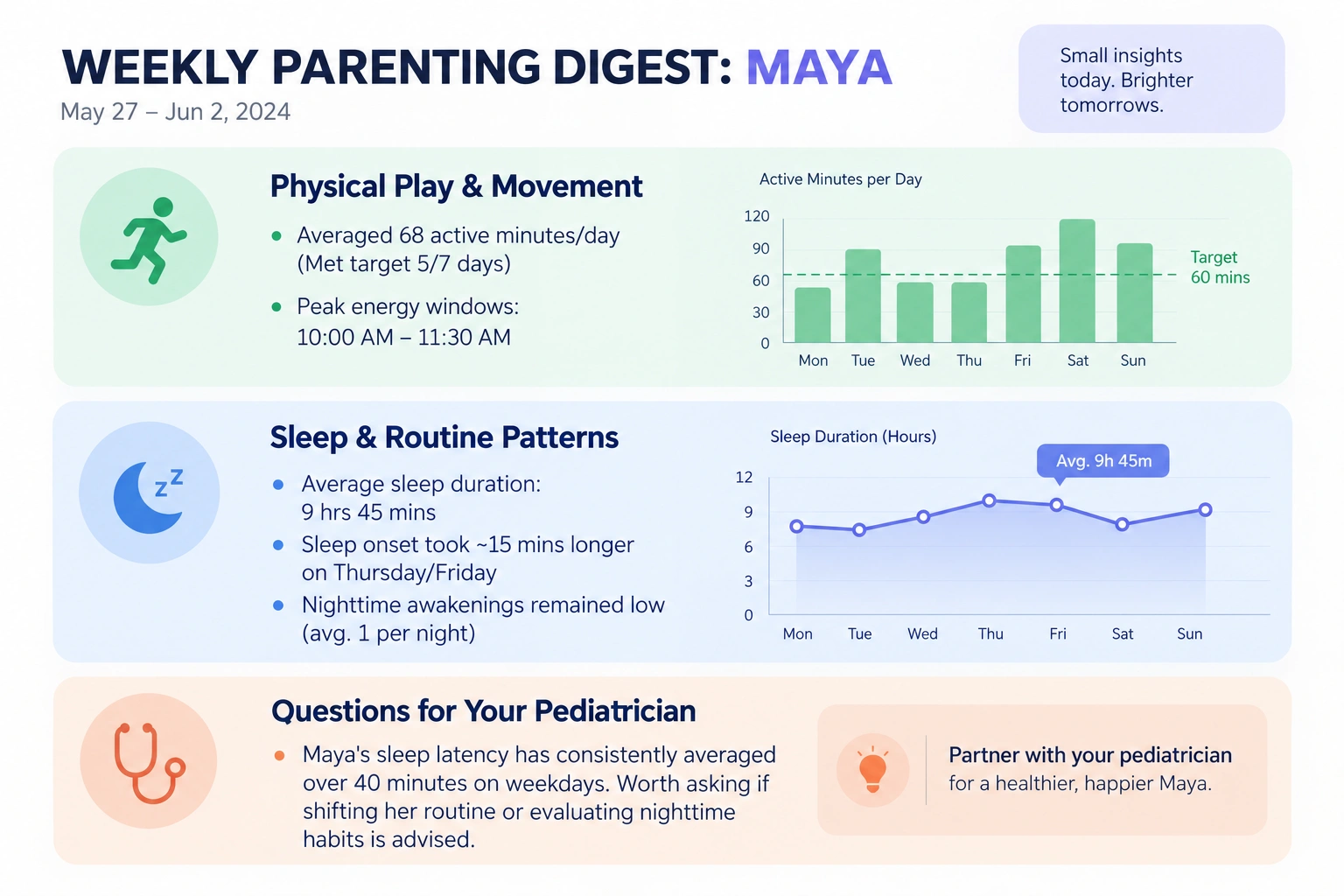
Effective AI parenting platforms compile multi-stream sensor data into concise, digest-style weekly briefs designed for home review and clinical discussions:
- Translating Metrics Into Narratives: Raw numbers are replaced with clear trends, helping parents see how small changes such as removing screens before bed impact restfulness.
- Pre-Filtering for the Pediatrician: If an upcoming well-child visit is scheduled, the engine assembles a single-page PDF brief highlighting sleep duration baselines and active play patterns.
- Prompting Productive Clinical Discussions: The AI arms caregivers with objective questions to ask their doctor, transforming vague anxieties (“He seems tired all the time”) into structured clinical conversations grounded in verifiable observations.
Core Features to Build Into a Kids Wearable Parenting App
A kids’ wearable app hinges on reliable device connectivity, meaningful parent insights, and strict privacy controls. Prioritizing advanced AI features before securing these core fundamentals forces costly mid-development rebuilds.
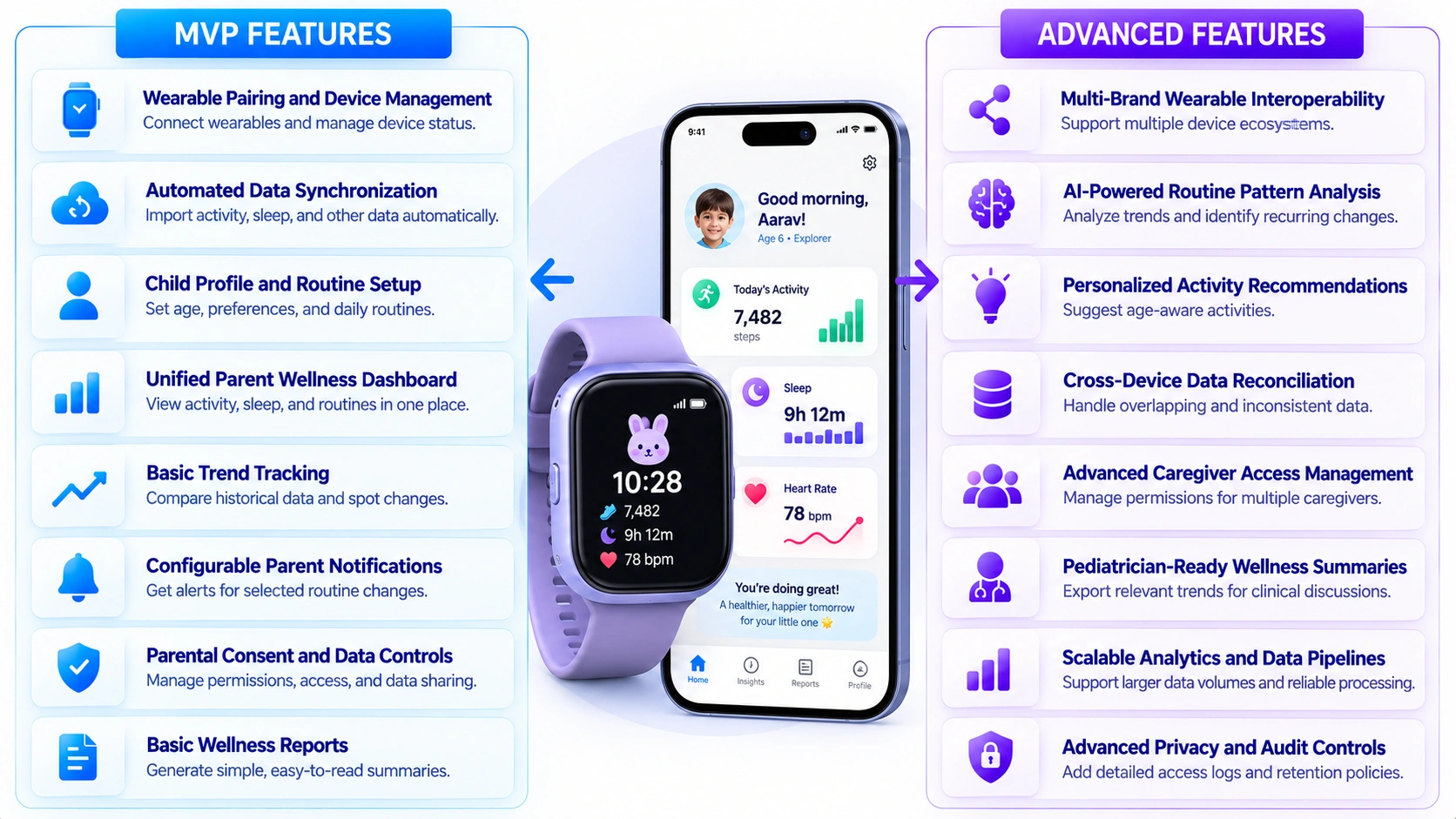
The roadmap distinguishes launch-ready MVP needs from later scaling features, aligning budgets and timelines with actual stage requirements rather than an advanced competitor’s feature list.
A. MVP Features for a Kids Wearable Parenting App
An MVP needs to prove one thing: that wearable data reliably becomes useful, trustworthy information for a parent. These eight features form that baseline.
| Feature | What It Does | Why It Matters |
| Wearable Pairing and Device Management | Connect supported wearables and manage device status | Broken pairing is the fastest way to lose a user before the app delivers any value |
| Automated Data Synchronization | Import available activity, sleep, and other supported data | Removes manual entry, which is where most tracking apps fail to retain engagement |
| Child Profile and Routine Setup | Maintain age context, preferences, and parent-entered routines | Gives every downstream data point the context needed to be interpreted correctly |
| Unified Parent Wellness Dashboard | Display activity, sleep, and routine information in one place | Prevents parents from cross-referencing multiple screens to understand their child’s day |
| Basic Trend Tracking | Compare historical data and identify changes in personal patterns | Establishes the baseline personalization that separates this from a static logbook |
| Configurable Parent Notifications | Notify parents about selected routine changes without unsupported medical alerts | Keeps the app useful without overstepping into clinical claims it can’t legally make |
| Parental Consent and Data Controls | Manage permissions, access, data sharing, and deletion | Meets baseline COPPA obligations that apply from the first user onward |
| Basic Wellness Reports | Generate readable summaries of available data for parents | Converts raw data into something a parent can act on without interpreting charts |
B. Advanced Features for a Scalable Parenting App
Once core integration is stable and validated with real users, these eight capabilities extend personalization, device support, and operational maturity.
| Feature | What It Does | Why It Matters |
| Multi-Brand Wearable Interoperability | Support additional device ecosystems through compatible APIs and SDKs | Expands addressable market beyond users of a single wearable brand |
| AI-Powered Routine Pattern Analysis | Analyze historical trends and identify recurring changes | Moves the product from reporting data to generating genuine insight |
| Personalized Activity Recommendations | Suggest age-aware activities based on supported data and parent preferences | Differentiates the app from competitors offering tracking without guidance |
| Cross-Device Data Reconciliation | Handle overlapping records, conflicting timestamps, and inconsistent readings | Prevents multi-device households from seeing contradictory or duplicated data |
| Advanced Caregiver Access Management | Configure permissions for multiple authorized caregivers | Supports real family structures spanning parents, grandparents, and nannies |
| Pediatrician-Ready Wellness Summaries | Allow parents to export relevant trends for professional discussion | Positions the app as a bridge into clinical care rather than a closed silo |
| Scalable Analytics and Data Pipelines | Support larger data volumes, monitoring, and reliable processing | Prevents performance degradation as the user base and data volume grow |
| Advanced Privacy and Audit Controls | Add detailed access logs, retention policies, and administrative oversight | Required once the platform handles data volume that draws regulatory scrutiny |
Note: These advanced capabilities should be prioritized according to the product’s users, supported devices, privacy requirements, and intended use. They are not all necessary for every app.
How to Integrate Wearables Into an AI Parenting App
Wearable integration into an AI parenting app follows six stages: selecting compatible devices, connecting APIs securely, normalizing data across manufacturers, storing it in a compliant architecture, layering AI analysis on top, and testing every failure path before launch.
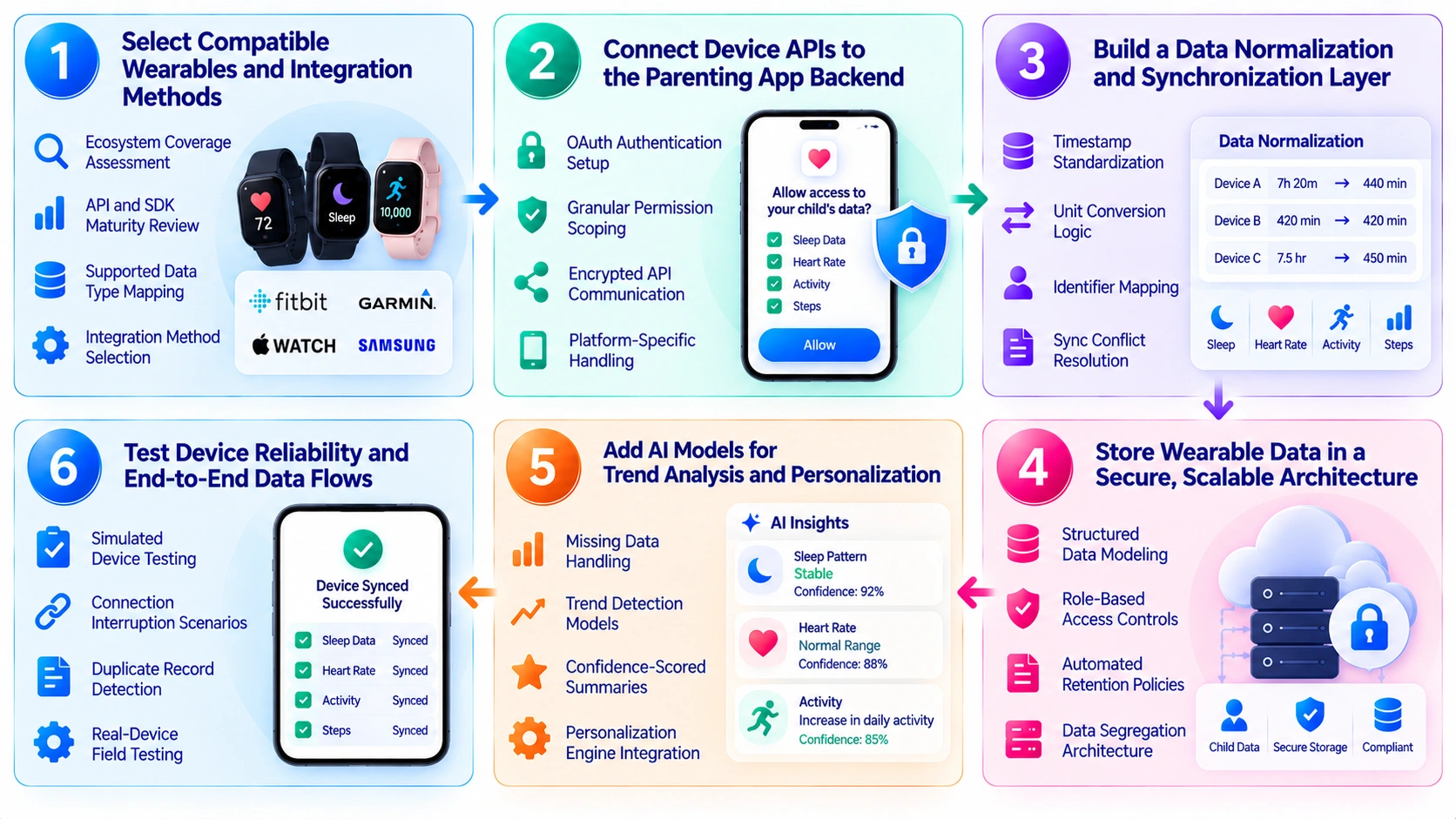
Step 1: Select Compatible Wearables and Integration Methods
We start by evaluating which device ecosystems match the target user base, since manufacturer APIs, SDK maturity, and supported data types vary significantly across the wearable market.
- Ecosystem Coverage Assessment: Evaluates which wearable brands the target user base already owns before committing engineering effort to any integration.
- API and SDK Maturity Review: Checks documentation quality, rate limits, and update frequency to avoid building on an unstable manufacturer API.
- Supported Data Type Mapping: Identifies which metrics (sleep, heart rate, activity) each device actually exposes through its public interface.
- Integration Method Selection: Chooses between direct API access, HealthKit/Health Connect aggregation, or manufacturer SDKs based on control needs.
Step 2: Connect Device APIs to the Parenting App Backend
Our developers handle authentication and permission scoping first, since a parenting app requesting a child’s health data needs stricter consent flows than a typical consumer integration.
- OAuth Authentication Setup: Implements OAuth 2.0 token exchange so users grant access without exposing device account credentials directly.
- Granular Permission Scoping: Requests only the specific data types needed per feature, avoiding broad access that complicates consent management later.
- Encrypted API Communication: Routes all device data through TLS 1.3 encrypted channels to protect information in transit.
- Platform-Specific Handling: Builds separate integration paths for iOS HealthKit, Android Health Connect, and manufacturer-specific REST APIs.
Step 3: Build a Data Normalization and Synchronization Layer
We treat normalization as its own engineering layer, since two devices reporting “sleep duration” rarely use the same units, timestamps, or measurement intervals without translation.
- Timestamp Standardization: Converts all device timestamps to a single time zone and format to prevent misaligned trend calculations.
- Unit Conversion Logic: Normalizes units across manufacturers so heart rate, duration, and distance values remain directly comparable.
- Identifier Mapping: Maintains a consistent internal identifier per child and device, independent of manufacturer-specific ID schemes.
- Sync Conflict Resolution: Defines rules for handling overlapping or duplicate records when multiple devices report similar data.
Step 4: Store Wearable Data in a Secure, Scalable Architecture
We architect storage around the assumption that child wearable data is regulated by default, which shapes schema design before a single feature gets built on top.
- Structured Data Modeling: Organizes wearable data into schemas that support fast querying for trends without sacrificing storage efficiency.
- Role-Based Access Controls: Restricts data visibility to authorized caregivers and internal systems based on defined permission tiers.
- Automated Retention Policies: Enforces data deletion timelines aligned with COPPA requirements rather than relying on manual cleanup.
- Data Segregation Architecture: Isolates children’s health data in separate schemas or environments from general application data.
Step 5: Add AI Models for Trend Analysis and Personalization
Our AI layer only runs on validated data, since generating a confident-sounding summary from a gap-filled or inconsistent dataset creates more risk than showing no insight at all.
- Missing Data Handling: Flags gaps in device data rather than interpolating values that could misrepresent a child’s actual patterns.
- Trend Detection Models: Identifies statistically meaningful pattern shifts in sleep, activity, or vitals data over rolling time windows.
- Confidence-Scored Summaries: Attaches a reliability indicator to AI-generated insights based on how complete the underlying data is.
- Personalization Engine Integration: Feeds validated trend data into the broader recommendation system covered earlier in this article.
Step 6: Test Device Reliability and End-to-End Data Flows
We test failure paths as rigorously as the happy path, since a wearable integration that only works under ideal conditions will fail in exactly the households that need it most.
- Simulated Device Testing: Runs mock API responses to validate app behavior before real hardware is available for testing.
- Connection Interruption Scenarios: Verifies the app recovers gracefully when a wearable disconnects mid-sync or loses power.
- Duplicate Record Detection: Confirms the deduplication logic correctly merges records when a device resends previously synced data.
- Real-Device Field Testing: Validates end-to-end data flow across actual hardware in real household network conditions before launch.
What Does It Cost to Build a Kids Wearable Parenting App?
Wearable integration adds a distinct cost layer on top of standard AI parenting app development, since device APIs, data normalization, and health-data compliance don’t scale the same way software-only features do. A kids wearable parenting app typically costs between $60,000 and $280,000+, depending on how many device ecosystems are supported and how much AI analysis runs on top of the wearable data.
A. Phase-Wise Wearables Integration Into The App
The cost of wearable integration depends on the devices, data complexity, AI capabilities and security requirements involved. Breaking the work into phases makes it easier to estimate development effort and plan the budget.
| Phase | Estimated Cost (USD) | What Drives the Cost |
| 1. Select Compatible Wearables and Integration Methods | $6,000 – $25,000 | Device ecosystem evaluation, API/SDK research, integration strategy planning |
| 2. Connect Device APIs to the Parenting App Backend | $12,000 – $50,000 | OAuth authentication, permission handling, platform-specific adapters |
| 3. Build a Data Normalization and Synchronization Layer | $10,000 – $40,000 | Schema design, timestamp/unit standardization, duplicate resolution logic |
| 4. Store Wearable Data in a Secure, Scalable Architecture | $12,000 – $55,000 | Encrypted storage, access controls, COPPA-aligned retention rules |
| 5. Add AI Models for Trend Analysis and Personalization | $12,000 – $70,000 | Model development, confidence scoring, handling sparse or inconsistent data |
| 6. Test Device Reliability and End-to-End Data Flows | $8,000 – $40,000 | Simulated and real-device QA, edge-case and failure-mode testing |
| Total | $60,000 – $280,000 | Varies based on device coverage, architecture, AI complexity and testing requirements |
Note: These figures reflect 2026 US market ranges and apply to software-only integration with existing third-party wearables (software-only). Costs can vary based on device coverage, API complexity, AI capabilities and compliance requirements for the final scope.
B. Kids Wearable Parenting App Cost by Tier
Kids wearable parenting app costs vary with the level of device integration, AI capabilities and platform complexity. The following tiers show how the budget can change as the app moves from a basic MVP to a more advanced ecosystem.
| Tier | Estimated Cost | Timeline | What’s Included |
| MVP with single-device integration | $60,000 – $95,000 | 3 – 5 months | One wearable ecosystem (e.g., Apple HealthKit), basic sync, unified dashboard, consent controls, basic reports |
| Multi-device platform | $95,000 – $160,000 | 5 – 8 months | 2–3 device ecosystems, data normalization layer, trend tracking, configurable notifications, caregiver access |
| AI-driven wearable ecosystem | $160,000 – $280,000+ | 8 – 13 months | Multi-brand interoperability, AI pattern analysis, personalized recommendations, pediatrician-ready exports, advanced audit controls |
Note: These kids wearable parenting app integration cost figures are estimates for software-only parenting apps using existing wearable ecosystems. Actual costs can vary based on device compatibility, AI complexity, data infrastructure, security requirements and third-party services. Custom hardware development is scoped separately and can add costs.
C. What Drives Wearable Integration Costs Specifically
Beyond standard app development costs covered earlier in this article, wearable integration introduces its own cost drivers:
- Per-Device API Integration: Each additional wearable ecosystem (Apple HealthKit, Google Health Connect, Fitbit, Garmin, Owlet) adds $8,000 to $18,000 in dedicated integration work.
- Data Normalization Engineering: Standardizing timestamps, units, and identifiers across manufacturers is a distinct engineering effort, typically adding $12,000 to $25,000.
- Health Data Compliance Overhead: Storing and processing children’s physiological data requires stricter encryption, segregation, and retention infrastructure than standard app data, adding $15,000 to $35,000.
- Sync Reliability Engineering: Handling interrupted connections, duplicate records and conflicting readings across devices requires dedicated testing and fallback logic, adding $10,000 to $20,000.
- AI Trend Analysis Layer: Building models that detect meaningful pattern shifts while accounting for missing or inconsistent device data adds $20,000 to $45,000 depending on personalization depth.
- Ongoing Device Compatibility Maintenance: Manufacturer API changes and new device model support require continuous engineering attention post-launch, typically 10 to 15 percent of initial integration cost annually.
The single-device MVP tier is a practical starting point for most founders. It helps validate whether parents value continuous wearable data before taking on the engineering and compliance overhead of multi-device support. IdeaUsher follows an incremental integration approach, starting with the device ecosystem the target users already own instead of building broad compatibility upfront.
The Technical Architecture Behind Kids’ Wearable Integration
Ingesting high-frequency wearable telemetry into an AI parenting app requires a secure, event-driven streaming pipeline capable of turning intermittent sensor packets into normalized, context-rich insights.
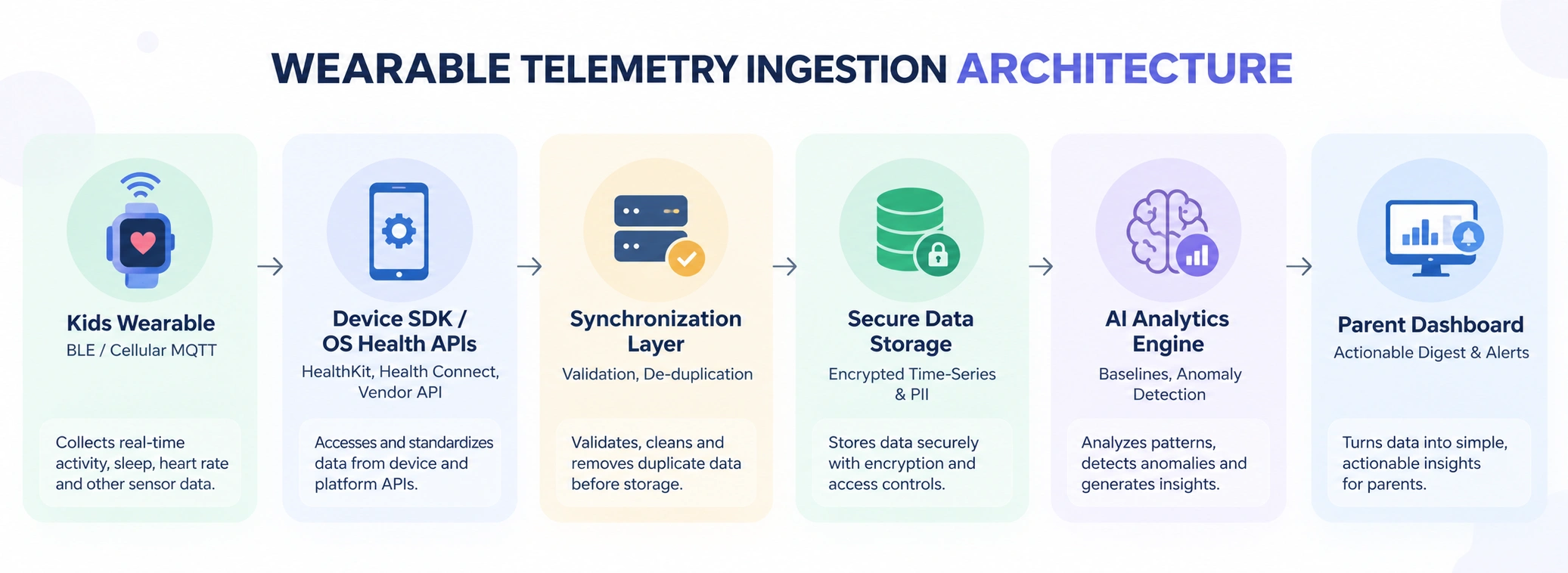
A. Wearable SDKs, APIs, and Device Connectivity
Wearable hardware transmits telemetry via Bluetooth Low Energy (BLE) or cellular MQTT/HTTPS. Integration occurs through native OS frameworks such as Apple HealthKit and Android Health Connect for standardized steps and sleep records, or through direct manufacturer APIs/SDKs such as Garmin, Fitbit and proprietary kid-watch OEMs for continuous GPS and heart rate streams.
B. Cloud Infrastructure, Analytics, and AI Processing
Incoming payloads hit an API Gateway terminating TLS 1.3, which routes data into an event streaming broker (e.g., Apache Kafka). Normalization microservices standardize diverse manufacturer schemas into uniform time-series metrics.
Sanitized events are written to an encrypted time-series database (e.g., TimescaleDB), where ML models compute rolling baselines and stream proactive routine adjustments to the parent dashboard.
C. Handling Missing Data, Sync Delays, and Inconsistent Readings
Kids frequently let batteries drain, remove watches during play, or enter offline dead zones. The sync layer must handle intermittent gaps:
- Offline Caching & Retries: Devices buffer timestamps locally and backfill telemetry using exponential backoff retries upon reconnection.
- Data-Quality Flags: The pipeline flags sensor anomalies (e.g., zero movement during peak school hours or optical heart rate drops).
- Inference Safeguards: The AI engine requires a minimum data-completeness threshold (e.g., ≥70% continuous night wear) before generating sleep scores, preventing misleading recommendations derived from incomplete telemetry.
Privacy and Compliance Requirements for Children’s Wearable Data
kids wearable parenting app integration continuously ingest sensitive physical, biometric, and spatial signals. Safeguarding this data stream requires strict adherence to privacy laws and deliberate technical controls.
A. COPPA Requirements for Collecting Children’s Personal Data
Under COPPA, services collecting information from children under 13 must obtain verifiable parental consent (VPC) before ingesting biometric or device data. Operators must provide clear notice of their data practices and grant parents the legal right to review, export, and delete collected information at any time.
Indefinite storage is prohibited; platforms must enforce defined data-retention schedules that permanently purge raw telemetry once its operational purpose is complete.
B. Parental Consent, Data Minimization, and Access Controls
Wearable platforms must implement strict operational boundaries across the software stack:
- Guardian-Managed Provisioning: Child profiles must link directly to an authenticated parent account with granular toggles for specific sensor feeds (e.g., opting into step tracking while disabling continuous heart rate logging).
- Data Minimization: Devices should collect only the metrics required for core functionality, discarding extraneous passive signals.
- Encrypted API Rails: Telemetry requires end-to-end encryption like TLS 1.3 in transit and AES-256 at rest, alongside zero-trust backend permissions to prevent unauthorized internal or external access.
C. Protecting Location, Sleep, and Activity Data From Misuse
Continuous location and health telemetry expose intimate household routines. GPS coordinates and geofences must remain strictly partitioned, barring third-party advertising SDKs and commercial brokers from scraping device breadcrumbs.
Data-sharing policies must remain fully transparent, backed by short time-to-live (TTL) expiration rules that automatically scrub historical movement and sleep records to prevent longitudinal surveillance.
D. Designing Privacy Controls Into the Product From Day One
Privacy-by-design requires embedding regulatory governance directly into engineering sprints:
- System Architecture: Decouple child biometrics from account identifiers via pseudonymization vaults.
- User Experience: Build intuitive in-app dashboards for one-tap parental data erasure and consent revocation.
- Testing & Auditing: Conduct recurring penetration tests and SDK audits before releases to catch unauthorized data leakage.
How IdeaUsher Can Build Your Kids Wearable Parenting App
IdeaUsher operates as an enterprise product engineering partner, backed by 11+ years of software expertise, 250+ specialized technologists and a 4.9/5 Clutch rating across 1,000+ completed builds. We build custom, connected parenting ecosystems that translate complex biometric and telemetry streams into secure, actionable guidance for parents.
A. Validate Your Wearable Integration Use Case
We align hardware capabilities with core family needs during initial product discovery:
- Ecosystem & Device Scoping: Selecting target hardware ecosystems evaluating Apple Watch (Family Setup), Wear OS, Garmin, or proprietary cellular/GPS kids’ trackers.
- Data Protocol Definition: Establishing telemetry ingestion models for real-time GPS coordinates, heart-rate zones, sleep cycles, activity levels, and geofencing triggers.
- Lean MVP Prioritization: Defining a focused initial feature scope to validate child safety and wellness engagement before heavy capital expenditure.
B. Design Connected Parenting Experiences Around Real Data
Raw sensor metrics overwhelm parents; we design empathetic interfaces centered on clarity and parental control:
- Parent Command Dashboards: Clean mobile interfaces delivering at-a-glance wellness summaries, battery levels, live breadcrumb tracking, and instant SOS alerts.
- Child Profiles & Granular Permissions: Role-based device pairing allowing guardians to manage safe zones, school-time silence modes, and caregiver access tiers.
- Contextual Wellness Insights: Transforming step counts and sleep architecture into easy-to-understand developmental trends and behavioral patterns.
C. Develop the AI, Backend and Wearable Integration Layers
We construct high-concurrency cloud pipelines capable of handling continuous device telemetry:
- Streaming Ingest Pipelines & APIs: Low-latency MQTT, WebSockets, and REST endpoints built on auto-scaling microservices to process location pings and sensor logs without lag.
- Predictive AI & Geofencing Engines: Machine learning models that detect anomalies in resting heart rate, track sleep disruptions, and generate proactive boundary alerts.
- COPPA-Compliant Security Architecture: End-to-end AES-256 encryption, zero-trust cloud infrastructure, and isolated child data vaults compliant with COPPA and GDPR-K regulations.
D. Prepare the Platform for Testing and Future Expansion
We ensure robust real-world reliability across fluctuating conditions:
- Compatibility & Stress Testing: Validating performance across operating systems, network drop-offs, intermittent GPS signals, and Bluetooth/cellular handshakes.
- Extensible Hardware Roadmap: Modular API abstraction layers designed to easily integrate new consumer smartwatches, medical sensors, and smart clothing without platform refactoring.
- Complete IP & Code Ownership: Delivering 100% clean, documented source code with zero vendor lock-in.
Planning to build a connected parenting platform? Discuss your kids wearable parenting app integration requirements with Idea Usher to define the right features, architecture and development roadmap.
Conclusion
Connected parenting apps are changing how families understand children’s daily routines, activity and sleep. The real opportunity lies in turning wearable data into meaningful, age-aware guidance while keeping children’s privacy and well-being at the center. With thoughtful features, reliable integrations and responsible AI, businesses can deliver more personalized parenting experiences. A well-planned kids wearable parenting app integration strategy helps founders connect device data with practical insights and build a scalable platform that supports parents as their children grow.
FAQs
A.1. kids wearable parenting app integration can provide activity, sleep, movement, heart rate and location data. Available metrics depend on device capabilities, permissions and integration methods.
A.2. AI in kids wearable parenting app integration analyzes wearable data against a child’s routines and personal baselines to identify meaningful changes, provide contextual insights and support informed parenting decisions.
A.3. Core features of kids wearable parenting app integration include wearable pairing, automated syncing, child profiles, unified dashboards, activity and sleep tracking, AI-powered routine analysis, personalized recommendations, configurable alerts, multi-device interoperability, caregiver access, consent controls, privacy management and wellness reports.
A.4. Kids wearable parenting app integration typically costs $60,000–$95,000 for an MVP with single-device integration, $95,000–$160,000 for a multi-device platform and $160,000–$280,000+ for an AI-driven wearable ecosystem, depending on scope and complexity.