

Key Takeaways
- Businesses are adopting design-to-code platforms to transform designs and prompts into production-ready applications with greater speed and efficiency.
- Platforms like Figma Make combine AI-powered design generation, code conversion, collaboration, and design system integration in a unified workflow.
- Modern platforms rely on multimodal AI, context-aware code generation, responsive frameworks, and cloud-native infrastructure to deliver high-quality results.
- Scalable design-to-code platforms create long-term value through subscription models, ecosystem integrations, AI automation, and enterprise-ready collaboration.
- How Idea Usher can help businesses build design-to-code platforms with intelligent code generation, collaborative workflows, and scalable cloud architecture.
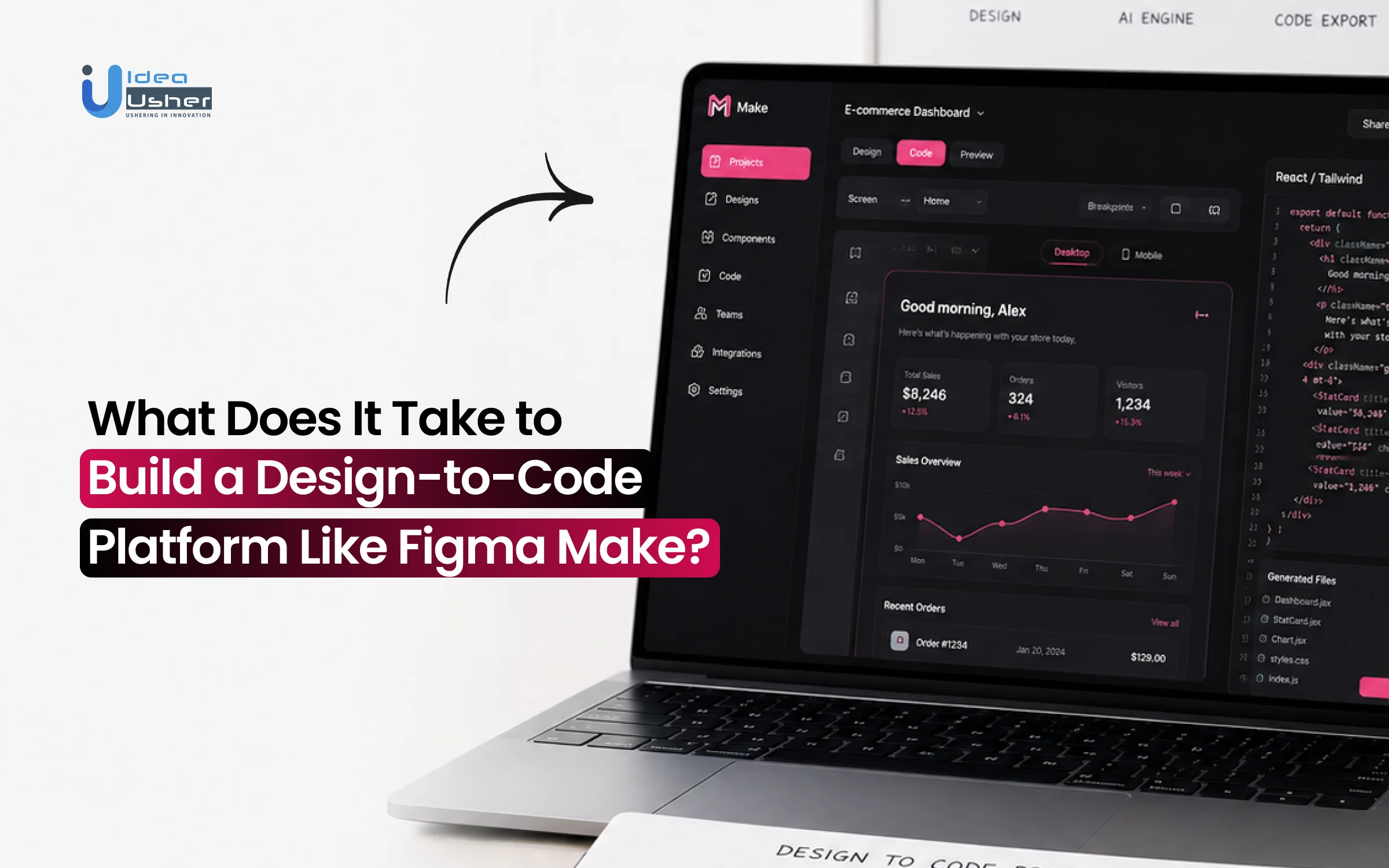
The way software is built is changing as AI brings design and development into a single workflow. With platforms like Figma Make, an idea can quickly become an interactive application without going through lengthy handoffs. Businesses are embracing this approach because it helps them move faster, validate concepts earlier, and build with greater confidence. Creating a platform like this requires much more than an AI coding assistant. It needs intelligent systems that understand design context and produce reliable, production-ready code that teams can continue building on.
We’ve developed several design-to-code solutions that combine multimodal AI models with intelligent code generation engines to help businesses transform designs and natural language prompts into functional applications. With this hands-on expertise, Idea Usher understands what it takes to build these platforms. In this blog, we’ll explore the core features, technology stack, and system architecture behind building a design-to-code platform like Figma Make.
Market Demand for AI Design-to-Code Platforms
According to Grand View Research, the global low-code development platform market was valued at USD 6.78 billion in 2022 and is projected to reach USD 35.22 billion by 2030 at a 22.9% CAGR. This rapid growth shows that businesses want faster and more efficient ways to build software. Design-to-code platforms are becoming a key part of this shift by helping teams convert designs into working applications in a fraction of the usual time. As AI continues to improve development workflows, the demand for platforms like Figma Make is expected to grow even further.
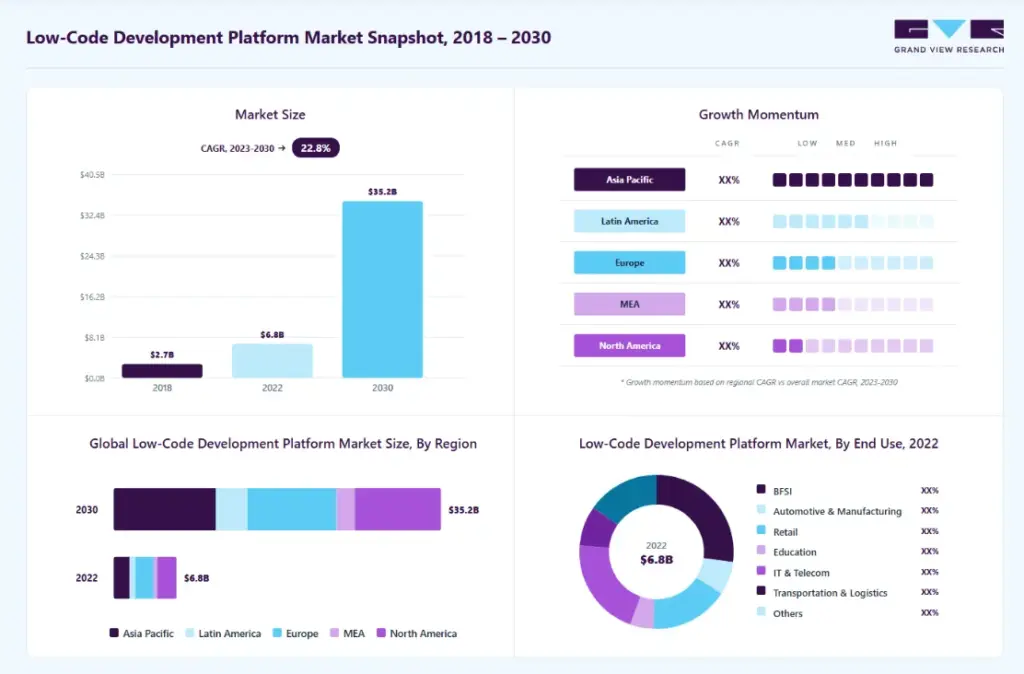
Source: Grand View Research
Faster Product Development
Speed to market is the primary driver of enterprise survival. A prolonged development cycle can ruin a startup or cost an established enterprise its competitive edge. Traditional front-end engineering requires days or weeks of manual translation from static images to responsive layouts.
Look at the success of early market movers like Anima. By focusing heavily on automating this manual translation layer, Anima captured a substantial market share, scaling its operations to an estimated 7.7 million dollars in annual recurring revenue. Platforms that compress development cycles from months to days easily capture early-stage tech budgets.
- Shrinking Time-to-Market: Startups must validate ideas quickly before running out of capital.
- Operational Cost Reduction: Engineering talent is expensive, and shifting mundane coding tasks to automated engines optimizes corporate payroll.
- Rapid Prototyping: Enterprises can test multiple iterations of a product in real-time with actual user groups before committing to heavy backend infrastructure investments.
Bridging the Design-to-Code Gap
Historically, the handoff between design and engineering has been filled with miscommunication. Designers focus on user experience and aesthetics, while developers care about clean architecture, scalability, and performance. Standard automation tools often fail because they generate bloated, unmaintainable code that developers end up rewriting from scratch.
Modern AI models solve this by understanding context. Instead of just absolute positioning elements on a screen, sophisticated AI builders interpret the structural intent of a design.
| Feature | Legacy Code Generators | Modern AI Builders |
| Code Quality | Inline styles and rigid layouts | Clean CSS and responsive flexbox |
| Framework Adaptability | Limited to basic HTML | React, Vue, Tailwind, and Next.js |
| Component Recognition | Treats everything as static images | Identifies buttons and inputs automatically |
This contextual awareness ensures that the output matches the design perfectly while maintaining structural integrity. It eliminates the constant back-and-forth revisions that typically stall product launches.
Growing Enterprise Investment
Venture capital and enterprise budgets are shifting heavily toward development infrastructure. Decision-makers realize that scaling a business requires scaling their software production capabilities without linearly increasing headcount. This structural change makes AI design-to-code platforms a highly lucrative investment vector.
Consider the traction of enterprise-focused players like Builder.io. By offering visual editing combined with deep AI code translation, the platform has scaled its annual revenue to an estimated 19.4 million dollars. Corporate buyers are hunting for internal tooling solutions that integrate with their existing design languages and security frameworks. They are investing in proprietary workflows that keep them agile.
How Figma Make Fit into the Modern Product Development Workflow?
Figma Make is a suite of AI-native features built directly into the Figma canvas that allows teams to generate UI designs, wireframes, and prototypes using natural language prompts. This tool changes product development by removing traditional communication walls. Instead of static files passing through isolated teams, this platform serves as a shared environment for everyone involved. For investors and creators, it minimizes production delays and optimizes capital efficiency.
Where Designers Use Figma Make
Designers no longer waste hours on repetitive formatting and pixel-pushing tasks. With Figma Make, they can instantly transform a rough wireframe into a polished component. The AI acts as an assistant within the canvas, helping them build out responsive layouts based on existing design systems.
- Instant Wireframing: Generating multiple layout variations in seconds keeps creative momentum high.
- Component Scaling: The tool easily matches new designs with established enterprise UI guidelines.
- Interactive Previews: Designers can test real-time responsive states without waiting for a developer to code them.
This streamlined workflow lets designers focus on high-level user research and strategic user experience rather than mechanical asset creation.
How Product Teams Validate Ideas Faster
Product managers and founders often struggle to secure stakeholder buy-in using static mockups. Figma Make allows non-technical leaders to generate functional, clickable MVPs using natural language prompts. This capability allows teams to test business logic quickly before dedicating any engineering budget to the project.
| Validation Stage | Old Way | With Figma Make |
| MVP Creation | Requires backend developer hours | Generated instantly via text prompts |
| User Testing | Static screen clicks | Dynamic, responsive interactions |
| Iterative Feedback | Redesigning layout manually | Updating interfaces via rapid prompting |
Gathering reliable user feedback early saves massive amounts of capital. Founders can pitch investors or validate product-market fit with a layout that looks and behaves like a finished application.
How Developers Turn Prototypes into Products
Engineers rarely enjoy rewriting front-end code from scratch to match a design layout. Figma Make provides clean, inspectable code components directly out of the visual workspace. This output serves as a highly accurate foundation for the engineering team. Developers can plug these generated code blocks straight into their local codebases. Because the system tracks version history, engineering teams can sync design updates without breaking their existing codebase architecture.
How Figma Make Transforms Prompts into Working Applications?
Figma Make simplifies how a concept becomes software by establishing a clear prompt-to-code pipeline. For builders and non-technical founders, this eliminates the confusion of translating visual design requirements into actual software architecture. The platform operates on a continuous feedback loop where natural language controls the output at every stage.
1. Natural Language to Interactive UI
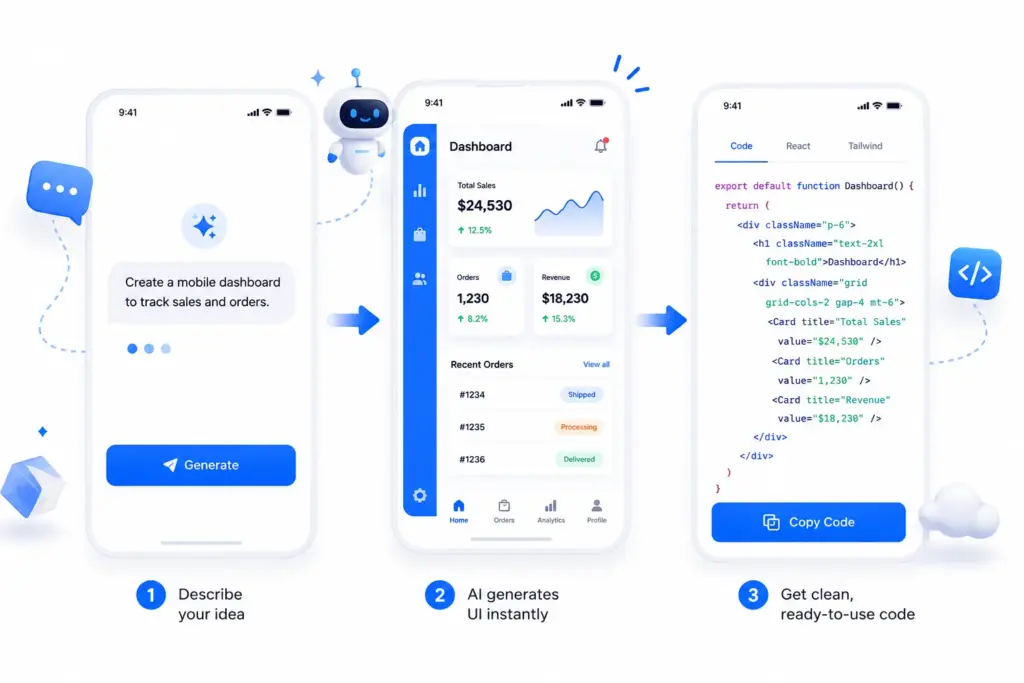
The application building process starts with user intent. Instead of drawing shapes and boxes manually, users type a detailed description of the application interface into the prompt interface. The AI engine interprets this text and immediately builds a responsive user interface layout on the canvas.
- Layout Generation: The system determines the placement of navigational menus, data tables, and input fields automatically.
- Responsive Scaling: Generated interfaces automatically adapt to desktop, tablet, and mobile screen formats.
- Instant Interactions: Buttons and links are created with basic functional logic, allowing users to click through the interface right away.
This capability lowers the barrier to entry for software creation. An entrepreneur can describe a complex dashboard layout, and the engine generates a refined, visually structured interface within seconds.
2. Converting Designs into Code
A design is only as valuable as the software it produces. Figma Make closes this gap by transforming visual layouts into clean, production-ready code. Unlike older automated systems that output unreadable code blocks, this engine focuses on developer-first code structures.
| Output Parameter | Traditional Visual Tools | Figma Make Engine |
| Code Structure | Hardcoded positions, messy tags | Semantic HTML, modular layouts |
| CSS Management | Bloated inline styling definitions | Utility-first frameworks like Tailwind CSS |
| Framework Support | Static, unreactive export files | Dynamic component logic for React and Next.js |
Developers can take these code components and integrate them straight into their local environments. This saves engineering teams from spending hours writing basic styling rules, allowing them to focus entirely on writing complex backend logic and API connections.
3. Refining Apps Through AI
Building a successful platform requires constant adjustment, and initial prompts rarely deliver a flawless final product. The iteration workspace allows users to refine their application step by step through conversational prompts. If a section needs a change, users can select the element and ask the AI to modify it directly.
Strategic Insight: Enterprise teams can attach existing design systems or asset documents directly to the workspace. This ensures the AI maintains brand guidelines and strict data layouts throughout the entire revision cycle.
Core Features for a Design-to-Code Platform Like Figma Make
Building a competitive software asset requires understanding the core mechanics that drive user adoption. In the design-to-code market, Figma Make sets the operational standard by packing deep functionality into an intuitive layout. Users rely on these specific technical capabilities to bypass legacy development bottlenecks and ship products faster.
1. AI Prompt-to-App Generation
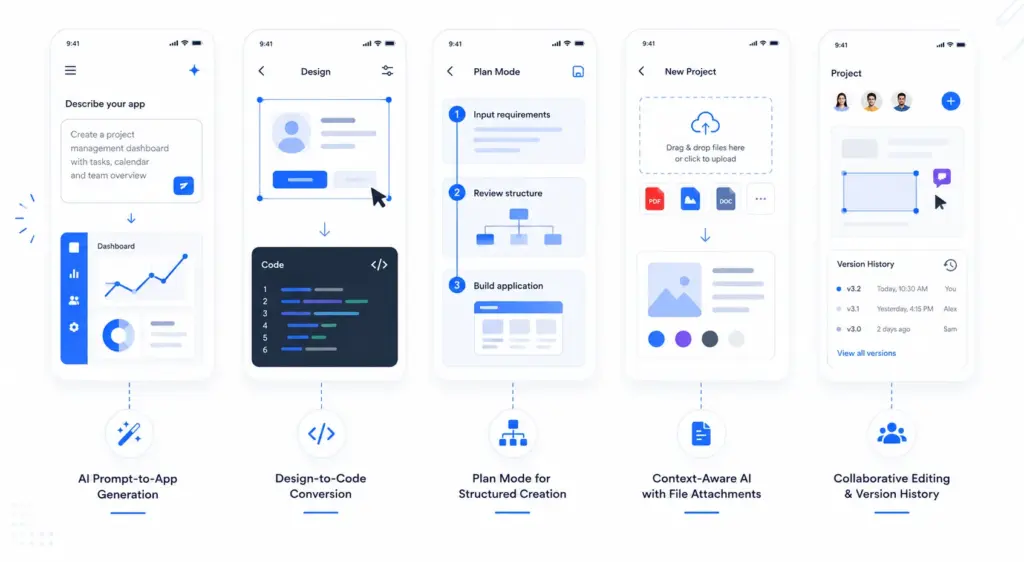
Users start the creative cycle by entering natural language descriptions directly into the Figma Make generation window. The underlying AI engine processes the text to construct complete, working application layouts in real time.
- Speed: Changes a multi-week design cycle into a two-minute automated process.
- Interactivity: Generates functional menus, clickable buttons, and working links instantly.
- Exploration: Allows founders to spin up multiple distinct UI variations from a single text concept.
This capability bridges the gap between raw imagination and functional digital assets, giving teams a tangible product to evaluate immediately.
2. Design-to-Code Conversion
Figma Make lets users select any static vector layout on the canvas and convert it into high-fidelity front-end code with one click. Developers use this feature to eliminate the tedious process of writing manual CSS and HTML frameworks from scratch. The tool scans the visual grouping of the design and outputs clean, structured components. This automated transition ensures that the final software matches the original design vision perfectly without engineering delays.
3. Plan Mode for Structured App Creation
To prevent chaotic outputs, users activate Plan Mode inside Figma Make before generating any visual elements. This structural phase allows product teams to map out core user journeys and feature requirements systematically. By establishing this clear technical roadmap, the AI achieves much higher accuracy, avoiding the common structural mistakes found in simpler text-to-code tools.
| Step | User Action | Figma Make Execution |
| 1 | Input text requirements | Generates architectural user flows |
| 2 | Review structural logic | Creates data object blueprints |
| 3 | Approve framework plan | Builds the UI based on verified architecture |
4. Context-Aware AI with File Attachments
Users don’t have to rely solely on text prompts because Figma Make allows them to attach external files directly to the generation session. Teams upload PDFs, competitor screenshots, user research documents, and legacy design files to guide the asset creation. The platform reads the uploaded data to extract exact color values, specific layout patterns, and precise business rules. This rich context prevents the AI from generating generic layouts and ensures the output serves real business needs.
5. Collaborative Editing and Version History
Product development is a team sport, and Figma Make keeps everyone connected inside a live workspace. Team members drop feedback pins, tag colleagues, and use conversational AI commands to adjust components together.
- Live Annotations: Teams mark up specific layout sections for instant AI modification.
- Version Control: The system logs every generation step so users can roll back changes safely.
- Role Management: Designers, product managers, and clients collaborate on the same file without overwriting work.
This transparent environment keeps stakeholders aligned and ensures project momentum never stalls due to version confusion.
6. Design System and Component Integration
Enterprise users maintain brand consistency by linking their existing UI kits and design systems to Figma Make. When the AI builds new pages, it pulls directly from these approved libraries rather than creating random elements. The engine matches incoming prompts with pre-built navigation bars, input fields, and company icons. This integration ensures that even AI-generated software adheres strictly to established brand guidelines and corporate identity.
7. Production-Ready Code and External Integrations
The final step in the workflow happens when developers connect Figma Make directly to their local codebases and deployment pipelines. The platform generates production-grade code compatible with modern web frameworks like React and Tailwind. Engineers pull these clean code modules straight into their local environments via API connections. This seamless handoff eliminates layout bugs and lets development teams spend their valuable hours building secure backend systems and database infrastructures.
Development Steps to Make a Design-to-Code Platform like Figma Make
Building a design-to-code platform of this scale requires a blend of advanced AI orchestration, stable cloud infrastructure, and intuitive product design. We approach this journey through a structured engineering roadmap designed to maximize product stability while minimizing time to market.
1. Define Product Vision and Workflows
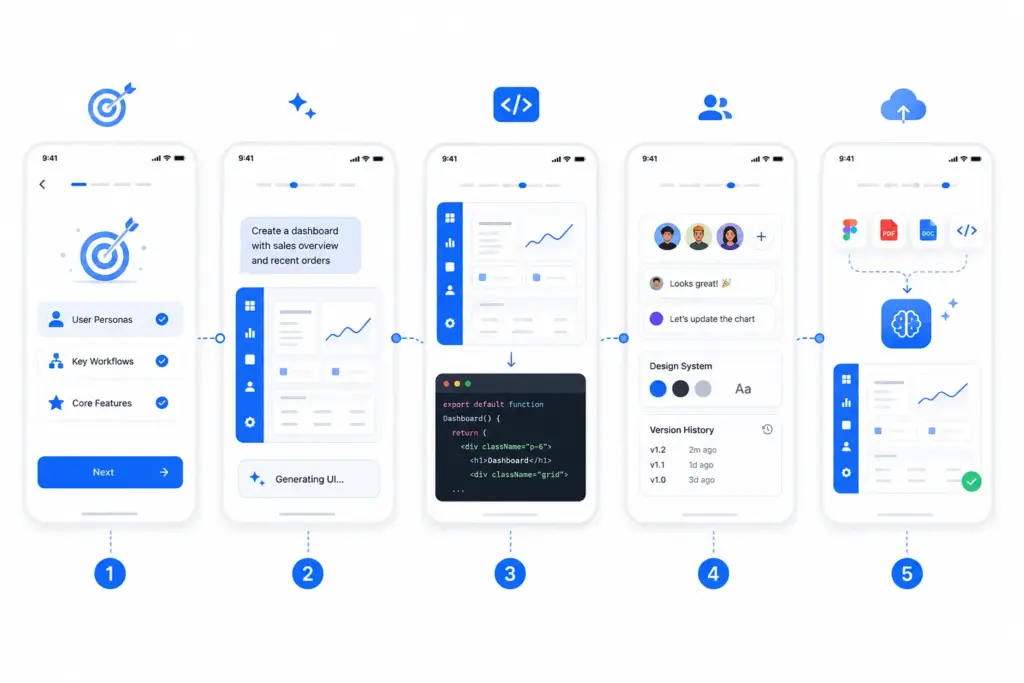
Every successful platform starts with absolute clarity on who will use it and why. We begin by helping you isolate your specific market niche, whether you want to target early-stage startup founders who need instant MVPs or enterprise engineering teams looking to automate front-end scaffolding.
- Persona Mapping: We trace the exact operational friction your platform will solve for designers and engineers.
- Workflow Optimization: Our architects design a fluid user journey that minimizes the steps between entering a text prompt and viewing a live prototype.
- Feature Prioritization: We isolate the essential core capabilities required to launch a powerful, market-ready MVP without over-engineering early iterations.
2. Build the Prompt-to-UI Engine
The core value of your software lies in its ability to translate human thought into structural digital interfaces. We build advanced prompting layers that accept natural language input and pass it through optimized Large Language Models tuned specifically for layout geometry.
| Engine Responsibility | Technical Execution |
| Intent Parsing | Translating text commands into precise UI layout instructions |
| Structural Assembly | Ordering buttons, forms, and navigation bars logically on a grid |
| Responsive Logic | Injecting automatic scaling properties for various screen sizes |
Our development squads focus heavily on semantic mapping, ensuring the AI understands user intent perfectly. This prevents the system from generating generic blocks and allows it to construct highly relevant, interactive interfaces on the fly.
3. Develop the Design-to-Code Layer
A beautiful layout is useless to an enterprise client if the underlying code is unreadable. We construct a specialized compilation pipeline that parses visual nodes and transforms them into clean, production-ready front-end code frameworks. We engineer this layer to prioritize human-readable code structures, avoiding the typical bloat associated with automated systems. By generating component-driven architectures like React and Next.js, we create a platform that developers genuinely love using.
4. Integrate Collaboration and Systems
To attract enterprise budgets, your application must support real-time teamwork and brand consistency. We implement robust, real-time sync engines that allow multiple users to edit, comment, and review layouts simultaneously.
- Real-Time Collaboration: We deploy web socket architectures to enable lag-free team interactions on the live canvas.
- Design Token Syncing: We build systems that import corporate brand guidelines, fonts, and color libraries automatically.
- Version Control Architecture: Our teams construct a reliable rollback database layer so users never lose their historical work progress.
5. Connect APIs, Assets, and Tools
The power of a design-to-code engine increases exponentially when it can ingest context from external business files. We build robust ingestion pipelines that allow users to connect design files, PDFs, business strategy documents, and legacy code repos straight to the AI engine.
Strategic Insight: By setting up secure API integrations and npm package support, we ensure the platform can pull down external live data. This enables the AI to generate hyper-contextualized applications that mirror real-world business mechanics.
6. Optimize Performance and Security
As your user base scales, cloud infrastructure and API token costs can quickly erode profit margins. We design smart model-routing architectures and semantic caching systems to minimize computational overhead and maximize generation speed. Security remains a primary focus throughout this phase.
We implement enterprise-grade encryption frameworks, clear data isolation protocols, and robust role-based access controls to guarantee that your users’ proprietary designs and source code remain completely secure.
7. Launch, Monitor, and Improve
Launching the product is simply the beginning of your platform’s commercial lifecycle. We help you deploy a polished, highly stable MVP to the market while setting up automated telemetry pipelines to track how users interact with the generation tools. We establish deep behavioral analytics and feedback collection mechanisms inside the user interface.
This constant flow of real-world usage data allows us to continuously tune your AI models, fix workflow friction, and roll out advanced enterprise features that keep you ahead of the competition.
Cost to Build a Platform Like Figma Make
Allocating capital into a next-generation design-to-code platform requires a granular understanding of financial inputs. Entrepreneurs must treat this build not just as a standard software project, but as a sophisticated AI orchestration ecosystem. Balancing upfront development expenses against long-term computing overhead is critical to maintaining a healthy runway and achieving profitability.
MVP Development Cost
Building a Minimum Viable Product focuses entirely on validating your core commercial thesis without burning unnecessary capital. The primary goal is to deliver stable, high-value workflows that prove your engine can convert visual files into usable frontend components better than manual methods.
- Core Prompt-to-App Logic: Setting up the essential LLM parsing infrastructure to handle user text layouts costs roughly $15,000 to $25,000.
- UI Canvas and Editing Tooling: Constructing a lightweight, interactive visual board where users can view and tweak elements requires an investment of $12,000 to $20,000.
- Basic Multi-Tenant SaaS Layer: Implementing secure user authentication, team access management, and cloud deployment pipelines adds about $8,000 to $15,000.
By focusing purely on these essential system pillars, we help you launch a functional product within 8 to 14 weeks, giving you a tangible asset to show investors or early paying clients.
Factors That Influence Development Cost
The final price tag of your platform depends heavily on a few critical architectural choices made during the initial planning phase. Understanding these technical levers allows you to scale your capital allocation smoothly as your business grows. Our engineering teams sit down with you during discovery to audit these variables.
| Cost Driver | Lower-End Approach | Higher-End Approach | Budget Impact |
| AI Model Strategy | Off-the-shelf APIs (OpenAI / Claude) | Fine-tuned custom open models | $10,000 to $50,000+ |
| Code Generation Layer | Static HTML / Basic CSS export | Dynamic React / Next.js component mapping | $15,000 to $40,000 |
| Collaboration Engine | Single-user sessions with basic saving | Real-time multiplayer canvas via WebSockets | $12,000 to $30,000 |
| Data Context Pipelines | Pure text prompt processing | Ingesting massive PDFs, images, and Figma kits | $10,000 to $35,000 |
We ensure you do not overspend on complex, custom-trained models when a well-architected API integration combined with smart prompt management can deliver the exact same high-fidelity results.
Cost Estimate for MVP vs Enterprise Platform
To build a sustainable business model, you must plan your capital injection across the entire lifecycle of the product. While an MVP opens the door to market validation, capturing lucrative B2B contracts requires moving toward a deeply secure, highly scalable enterprise environment.
Strategic Insight: Moving from an MVP to a commercial platform involves a shift from simple AI usage to deep infrastructure control. Enterprise buyers demand strict security compliance, custom brand configurations, and predictable cloud pricing models. We map your growth strategy across three distinct development tiers to keep your scaling predictable:
- Basic AI MVP ($25,000 – $75,000): Built for early validation, using public foundational model APIs, featuring core prompt-to-UI tools and essential workspace management.
- Mid-Scale Commercial SaaS ($80,000 – $180,000): Features advanced component mapping, clean React and Tailwind exports, basic design system integration, and multiplayer team collaboration.
- Enterprise-Grade Platform ($200,000 – $450,000+): A complete powerhouse featuring custom fine-tuned models, deep security protocols, local repository syncing, and automated MLOps pipelines for continuous model optimization.
Build a Design-to-Code Platform Like Figma Make with Idea Usher
Building a design-to-code platform requires the right mix of AI expertise and product engineering. At Idea Usher, we build secure and scalable solutions that help businesses launch faster and grow with confidence. Our team takes care of the technology so you can focus on building your product and expanding your business.
End-to-End AI Expertise
Turning an ambitious concept into a functioning SaaS platform requires deep architectural alignment from day one. We take complete ownership of the technical lifecycle, mapping your target workflows from initial prompt structures down to the underlying data architecture.
- Strategic Product Discovery: We work closely with you to isolate highly profitable market niches, ensuring your application sets a distinct functional baseline.
- UX and Visual Canvas Layouts: Our designers craft highly responsive, multi-user visual boards where clients can interact with generated assets smoothly.
- Stable LLM Pipeline Setup: We configure optimized foundational model routing to ensure prompt generation remains incredibly fast while keeping computing token overhead low.
Our product engineering process minimizes technical debt, creating an application structure that easily adapts as your customer base expands. You receive a fully polished, launch-ready software asset that immediately establishes credibility with enterprise B2B buyers.
Custom Solutions for Your Business
A generic, off-the-shelf code generator cannot survive in today’s competitive enterprise software market. We focus heavily on building proprietary, custom-tailored automation features that match the specific operational workflows of your target clientele. We build these advanced components directly into your application’s DNA.
| Technical Feature | Our Custom Implementation Strategy | Direct Business Impact |
| Prompt-to-App Mechanics | Custom-tuned semantic parsing layers built for layout geometry | Users move from text ideas to functional applications in under two minutes |
| Design System Mapping | Synchronized token bridges that connect with existing company UI kits | Generates highly consistent, brand-compliant software automatically |
| Enterprise Data Guardrails | Air-gapped database environments with role-based access management | Protects proprietary source code to secure lucrative B2B contracts |
Whether you need deep repository integrations with platforms like GitHub or context-aware parsing that reads massive structural business documents, we engineer a solution that matches your commercial goals.
Scale with a Future-Ready Partner
Long-term market success requires an engineering foundation that can handle massive user scaling without crashing or driving up server costs. We back your project with over 500,000 hours of rigorous product development experience, deploying elite development talent to build your infrastructure.
Strategic Insight: Our core development squads include ex-MAANG engineers who understand how to build systems for maximum data throughput and low latency. This deep level of technical execution ensures your platform remains resilient under heavy user traffic.
Conclusion
A successful design-to-code platform combines AI, modern development tools, and an intuitive user experience into one product. When these elements work together, teams can move from an idea to a working application much faster. As more organizations adopt AI-driven development, platforms like Figma Make are set to play a much bigger role in the future of software engineering.
Things to Know About Design-to-Code Platforms
A1: A design-to-code platform uses AI to transform design files, wireframes, or natural language prompts into functional source code. Instead of manually recreating UI designs, teams can generate interactive interfaces in minutes. This speeds up product development while allowing developers to refine and extend the generated code as needed.
A2: A no-code platform is designed for building applications without programming knowledge and often relies on proprietary visual builders. A design-to-code platform generates editable source code using frameworks like React, Vue, or HTML/CSS, making it suitable for professional development teams that want to customize, scale, and maintain their applications.
A3: Building a platform like Figma Make requires more than an AI model. It typically combines multimodal AI for understanding designs, code generation engines, cloud infrastructure, design system integration, live preview environments, version control, and secure execution sandboxes. Together, these technologies create a seamless workflow from design to production-ready code.
A4: Yes, AI-generated code can serve as a strong starting point for production projects, especially for frontend development. Most teams still review and optimize the output to match coding standards, improve performance, and integrate business logic. This approach significantly reduces development time while maintaining code quality.