

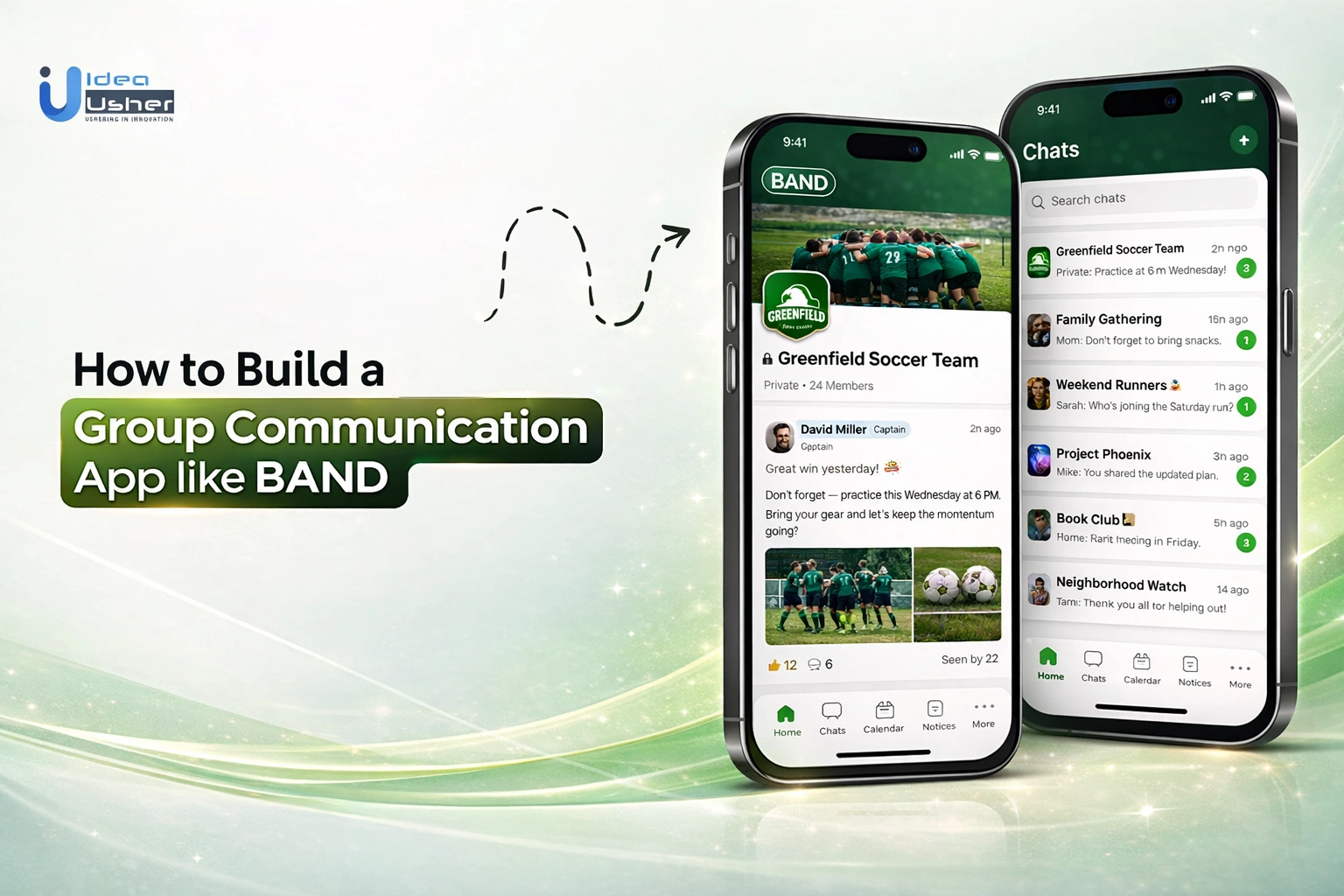
Group communication often becomes fragmented when conversations, schedules, and shared content are spread across multiple tools. The need for a central space where teams communities, and organizations can unify messaging, event coordination, announcements, and file sharing without switching platforms is driving significant interest in BAND like group communication app development, where communication and coordination are unified within a single, structured environment.
The need to integrate messaging threads, event scheduling, content sharing, notifications, and role-based access into a unified system ensures that group coordination remains seamless and organized beyond simple chat functionality. The effectiveness of the platform depends on how well these systems keep members aligned while maintaining clarity, scalability, and ease of use.
In this blog, we explain how to build a group communication app like BAND by examining core features, architectural considerations, and practical steps involved in creating a scalable and efficient group communication platform.
Why Apps Like BAND Are Replacing Multiple Tools
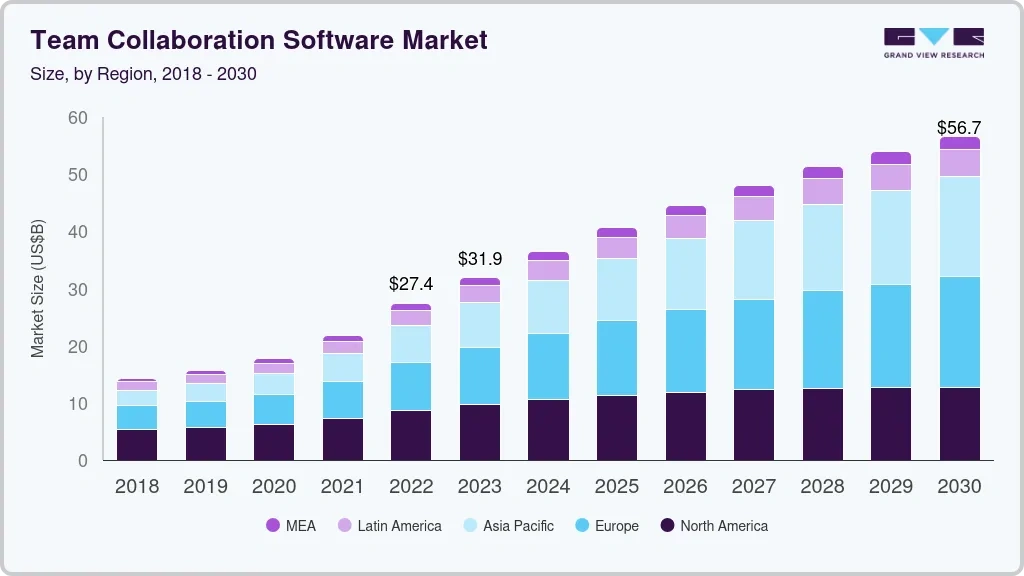
The global team collaboration and group communication software market is expanding and shifting away from a patchwork of disconnected applications toward centralized ecosystems, driven by the rise of remote and community-based interactions. Valued at over $36.1 billion in 2024, it is projected to reach around $57.4 billion by 2030, growing at a CAGR of 7.4%.
Modern groups often struggle with “app fatigue,” where managing separate logins for chat, file storage, real-time communication, unified group management, and scheduling creates unnecessary friction. A BAND like group communication app addresses this by consolidating essential functions into a single interface, significantly reducing the cognitive load on members and administrators.
A. The Shift From Fragmented Tools to Unified Platforms
Transitioning from fragmented tools to a unified system is about more than just convenience; it is about data integrity and operational efficiency. When tools are disconnected, information often gets lost in the gaps between platforms. A unified platform creates a synchronized environment where every feature works in tandem:
- Centralized Source of Truth: All group members access the same files, calendars, and announcements, eliminating version control issues.
- Reduced Context Switching: Users no longer need to jump between three or four different apps to complete a single task, which increases overall engagement.
- Cross-Feature Automation: In a unified system, creating a calendar event can automatically trigger a RSVP poll and a push notification, ensuring no manual follow-up is required.
- Enhanced Security: Managing permissions within one secure environment is far more reliable than overseeing access across multiple third-party services.
B. Real Use Cases Across Teams and Communities
The versatility of an all-in-one coordination model allows it to serve diverse groups with specific operational needs. The following table illustrates how different sectors utilize these integrated features:
| Sector | Primary Challenge | Integrated Solution |
| Sports Teams | Last-minute schedule changes and attendance tracking. | Real-time notifications paired with RSVP tracking and shared calendars. |
| Education & PTAs | Fragmented parent-teacher communication and privacy concerns. | Secure, private groups for sharing assignments, photos, and event sign-ups. |
| Corporate Teams | Distraction from social media and loss of document history. | Dedicated workspaces with file sharing, task management, and searchable archives. |
| Non-Profits | Coordinating large volunteer groups with zero budget for IT. | Polling for availability, broadcast announcements, and public/private sub-groups. |
C. Rising Demand for All-in-One Communication Apps
The demand for these platforms is surging as organizations move toward “private-by-design” digital spaces. Users are increasingly seeking environments that provide the social connectivity of traditional networks without the noise, advertisements, or data privacy risks associated with public social media. This trend is driven by several key factors:
- Niche-Focus Requirements: General messaging apps lack the administrative depth required for serious coordination, such as read receipts and member management.
- Hybrid Coordination: As more activities move to a mix of in-person and remote formats, the need for a robust digital “home base” becomes critical for maintaining community cohesion.
- Accountability Standards: Leadership in sports, business, and education requires tools that prove information has been received and acted upon, a feature set unique to dedicated coordination platforms.
- Scalability: A BAND like group communication app is built to handle groups ranging from small families to thousands of members without a degradation in performance or organization.
Understanding the BAND App Model in Depth
The architecture of BAND is defined by its ability to act as a digital headquarters for organized collectives. Unlike social media, it focuses on private groups, ensuring all communication stays within a closed, relevant ecosystem tailored to a community’s specific goals.
A. Core Concept Behind Unified Group Communication
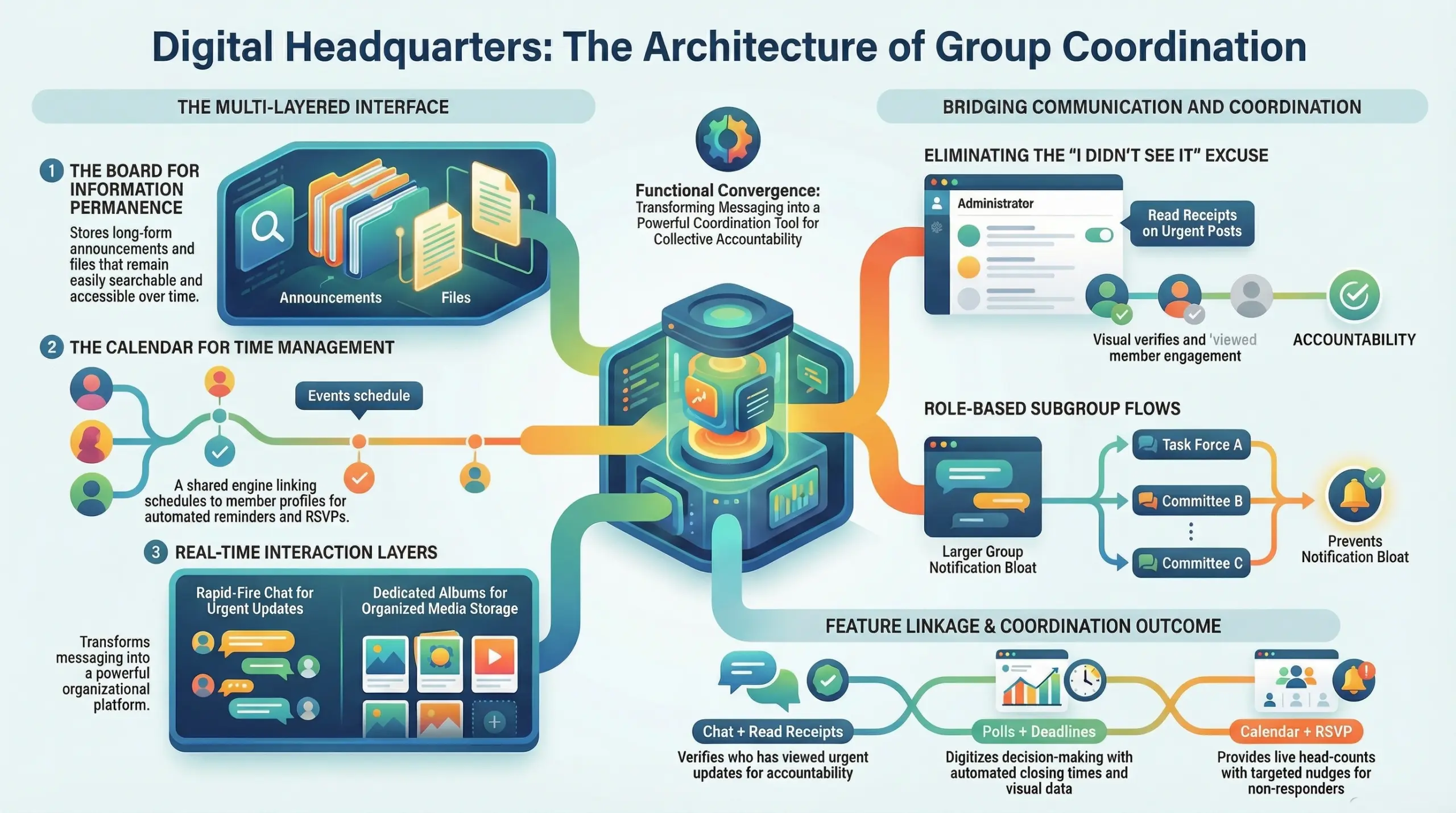
The BAND like group communication app is based on the philosophy of functional convergence. Instead of a linear chat stream where information quickly disappears, the core concept relies on a multi-layered interface that categorizes data by its utility.
- The Board (Information Permanence): A space for long-form announcements, polls, and files that need to remain accessible and searchable, unlike transient chat messages.
- The Calendar (Time Management): A shared scheduling engine that links directly to member profiles for RSVP tracking and automated reminders.
- The Chat (Real-time Interaction): A rapid-fire messaging layer for urgent updates, supporting both 1:1 and subgroup conversations.
- The Album (Media Storage): A dedicated repository for photos and videos, organized by event or date, preventing media from cluttering the main communication feed.
B. How BAND Combines Messaging and Coordination
The true power of this model lies in the technical bridge between talking and doing. Coordination features are not just “add-ons”; they are deeply integrated into the messaging logic to ensure accountability.
| Feature Linkage | Coordination Outcome |
| Chat + Read Receipts | Admins can verify exactly who has seen an urgent update, eliminating the “I didn’t see it” excuse. |
| Polls + Deadlines | Decision-making is digitized with automated closing times and visual data representation. |
| Calendar + RSVP | Event creators get a live head-count and can send targeted nudges to those who haven’t responded. |
| Posts + Attachments | Documents are anchored to specific announcements, ensuring members always have the right context. |
C. Key User Flows That Drive Engagement
High retention in a BAND like group communication app is achieved through intuitive workflows that solve specific pain points for group leaders and members alike.
- The Onboarding Flow: New members are invited via secure links or QR codes. Upon joining, they immediately see a “Welcome” post and upcoming calendar events, providing instant value and orientation.
- The Announcement Flow: An admin creates a post with an attached file and an RSVP poll. The system pushes a high-priority notification to all members. The admin then monitors the “Read” list to identify inactive participants.
- The Subgroup Flow: Within a large organization, members can be segmented into smaller “Chat Rooms” based on specific roles or tasks. This prevents “notification bloat” by ensuring users only receive pings relevant to their specific sub-duties.
- The Content Discovery Flow: Members use the “Search” and “Tagging” functions to retrieve past documents or photos from months ago without scrolling through thousands of old chat messages.
Different Types of Group Communication Apps
A BAND-like app is a versatile architectural blueprint, not a monolithic product. By tailoring its coordination engine to specific market segments, platforms solve unique pain points that generic social media ignores.
The following table identifies high-growth niches where specialized communication tools provide the greatest competitive advantage.
| Type | Differentiation Angle | Strategic ROI Potential | Platform Examples |
| Community-Based Apps | Focus on privacy-first social networking and interest-based discovery. | High retention through exclusive content and secure private member directories. | Mighty Networks, Circle, Disco, Geneva |
| Team Collaboration Apps | Focus on workflow automation for small-to-medium businesses. | Recurring revenue by replacing expensive software with integrated task management. | Slack, Connecteam, Blink |
| Event-Centric Apps | Focus on real-time logistics and high-volume coordination. | Transaction-based earnings from RSVP tracking and integrated logistics management. | Luma, Eventbrite, Partiful, Eventee |
| Niche Apps for Schools/Sports | Focus on accountability and safety for youth and athletic groups. | Niche market dominance using mandatory read receipts and safety compliance. | Remind, TeamSnap, Heja, Spond |
Key Features Required in a BAND-Like App
The BAND like group communication app functions as a fluid ecosystem where messaging and organization intersect. Success depends on ensuring every tool, from chat to calendars, works together to streamline daily operations. These features ensure seamless communication, efficient coordination, and structured group management within a unified platform.
1. Group Messaging With Subgroup Channels
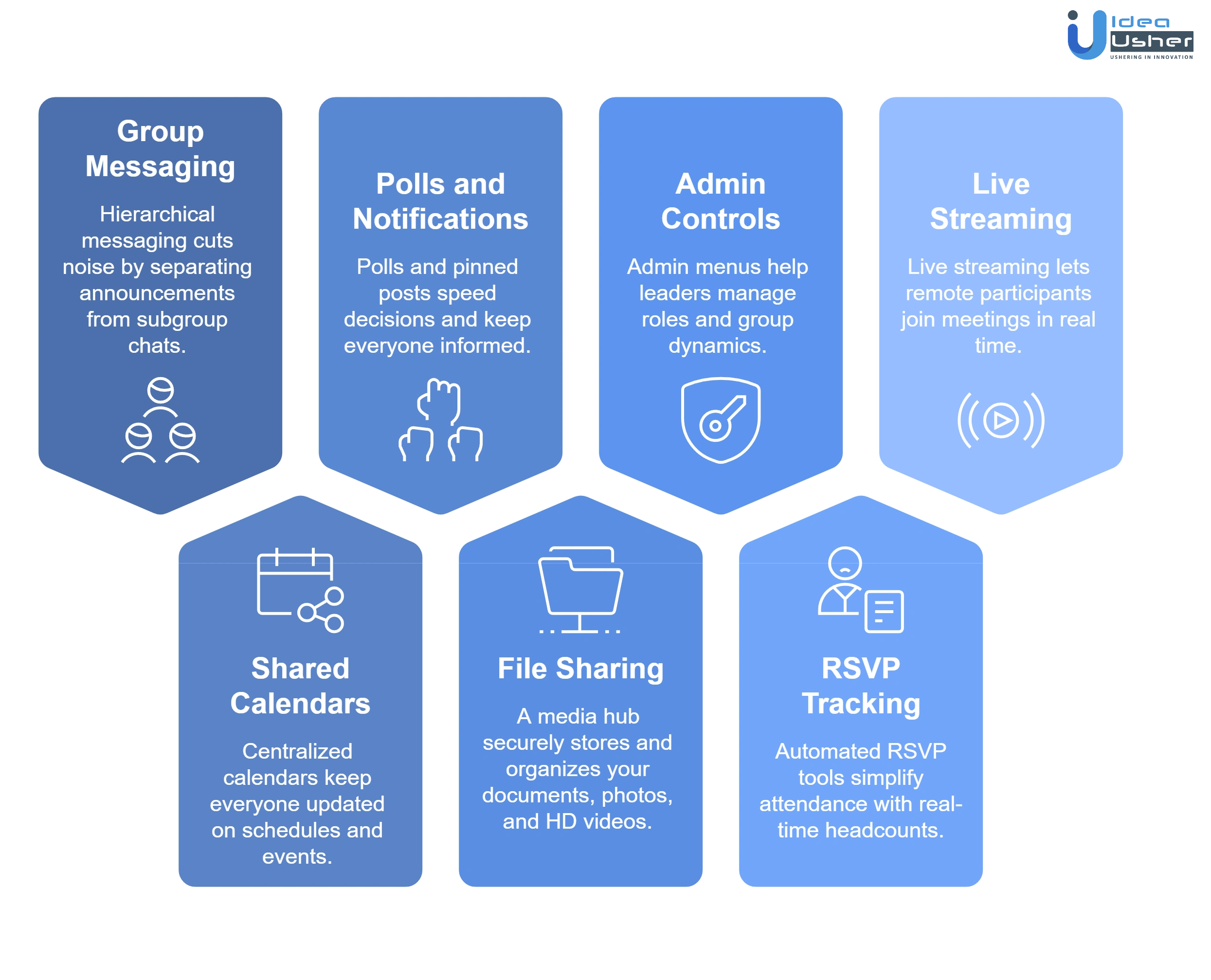
Hierarchical messaging solves organizational “noise” by separating general announcements from infinite subgroup channels. Segmenting by roles, locations, or projects prevents user disengagement and ensures that communications remain relevant and productive.
Subgroups must support granular notification settings, prioritizing immediate team pings over daily organizational digests. Implementing threaded replies and mentions ensures specific conversations remain organized, searchable, and visible within high-volume data streams.
2. Shared Calendars and Event Scheduling
Centralized calendars synchronize group schedules, ensuring all members stay updated on upcoming activities. Integrated tools allow for seamless event creation, recurring appointments, and automatic reminders to reduce missed deadlines.
Syncing with external platforms provides a unified view of professional commitments. Attaching maps and documents directly to events streamlines preparation, making it a staple for any BAND like group communication app.
3. Polls, Announcements, and Smart Notifications
Interactive polls and pinned announcements facilitate rapid consensus and ensure critical information reaches every member. Smart notification systems filter updates, delivering high-priority alerts instantly while grouping minor interactions.
These survey tools replace messy email threads, collecting organized responses for quick decision-making. Multi-format support allows for rich, engaging announcements that capture and maintain essential organizational attention.
4. File Sharing and Media Collaboration
A dedicated media hub provides a secure space for storing and organizing documents, photos, and high-definition videos. Categorized folders allow members to retrieve essential assets quickly and efficiently.
Advanced controls enable private sharing while preventing unauthorized downloads of sensitive files. High-capacity storage supports bulk transfers, a necessary function in a BAND like group communication app for media-heavy projects.
5. Admin Controls and Role-Based Permissions
Robust administrative menus empower leaders to manage group dynamics by defining specific roles. Tiered permissions ensure users only interact with data relevant to their specific organizational functions.
Managers can restrict posting or chat privileges to maintain professional decorum and information security. Comprehensive audit logs provide full oversight of the digital workspace and the entire community.
6. RSVP Tracking and Event Participation
Automated RSVP tools simplify attendance management by providing real-time headcounts. Organizers can track who has viewed invitations, ensuring no member is overlooked during the critical planning phase.
Segmenting guests into confirmed or pending lists allows for targeted follow-ups and automated reminders. Features like external guest registration accommodate stakeholders, fostering inclusive participation for all major events.
7. Live Streaming and Real-Time Engagement
Live streaming capabilities bridge the gap for remote participants, allowing them to join meetings in real-time. Interactive features like live comments and reactions foster a strong sense of belonging.
Recording broadcasts for later viewing ensures that members who missed the live session stay informed. This real-time engagement is what defines a high-quality BAND like group communication app.
Advanced Features That Boost User Retention
The BAND like group communication app drives retention by becoming a personalized assistant, automating tasks and embedding itself into daily community workflows. This transition from a “one-size-fits-all” interface to a dynamic, user-centric environment reduces churn and encourages long-term platform adoption by group leaders.
1. AI-Based Notifications and Smart Suggestions
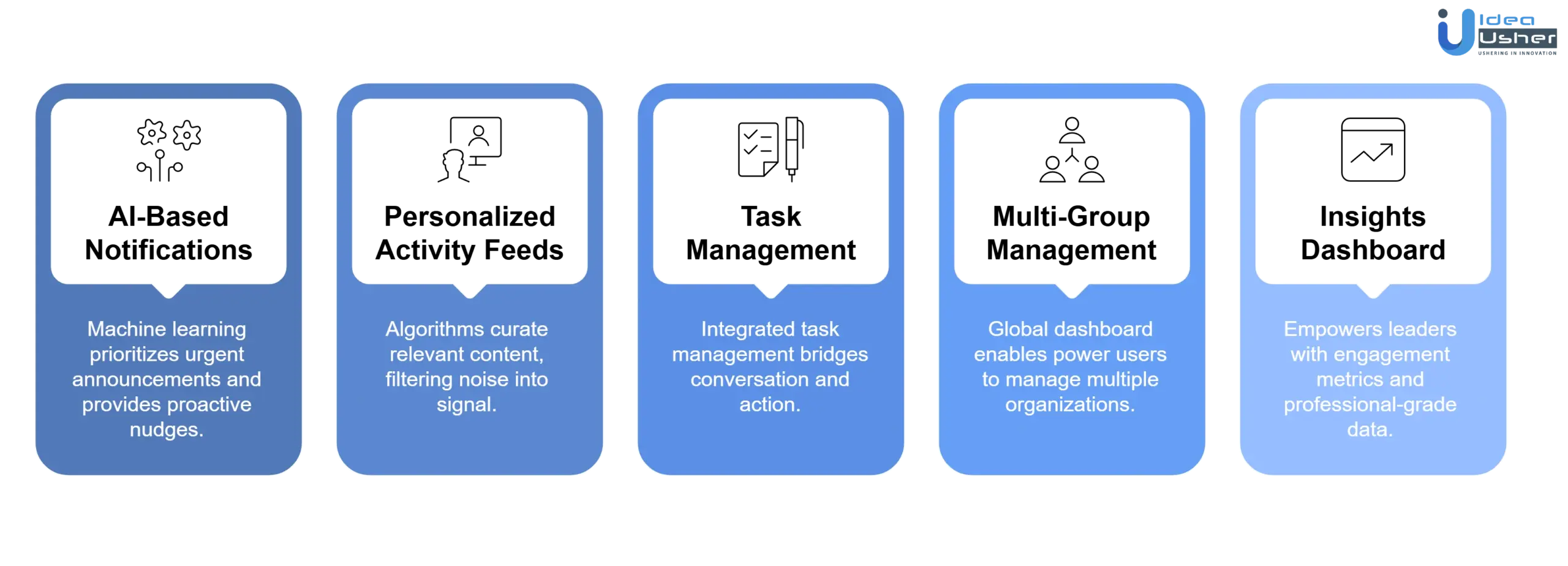
Machine learning integration combats notification fatigue by prioritizing urgent announcements over minor chatter. Furthermore, smart suggestions analyze group behavior to provide proactive nudges, such as meeting creation. This ensures the platform remains an intuitive tool for streamlined coordination and efficient logistics.
2. Personalized Activity Feeds for Members
Algorithms prioritize a personalized activity feed to surface relevant content, such as subgroup posts or RSVP deadlines, for every member. This curation filters “noise” into “signal,” transforming the app into a valuable dashboard of community responsibilities rather than a chaotic stream.
3. Built-In Task and Workflow Management
Integrated task management bridges the gap between conversation and action by allowing to-do assignments directly from chats. This workflow integration adds accountability through deadlines and checklists, creating a sticky environment where members manage their professional output within one ecosystem.
4. Multi-Group Management for Power Users
The global dashboard enables power users to manage multiple organizations via a single, unified view of notifications. While providing a seamless switch between groups, the architecture maintains strict data silos to ensure total privacy and security across different community operations.
5. Insights Dashboard for Admin Analytics
The insights dashboard empowers leaders with engagement metrics, including post-view rates and member activity levels. By providing professional-grade data, the platform helps admins proactively re-engage their community, making the tool indispensable for successful, long-term management strategies.
UX Design Principles Behind Successful Group Apps
Effective design for a BAND like group communication app must prioritize functional clarity over aesthetic decoration. An expert approach focuses on reducing friction for administrators while ensuring members can navigate dense information ecosystems with minimal cognitive effort and maximum speed.
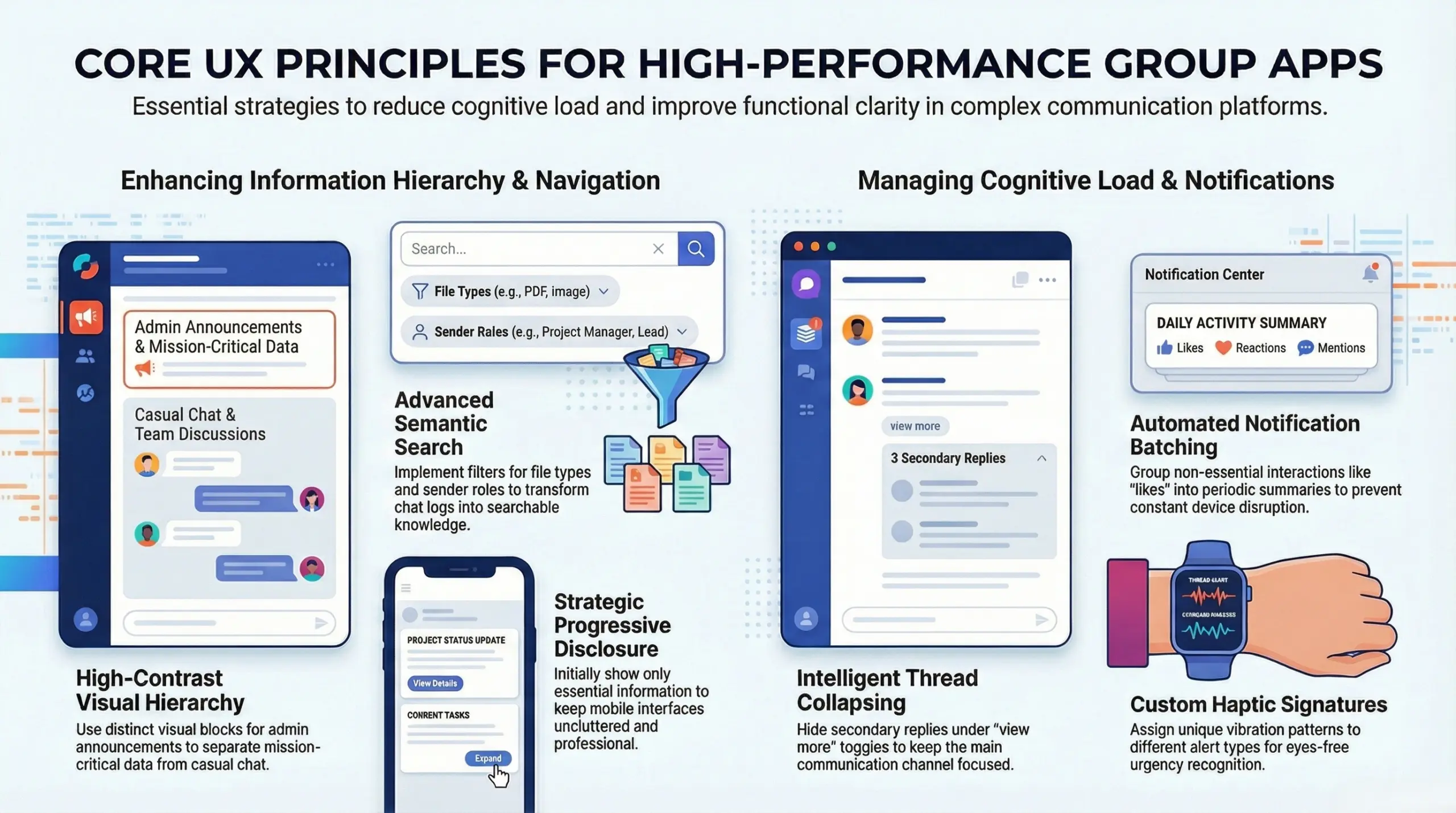
1. Designing for Clarity in Group Conversations
Interface layouts must distinguish between casual chatter and official group directives to prevent critical updates from being ignored or lost in the stream.
- Distinct Post Styling for Hierarchy: Implementing high-contrast visual blocks for pinned administrative announcements ensures that mission-critical data stands out from standard user chat bubbles, creating an immediate visual hierarchy.
- Contextual Priority Tagging: Utilizing color-coded labels such as “Urgent,” “Action Required,” or “FYI” allows members to quickly scan a busy feed and prioritize their engagement based on the specific needs of the group.
- Integrated Action Shortcuts: Embedding direct links to the shared calendar or file repository within the conversation view prevents users from having to navigate through multiple menus to perform a simple follow-up task.
2. Reducing Cognitive Load in Multi-Thread Chats
Managing several active discussions simultaneously requires a layout that prevents information overlap and protects the user from experiencing digital exhaustion during peak activity.
- Intelligent Thread Collapsing: By hiding secondary replies and side-conversations under a single “view more” toggle, the main communication channel remains clean, focused, and free from overwhelming blocks of text.
- Subgroup Activity Indicators: Subtle but distinct visual cues, such as glowing icons or badge counts, inform users exactly which niche channels require attention without forcing them to manually check every subgroup for updates.
- Granular Muting Protocols: Providing the ability to silence specific high-volume threads while keeping the main group alerts active ensures that users remain connected to the community without being bombarded by irrelevant pings.
3. Structuring Information for Easy Navigation
A successful coordination platform allows users to find specific data points across months of history without resorting to excessive scrolling or complex menu diving.
- Persistent Global Navigation Bar: Maintaining fixed access to the core pillars of the app such as the board, calendar, and member list ensures that the user always has a “home base” regardless of how deep they are into a sub-menu.
- Advanced Semantic Search Filters: Implementing filters that allow users to sort history by file type, sender role, or specific date ranges transforms a simple chat log into a powerful, searchable knowledge base for the organization.
- Strategic Progressive Disclosure: Designing the interface to show only essential information initially, while revealing technical details or longer posts upon user interaction, keeps the mobile experience uncluttered and professional.
4. Balancing Notifications and User Control
User retention depends on a notification strategy that informs the user about important milestones without becoming a intrusive digital nuisance that leads to app deletion.
- Automated Notification Batching: Grouping non-essential interactions like reactions, likes, or read receipts into a single periodic summary prevents the constant vibration of a device from disrupting the user’s daily workflow.
- Context-Aware Quiet Hours: Offering scheduled “Do-Not-Disturb” windows that align with the user’s specific timezone or work schedule demonstrates a respect for user boundaries that is critical for long-term platform loyalty.
- Custom Haptic and Audio Signatures: Assigning unique vibration patterns or sounds to different alert types allows users to distinguish between an urgent announcement and a casual mention without even looking at their screen.
How to Build a Group Communication App like BAND?
The transition from a conceptual framework to a functional platform requires a methodical engineering and business strategy. Successful deployment relies on aligning technical milestones with user needs to ensure market viability and long-term scalability.
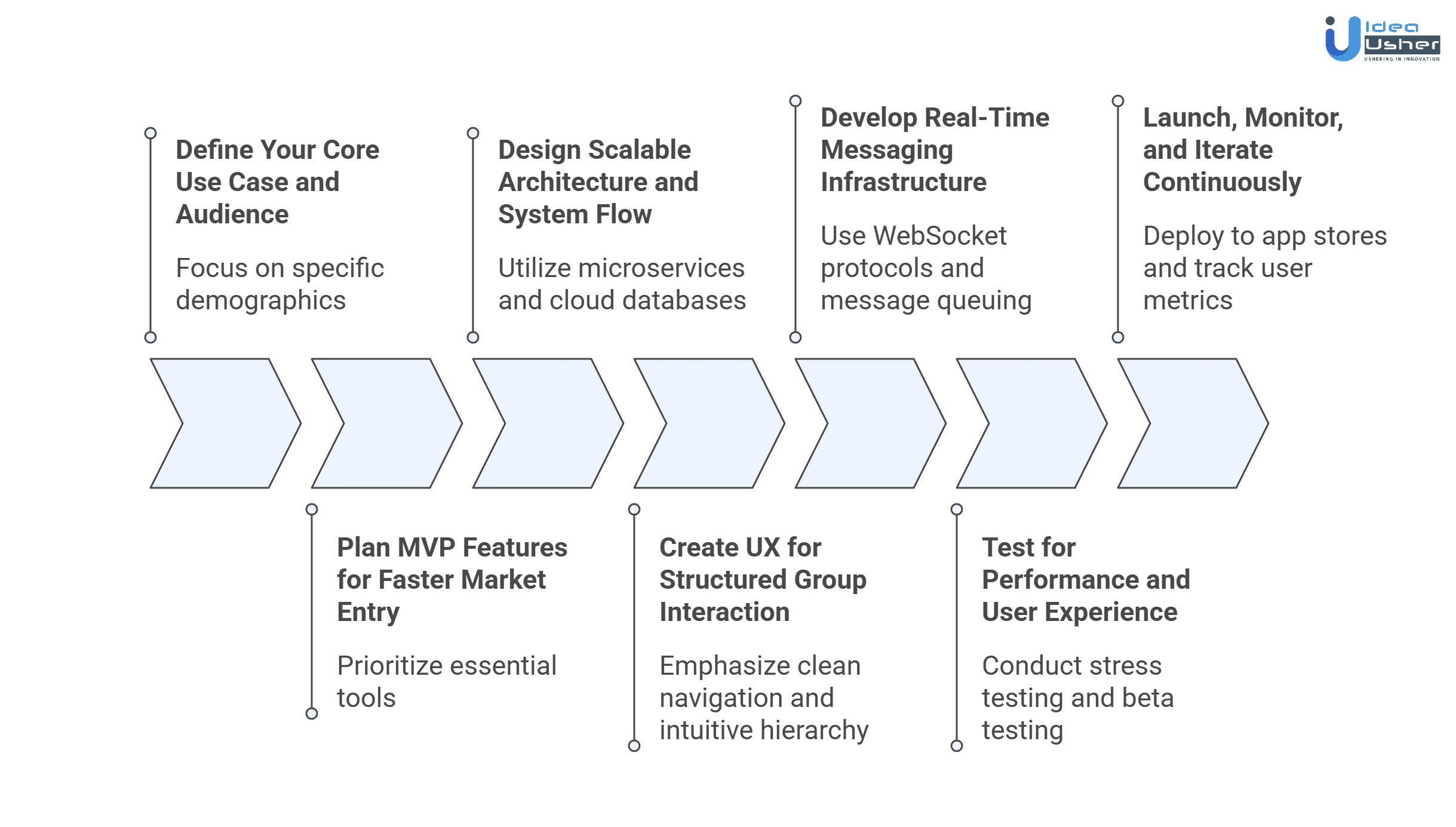
1. Define Your Core Use Case and Audience
A specific focus on demographics such as youth sports leagues or corporate departments ensures the initial feature set solves high-pain problems of BAND like group communication app development. This clear audience definition guides the development of specialized tools that generic messaging platforms typically overlook.
2. Plan MVP Features for Faster Market Entry
The prioritization of essential tools like private messaging, shared calendars, and basic polls allows for a rapid launch. This Minimum Viable Product strategy gathers critical user feedback early, preventing over-investment in complex features that might not meet demand.
3. Design Scalable Architecture and System Flow
A robust backend infrastructure utilizing microservices and cloud-based databases supports thousands of concurrent users without performance degradation. The system architecture must prioritize data security and seamless integration between different functional modules like chat, storage, and notification engines.
4. Create UX for Structured Group Interaction
The user experience design for a BAND like group communication app emphasizes clean navigation and intuitive information hierarchy. Designers prioritize reducing the number of taps required to RSVP or view announcements, ensuring that even non-technical users manage groups effectively.
5. Develop Real-Time Messaging Infrastructure
WebSocket protocols and dedicated message queuing services provide the low-latency environment required for instant communication in a BAND like group communication app. This technical layer ensures that push notifications and chat updates reach members across the globe in milliseconds, maintaining the platform’s reliability as a coordination hub.
6. Test for Performance and User Experience
Rigorous stress testing identifies potential bottlenecks in media uploads and high-volume message delivery before the public release. Quality assurance protocols include beta testing with real community leaders to validate that the interface remains responsive under heavy organizational workloads.
7. Launch, Monitor, and Iterate Continuously
The deployment onto app stores marks the beginning of a data-driven improvement cycle focused on user retention metrics. Monitoring tools track feature adoption rates, allowing developers to refine the product roadmap based on how actual communities interact with the platform daily.
Best Tech Stack for Group Communication Apps
The technical foundation of a BAND like group communication app defines its ability to handle high-concurrency messaging and seamless data synchronization, requiring a modern, decoupled stack to ensure responsiveness while efficiently managing complex backend coordination tasks. The following table outlines the strategic components required to build a resilient and scalable platform.
| Component | Strategic Technology Selection | Rationale and Technical Depth |
| Frontend Technologies | React Native or Flutter | These frameworks provide a single codebase and near-native performance, ensuring a consistent user experience across both iOS and Android. |
| Backend Systems | Node.js or Elixir (Phoenix) | These technologies support low-latency WebSockets and high-concurrency, which are vital for real-time messaging and instant synchronization of group data. |
| Database Design | PostgreSQL + MongoDB / Redis | A hybrid database architecture manages structured data efficiently while using in-memory caching for rapid access to active chat histories. |
| Cloud Infrastructure | AWS or Google Cloud (GCP) | Auto-scaling clusters and containerization allow the infrastructure to expand dynamically, ensuring the platform remains stable during peak usage. |
| Integrations and APIs | Twilio, Firebase, and Stripe | Integrated third-party APIs streamline specialized functions like automated push notifications and secure, encrypted payment processing for group dues. |
Security and Data Protection in Group Apps
Robust security is the cornerstone of enterprise trust in an era of rising cyber threats. BAND like group communication apps prioritize data integrity through multi-layered defense mechanisms, ensuring that sensitive organizational communications remain confidential, compliant, and fully protected against unauthorized external or internal access.
A. End-to-End Encryption for Messaging
Advanced encryption protocols ensure that only the intended recipients can access communication content. By securing data at the source, platforms eliminate the risk of interception by service providers or hackers.
- AES-256 Bit Encryption Standards: Utilizing military-grade algorithms to protect data both at rest and during active transit across networks.
- Perfect Forward Secrecy (PFS): Implementation of unique, short-lived session keys that prevent a single compromised key from exposing historical message logs.
- Cryptographic Verification: Tools that allow users to verify the identity of their contacts to prevent “man-in-the-middle” attacks.
B. Role-Based Access and Data Control
Granular permission settings allow organizations to manage information flow based on specific user functions. This structure prevents internal data leaks by ensuring sensitive files are accessible only to authorized personnel.
- Customizable Administrative Hierarchy: Defining specific roles such as owners, admins, and moderators with tiered levels of data visibility and management rights.
- Dynamic Permission Updates: The ability to instantly revoke access or adjust user capabilities as personnel change or projects conclude.
- Comprehensive Audit Trails: Automatic logging of administrative actions and data access patterns to provide a clear history for internal security reviews.
C. Compliance With Global Privacy Standards
Modern group applications are engineered to satisfy stringent international regulatory frameworks. These systems automate data sovereignty and privacy workflows to help businesses maintain legal standing across diverse global jurisdictions.
- Regulatory Alignment: Pre-configured settings designed to meet the technical requirements of GDPR, CCPA, and various regional privacy laws.
- Data Sovereignty Options: Capabilities for organizations to choose the geographical location of data storage to comply with local residency mandates.
- Automated Data Governance: Built-in features for managing Subject Access Requests (SARs), data portability, and the permanent deletion of user records.
D. Secure Media and File Sharing Systems
Encrypted storage environments protect documents and media shared within groups. Integrated scanning processes ensure that collaboration remains seamless while preventing the introduction of malicious software into the corporate network.
- Malware and Virus Filtering: Real-time scanning of all uploaded attachments to identify and block suspicious code or malicious payloads before they reach devices.
- Secure Cloud Vaults: Storage of media in isolated, encrypted partitions that require specific authentication tokens for retrieval.
- Time-Limited Access: Advanced settings that allow for “view-only” modes or the automatic expiration of files to minimize the long-term digital footprint.
Real Challenges in Building These Platforms
Engineers must navigate complex technical and behavioral hurdles to maintain a high-performance coordination environment. Addressing synchronization lag and privacy requirements is essential for sustaining user trust and ensuring the platform remains a reliable tool for professional and community-led organizations.
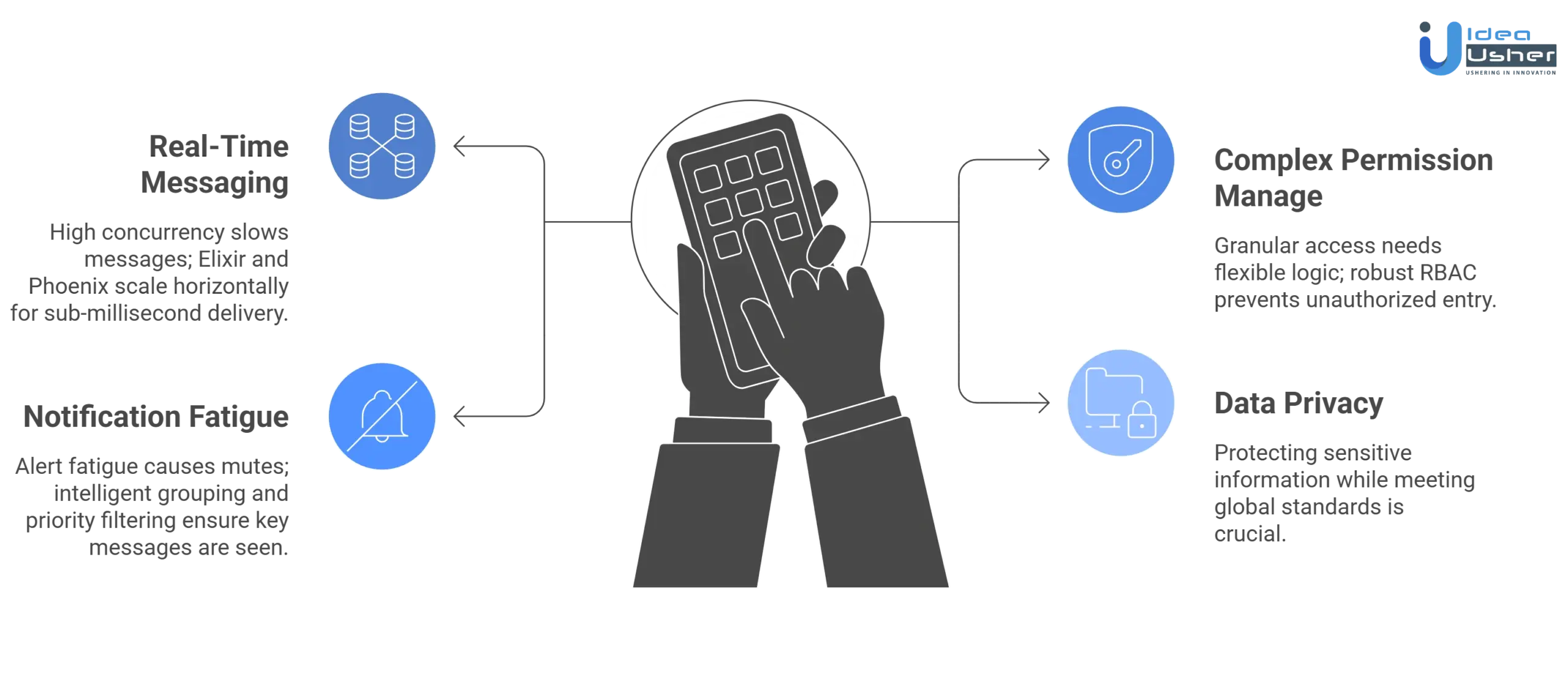
1. Scaling Real-Time Messaging Without Delays
Challenge: High concurrency during peak hours can cause message latency and server strain, leading to out-of-order conversations and poor user experiences.
Solution: Our developers implement horizontal scaling with Elixir and Phoenix, utilizing distributed nodes and Pub/Sub architectures to ensure sub-millisecond delivery for millions of simultaneous users across a global network.
2. Managing Complex Permissions and Roles
Challenge: Defining granular access levels for diverse groups requires a flexible logic that prevents unauthorized data access without overcomplicating the interface.
Solution: We utilize a robust Role-Based Access Control system, allowing admins to create custom permissions. Our team builds dynamic policy engines to validate every API request against specific user credentials.
3. Preventing Notification Fatigue in Users
Challenge: Constant alerts from multiple active subgroups often lead to users muting the entire platform, which significantly reduces overall engagement rates.
Solution: Our engineers develop intelligent notification grouping and priority-based filtering. Users receive batched summaries for casual chatter while high-priority announcements use dedicated channels to ensure they always break through.
4. Ensuring Data Privacy and Compliance
Challenge: Protecting sensitive group information while meeting global standards like GDPR and CCPA is a non-negotiable requirement for modern communication platforms.
Solution: We implement end-to-end encryption for private messaging and regional data residency. Our developers perform regular security audits and utilize automated compliance tools to monitor and protect user data integrity.
Case Study: Building a Scalable Group App
The successful deployment of a high-performance communication platform requires balancing complex backend architecture with intuitive user experiences. This case study explores the journey of engineering a robust, scalable solution designed to handle 10M+ concurrent connections while maintaining elite security.
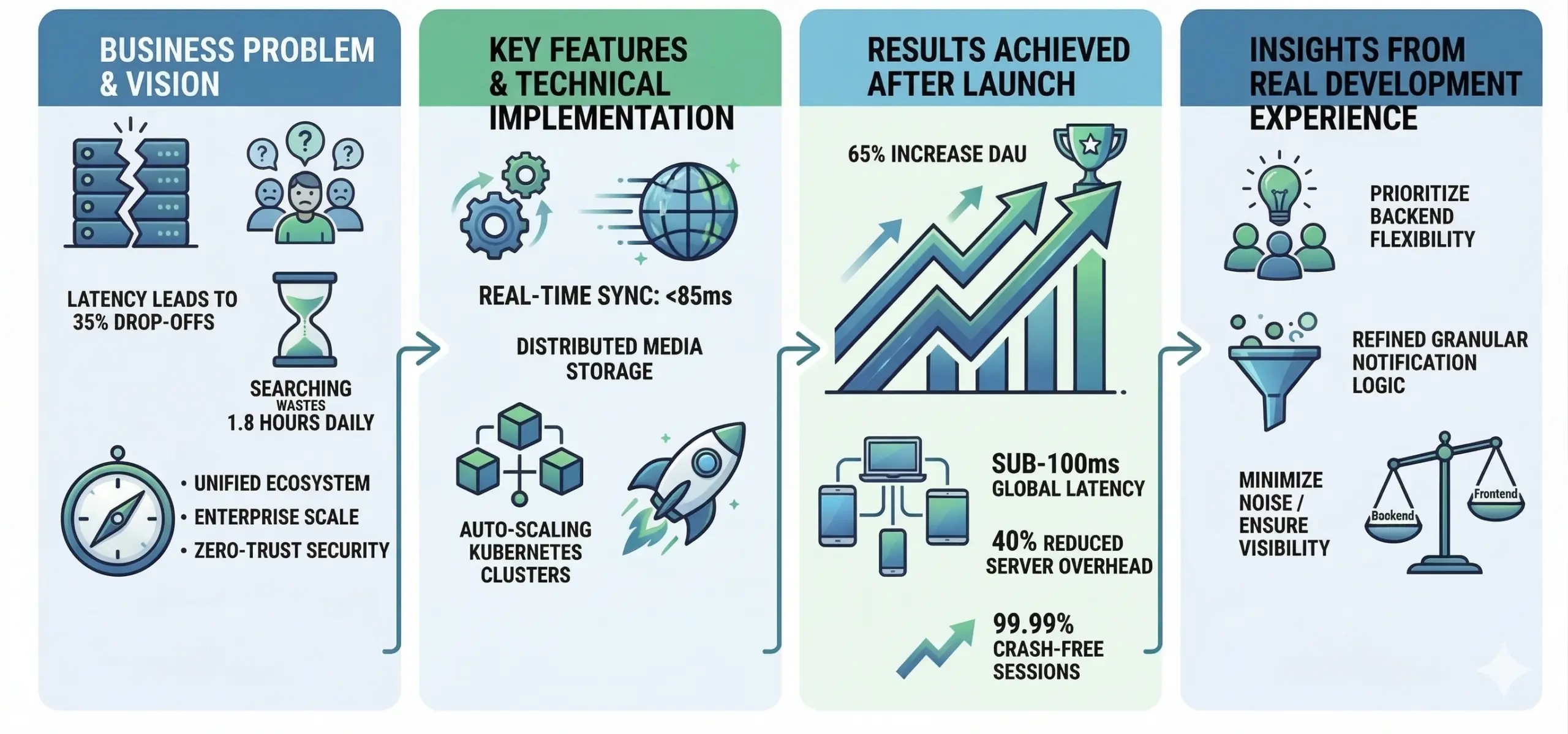
A. Business Problem and Product Vision
Legacy communication tools often collapse under heavy loads, causing 35% drop-offs in user engagement due to message latency. Fragmented ecosystems create information silos, where employees lose an average of 1.8 hours daily searching for data.
- Unified Ecosystem: Consolidate fragmented workflows into a single source of truth for all communication.
- Enterprise-Grade Scalability: Support vertical and horizontal scaling to accommodate 500,000+ members per group.
- Zero-Trust Security: Implement AES-256 encryption and multi-factor authentication to eliminate data vulnerability risks.
B. Key Features and Technical Implementation
The development focused on integrating high-demand features within a resilient technical framework. By utilizing a microservices-based architecture, the team ensured that each component could scale independently to meet fluctuating global demands.
- Real-Time Data Synchronization: Leveraging WebSockets and MQTT to achieve a global message delivery latency of less than 85ms.
- Distributed Media Storage: Utilizing S3-compatible cloud storage with Edge CDN integration for 3x faster file retrieval speeds.
- Auto-Scaling Clusters: Implementing Kubernetes orchestration to maintain 99.99% uptime during sudden traffic spikes of 300% above baseline.
C. Results Achieved After Launch
Post-launch metrics demonstrated substantial improvements in user retention and system reliability. The platform successfully transitioned to a full-scale enterprise solution, exceeding all initial performance benchmarks and ROI targets within six months.
| Metric Category | Performance Outcome |
| User Engagement | 65% increase in daily active users (DAU) within the first quarter. |
| System Latency | Average message delivery time stabilized at sub-100ms globally. |
| Operational Costs | 40% reduction in server overhead via intelligent resource allocation. |
| Crash Rate | Maintained a 0.02% crash-free session rate across iOS and Android. |
| Data Throughput | Successfully processed 1.2 petabytes of media data with zero corruption. |
D. Insights From Real Development Experience
Building a BAND like group communication app revealed that prioritizing backend flexibility is just as critical as the user interface. Real-world testing highlighted that automated horizontal scaling is the only way to handle viral growth without service interruptions.
Furthermore, user feedback loops during the MVP phase proved invaluable for refining the granular notification logic. Success in this space depends on the ability to minimize “noise” while ensuring that critical organizational alerts remain highly visible and prioritized.
How IdeaUsher Builds Apps Like BAND?
IdeaUsher transforms complex concepts into high-performance community platforms by combining deep industry expertise with cutting-edge technology. Our process ensures every BAND like group communication app is secure, scalable, and user-centric.
1. Product Discovery and Market Alignment
The journey begins with deep market research to define a unique value proposition. By identifying specific user pain points, the strategy aligns technical requirements with business goals to ensure long-term product viability and success.
2. UX Strategy Focused on Engagement
Designers prioritize an intuitive interface that simplifies navigation while fostering community interaction. By integrating seamless information architecture, the UX strategy reduces cognitive load and maximizes daily active usage through habit-forming, user-centric design principles.
3. Agile Development With Rapid Iterations
Utilizing a sprint-based approach, developers build core functionalities while maintaining the flexibility to pivot based on feedback. This Agile methodology ensures high-quality code and allows for the rapid deployment of critical communication features.
4. Post-Launch Scaling and Optimization
After launch, the focus shifts to monitoring system performance and user behavior data. Continuous optimizations and automated server scaling ensure the platform remains responsive as the user base grows into millions of concurrent members.
Planning Your BAND-Like App Strategy
Success starts with a clear blueprint that balances technical feasibility with market demand. A well-defined strategy ensures your platform provides immediate value while remaining adaptable to evolving organizational communication needs.
A. Identify Your Niche and Target Audience
Generic tools often fail to address specific community needs. Focus on high-value niches like sports leagues, corporate teams, or educational institutions to create tailored experiences. Understanding unique user pain points ensures market-product fit.
B. Define Core Features vs Add-On Features
Prioritize essential communication tools like group messaging and shared calendars for your MVP. By distinguishing core utilities from secondary “nice-to-have” features, you ensure a lean development process and a clutter-free initial user experience.
C. Build a Go-To-Market Strategy
A successful launch requires more than just code; it needs a multi-channel marketing approach. Focus on viral growth loops, influencer partnerships, and targeted SEO to attract community leaders who will drive organic platform adoption.
D. Align Product With Long-Term Growth
Designing for the future means building a scalable infrastructure that supports millions of users. By aligning your roadmap with emerging tech trends and user feedback, your platform maintains relevance and high retention rates over time.
Ready to Build Your Group Communication App With IdeaUsher
Transform your vision into a market-leading platform with a team that understands elite-level engineering. Leveraging the expertise of ex-FAANG/MAANG developers and over 500,000+ hours of development experience, we build secure, scalable, and high-performance solutions.
Partner with us to navigate the complexities of real-time architecture and deliver a world-class user experience that drives global community engagement.
- Validate Your Idea With Experts: Work alongside seasoned strategists to refine your concept, ensure market-product fit, and identify high-impact features for your initial launch.
- Get a Custom Development Roadmap: Receive a detailed, step-by-step technical blueprint tailored to your specific business goals, ensuring transparent timelines and predictable project milestones.
- Launch Faster With the Right Tech Partner: Accelerate your time-to-market using our proven agile frameworks and robust pre-built modules designed for massive organizational scalability.
Connect with IdeaUsher Today to transform your vision into a high-performance communication platform, leveraging our elite engineering expertise to build secure, scalable, and user-centric group solutions.
Explore our portfolio to see how we’ve empowered global brands with cutting-edge digital solutions.
Conclusion
The development of a BAND like group communication app represents a shift toward purposeful, organized digital spaces. By merging real-time messaging with structured coordination tools, you provide a unified headquarters that eliminates the chaos of fragmented platforms. Success lies in balancing high-utility features with an intuitive, fluid user experience that anticipates community needs. As groups continue to seek private, efficient ecosystems, a well-engineered platform becomes more than just a tool; it becomes the essential backbone of their daily operations and long-term collective growth.


FAQs
A.1. A robust stack includes Node.js or Go for backend scalability, React Native or Flutter for cross-platform efficiency, and WebSocket for real-time messaging. PostgreSQL or MongoDB handles diverse community data effectively.
A.2. Security must prioritize end-to-end encryption for private chats and robust role-based access controls. Compliance with GDPR or CCPA standards ensures user trust and protects sensitive organizational data from unauthorized access.
A.3. The backend utilizes horizontal scaling and load balancers to distribute traffic across multiple servers. Implementing a dedicated message broker ensures real-time data remains synchronized without lagging, even during peak global activity.
A.4. Managing media in a BAND like group communication app is best handled through Cloud storage and Content Delivery Networks. This setup allows users to upload and view high-resolution videos or documents without slowing down the core messaging interface.