

Key Takeaways
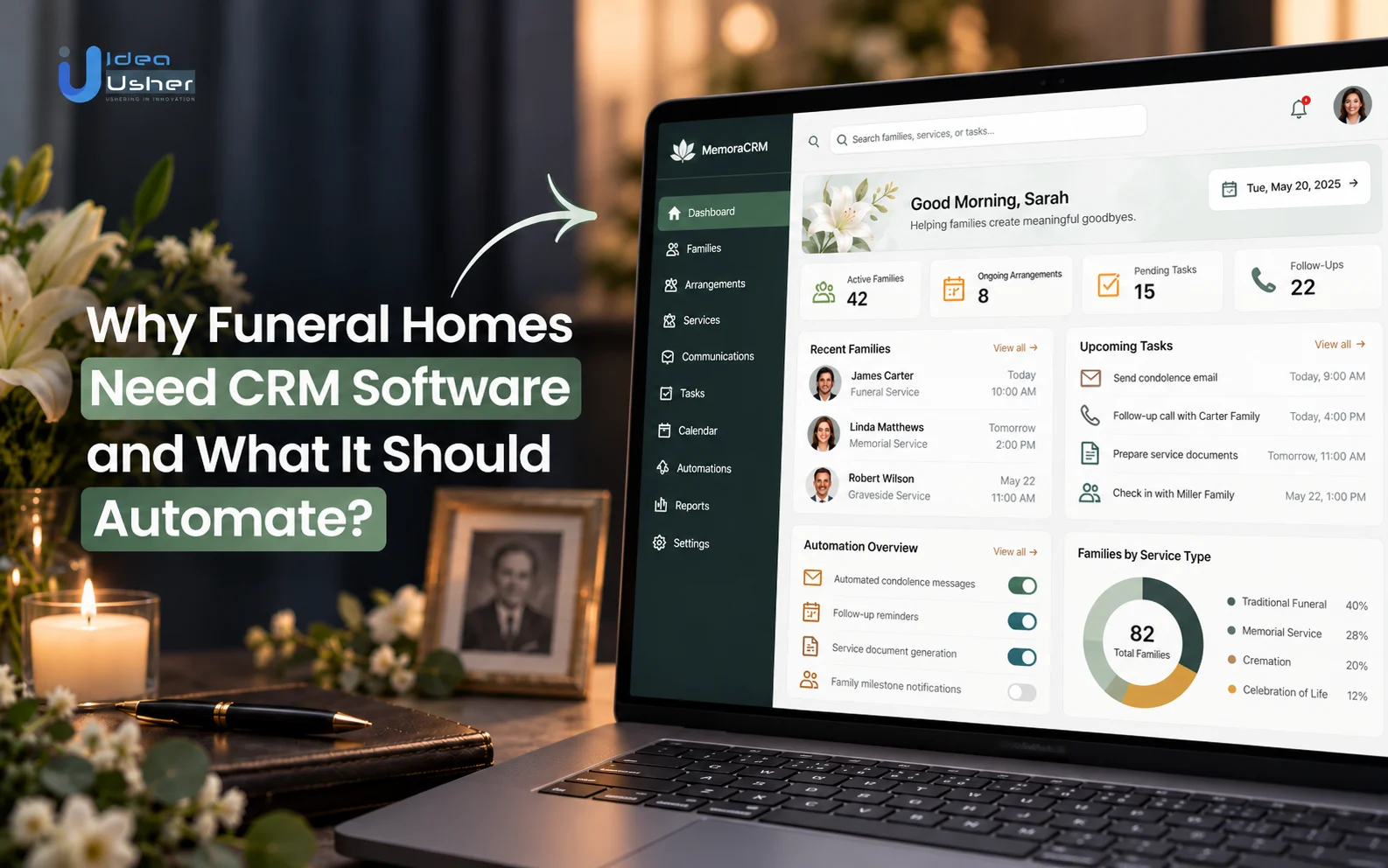
- A funeral home CRM software gathers family details, inquiries, cases, schedules and communications in one place. That helps staff work with every detail in one place instead of jumping between different systems.
- The software automates follow-ups, preneed and at-need cases, documents, payments, scheduling and aftercare. That helps staff spend less time on manual work and focus on each family’s different demands.
- Preneed and at-need cases need different workflows, but both should use the same family data so information does not have to be entered again.
- The basic funeral home CRM software must cover family records, lead tracking, case management, tasks, communication and scheduling before adding more advanced features.
- Funeral home CRM software development can cost around $40,000 to $300,000+. The final price mainly depends on automation, integrations, workflow complexity and scale.
Funeral homes need CRM software to centralize family relationships, inquiries, cases and communications while reducing manual work. A specialized funeral home CRM software connects these workflows with case management, scheduling, documents, payments and aftercare in one system. It should automate lead capture, follow-ups, preneed and at-need workflows, documents, payments, scheduling and aftercare.
Manual processes can leave funeral home teams switching between spreadsheets, emails, paper records and separate scheduling or payment tools. This creates duplicate data, missed follow-ups and limited visibility into each family’s journey. Dedicated funeral home CRM software can connect these touchpoints, giving staff a complete view of every family, case and service while reducing repetitive administrative work.
In this blog, we will talk about why funeral homes need CRM software, the workflows it should automate, the essential features it requires and how these capabilities can create a more connected experience for staff and families.
What Is Funeral Home CRM Software?
Funeral home Customer Relationship Management (CRM) software is a specialized, cloud-based platform designed to organize, track, and manage all interactions between a funeral home and the families, leads, and community members it serves. Unlike generic business CRMs, it is tailored specifically to the unique lifecycle of death care, spanning advance planning (preneed), immediate arrangements (at-need), and long-term family support (aftercare).
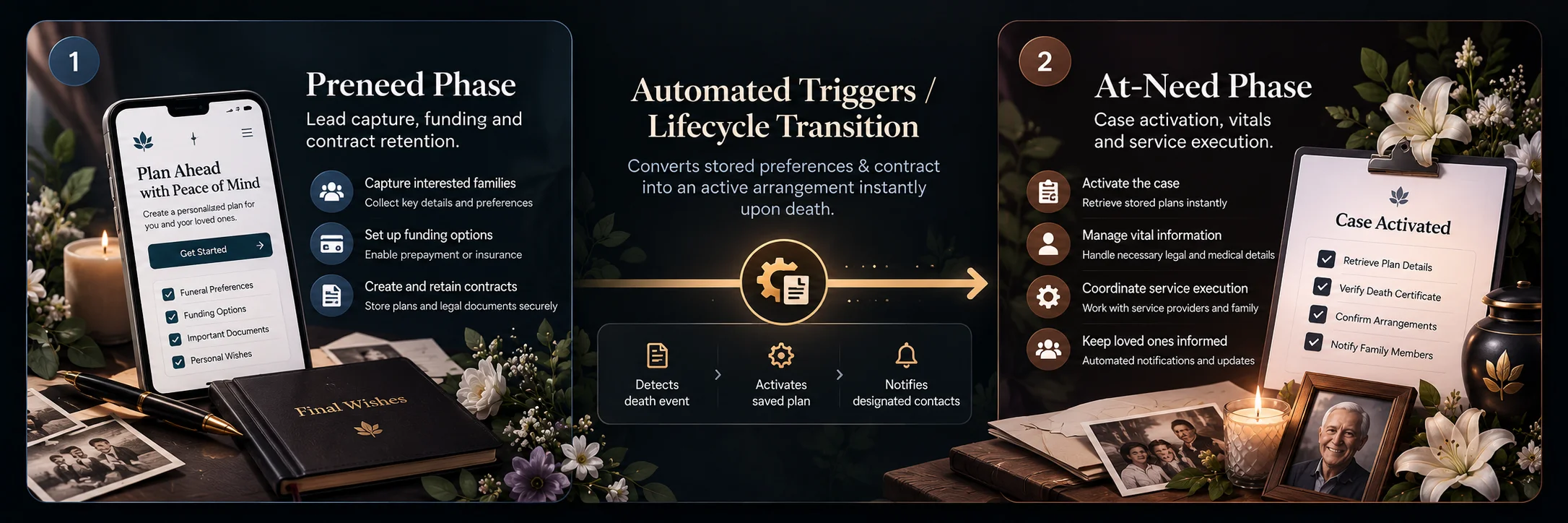
The software acts as an operational hub: it captures inbound leads, routes them to staff, automates workflows, and centralizes case documents into a single profile.
- Preneed Pipeline Management: Tracks pre-planning leads, follow-ups, funding structures and policy documents over time.
- Instant Case Conversion: Converts a preneed contract into an active at-need case when needed, carrying over demographics and service preferences without duplicate data entry.
- Long-Term Engagement: Automates anniversary or birthday reminders and educational outreach to maintain relationships with preneed policyholders over years or decades.
Why Funeral Homes Need Dedicated CRM Software
The death-care journey is fundamentally different. It spans multi-decade preneed planning, high-stress at-need arrangements and long-term aftercare. Standard CRMs lack native support for vital statistics, Electronic Death Registration System (EDRS) filings, merchandise tracking (caskets, urns, vaults) and death-care compliance, creating operational friction and administrative risks.
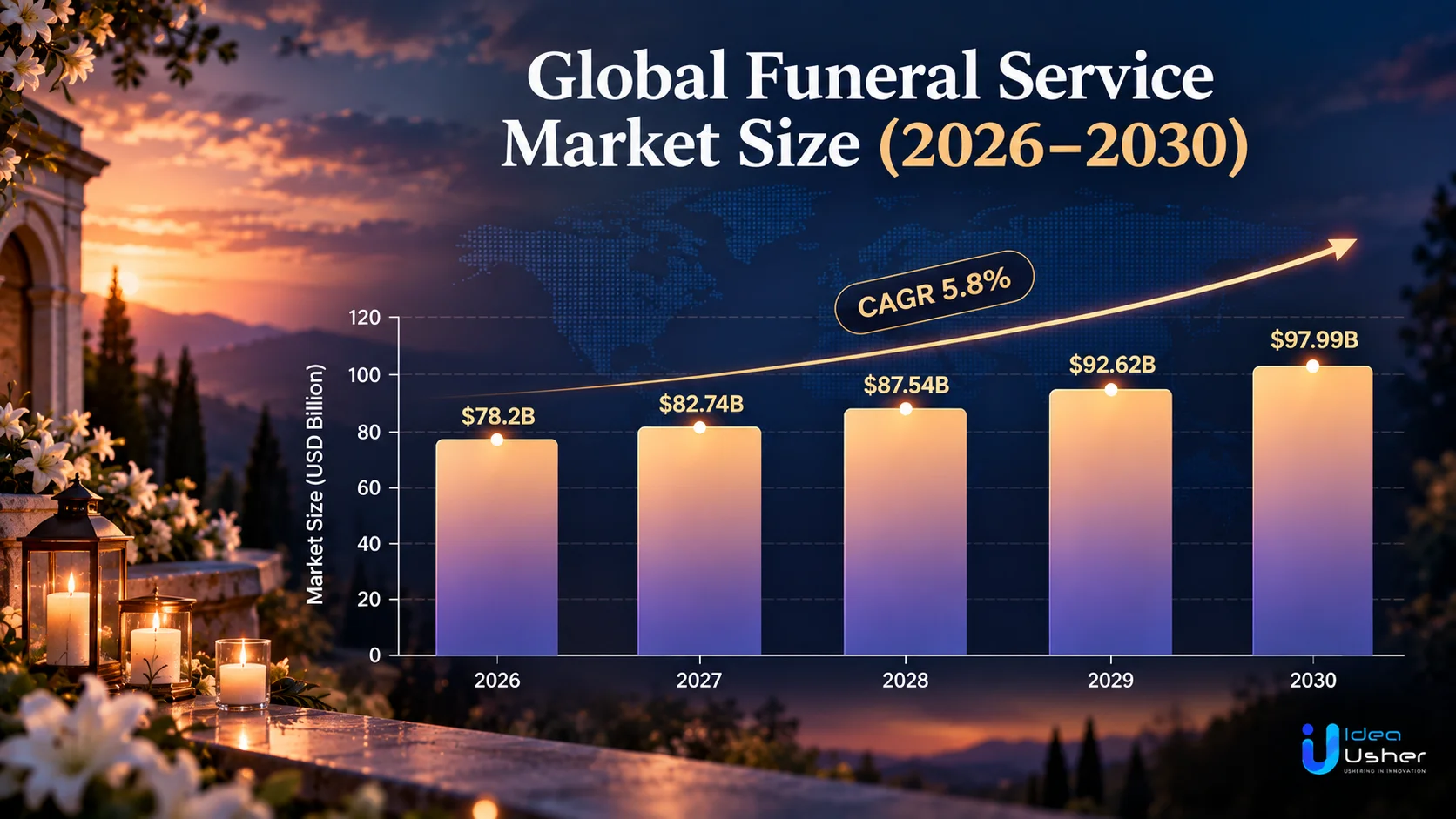
The global funeral and cremation services market valued at $70.6 billion in 2024, the global funeral and cremation market is projected to reach $98.5 billion by 2030 (a 5.8% CAGR from 2025). This ongoing demand highlights the need for technology that streamlines operations and family care.
NFDA’s 2025 study found that nearly 30% of families now complete funeral arrangements online, while almost 48% of those who plan online still need a funeral director’s help. This shows why funeral homes need technology that connects digital convenience with human-led death-care workflows.
A. Fragmented Family Data Creates Operational Gaps
When a funeral home relies on off-the-shelf CRM tools, family records frequently become fractured across separate, disconnected systems:
- Siloed Preneed vs. At-Need Records: Preneed wishes and policy details may not transfer to case management or billing systems when a client becomes an at-need case.
- Redundant Data Entry & Errors: Staff may manually re-enter vital statistics, informant details and service preferences, increasing the risk of incorrect records, permit delays or wrong merchandise orders.
- Inter-Departmental Communication Gaps: Information captured by preneed staff may not reach funeral directors, crematory teams or aftercare staff, forcing families to repeat information during an already difficult time.
B. Manual Follow-Ups Can Lead to Missed Opportunities
Traditional death-care workflows often rely on sticky notes, memory or spreadsheets to manage leads, event RSVPs and aftercare.
NFDA’s 2025 study also found that 40% of consumers had used a funeral home they found on Facebook, nearly double the 21% reported in 2023. As digital channels generate more funeral-service inquiries, manual follow-ups can make it harder to consistently capture and nurture prospects.
- Poor Follow-Up Timing: Generic drip campaigns can send inappropriate sales messages, while manual processes may cause staff to miss aftercare resources and milestone-based outreach.
- Lost Preneed Inquiries: Preneed decisions can take months or years, but without lead nurturing, seminar attendees and planning-guide requests can easily fall through the cracks.
- Limited Pipeline Visibility: Without unified analytics, funeral homes may struggle to identify which marketing channels drive preneed conversions and service inquiries, making growth decisions less data-driven.
What Should Funeral Home CRM Software Automate?
Funeral home CRM software should automate repetitive tasks across inquiries, follow-ups, preneed and at-need cases, communications, documents, payments and aftercare. The goal is to reduce manual coordination while keeping every family interaction timely, organized and traceable. The table below showcases the key automation areas.
| Automation Area | What the CRM Should Automate |
| Inquiry Capture and Lead Assignment | Capture inquiries from calls, websites and referrals, then assign them to the appropriate staff member. |
| Follow-Ups and Staff Notifications | Create follow-up tasks, reminders and notifications based on inquiry status and deadlines. |
| Preneed Lead Nurturing | Schedule personalized follow-ups, re-engagement messages and reminders for future planning opportunities. |
| At-Need Arrangement Workflows | Trigger case-specific tasks, communications, documents and internal actions after an at-need inquiry. |
| Family Communications | Schedule emails, texts, updates and other communications while maintaining interaction history. |
| Documents and E-Signatures | Request required documents, track completion and trigger e-signature workflows. |
| Payments and Balance Reminders | Send payment reminders, balance notifications and related updates based on case status. |
| Post-Service Aftercare | Trigger appropriate follow-ups, feedback requests, grief resources and other post-service communications. |
| Anniversary and Long-Term Reminders | Schedule sensitive anniversary messages and future relationship or preneed follow-ups. |
These automations help funeral homes reduce administrative workload, maintain consistent workflows and ensure important family interactions are not missed as a case progresses.
How Funeral Home CRM Automation Works From Inquiry to Aftercare
Automation in a specialized funeral home CRM streamlines every operational phase, eliminating repetitive administrative tasks while ensuring no detail is overlooked during sensitive family interactions. By replacing manual paperwork with automated triggers, funeral homes can guide families seamlessly from the initial point of contact through long-term grief support.
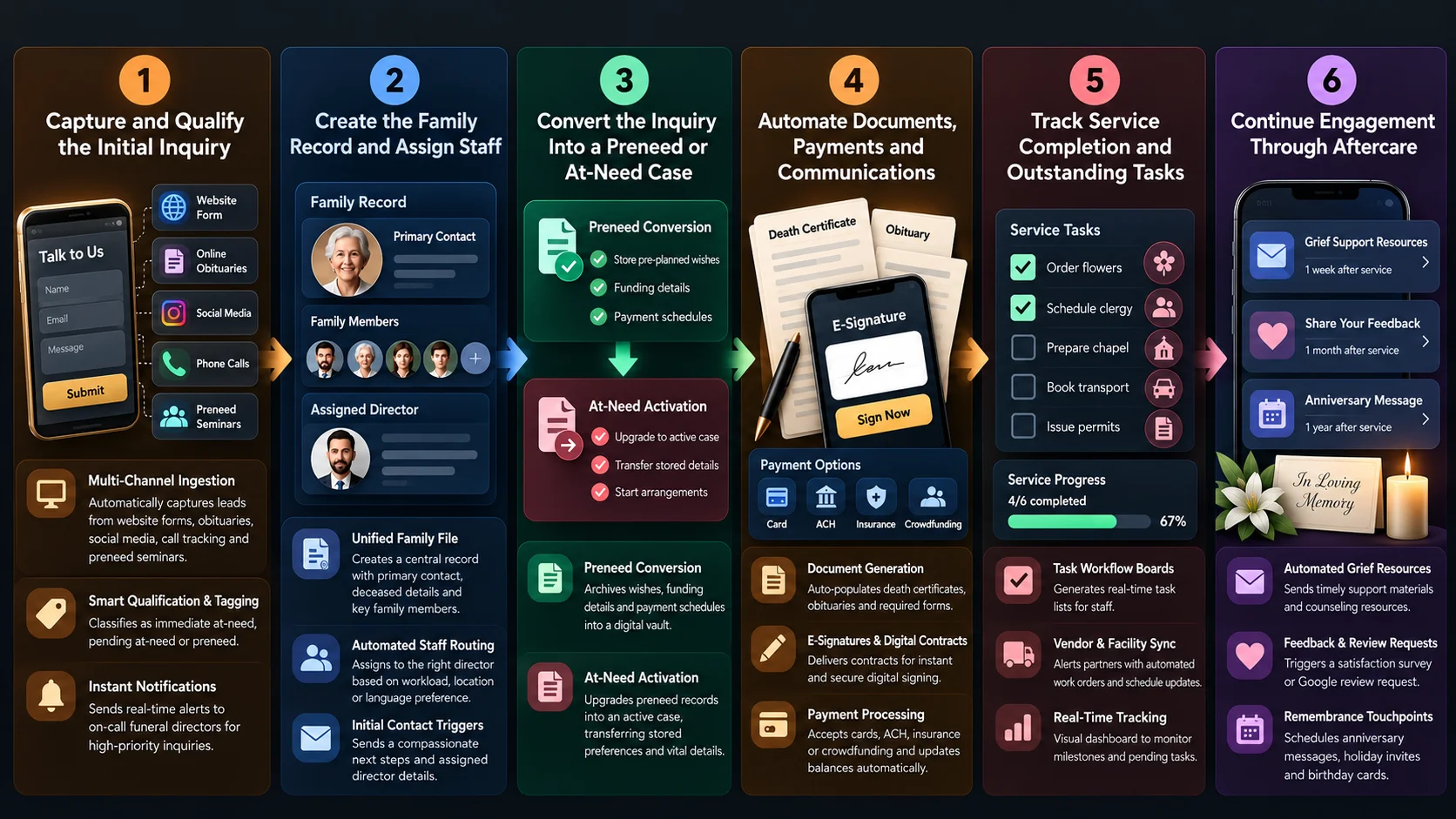
Step 1: Capture and Qualify the Initial Inquiry
The CRM acts as a 24/7 automated intake hub, capturing inquiries across multiple channels and helping staff respond without relying on manual data entry.
- Multi-Channel Ingestion: Automatically logs & captures leads from website forms, online obituaries, preneed seminars, social media and call tracking systems.
- Smart Qualification & Tagging: Classifies inquiries by urgency as Immediate At-Need (active death), Pending At-Need (hospice care), or Preneed (advance planning).
- Instant Notifications: Sends real-time SMS or push alerts to on-call funeral directors or planning counselors for high-priority inquiries.
Step 2: Create the Family Record and Assign Staff
Once captured, the platform builds a centralized profile to prevent data fragmentation and establish internal accountability.
- Unified Family File: Automatically generates a main record linking the primary contact (informant/buyer), deceased details (if applicable) and key family members.
- Automated Staff Routing: Assigns the case to a specific funeral director or preneed counselor based on workload, location, language preference, or shift availability.
- Initial Contact Triggers: Sends an automated, compassionate confirmation message to the family detailing next steps, required documents to bring, and their assigned director’s contact information.
Step 3: Convert the Inquiry Into a Preneed or At-Need Case
When an inquiry transitions into an active arrangement, the CRM converts the lead into an operational case file with zero redundant data entry.
- Preneed Conversion: If a preneed contract is executed, the CRM archives the pre-planned wishes, funding details (insurance/trust), and payment schedules into a permanent digital vault.
- At-Need Activation: If a death occurs, the CRM immediately upgrades preneed records into an active At-Need Case, transferring stored preferences and vital details into the arrangement system.
Step 4: Automate Documents, Payments and Communications
The platform handles time-sensitive administrative tasks, permitting directors to focus on personal family care during arrangement conferences.
- Document Generation: Auto-populates vital statistics into state Electronic Death Registration Systems (EDRS), death certificate applications, obituaries, and cremation authorization forms.
- E-Signatures & Digital Contracts: Delivers Statement of Funeral Goods and Services selected directly to family members’ mobile devices or email for instant, secure digital signing.
- Payment Processing: Integrates with digital payment gateways to accept credit cards, ACH transfers, insurance assignments, or crowdfunded contributions, automatically updating ledger balances.
Step 5: Track Service Completion and Outstanding Tasks
To ensure flawless execution on the day of the service, the CRM converts arrangement choices into automated internal checklists and vendor workflows.
- Task Workflow Boards: Generates real-time task lists for staff such as ordering flowers, scheduling clergy, preparing the chapel, booking transport, and issuing permits.
- Vendor & Facility Sync: Automatically alerts third-party partners (crematories, florists, cemeteries, transport teams) with automated work orders and schedule updates.
- Real-Time Tracking: Provides directors with a visual dashboard indicating completed milestones and flagging pending tasks prior to service start times.
Step 6: Continue Engagement Through Aftercare
After the service concludes, the CRM automatically transitions the family into a personalized aftercare journey to provide ongoing support and nurture long-term community relationships.
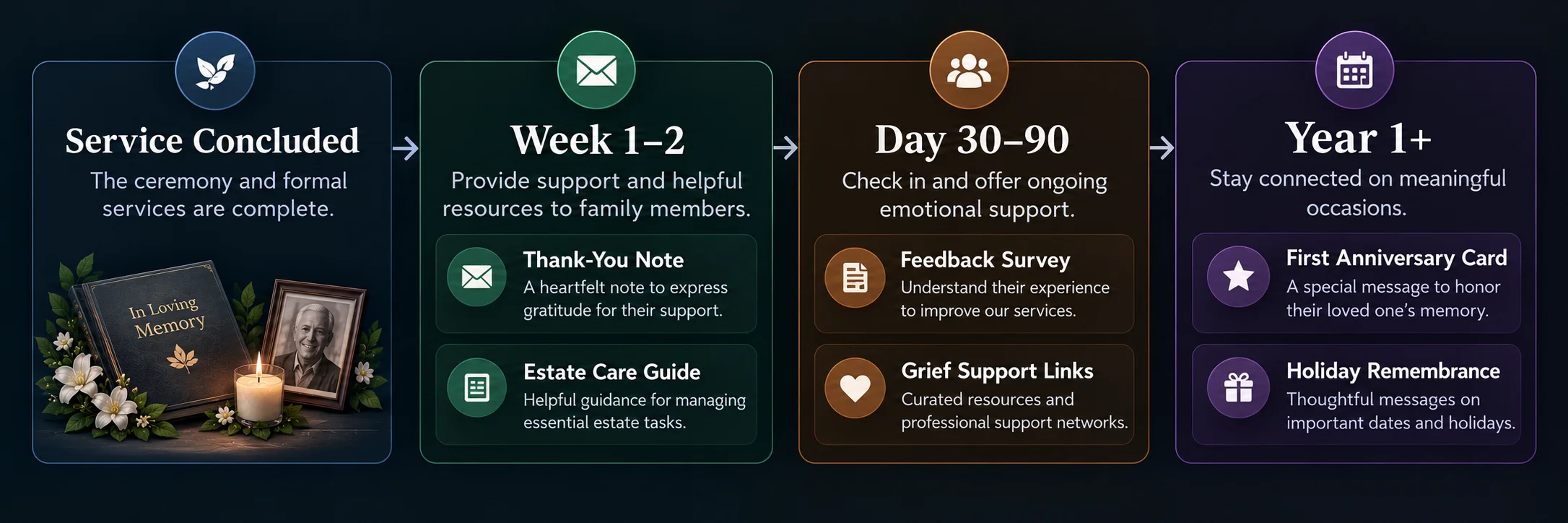
Aftercare automation helps funeral homes maintain thoughtful communication after services, providing families with useful resources, gathering feedback and creating meaningful remembrance touchpoints without adding manual follow-up work.
- Automated Grief Resources: Delivers timed, sensitive emails or texts offering grief counseling materials, estate settlement checklists, and support group schedules.
- Feedback & Review Requests: Triggers a polite satisfaction survey or invitation to leave a Google review once the immediate mourning period has passed.
- Remembrance & Milestone Touchpoints: Automatically schedules annual anniversary messages, holiday remembrance invites, and birthday cards for surviving family members across generations.
Preneed vs. At-Need CRM Workflows: What Should Differ?
While both workflows serve the same families, preneed (advance planning) and at-need (immediate death) represent fundamentally different consumer journeys.
Preneed is a consultative, long-term educational sales process that takes place over weeks, months, or years. At-need is a time-sensitive, highly emotional crisis management process that unfolds over hours and days.
Treating both workflows identically leads to tone-deaf automated messaging, missed sales opportunities, or administrative errors during active arrangements.
A. How Preneed Automation Should Work
Preneed automation focuses on long-tail lead nurturing, consumer education, and consultation scheduling.
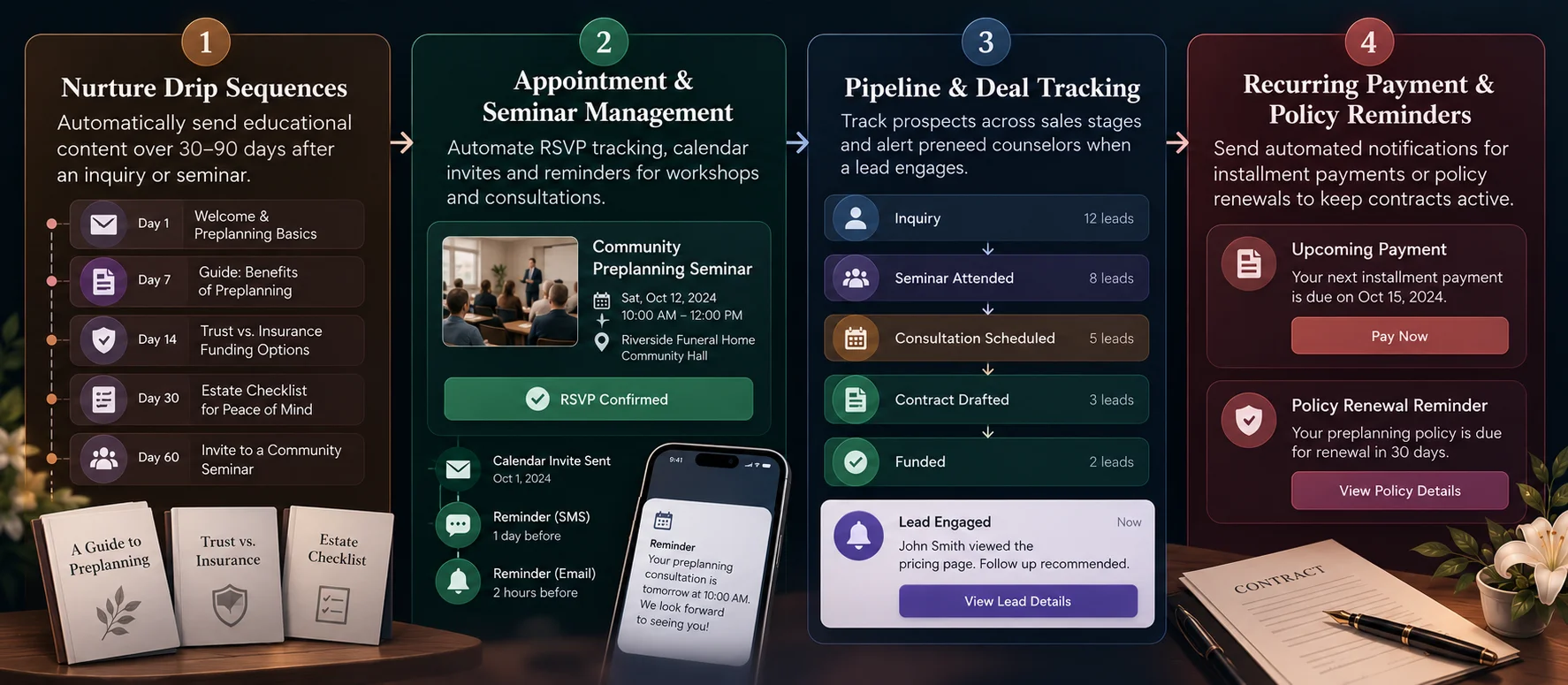
Because prospects are actively planning for the future without the immediate pressure of a death, messaging can follow structured marketing pipelines.
- Nurture Drip Sequences: Automatically sends educational content such as digital guides on preplanning benefits, trust vs. insurance funding options and estate planning app checklists, over a 30-to-90-day period following an initial inquiry or seminar.
- Appointment & Seminar Management: Automates RSVP tracking for community workshops, sends automated calendar invites, and issues SMS reminders for consultation meetings.
- Pipeline & Deal Tracking: Tracks prospects across sales stages (e.g., Inquiry, Seminar Attended, Consultation Scheduled, Contract Drafted, Funded), alerting preneed counselors when a lead engages with emails or views pricing pages.
- Recurring Payment & Policy Reminders: Issues automated notifications for installment payments or policy renewals to keep advance-funding contracts active.
B. How At-Need Automation Should Work
At-need automation is built for speed, operational precision and respectful, low-friction support. When a death occurs, aggressive sales pipelines must be replaced with immediate action and compassionate logistics.
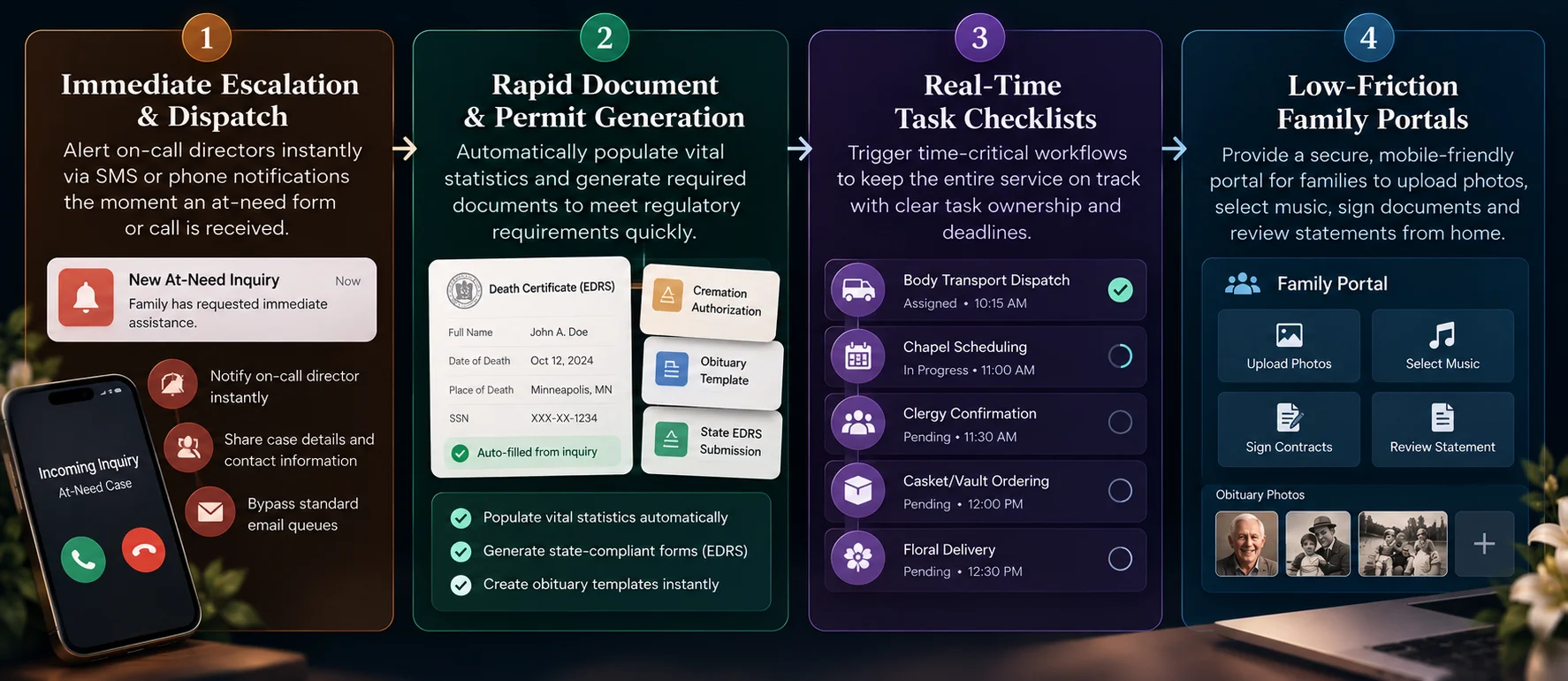
This connects family requests with time-sensitive funeral operations, helping staff respond quickly, coordinate services, complete required documentation and give families a simpler way to manage arrangements.
- Immediate Escalation & Dispatch: Instantly alerts on-call directors via SMS or phone notifications the second an at-need form or call comes in, bypassing standard email queues.
- Rapid Document & Permit Generation: Instantly populates vital statistics into state Electronic Death Registration Systems (EDRS), cremation authorization forms, and obituary templates to meet tight regulatory windows.
- Real-Time Task Checklists: Triggers time-critical operational workflows such as body transport dispatch, chapel scheduling, clergy confirmation, vault/casket ordering, and floral delivery.
- Low-Friction Family Portals: Delivers mobile-friendly links where grieving families can upload obituary memorial photos, select music, sign legal contracts via e-signature, and review statements from home.
C. Where Both Workflows Should Share Family Data
Although their execution triggers differ, preneed and at-need workflows must draw from a single centralized data repository. Siloing preneed records away from active case management creates severe operational risk.
| Shared Data Element | Operational Purpose Across Workflows |
| Vital Statistics & Bio Data | Captured during preneed planning; instantly populates at-need death certificates and legal permits without asking grieving families to re-enter information. |
| Service & Merchandise Preferences | Pre-selected choices (casket models, disposition type, music, readings) carry over directly to the active arrangement conference. |
| Funding & Insurance Records | Trust numbers, insurance policy details, and payment histories sync directly to the at-need ledger to calculate remaining balances accurately. |
| Family & Informant Relationships | Designated decision-makers, emergency contacts, and family trees remain accessible across generations for post-service aftercare. |
D. Why One Pipeline Should Not Handle Every Case the Same Way
Each case requires different workflows, communication timing, compliance controls and staff responsibilities. Using a single, rigid CRM pipeline for all cases compromises both business growth and family care:
- Tone-Deaf Messaging: Sending an automated “Schedule your preneed consultation today!” email to a family that just suffered an immediate loss damages trust and alienates the community.
- Loss of High-Value Preneed Leads: If at-need directors handle preneed inquiries using short-term crisis steps, long-tail leads who need months of gentle educational follow-up fall through the cracks.
- Regulatory & Compliance Hazards: At-need cases require rigid legal timelines for death certificates, permits, and authorizations that preneed sales pipelines are simply not structured to enforce or audit.
- Staff Friction: Preneed counselors rely on sales metrics like conversion rates and quota tracking, whereas at-need directors need operational task boards for scheduling and logistics. A one-size-fits-all approach forces both teams to work with ill-suited tools.
Core Features of Funeral Home CRM Software
A funeral home CRM should be built in stages, starting with the workflows required to manage families, inquiries and cases, then expanding into automation, integrations and multi-location operations.
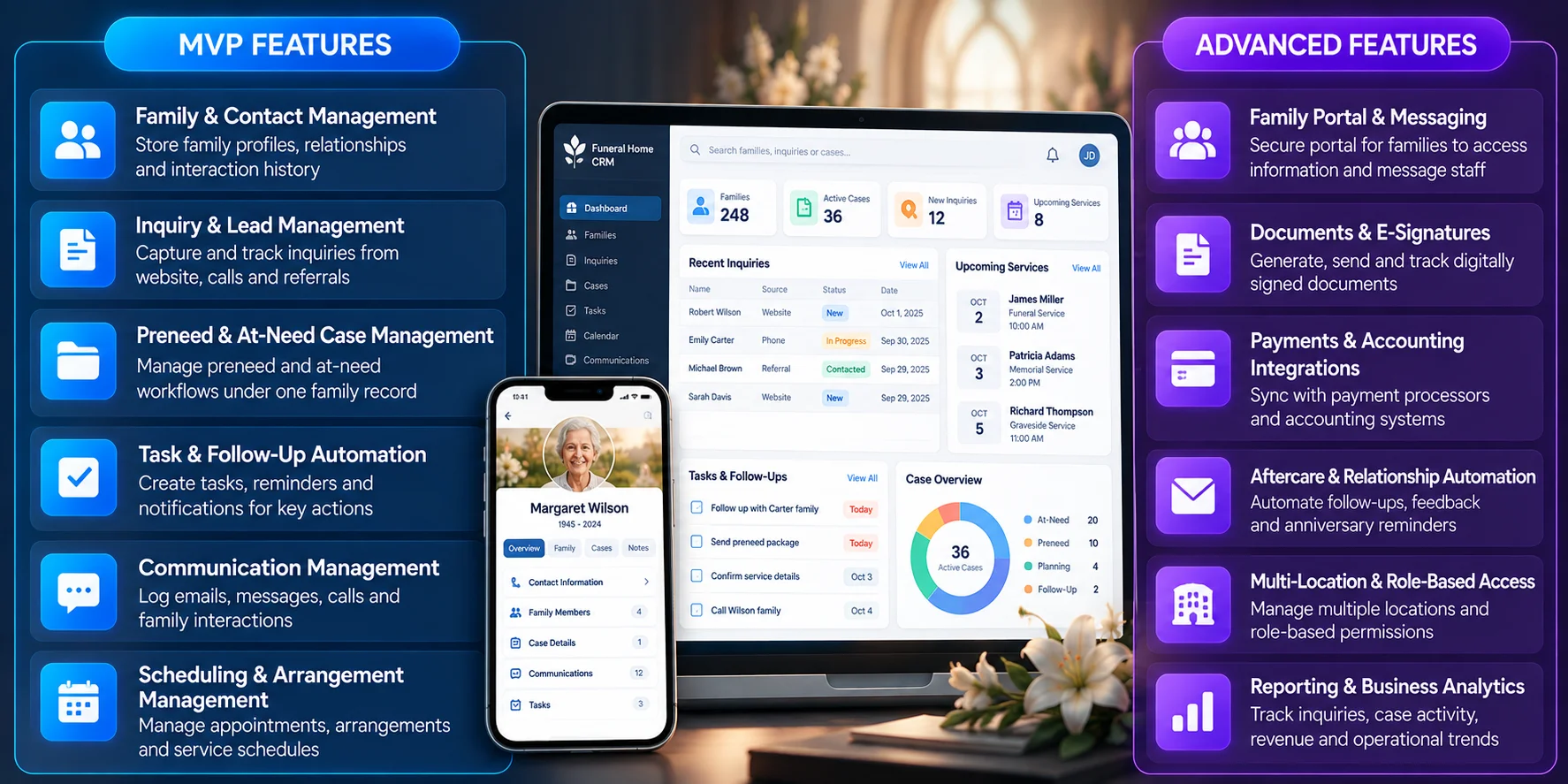
The following MVP and advanced features cover the capabilities that deliver the most practical value.
A. MVP Features for Funeral Home CRM Software
An MVP should prioritize the workflows funeral homes need from day one: managing families, inquiries, cases, follow-ups, communications and schedules. These core features establish the foundation for reliable CRM operations before adding advanced capabilities.
| Feature | What It Does | Why It Matters |
| Family & Contact Management | Stores family profiles, relationships, preferences and interaction history in one record. | Gives staff a complete family view without searching across spreadsheets, emails or paper files. |
| Inquiry & Lead Management | Captures inquiries from websites, calls, referrals and other sources while tracking status and ownership. | Prevents lost inquiries and provides a structured way to manage prospects. |
| Preneed & At-Need Case Management | Separates preneed and at-need workflows while linking both to the same family profile. | Manages different service journeys without duplicate family records. |
| Task & Follow-Up Automation | Creates tasks, reminders and notifications based on case status, deadlines and required actions. | Reduces manual coordination and keeps time-sensitive work on track. |
| Communication Management | Records emails, messages, calls and family interactions against the relevant contact or case. | Keeps communication history accessible and preserves previous commitments. |
| Scheduling & Arrangement Management | Manages appointments, arrangements, service schedules and related staff tasks. | Coordinates time-sensitive activities while keeping operational data connected to each case. |
Takeaway: A focused MVP gives funeral homes the essential CRM foundation while keeping initial development manageable. Advanced capabilities can then be introduced based on operational requirements, user feedback and business growth.
B. Advanced CRM Features for Scaling
Once core CRM workflows are established, growing funeral homes can extend the platform with family-facing tools, deeper integrations, multi-location controls and analytics. These capabilities support more complex operations without disrupting the central family record.
| Feature | What It Does | Why It Matters |
| Family Portal & Messaging | Lets families access information, complete tasks, message staff and receive updates through a secure family portal. | Reduces back-and-forth while providing a convenient digital experience. |
| Documents & E-Signatures | Generates, sends, tracks and stores forms, agreements and digitally signed documents. | Reduces paperwork and makes outstanding documents easier to track. |
| Payments & Accounting Integrations | Connects the CRM with payment processors and accounting systems to sync financial data. | Reduces duplicate entry and keeps payment and case records aligned. |
| Aftercare & Relationship Automation | Automates post-service communication, feedback requests, grief resources and anniversary reminders. | Supports long-term relationships while keeping sensitive communications configurable. |
| Multi-Location & Role-Based Access | Manages multiple locations, centralized records, workflows and role-based permissions. | Supports consistent operations while protecting sensitive information. |
| Reporting & Business Analytics | Tracks inquiries, conversion sources, case activity, revenue metrics and operational trends. | Helps identify inquiry sources, workflow gaps and business opportunities. |
Takeaway: These advanced capabilities turn a basic CRM into a connected funeral home management platform, helping organizations scale operations, integrate existing systems and gain greater visibility across locations and family relationships.
How to Build Funeral Home CRM Software
Building funeral home CRM software requires more than creating a contact database. The platform needs to connect family relationships, service cases, arrangements, scheduling, documentation, payments, communications, and aftercare within a secure workflow.
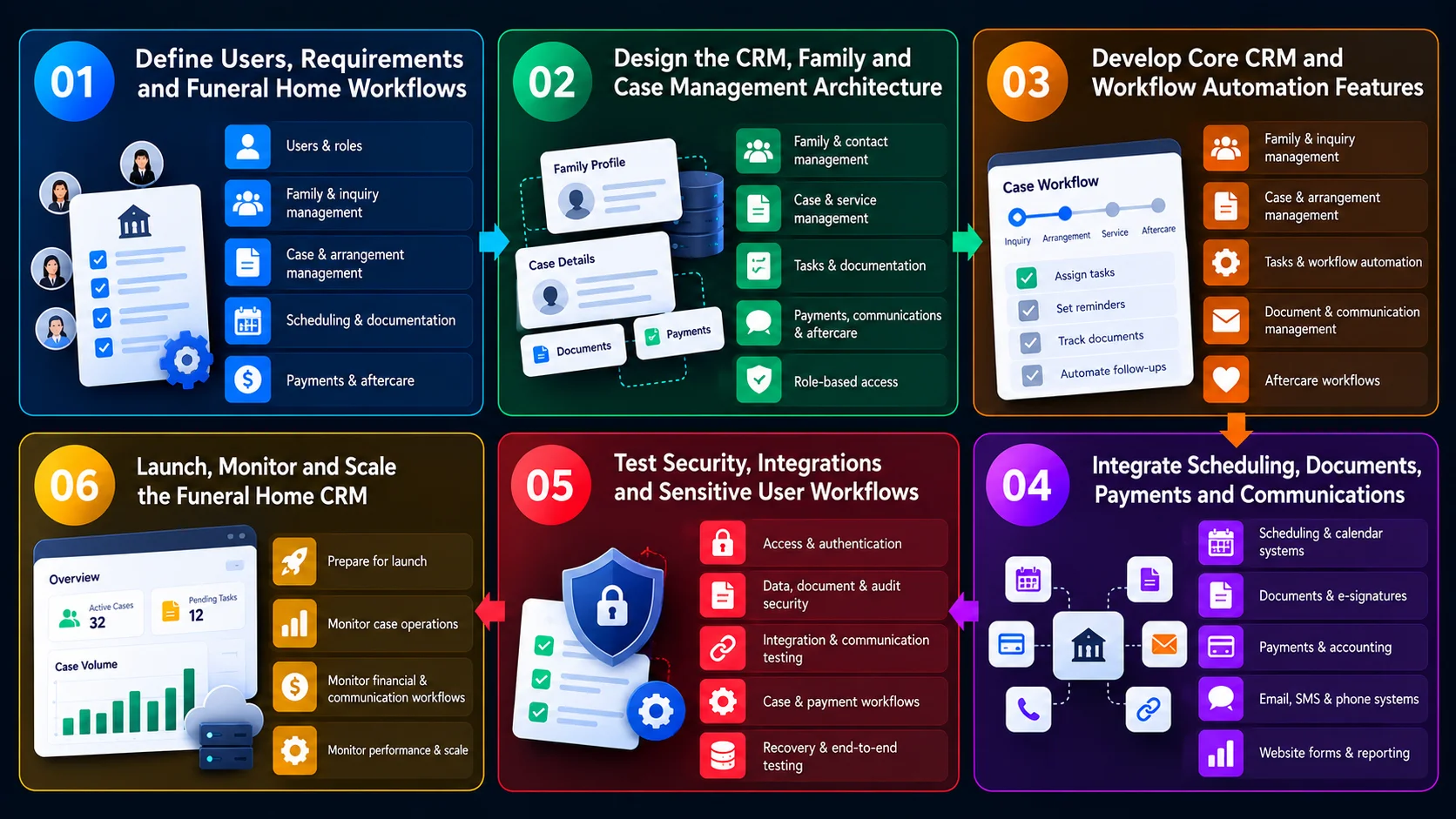
A practical development process should begin by mapping how a funeral home currently manages families and cases, then establish the CRM architecture, automate core workflows, connect operational systems, and validate the platform before launch.
1. Define Users, Requirements and Funeral Home Workflows
Start by understanding how different users interact with families and manage funeral service cases. The goal is to translate day-to-day funeral home operations into clear software requirements & identify:
- Users & Roles: Funeral directors, arrangers, administrators, managers, support staff and other authorized users.
- Family & Inquiry Management: Family profiles, relationships, contact details, preferences, communication history, referrals, calls, walk-ins and website inquiries.
- Case & Arrangement Management: Deceased-person details, service preferences, merchandise, venues, transportation, clergy, flowers, assigned staff and case status.
- Scheduling & Documentation: Visitations, ceremonies, burial or cremation, facilities, vehicles, contracts, permits, authorizations and other case documents.
- Payments & Aftercare: Estimates, invoices, deposits, balances, payment status, feedback, anniversary reminders and grief resources.
Map the handoffs between staff members and identify manual processes such as duplicate data entry, spreadsheet tracking, document searching, appointment coordination, and repeated family follow-ups.
2. Design the CRM, Family and Case Management Architecture
Next, design the underlying architecture that connects families, cases, services, staff, documents, communications, and financial information. Core entities can include:
- Family & Contact Management: Store family profiles, relationships, preferences, communication history and notes, plus contacts for clergy, cemeteries, crematories and vendors.
- Case & Service Management: Manage case details, deceased-person information, assigned staff, service arrangements, important dates and case status.
- Tasks & Documentation: Track tasks, deadlines, contracts, authorizations, permits, forms and case records with clear ownership.
- Payments, Communications & Aftercare: Connect invoices, deposits, balances, calls, messages, notifications, follow-ups, feedback and aftercare reminders.
The architecture should establish relationships between these records so staff can open a family or case and see the relevant information without searching across disconnected systems. Role-based access should also determine which users can view, create, edit, approve or manage sensitive records.
3. Develop Core CRM and Workflow Automation Features
With the underlying data model established, build the features that support the funeral home’s daily operations. Core functionality can include:
- Family & Inquiry Management: Centralize family records, relationships and inquiries from multiple channels while tracking lead status.
- Case & Arrangement Management: Manage cases from initial arrangement through service completion, including service preferences, merchandise, vendors, venues and transportation.
- Tasks & Workflow Automation: Assign staff responsibilities and deadlines, automate task creation, status updates, reminders and information routing.
- Document & Communication Management: Link required documents and completion status to cases while maintaining relevant family communication history.
- Aftercare Workflows: Schedule follow-ups, feedback requests, reminders and post-service communications to maintain ongoing family engagement.
Case states can be configured around the funeral home’s operating model, such as
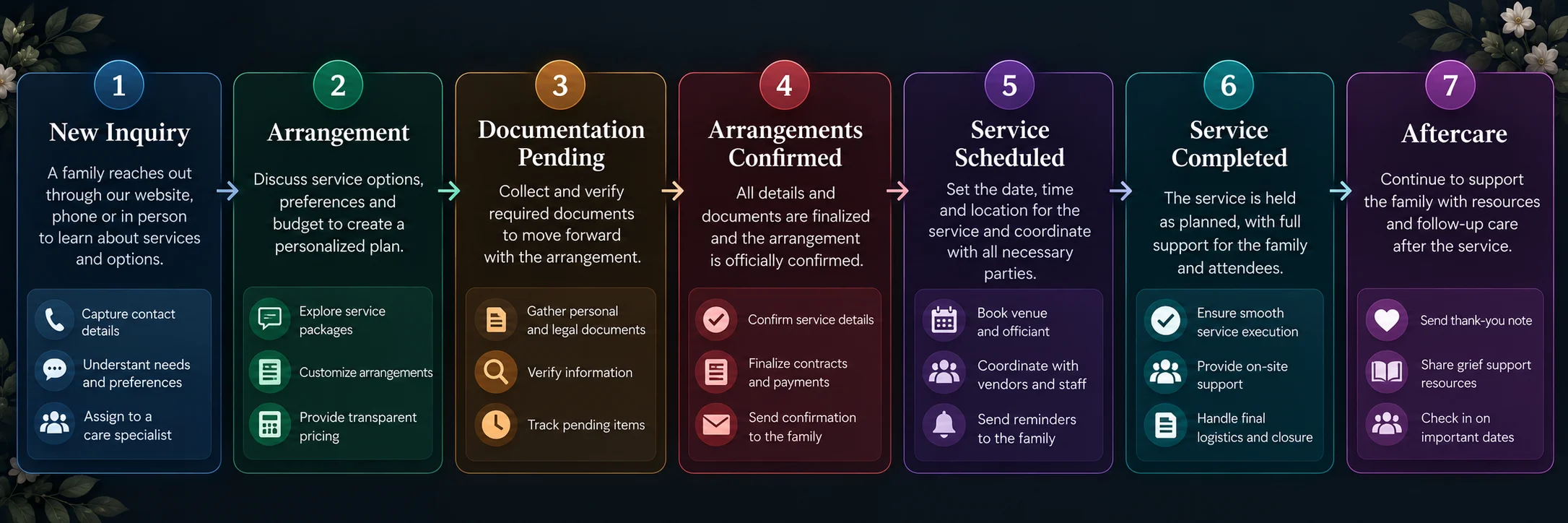
Automation minimizes repetitive administrative tasks while preserving essential human review for sensitive family interactions. A funeral home CRM software combines family management, case workflows, task automation, document tracking, interaction histories, and aftercare.
4. Integrate Scheduling, Documents, Payments and Communications
The CRM becomes more useful when it connects with the systems funeral homes already use to coordinate services and communicate with families. Potential integrations include:
- Scheduling & Calendar Systems: Synchronize services, visitations, facilities, staff, vehicles and case-related appointments to keep schedules aligned across teams.
- Documents & E-Signatures: Connect contracts, authorizations, forms and electronic signatures, allowing required paperwork to stay linked to individual cases.
- Payments & Accounting: Integrate deposits, invoices, payments and balances with accounting systems to support financial records and reconciliation.
- Email, SMS & Phone Systems: Enable reminders, confirmations, updates and follow-ups while associating relevant calls and communications with family or case records.
- Website Forms & Reporting: Capture online inquiries directly into the CRM and connect operational or financial data with reporting tools for management insights.
REST APIs, webhooks, and event-driven workflows can keep connected systems synchronized. For example, confirming a service in the CRM can automatically update the associated calendar event and trigger a family notification where configured.
Integrations should include authentication, validation, error handling, retry mechanisms, and synchronization controls to prevent duplicate or inconsistent records.
5. Test Security, Integrations and Sensitive User Workflows
Funeral home CRM software manages sensitive personal, family, financial, and service information. Testing therefore needs to cover both technical security and the real-world workflows staff use when assisting families. Testing should include:
- Access & Authentication: Verify role-based access, secure login, session management, password controls and authentication mechanisms across user types.
- Data, Document & Audit Security: Test encryption, document restrictions and audit logging to ensure sensitive records and administrative changes remain protected and traceable.
- Integration & Communication Testing: Validate scheduling, payment, accounting, document, website, email and SMS integrations, including failed transactions, scheduling conflicts and notification failures.
- Case & Payment Workflows: Test the complete inquiry-to-service-to-aftercare workflow, including case updates, overlapping schedules, payment failures, duplicate transactions, refunds and reconciliation.
- Recovery & End-to-End Testing: Simulate realistic workflows from start to finish while validating backups, restoration, failure recovery and system reliability under different conditions.
User acceptance testing should involve funeral home staff who can confirm that the software reflects actual arrangement and service-management processes.
6. Launch, Monitor and Scale the Funeral Home CRM
The initial launch should focus on the workflows that provide the greatest operational value while allowing staff to adapt to the new system.
The architecture should allow these capabilities to be added without disrupting the core workflow:
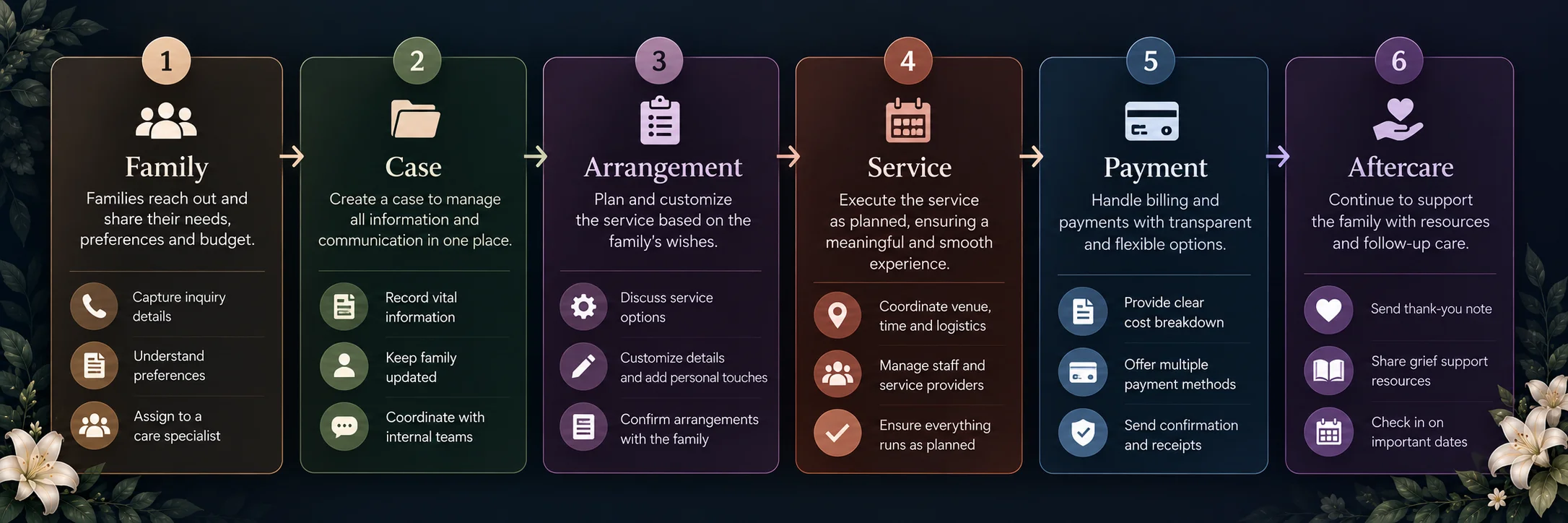
Once the core funeral home workflows are connected, the focus shifts to deploying the CRM reliably, helping staff adopt it and continuously monitoring how the platform performs across operational, financial and communication workflows.
- Prepare for Launch: Establish user roles, permissions, data migration, integrations, backups, security monitoring and incident-response procedures before deployment.
- Monitor Case Operations: Track case volumes, completion times, pending tasks, documentation, scheduling conflicts and workflow bottlenecks.
- Monitor Financial & Communication Workflows: Track payment status, reconciliation issues, communication delivery failures and family follow-up activities.
- Monitor Performance & Scale: Measure feature adoption, application availability, API performance, database health and infrastructure usage to guide ongoing improvements and scaling.
As the funeral home’s operational volume grows, the platform can expand with advanced reporting, automated aftercare, multi-location management, additional integrations, mobile workflows, and more sophisticated analytics.
How Much Does Funeral Home CRM Software Development Cost?
Funeral home CRM software development can cost $40,000 to $300,000+, depending on features, integrations, automation and scalability. Essential CRMs cost less, while enterprise systems require deeper integrations and advanced workflows. The following funeral home development cost breakdown shows how development costs vary by platform tier and technical complexity.
A. Funeral Home CRM Software by Tier
Funeral home CRM costs vary by feature scope, automation, integrations and user requirements. Essential systems cover basic relationship management, while enterprise platforms add multi-location support, compliance workflows and advanced analytics.
| Tier | Estimated Cost | Timeline | What It Includes |
| Essential CRM | $40,000 – $60,000 | 3–5 months | Contact and family database, simple pipeline tracking, manual follow-up reminders |
| Mid-tier | $65,000 – $110,000 | 5–8 months | Separate pre-need and at-need pipelines, automated email/SMS follow-up sequences, one case-management integration, reporting dashboard |
| Enterprise | $150,000 – $300,000+ | 8–14+ months | Multi-location and franchise support, multiple case-management integrations, FTC Funeral Rule-aligned pricing and document workflows, advanced conversion analytics, granular role-based access |
These are estimated custom development costs and timelines, not fixed project quotes. The difference between CRM and full funeral home software costs largely comes down to integration depth, automation, case-management functionality and compliance requirements.
- Full funeral home management platforms: Published estimates range from $75,000 – $140,000 for platforms covering case management, billing and digital memorial platforms.
- Comprehensive MVPs: More feature-rich platforms can cost around $160,000 – $270,000.
- Enterprise-scale platforms: Large, complex implementations can reach $300,000 – $500,000+.
- Dedicated funeral home CRM: A CRM typically costs less because it excludes case management, GPL (General Price List) compliance, accounting and other components that add significant development and regulatory complexity.
B. Factors That Influence CRM Development Cost
Several factors can increase funeral home CRM development costs, particularly workflow complexity, third-party integrations and automation. Understanding these drivers helps estimate the budget required for customization, scalability and specialized death-care functionality.
- Pre-Need vs. At-Need Workflows: Separate planning and active-service workflows can add $5,000 – $15,000 for pipeline logic, case stages, forms and automation.
- Case Management Integrations: Syncing with platforms such as Passare, Osiris, Halcyon or SRS can add $10,000 – $30,000+, depending on API access, data mapping and integration depth.
- Communication Automation: Multi-channel email, SMS and phone workflows can add $8,000 – $20,000, especially when timing, personalization and grief-sensitive messaging require custom logic.
- Multi-Location Support: Centralized reporting, branch-level permissions and shared data across multiple locations can add $15,000 – $40,000+ to development costs.
- FTC Funeral Rule Workflows: Pricing quotes, disclosures and related compliance workflows can add $5,000 – $15,000 for specialized requirements, validation and compliance review.
- Reporting & Conversion Analytics: Pre-need conversion, follow-up completion and counselor performance dashboards can add $5,000 – $15,000 beyond basic CRM reporting.
The main cost driver is integration depth. Syncing contacts and statuses with an existing case management system is cheaper than replacing core functionality. Absorbing case management shifts the platform toward full funeral home management software, raising development costs.
Why Build a Custom Funeral Home CRM Instead of Using a Generic CRM?
The death-care industry differs from standard B2B or B2C commerce. NFDA research reports that over 89% of U.S. funeral homes are independently owned family businesses, where local trust and long-term relationships are essential.
The generic CRMs (Salesforce, HubSpot and Zoho) sales automation may not suit the non-linear family journey in death care. A custom funeral home CRM can address these needs through specialized workflows, sensitive communication and case management.
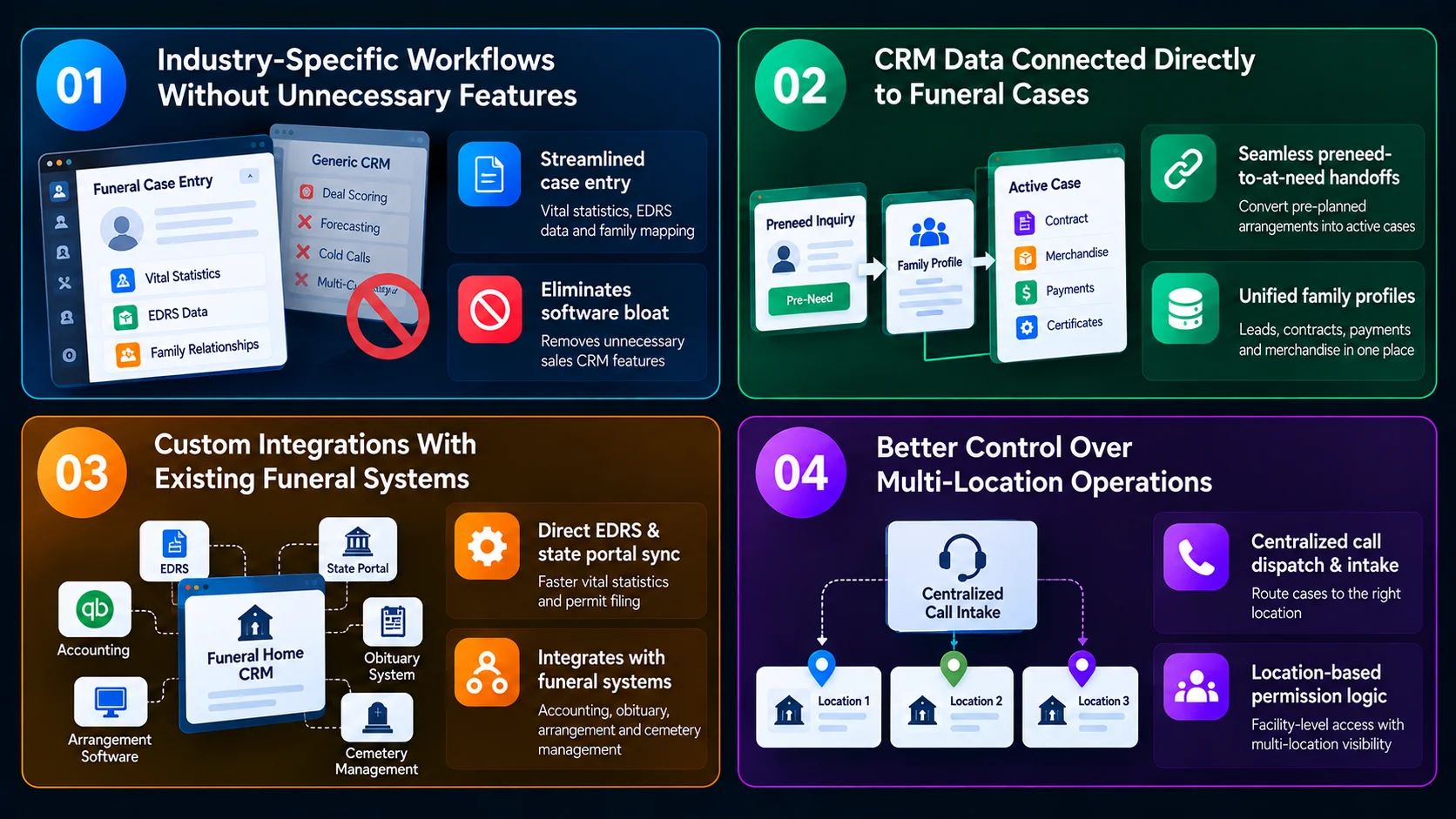
A. Industry-Specific Workflows Without Unnecessary Features
Generic CRMs are bloated with features designed for multi-stage enterprise sales teams like deal scoring, multi-currency forecasting, and cold-call sequences which obscure the actual tasks death-care staff handle daily.
- Streamlined Case Entry: A custom system replaces complex B2B pipelines with dedicated modules for vital statistics collection, EDRS (Electronic Death Registration System) data entry, and family relationship mapping.
- Elimination of Software Bloat: Industry surveys indicate that up to 70% of feature sets in generic enterprise CRMs go completely unused by funeral staff, forcing directors to navigate non-relevant dashboards while managing high-stress at-need arrangements.
B. CRM Data Connected Directly to Funeral Cases
When using standard CRM software, lead management remains completely detached from actual case execution, creating dangerous operational silos between preneed sales and active arrangements.
- Seamless Preneed-to-At-Need Handoffs: NFDA data shows that over 35% of Americans over age 60 have pre-planned their funeral arrangements. In a generic CRM, when an advance-planner passes away, staff must manually transcribe pre-selected choices into a separate case management system, a process where an estimated 15% to 20% of manual data entry errors occur.
- Unified Family Profiles: A custom platform links lead records directly to active funeral contracts, ledger balances, merchandise selections (caskets, urns, vaults), and death certificate applications under a single, unified database.
C. Custom Integrations With Existing Funeral Systems
Generic CRMs rely on third-party connectors (like Zapier) that often fail to support niche, legacy death-care software and state government portals.
- Direct EDRS & State Portal Sync: Custom CRMs integrate natively with state Electronic Death Registration Systems, cutting the time required to file vital statistics and secure burial/transit permits from days down to hours.
- Specialized System Interoperability: Enables direct data flow between the CRM, accounting platforms (QuickBooks, Sage), obituary hosting engines, digital arrangement software, and cemetery management systems, eliminating redundant data entry across systems.
D. Better Control Over Multi-Location Operations
With consolidation on the rise, many independent operators run multiple rooftops or regional brands across different towns.
- Centralized Call Dispatch & Intake: Allows a centralized call center or on-call director team to capture initial inquiries across 5, 10, or 20 locations, instantly routing case assignments based on the family’s ZIP code or local facility capacity.
- Location-Based Permission Logic: Ensures regional directors see only their assigned facility’s active cases, while giving executive leadership bird’s-eye visibility into multi-location preneed sales volume, conversion rates, and staff workload distribution.
How IdeaUsher Can Help Build Funeral Home CRM Software
IdeaUsher operates as an enterprise product engineering partner, backed by 11+ years of software expertise, 250+ specialized technologists and a 4.9/5 Clutch rating across 1,000+ delivered builds. We engineer custom, cloud-native CRM and case management platforms that replace fragmented paperwork and legacy software with automated, compassionate family care workflows.
A. Custom CRM Architecture Around Funeral Home Workflows
We design custom CRM architecture around funeral-home workflows, connecting family relationships, decedent records, permissions and care stages into one scalable case management system.
- Inquiry-to-At-Need Pipelines: Map distinct relationship tracks for pre-need planning, at-need immediate services, and post-service aftercare outreach.
- Family Relationship & Decedent Records: Structure relational data models linking decedents, surviving next-of-kin, authorized informants, and legal decision-makers into a unified case record.
- Role-Based Permissions: Enforce access boundaries tailored for funeral directors, arrangement counselors, embalmers, and accounting staff.
B. Automation Across CRM and Case Management
With our development approach, CRM automation connects documents, scheduling, tasks and aftercare into streamlined funeral home workflows, reducing administrative work and limiting repetitive manual processes.
- Dynamic Document Generation: Auto-populate vital statistic reports, burial transit permits, death certificate applications, and General Price List (GPL) contracts from initial intake data.
- Service Scheduling & Task Triggers: Automatically generate milestone-driven checklists covering embalming clearances, chapel reservations, livery dispatch, and celebrant scheduling.
- Automated Aftercare Sequences: Schedule empathetic, automated milestone check-ins, anniversary remembrances, and grief resource deliveries.
C. Integrations With Your Existing Business Systems
We integrate funeral home CRM software with accounting, EDRS, memorial and obituary systems, creating connected workflows that help funeral homes manage critical operational data across existing technology ecosystems.
- Accounting & Invoicing Rails: Integrate QuickBooks, Sage, or Xero for merchandise invoicing, trust accounting, and insurance assignment reconciliation.
- State EDRS Integration: Build API connectors linking state Electronic Death Registration Systems to expedite certified permit and certificate issuance.
- Digital Memorial & Obituary Feeds: Sync service schedules and decedent profiles directly with online memorial platforms, floral delivery partners, and local press networks.
D. Scale for Multi-Location Funeral Businesses
Our developers architect scalable funeral home CRM platforms for multi-location businesses, connecting branches, shared resources and operations while maintaining data isolation, security and full ownership.
- Multi-Branch Data Federation: Enable centralized administrative visibility across chapels, preparation rooms, and crematories with branch-level data isolation.
- Shared Resource Pooling: Manage fleet vehicles, specialized staff, and refrigeration capacity across multiple local facilities without double-booking.
- 100% Clean Code & Full IP Ownership: Deploy HIPAA-conscious, AES-256 encrypted microservices on cloud infrastructure with zero vendor lock-in.
Planning to build custom funeral home CRM or case management software? Connect with Idea Usher’s software architects to evaluate your arrangement workflows, system integration requirements, and technical development roadmap.
Conclusion
A specialized funeral home CRM software brings family relationships, case management, automation, communication, payments and aftercare into one connected platform. It helps funeral homes reduce fragmented workflows while giving staff greater visibility across preneed and at-need services. The right CRM can also support secure integrations, multi-location operations and sensitive family communications without forcing teams into generic workflows. With the right product strategy and technology partner, funeral homes can establish a scalable digital foundation that supports both operational efficiency and compassionate family care.
FAQs
A.1. Funeral home CRM software typically costs $40,000 to $300,000+, depending on feature scope, automation, integrations, multi-location support, security requirements and overall platform complexity.
A.2. Core features include family and contact management, inquiry tracking, preneed and at-need workflows, task automation, communications, scheduling, documents, payments, aftercare, reporting and role-based access.
A.3. Yes, custom funeral home CRM software can integrate with case management, accounting, payment, scheduling, EDRS, email, SMS, obituary and digital memorial systems through APIs, webhooks and connected workflows.
A.4. Funeral home CRM software can maintain separate preneed and at-need workflows while connecting both to the same family record, allowing relevant preferences, documents and payment information to transfer between stages.