

Key Takeaways
- Legacy funeral home software can be modernized by gradually replacing outdated components without disrupting daily operations.
- Start with a complete audit of the existing system, workflows, data, and integrations.
- Then introduce modern APIs, cloud infrastructure, updated interfaces, and automated workflows in phases.
- Migrate sensitive case data carefully while running old and new systems together during the transition.
- Finally, test each component and move to the modern platform through a controlled, phased rollout.
- See how Idea Usher can help businesses modernize legacy funeral home software with custom development, API integrations, and phased system upgrades.
Modernizing legacy funeral home software works best as a phased process, using the Strangler Fig approach to safeguard case data while keeping daily operations running without disruption. A funeral home may have relied on the same software for years, but outdated screens, slow workflows, and disconnected tools can gradually make everyday work harder. Instead of replacing everything at once, modernization can start with the areas causing the most friction.
The process can include modernizing case management, funeral workflows, databases, reporting, payment and accounting systems, APIs, cloud infrastructure, family portals, document management, and third-party integrations. Each component can be upgraded gradually while the existing system continues to support daily operations. In this blog, we’ll walk through how to modernize legacy funeral home software without losing valuable records or disrupting daily operations.
Warning Signs Your Funeral Home Software Is Holding You Back
The clearest warning signs include too much manual work, scattered case data, slow access, broken integrations, delayed reports, disruptive updates, limited features, and poor scalability. If several of these sound familiar, your legacy software may be costing time and accuracy. According to 360 Research Reports, the funeral home software market is estimated at USD 2,600.28 million and is expected to reach USD 6,744.26 million by 2035, growing at a CAGR of 11.17%.
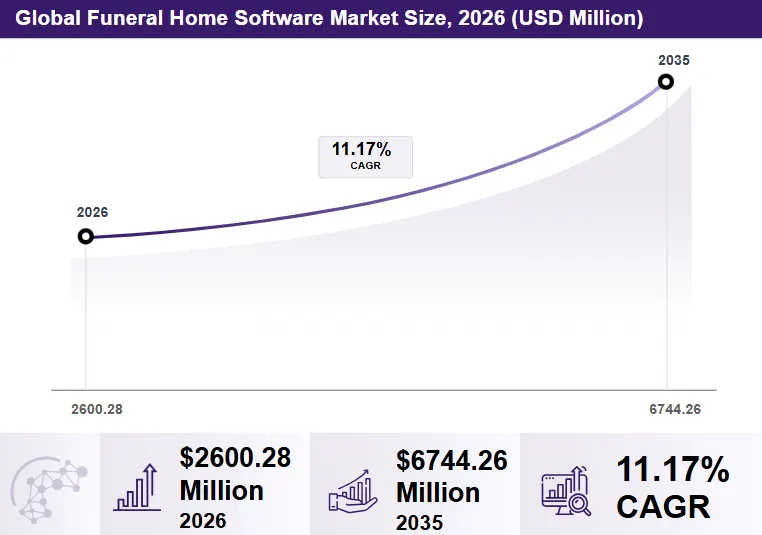
Source: 360 Research Reports
1. Staff Spend Too Much Time
Retyping decedent details into contracts, obituaries, permits, and invoices wastes time and increases errors. Smartsheet found that over 40% of workers spend at least a quarter of their workweek on repetitive tasks. This repetitive work also leaves funeral directors with less time to focus on families and other important responsibilities.
Common Signs
- Printing and scanning forms
- Re-entering case details
- Maintaining separate spreadsheets
- Staying late to finish paperwork
Modern platforms reduce this workload. Passare, for example, offers over 1,000 forms, eSignatures, and an AI Notetaker that records, transcribes, and summarizes arrangement conferences.
2. Case Data Is Scattered
When case information sits across software, spreadsheets, accounting tools, websites, and paper files, staff lack a complete view. MuleSoft found that 80% of respondents said integration issues lead to data silos.
| Data Source | Common Problem |
| Legacy software | Limited access |
| Spreadsheets | Version conflicts |
| Accounting tools | Manual re-entry |
| Website platforms | Duplicate data entry |
| Paper files | Hard to search |
The solution is single-point data entry. Passare, for example, syncs case information across devices and connects with Funeral Innovations to send obituary and service details directly to a funeral home’s website.
3. Old Software Limits Data Access
Legacy systems often depend on office desktops or on-premise servers, making remote access difficult. McKinsey has reported that employees spend 1.8 hours a day searching for information, or about 9.3 hours per week. Modern cloud platforms provide role-based access, mobile support, and faster search, allowing directors to access case information when they need it.
4. Integrations Keep Falling Behind
Funeral homes rely on accounting, payments, eSignatures, obituary platforms, insurance providers, and death-registration systems. Without reliable integrations, staff become the connection between these tools. MuleSoft reports that the average organization manages 957 applications, with only 27% connected.
Real-World Example: Halcyon
5. Reports Take Too Long
If reports require exports, spreadsheets, and manual calculations, decision-making slows down. Funeral home owners need quick visibility into case volume, revenue, outstanding balances, pre-need activity, and location performance.
| Legacy Reporting | Modern Reporting | |
| Time | Hours or days | Minutes |
| Data | Manual exports | Live data |
| Accuracy | Copy-paste errors | Consistent records |
| Access | Office computer | Authorized devices |
| Accounting | Manual entry | Direct sync |
Modern platforms connect payments and reporting, reducing duplicate entry and keeping financial data updated.
6. Updates Disrupt Daily Operations
Updates should not stop a funeral home’s work. Older systems may require manual patches, technician support, scheduled downtime, or machine-by-machine installations. ITIC reports that downtime can cost over $300,000 per hour for more than 90% of mid-size and large enterprises, although a funeral home’s financial exposure is much smaller.
Watch For These Signs
- Updates stop office work
- Technicians must install patches
- New versions require retraining
- Features break after updates
Cloud platforms can reduce these issues through centralized updates.
7. New Features Are Difficult
Families increasingly expect online arrangements, eSignatures, livestreams, digital obituaries, and quick communication. If every new feature requires custom development or a vendor change order, the software is limiting growth. Halcyon demonstrates the alternative. It added AI features including charity recommendations and an AI obituary writer that uses existing decedent information.
8. Software Cannot Scale Locations
Legacy systems often struggle with multiple locations because they lack shared data, centralized pricing, consolidated reporting, and easy location management. Broussard’s Mortuary grew to six locations serving over 1,500 families annually and found its 20-year-old software was no longer meeting its needs. After moving to Passare, document creation was streamlined through digital forms.
A scalable platform should provide centralized data, location-based permissions, shared catalogs, consolidated reporting, and easy location additions. Halcyon, for example, supports single- and multi-location funeral homes and crematories.
What to Audit Before Modernizing Funeral Software?
Before modernizing, audit case workflows, hidden dependencies, integrations, database health, performance, and ongoing costs. This shows what needs rebuilding, what can stay, and where the biggest risks are. A proper audit also gives developers a clearer scope and more realistic estimates.
1. Map Every Case Workflow
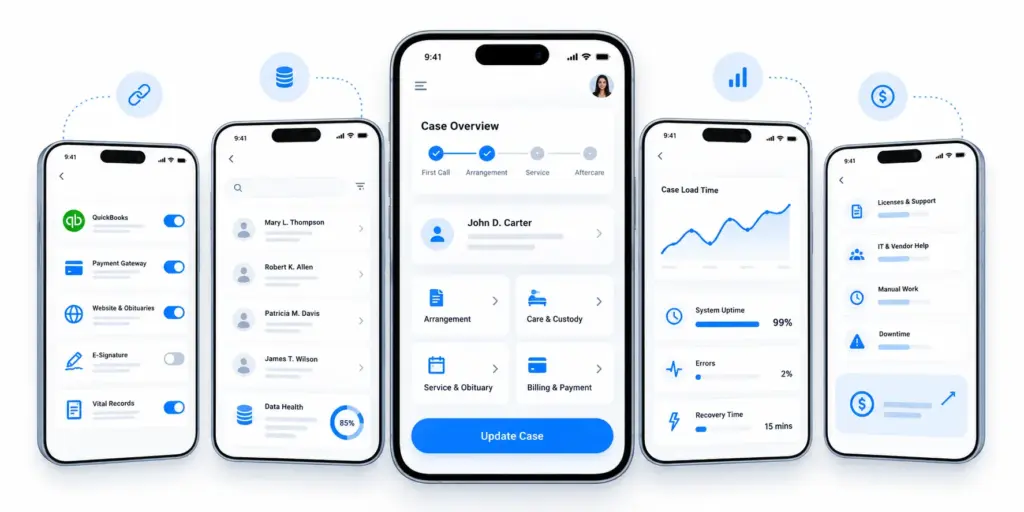
Trace a case from the first call to aftercare, noting every step, tool, and person involved. Review at-need, pre-need, and cremation cases separately, and speak with arrangers, embalmers, office staff, and drivers to uncover real workflow gaps.
| Stage | What to Capture | Key Question |
| First call and removal | Who logs it, where, how fast | Is it entered once? |
| Arrangement | Forms, price list, contracts | Which steps use paper? |
| Care and custody | Tracking, transfers, ID checks | Can staff see the location? |
| Service and obituary | Scheduling, website, livestream | How many systems share details? |
| Billing and payment | Invoices, insurance, payments | Where are balances reconciled? |
| Aftercare | Follow-ups, pre-need leads | Is anything tracked? |
Gather, a Boise-based funeral software company, covers case management, body tracking, livestreaming, websites, and hotel booking. These examples show why every workflow outside the current system should be included in the audit.
2. Identify Hidden Dependencies
Legacy systems often contain undocumented processes such as scheduled reports, custom forms, spreadsheets, hardware dependencies, and vendor-specific formats. Ask long-term staff what would stop working if the system disappeared tomorrow. These hidden dependencies can cause unexpected disruptions when the old system is replaced or upgraded, making them important to document before modernization.
Common Hidden Dependencies
- Scheduled reports and backups
- Custom forms and price lists
- Connected spreadsheets
- Older hardware and drivers
- Stored login and permission rules
- Vendor-specific data formats
3. Document Existing Integrations
List every connected system and record whether it uses an API, file export, or manual entry. Include accounting, payments, e-signatures, websites, insurance, answering services, and state death-registration systems.
| Integration | Connection Type | Risk |
| Accounting | API, file, or manual | Reconciliation errors |
| Payments | Gateway or portal | Delayed collections |
| Website and obituaries | Publish or copy-paste | Outdated information |
| Broadcast and media | Built-in or third-party | Missed announcements |
| Vital records | Electronic or paper | Delayed filings |
4. Review Your Legacy Database
Check the database’s age, structure, duplicates, incomplete records, sensitive data, access controls, and backups before planning migration. Test a backup restore and decide which records need to move versus being archived. Gartner research cited by Experian found that 83% of data migration projects fail or exceed their budgets and timelines. Cleaning inconsistent or outdated data before migration can reduce these risks and simplify development.
5. Measure Performance and Downtime
Track how long it takes to open cases, generate contracts, run reports, and recover from failures. Also record crashes, remote-access issues, and security gaps such as unsupported operating systems.
Track These Metrics
- Case and report load times
- Monthly crashes and errors
- Recovery time after failures
- Remote and mobile access
- Security and patch gaps
IDC research for Carbonite estimates small-business downtime at 137–427 per minute, or about 8,000–25,000 per hour. Gartner’s broader estimate is $5,600 per minute.
5. Calculate the Cost of Staying
Add licenses, support, hardware, IT help, manual work, errors, delayed reports, downtime, and missed opportunities. Project these costs over the next three to five years to understand the real cost of keeping the legacy system. Deloitte found that enterprises spend an average of 57% of their IT budget on business operations and only 16% on innovation. The GAO found that federal agencies spend about 80% of their annual IT budget on operating and maintaining existing systems.
| Cost Category | Calculation |
| Licenses and support | Annual invoices |
| IT and vendor help | Monthly hours × rate × 12 |
| Manual work | Weekly hours × wage × 52 |
| Downtime | Annual hours × estimated loss |
| Missed opportunities | Services you cannot offer |
| Migration and training | Development partner quote |
Compare the total cost with a modernization quote to create a clear business case for moving forward.
Modernization vs Rebuilding Funeral Home Software
Modernize when the current system still fits your workflows but suffers from old code, slow infrastructure, or missing integrations. Rebuild when its architecture, data model, or vendor can no longer support your needs. Most funeral homes can start with the smallest change that fixes the biggest bottleneck and expand from there.
When Refactoring Is Enough
Refactoring improves existing code without changing the user experience. It works when the workflows are right but the code is slow, tangled, or difficult to maintain. Stripe’s Developer Coefficient survey found developers spend about 17.3 of a 41.1-hour week on technical debt and bad code, or roughly 42% of their time. Stripe estimated the global opportunity cost at nearly $85 billion annually.
Refactoring Usually Fits When
- Workflows work but software is slow or buggy
- The technology is still supported
- Small changes take too long
- The database and documentation are usable
- Budget favors gradual improvements
When APIs Can Extend Software
An API layer can connect working legacy software with newer tools without replacing the core system. It can link payments, e-signatures, websites, memorial platforms, accounting, and state records. Postman’s State of the API report found that 82% of organizations have adopted some level of API-first development, while 25% are fully API-first.
Osiris Software shows this approach in practice. Its eSignature product combines contracts, signatures, and document storage. In 2025, its partnership with Eulogize Memorials enabled funeral homes to transfer service and family information directly to the tribute platform, reducing manual entry.
| What You Want to Add | API Layer Helps With |
| Online payments | Connects case data to payment gateways |
| E-signatures | Sends and stores signed contracts |
| Obituaries and websites | Publishes from case records |
| Memorial products | Transfers family and service details |
| Accounting | Moves invoices and payments |
When Replatforming Makes Sense
Replatforming moves the application to a new infrastructure or cloud environment with minimal code changes. It works when the software is usable but the infrastructure is outdated, such as an unsupported OS, aging server, or unreliable backups. However, it does not remove limitations built into the legacy code.
| Path | What Changes | Typical Timeline |
| Replatform | Infrastructure and hosting | 4–8 weeks |
| Refactor | Internal code structure | 2–6 months |
| Full rebuild | Complete application | 6+ months |
These are general industry estimates and can vary based on scope, data, and integrations.
When Phased Rebuilds Work Better
A phased rebuild replaces the system module by module while the legacy platform keeps running. A funeral home might start with online arrangements and payments, then move to billing and case management. McKinsey and Oxford studied more than 5,400 large IT projects with initial budgets above $15 million. They found projects ran 45% over budget on average and delivered 56% less value than predicted. Each additional year increased cost overruns by 15%.
A Typical Phased Plan
- Audit workflows, data, and integrations
- Build and launch one high-value module
- Run old and new systems together
- Retire the replaced legacy component
- Repeat until the old system is removed
When Full Replacement Is Necessary
Full replacement makes sense when the data model, vendor, security, or architecture can no longer support the business. It may also be necessary when workarounds cost more than a new platform. PlotBox provides an industry example. Its acquisition of MIS, a funeral home system previously owned by Batesville, gave MIS customers access to a modern platform covering case management, scheduling, arrangements, billing, and reporting.
PlotBox has also introduced an AI Obituary Assistant and Funeral Director Portal and earned ISO 9001:2015 certification in December 2024. If a vendor is being sunset, sold, or left behind, planning a replacement early can reduce migration pressure.
| Your Situation | Best-Fit Path |
| Code is messy but workflows work | Refactor |
| Need new integrations | API layer |
| Infrastructure is outdated | Replatform |
| Core logic needs changing | Phased rebuild |
| Vendor or architecture cannot support growth | Full replacement |
How to Modernize Funeral Software Without Disruption?
The safest approach is to modernize in small, reversible steps while keeping the legacy system running. Start with one painful workflow, connect old and new systems through APIs, build modules alongside the legacy platform, run both systems together, migrate staff in waves, and keep a tested rollback option. This reduces disruption while giving staff time to learn the new system.
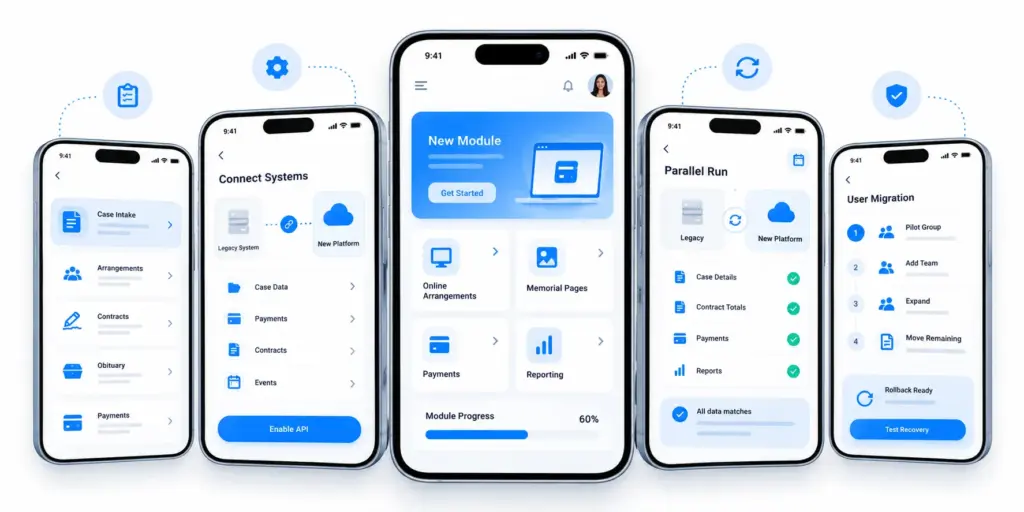
1. Start With the Highest-Friction Workflow
Begin with the workflow causing the most time loss or errors rather than modernizing everything at once. Common targets include case re-entry, paper contracts, obituary publishing, and payment collection. Standish Group’s CHAOS data, summarized in a Hastie study of 2011–2015 projects, found that small agile projects succeeded 58% of the time, compared with 18% for large agile projects and 3% for large waterfall projects.
| Scoring Factor | What to Check |
| Staff time lost | Hours spent weekly |
| Error rate | Corrections or complaints |
| Family visibility | Delays families notice |
| Dependencies | Systems or people involved |
| Rollback ease | Same-day recovery |
Choose a workflow with high time loss and errors but few dependencies as the first project.
2. Put an API Around Legacy Software
An API creates a bridge between the legacy system and newer tools without rewriting the core. It can expose case data, payments, contracts, and events to new modules. Postman’s State of the API report found that 63% of teams can produce an API within a week.
A Useful First API
- Read and update case records
- Access contracts and payment status
- Send case and payment events
- Log API activity for auditing
Add authentication, role-based access, and rate limits from the start.
3. Build New Modules Alongside
Build new modules beside the legacy system instead of replacing everything at once. Start with areas such as online arrangements, payments, memorial pages, or reporting, then retire the old version when the replacement is stable. FrontRunner Professional demonstrates this modular approach with online arrangements through Arrangement Aide, while its Pulse platform combines management, reporting, accounting, memorials, and websites.
It also supports AI-assisted obituary drafting and integrations such as Hilton Funeral Supply’s Shared Memories stationery.
4. Run Old and New Together
Parallel running means using both systems for the same cases and comparing results. This helps identify differences in names, dates, totals, contracts, payments, and reports before the new platform becomes the primary system.
| What to Compare | Frequency | Who Checks |
| Case details and dates | Daily | Arranger |
| Contract totals | Every contract | Office manager |
| Payments and balances | Weekly | Bookkeeper |
| Reports | Weekly | Owner or manager |
| Obituary output | Every publish | Arranger |
End the overlap only after several clean weeks with no unresolved differences.
5. Migrate Users in Controlled Waves
Move staff in stages instead of switching everyone at once. Begin with a small pilot group or location, then expand as issues are resolved. MorTrack has used a similar early-access approach by inviting customers to test new versions before broader release. Its Version 3.7 comparison highlighted faster pages, quicker reports, and real-time case updates.
A Simple Migration Plan
- Pilot with two or three staff
- Add one team or location
- Expand to remaining teams
- Move pre-need and cremation cases
- Retire legacy screens after stabilization
6. Keep Rollback Available
Rollback provides a way to return to the previous system if the new platform fails. Test the recovery process before cutover day and keep the legacy system available for a defined period. Google’s DORA research found elite software teams recover from failed deployments in under an hour and have a change failure rate of around 5%. Elite teams represented about 19% of respondents, so these figures are a target rather than an average.
Cutover Checklist
- Take and test a full backup
- Define clear go/no-go criteria
- Keep the legacy system read-only
- Capture new cases for possible rollback
- Schedule cutover outside peak periods
- Give staff a clear support contact
Modernize the Funeral Case Management Layer
Make the case record the single source of truth for family details, arrangements, documents, tasks, communication, and payments. This prevents staff from re-entering information across disconnected tools. Harvard Business Review found that workers across three Fortune 500 companies switched between apps and websites nearly 1,200 times a day, costing almost four hours per week.
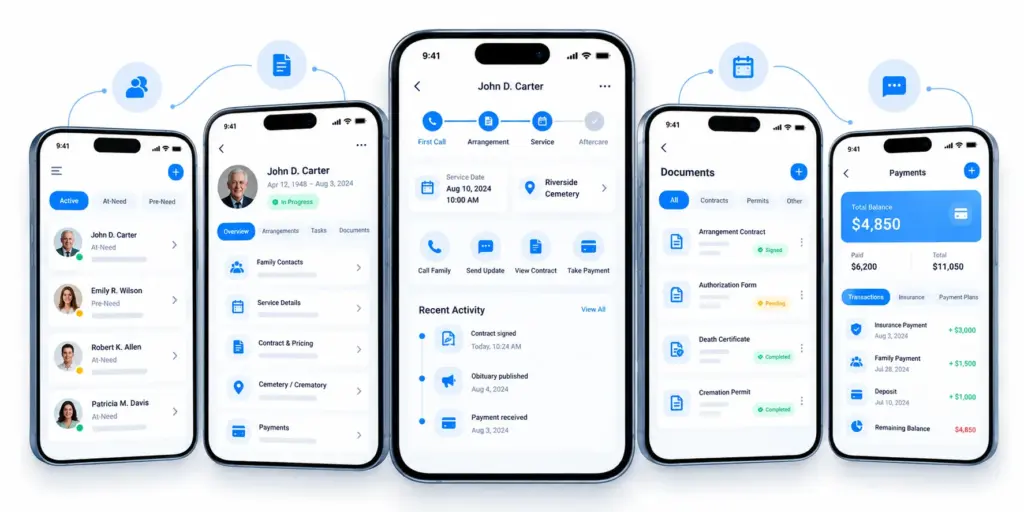
1. Centralize Every Funeral Case
Bring information from the first call through aftercare into one record, including decedent details, custody notes, arrangements, schedules, documents, and payments. This gives staff a complete view of each case and reduces duplicate entry, missed updates, and delays in finding important information.
A Central Case Record Includes
- Family and next-of-kin contacts
- Decedent and custody details
- Arrangements, pricing, and contracts
- Service, obituary, cemetery, and crematory details
- Signed documents and activity history
- Payments, balances, and insurance
2. Connect Arrangement and Service
Arrangement decisions should automatically flow into contracts, schedules, obituaries, programs, and cemetery or crematory orders. This prevents staff from updating the same information across multiple systems.
| Arrangement Detail | Should Flow Into |
| Service type and date | Calendar, staff, obituary, programs |
| Goods and services | Contract and invoice |
| Cemetery or crematory | Orders and transport |
| Family contacts | Communication and signatures |
| Personal effects | Custody and release forms |
3. Automate Funeral Documents
Modern case management can generate contracts, permits, statements, and authorization forms from existing case data while managing signatures and storing completed documents. Capterra found document management was rated critical by 52% of reviewers, pre-need management by 54%, and financial reporting by 65%.
eFD, built by Seker Tech, combines document generation, storage, customizable forms, case management, scheduling, and invoicing. Its Premium edition supports one to five branches, while Enterprise offers unlimited users and advanced multi-branch controls.
4. Link Tasks to Case Status
Each case status should trigger the next task and update the record when completed. This replaces reliance on whiteboards, texts, and memory.
| Case Status | Task Created | Owner |
| First call logged | Removal and custody entry | Removal team |
| Arrangement completed | Contract review | Arranger |
| Service confirmed | Staffing and setup | Coordinator |
| Obituary approved | Publish and notify | Office staff |
| Service completed | Invoice and follow-up | Office manager |
5. Connect Family Communication
Messages, portals, and updates should remain connected to the case rather than scattered across inboxes. NFDA research found 66.4% of consumers visit funeral home websites, while 82.4% are more likely to engage a firm that publishes its General Price List online. Another NFDA study found nearly 30% of families completed all arrangements online, while nearly 64% would arrange livestreaming for distant relatives.
Connect Communication to Cases
- Log calls, emails, and texts against the case
- Send service and obituary updates from the case
- Let families review, sign, and pay online
- Automate reminders for signatures and services
- Keep access to a real person
6. Track Payments and Balances
Keep deposits, payments, insurance assignments, payment plans, and outstanding balances within the case record. One funeral director cited by ASD Answering Service reported that about 70% of her firm’s payments were insurance assignments, with insurers sometimes taking more than a month to pay.
Funeral365, built on Microsoft Dynamics 365 Business Central, connects funeral operations and accounting while integrating with Power BI and Power Automate. It supports service contracts, pre-arranged contracts, quotations, last wishes, and family portals.
Essential Payment Features
- Updated contract totals
- Deposit and insurance tracking
- Aging reports for overdue balances
- Automated reminders and receipts
- Accounting synchronization
Connect the New System to Existing Funeral Tools
The new funeral software should connect with existing accounting, payment, obituary, cemetery, crematory, e-signature, email, and SMS tools through secure APIs. This keeps the case record as the central source of truth while allowing data to move between systems without duplicate entry or disrupting daily funeral operations.
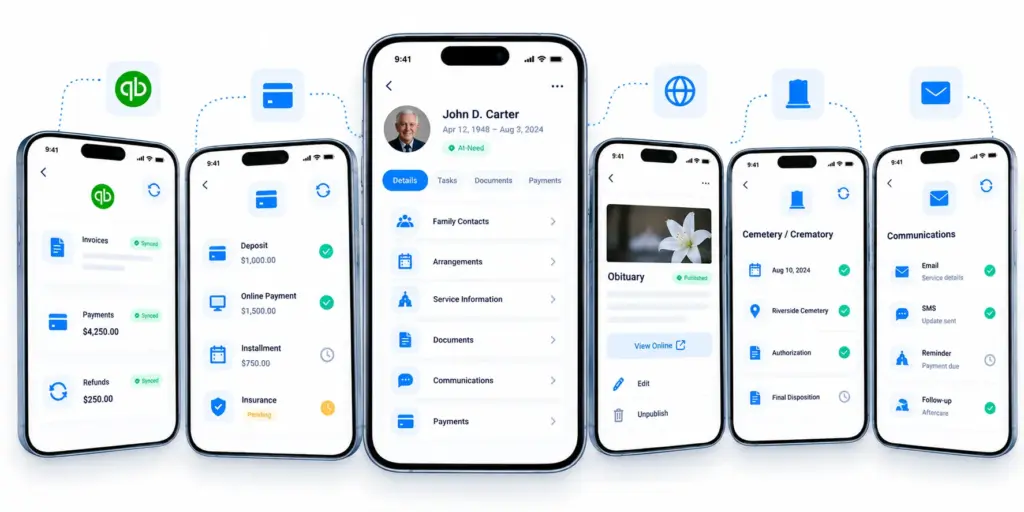
1. Accounting and QuickBooks
Accounting should be one of the first integrations because invoices, payments, and refunds all flow through it. Gartner estimates poor data quality costs organizations an average of $12.9 million per year. 1Director provides an example of a connected system. It generates invoices from arrangements, supports online and in-person payments, and syncs invoices, payments, and refunds with QuickBooks Online. Its listed pricing starts at $350 per month.
API Requirements
- Map customers, invoices, payments, and refunds
- Carry locations and departments across
- Log and retry failed syncs
- Reconcile changes from either system
2. Payment Processing
Payment integrations should update case balances instantly across deposits, online payments, installments, and insurance assignments. IBM’s Cost of a Data Breach report puts the average U.S. breach at $11.5 million.
| Payment Scenario | Integration Requirement |
| Deposit | Update case and contract |
| Online payment | Update balance and receipt |
| Card or check | Link to correct case |
| Installment | Track schedule and balance |
| Insurance | Record pending assignment |
API Requirements: Use tokenization so card details never enter the case database. Webhooks should update payments in real time, while idempotent requests prevent duplicate charges.
3. Obituary and Memorial Websites
Obituaries should publish directly from the case record instead of being retyped. NFDA’s 2024 consumer survey found nearly half of respondents visit funeral home websites for obituaries, while those looking for pricing rose to 26% from 19% the previous year. FuneralTech demonstrates this approach through its Family Arranger, which can sync family information with forms, contracts, invoices, and online tributes. Its Intelisync technology connects management software with stationery, marketing, business software, and memorial videos.
API Requirements: Define which case fields can become public and add an approval step before publishing. Rules should also cover corrections, edits, and takedowns.
4. Cemetery and Crematory Systems
Funeral homes often exchange information with cemeteries and crematories through phone calls, email, or fax. NFDA’s 2025 Cremation & Burial Report projects the U.S. cremation rate to reach 63.4% and rise to 82.3% by 2045.
| Data to Exchange | Why It Matters |
| Decedent ID and case number | Prevents mix-ups |
| Authorizations and permits | Confirms approval |
| Scheduling | Prevents double-booking |
| Custody events | Creates an audit trail |
| Final disposition | Keeps records updated |
API Requirements: Use status events such as scheduled, received, and completed to update cases automatically. Role-based access should limit partners to relevant cases.
5. Document and E-Signature Tools
Connecting e-signatures to the case lets documents auto-fill, reach the right signers, and return as signed records. DocuSign reports average savings of 4–10 per document, 75% faster contract turnaround, and 44% of documents signed within 15 minutes. These are vendor-reported figures across industries.
Document Workflow
- Map case fields to templates
- Send documents from the case
- Support remote and in-person signing
- Return signed PDFs and audit trails
- Apply retention and access controls
Use webhooks for sent, viewed, signed, and declined events so staff can track document status.
6. Email and SMS Communication
Connect communication tools to the case so service updates, reminders, receipts, and follow-ups are logged automatically. Gartner has reported SMS open and response rates as high as 98% and 45%, compared with 20% and 6% for email, although these figures are estimates and come from marketing contexts.
| Message Type | Suitable Channel |
| Service updates | SMS + email |
| Signature requests | Email + secure link |
| Payment reminders | Email + opted-in SMS |
| Aftercare | Email + personal calls |
API Requirements: Store consent and opt-out preferences with each family contact, apply them to every message, and log communications against the case.
Build Safety Nets Before the Final Cutover
Before cutover, put five safeguards in place: automated tests, side-by-side comparisons, live monitoring, a tested rollback plan, and verified backups. Each protects against broken logic, incorrect data, silent losses, failed launches, or missing records. For a funeral home, these safeguards help prevent software issues from affecting grieving families.
1. Run Automated Regression Tests
Regression tests confirm that the new system still performs everything the old one did. Build a baseline from the existing system and use it to compare every later version. For funeral software, test GPL calculations, contracts, itemized statements, and payment posting. ITIC’s survey of more than 1,000 firms found that one hour of downtime costs over $300,000 for more than 90% of mid-size and large enterprises. Datto estimates the average cost for small and medium businesses at $8,000 per hour.
Test these workflows:
- Creating a case from first call through final billing
- GPL pricing, taxes, and package discounts
- Contract and e-signature generation
- Payment processing and refunds
- Obituary and website publishing
- Preneed policy entry and conversion to an at-need case
- Role-based permissions for directors, office staff, and owners
2. Compare Legacy and New Outputs
Run both systems with identical inputs and compare their outputs. Keep the legacy system as the system of record while the new platform runs in parallel. Use row counts, checksums, and business-result comparisons to confirm data accuracy. Passare, for example, offers 40+ integrations, including a public API connection with webCemeteries. Its Miraven integration can also create cases automatically from information collected by an answering service.
| What to Compare | How to Check | Why It Matters |
| Record counts | Compare source and target totals | Finds missing or duplicate records |
| Financial totals | Reconcile by case and period | Prevents billing disputes |
| Generated documents | Compare old and new outputs | Preserves required fields and wording |
| Integration handoffs | Run test cases through each tool | Prevents missed calls and duplicate entry |
| Reports | Run identical reports | Confirms accurate numbers |
3. Monitor Errors During Migration
Log failed records, transformation warnings, and source-to-target mismatches throughout migration. Use record checks, row counts, and checksum validation instead of waiting until the migration ends. Set alert thresholds so the team knows when migration should pause.
DORA’s 2024 research reports a change failure rate near 5% for elite teams, with failed deployments recovered in under one hour. Osiris Software provides a funeral-industry example by requiring administrator approval for changes to case numbering and maintaining release notes. Its Eulogize Memorials partnership also transfers service and family information into the tribute platform.
4. Create a Rollback Strategy
Define exactly when the team will return to the legacy system and how that switch will happen. Set limits for error rates, outages, and financial mismatches, and keep the legacy platform available until the new system proves stable. DORA data shows only about 21.3% of teams recover from failed deployments in under an hour, making a rehearsed rollback important.
A rollback runbook should:
- Set go/no-go thresholds before cutover.
- Freeze changes when a threshold is crossed.
- Switch users and traffic back to the legacy system.
- Reconcile records created during the failed window.
- Review the failure and decide whether to retry or redesign.
Schedule cutover during the lowest-demand period and rehearse the rollback in a test environment.
5. Maintain Backups at Every Stage
Create a verified backup before migration, after each major data load, and immediately before cutover. CISA’s 3-2-1 guideline recommends three copies of data, two storage types, and one off-site copy. Veeam’s 2025 Ransomware Trends Report found that 89% of organizations had backup repositories targeted by ransomware, while 34% of repositories were modified or deleted on average.
Although 98% had ransomware playbooks, fewer than half had verified backup procedures or confirmed clean backups. Test restores at every migration stage.
| Migration Stage | Backup | What to Verify |
| Before migration | Full legacy database and document copy | Restore and open real cases |
| After each data load | Target-system snapshot | Counts and checksums match |
| Before cutover | Final backup of both systems | Off-site immutable or offline copy |
| After go-live | Daily new-system backups | Completed restore drill |
Contact Idea Usher to Build a Legacy Funeral Home Software
Modernizing legacy funeral home software requires more than replacing outdated technology. It requires careful workflow planning, secure data migration, and integrations that keep daily operations running smoothly. IdeaUsher brings 500,000+ hours of coding experience and a team of ex-MAANG and FAANG developers to help funeral homes modernize legacy systems with scalable custom solutions.
Legacy System Assessment
We assess your existing architecture, workflows, databases, integrations, and technical limitations to create a practical modernization roadmap. Our team identifies outdated components, performance bottlenecks, security gaps, and dependencies that could affect the transition.
Funeral Workflow Modernization
We modernize case management, arrangements, contracts, payments, reporting, and other core workflows while reducing disruption to daily operations. Modern workflows can reduce repetitive tasks and give funeral directors and staff faster access to important case information.
Legacy Data Migration
We securely migrate case records, family information, documents, financial data, and other critical records while maintaining data accuracy and integrity. Migration workflows can include validation, duplicate detection, backups, and staged transfers to reduce the risk of missing or corrupted information.
API and Integration Development
We connect the modernized platform with accounting, payment, cemetery, crematory, obituary, e-signature, communication, and other funeral technology systems. APIs can synchronize important information between platforms and reduce duplicate data entry across daily workflows.
Conclusion
Modernizing legacy funeral home software is about improving outdated systems without disrupting daily operations. With phased modernization, secure data migration, modern APIs, and connected workflows, funeral homes can build a more reliable and scalable platform that supports staff, families, and future growth.
FAQs
A1: Yes, legacy funeral home software can be modernized by upgrading outdated components without replacing the entire system at once. This can include adding APIs, improving workflows, moving infrastructure to the cloud, modernizing the user interface, and gradually replacing older modules while keeping daily operations running.
A2: The choice depends on the condition of the existing system. Modernization works when the core workflows and data structure still support the business, while a full replacement may make more sense when the architecture, database, or vendor technology prevents necessary improvements.
A3: Legacy funeral home data can be migrated through a staged process that includes data assessment, mapping, cleansing, transformation, validation, and controlled transfer. Case records, family information, contracts, documents, financial data, and other critical records should be backed up and verified before and after migration.
A4: Yes, legacy funeral software can be moved to the cloud through rehosting, replatforming, or gradual modernization. Cloud migration can improve accessibility, scalability, backups, and infrastructure management while allowing the existing system to remain operational during the transition.
A5: Yes, modern funeral software can integrate with QuickBooks through APIs or supported accounting integrations. The connection can synchronize customers, invoices, payments, refunds, and other financial information while reducing duplicate data entry and manual reconciliation.
A6: The timeline depends on the system’s complexity, data volume, integrations, and modernization approach. A smaller replatforming project may take several weeks, while deeper refactoring or a phased rebuild can take several months, especially when extensive data migration and third-party integrations are involved.