

Key Takeaways
- AI iOS app builders turn natural language into production-ready native iPhone apps using guided AI workflows and Swift code generation.
- Core capabilities include AI product planning, native Swift development, Xcode generation and App Store publishing automation.
- Structured AI workflows improve code quality, accelerate development and simplify App Store deployment for businesses and founders.
- Native iOS generation delivers better performance, code ownership and long-term scalability than prototype or no-code solutions.
- How Idea Usher can help you build an AI iOS app builder like x1 with autonomous AI workflows, native Swift generation and enterprise-grade cloud infrastructure.
The next generation of app builders is not competing on how much code AI can generate. It is competing on how effectively AI can guide an entire product from idea to App Store launch. This shift is accelerating demand for AI iOS App Builder Like x1 as founders and product teams seek structured, AI-driven workflows that produce production-ready native iPhone applications rather than simple prototypes.
Traditional app development relied on separate tools for planning, design, coding, testing, and publishing. Modern AI platforms unify prompt-to-app generation, native Swift development, Xcode project generation, AI-guided planning, visual design, and App Store one-click launch preparation. Their value lies in orchestrating the complete iOS development lifecycle while reducing complexity and maintaining production quality.
This blog explores what it takes to build an AI iOS app builder like x1, covering its core features, AI architecture, guided development workflow, technology stack, development costs, and how IdeaUsher can help you build an AI iOS app builder platform powered by structured, autonomous software engineering workflows.
Why AI App Studios Are Replacing Traditional iOS Development
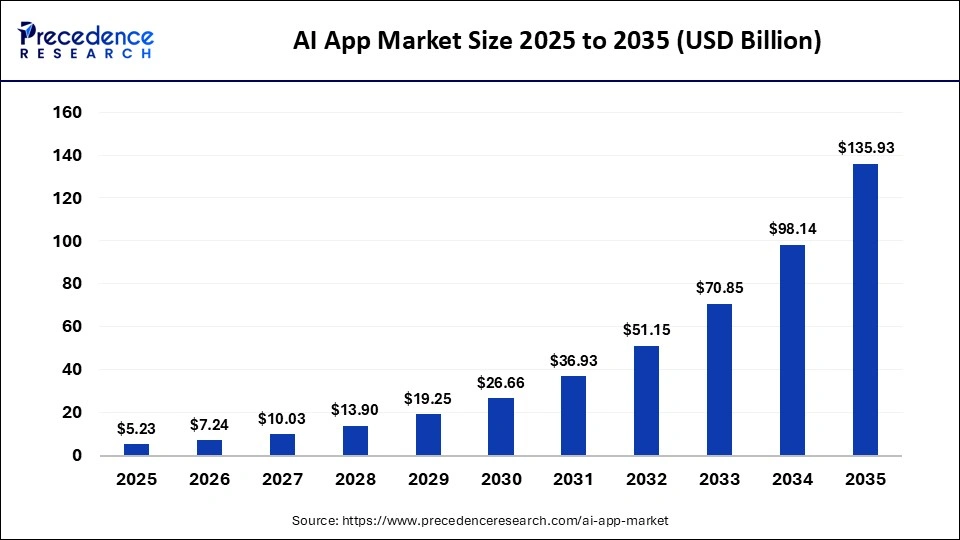
The Apple ecosystem has traditionally enforced the steepest barrier to entry in software engineering. Driven by the explosive surge in mobile infrastructure demand, the global AI mobile app market has grown to a $7.24 billion valuation and is expanding toward $135.93 billion by 2035, accelerating at a compound annual growth rate (CAGR) of 38.51%.
At the core of this transformation is a complete departure from local desktop compilation. Organizations are actively moving past legacy setup patterns to deploy cloud-based AI app studios.
In the overall mobile development landscape, the Apple App Store continues to hold a 53.2% market share dominance in revenue, as iOS users consistently exhibit a higher baseline spend on premium app subscriptions and in-app monetization blocks compared to alternative storefronts.
A. Businesses Want Production-Ready Apps, Not Prototypes
In a hyper-competitive funding landscape, click-through wireframes and non-functional visual mockups are no longer enough to secure market validation or venture capital.
- The Collapse of Throwaway Scaffolding: Traditional agency-built prototypes take 3–6 months and cost $5,000–$30,000, yet often cannot support live transactional workloads. AI-native builders generate production-ready code from the first prompt.
- Massive Cost Deflation Windows: Replacing outsourced engineering with autonomous development platforms reduces MVP development costs by 70–90%, enabling startups to launch production-ready software at a fraction of traditional costs.
- Surging Conversion Multipliers: Functional backend data layers enable early product validation. Applications with AI-driven behavioral personalization achieve up to 62% higher user engagement and 12.3% conversion rates, compared to 3.1% for static wireframes.
- Compressed Launch Windows: Shifting code generation and testing to autonomous cloud agents enables lean teams to launch software in days instead of months, reducing go-to-market timelines by 25–40%.
B. The Shift from AI Coding Assistants to AI App Studios
The development pipeline is moving beyond AI coding assistants toward AI app studios that build production-ready apps, while elastic engineering teams help businesses customize, scale, and evolve products for long-term growth.
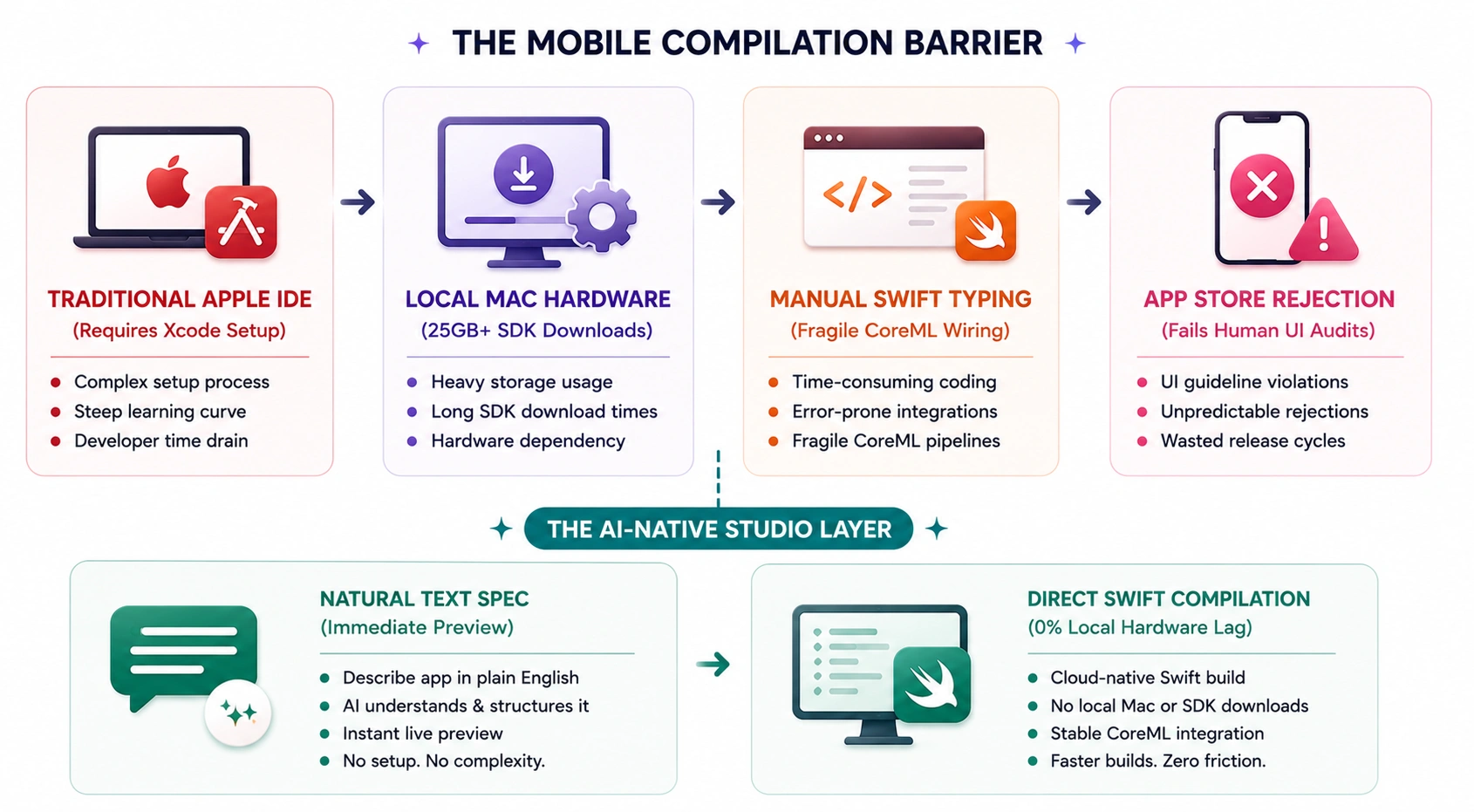
This evolution highlights how AI app studios are redefining software development by automating entire workflows while improving quality, scalability, and deployment efficiency.
- From Syntax Helper to Full Infrastructure Automation: Traditional AI coding assistants automate only 0–20% of the development pipeline, while AI app studios automate infrastructure tasks such as database design, security, user authentication, and system logic under human supervision.
- Eradicating Local Workspace Bloat: Traditional iOS development requires over 25GB of local tools, including Xcode and simulators. AI studios shift these workloads to remote sandboxes, eliminating local processing overhead.
- The Enterprise Agent Explosion: 40% of enterprise software applications now incorporate task-specific AI agents within their codebases, reflecting the growing adoption of autonomous development workflows.
- Drastic Reduction in Defect Density: Closed-loop agentic environments continuously audit code before execution, reducing software defect density by 62% compared to fragmented AI-assisted coding workflows.
C. Why Native Swift Generation Matters for App Store Success
While cross-platform hybrid web wrappers offer basic convenience, native Swift compilation remains essential for surviving Apple’s strict review guidelines and delivering premium mobile performance.
- Unlocking the Core Operating System Engine: Swift runs natively on Apple devices without JavaScript bridges, enabling smooth performance at 60–120 FPS.
- The Apple Performance Multiplier: Swift applications compile and execute up to 2.6× faster than Objective-C while using less memory, improving performance and stability.
- Zero-Latency On-Device Machine Learning: Core ML enables native Swift apps to perform on-device AI inference, image processing, and speech recognition without network latency or cloud API costs.
- Minimizing Day-One App Discard Rates: 25% of users abandon mobile apps within the first 24 hours. Generating native Swift code avoids cross-platform performance bottlenecks, improving early user retention.
What Is an AI iOS App Builder Like x1?
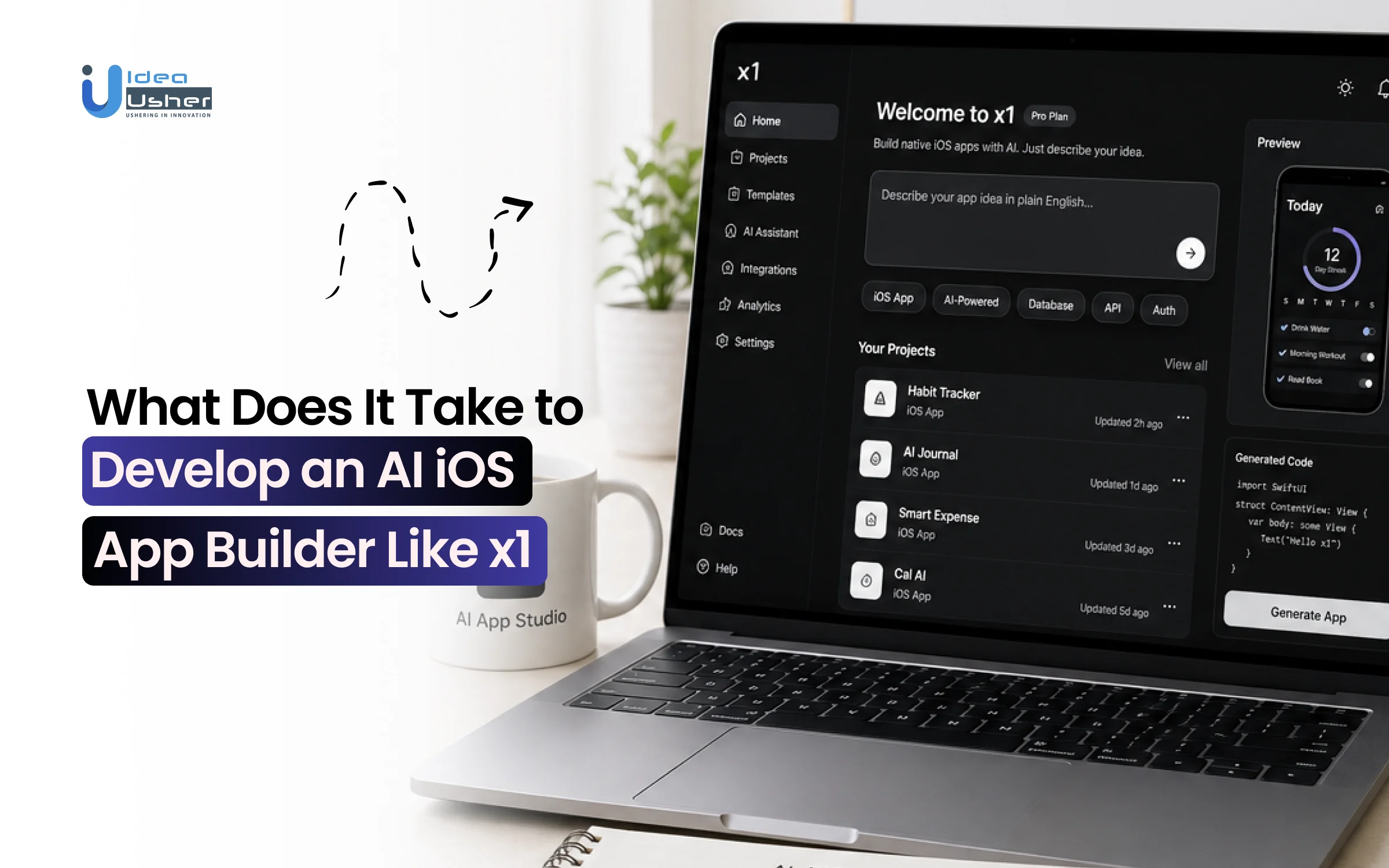
x1 is an AI-powered native iOS app builder that transforms plain-English ideas into production-ready iPhone applications through a structured, end-to-end development workflow. Unlike many AI coding tools that generate prototypes or web wrappers, x1 produces native Swift and Xcode projects that are designed for direct App Store deployment, making it ideal for founders, creators, and startups building real iOS products.
By ditching unstructured, chat-only prompts in favor of specialized, modular creation spaces including an Idea Studio, Brand Studio, Design Studio, Build Studio, and Publish Studio, x1 handles the complete lifecycle of app creation. Acting as an “AI app studio,” x1 leads non-technical users through Plan, Design, Build, Launch, and Iterate phases. This structured process enables AI to handle feature definition, UI generation, native Swift development, and App Store readiness, replacing disjointed manual workflows.
A. Why Structured AI Workflows Outperform One-Shot Prompting
Most text-to-code builders run on a “one-shot” approach: the user inputs a single prompt, and the AI attempts to write the entire application all at once. This framework frequently collapses when applied to complex mobile apps, introducing syntax errors and system bugs.
- Modular Progression vs. Prompt Loops: x1 replaces unstructured prompt loops with a guided, phased workflow, defining user flows, permissions, and visual themes before generating backend code.
- The Guardrailed System Architecture: By organizing development across dedicated modules, x1 maintains code consistency as applications scale, achieving 85%+ compilation accuracy and reducing issues common in unstructured AI workflows.
- Overcoming the 80% Wall: Unlike one-shot generators that often stall at prototype stage, structured development workflows reduce code regression errors by 70%, making applications easier to refine and extend.
B. What Makes Native iOS Generation Different from No-Code Builders
Legacy low-code and no-code builders rely heavily on drag-and-drop graphical menus that restrict custom functionality and degrade performance.
- True Swift Architecture vs. Web Wrappers: Unlike no-code platforms that rely on HTML5 web wrappers, AI-native builders generate native Swift code optimized for Apple’s Human Interface Guidelines (HIG), delivering smooth performance at 60–120 FPS.
- Total Code Ownership and Portability: Unlike proprietary no-code platforms, AI-native builders generate exportable, production-ready codebases that teams can download, host, and maintain independently.
- Disruptive Development Cost Frameworks: Instead of variable usage fees or platform lock-ins, AI-native builders offer tiered subscription plans (from $99/month to $299/month) with predictable pricing and unrestricted native code generation.
C. Why Businesses Are Adopting AI-Native App Builders
Faced with tight product release cycles and a shortage of senior mobile engineers, enterprises and tech consultancies are adopting agentic app platforms and white-label engineering to accelerate software delivery.
- Drastic Capital Efficiency Shifts: Building an internal business application with a traditional mobile engineering firm typically costs $50,000+ and takes 3–6 months. AI workspaces reduce development time to under an hour at a fraction of the cost, reshaping enterprise IT spending.
- Bypassing App Store Compliance Hurdles: AI app studios automate App Store compliance by managing signing certificates, generating compliance screenshots, writing app listings, and packaging apps for direct submission from a unified workspace.
- Faster Product Launches: Instead of spending 6–12 months building in-house teams, hiring specialized iOS engineers, and managing lengthy development cycles, SMBs and growing businesses can launch production-ready apps faster using AI app builders, then scale with an elastic engineering team as product complexity increases.
How an AI iOS App Builder Like x1 Works
The development lifecycle inside an AI-native workspace completely transforms traditional mobile engineering by replacing the slow, manual process of setting up local development tools. Instead of managing a fractured toolchain of separate text editors, terminal windows, and local phone simulators, the entire process runs inside a unified cloud-native engine.
By connecting advanced model reasoning directly to cloud compilation environments, platforms like x1 break down the app production lifecycle into five highly structured, modular execution steps.
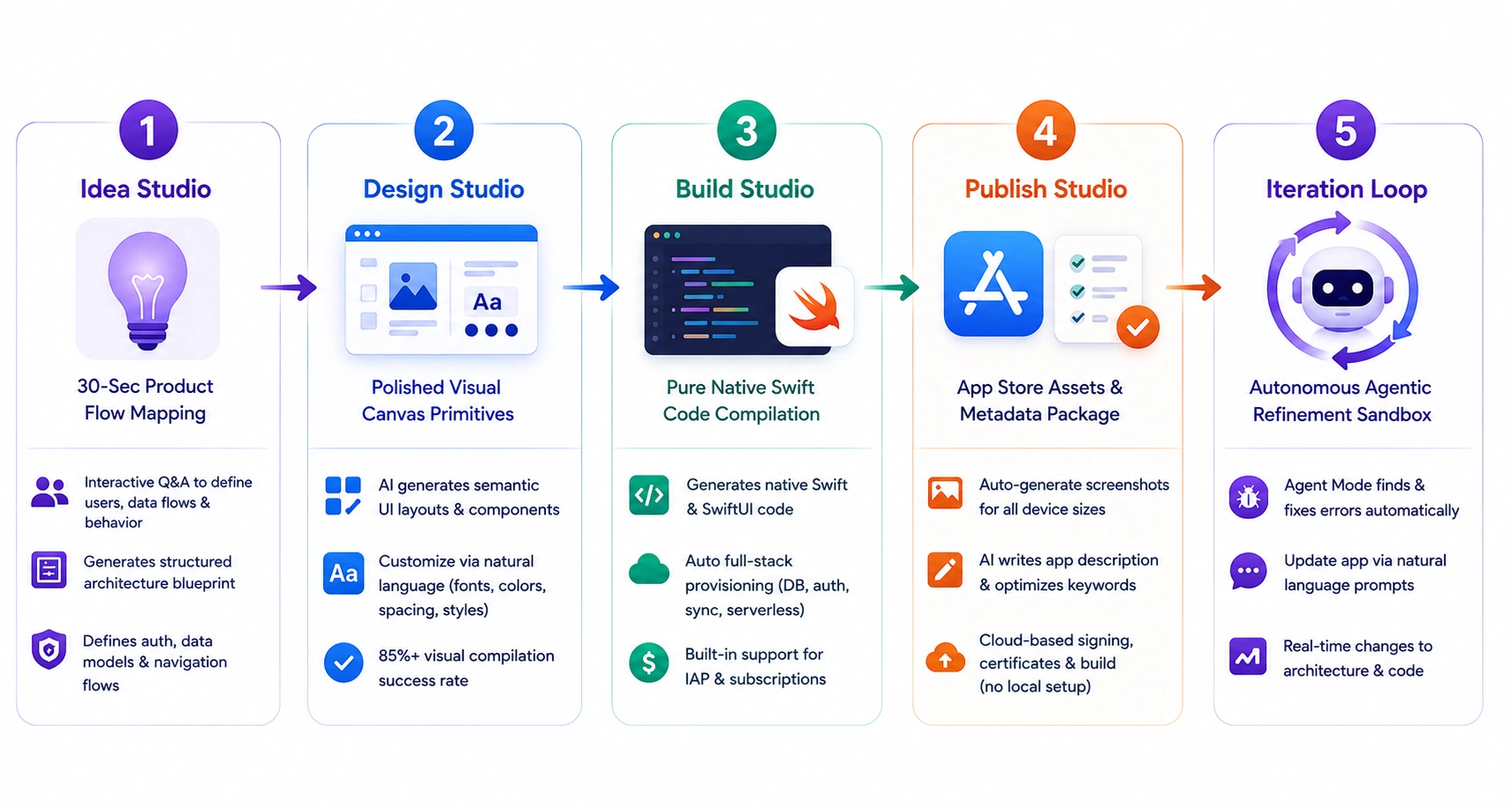
Stage 1: AI Product Planning
The production loop kicks off inside the Idea Studio, which replaces unstructured chat prompts with a guided discovery framework.
- Interactive System Mapping: When users enter a mobile app idea (e.g., “Build an offline spending tracker with recurring monthly budget sheets”), the platform guides them through interactive questions to define user roles, data flows, and system behavior before development begins.
- Structured Technical Blueprints: The platform converts user inputs into a structured application architecture blueprint, defining authentication, data management, and navigation flows before generating code.
Stage 2: Interface and UX Generation
With the structural plans locked in, the workspace transitions smoothly into the Brand Studio and Design Studio layers to handle the app’s visual identity.
- Component-Driven Canvas: The AI generates semantic UI layouts, designing flexible layout grids, interactive buttons, and custom components directly on a visual design canvas instead of using rigid drag-and-drop builders.
- Predictable Visual Primitives: Users can modify fonts, color themes, spacing, and button styles through natural language prompts, helping maintain consistent layouts with 85%+ visual compilation success rates.
Stage 3: Native App Development
Once the interface and user flows are approved, the platform moves into the Build Studio to compile the underlying application logic.
- Pure Native Swift Synthesis: Unlike hybrid or web-based builders, x1 generates native Swift and SwiftUI code optimized for Apple’s Human Interface Guidelines (HIG), delivering smooth performance at 60–120 FPS.
- Automated Full-Stack Provisioning: The platform automatically configures data storage, serverless synchronization, user authentication, and monetization (such as in-app purchases and subscriptions) from the initial product specifications.
Stage 4: App Store Launch Preparation
The development cycle bridges the gap between a completed build and a live digital asset by running the deployment files through the Publish Studio.
- Asset Pack Automation: The platform automates App Store preparation by generating multi-device screenshots, writing App Store descriptions, and organizing store keywords from a centralized workspace.
- Zero Local Desktop Drag: Instead of installing 25GB+ of Apple SDKs, desktop tools, and managing digital certificates, the platform performs these tasks in remote cloud sandboxes, eliminating local hardware overhead.
Stage 5: AI-Driven Iteration and Scaling
Maintaining and expanding the mobile application runs entirely inside an isolated, real-time testing sandbox.
- Closed-Loop Error Refinement: When runtime errors or dependency issues occur, Agent Mode analyzes the project, identifies the root cause, and autonomously rewrites faulty code, eliminating manual troubleshooting.
- Continuous Conversation Updates: Instead of editing code, users can update applications through natural language prompts (e.g., “Add an export to CSV button on the history screen”). The platform applies changes to the application architecture in real time.
Core Features Every AI iOS App Builder Should Include
The AI iOS app builder like x1 offer more than code generation, guiding users through planning, design, development, deployment, and continuous improvement using structured AI workflows that produce production-ready native iOS applications instead of incomplete prototypes or fragmented development outputs.
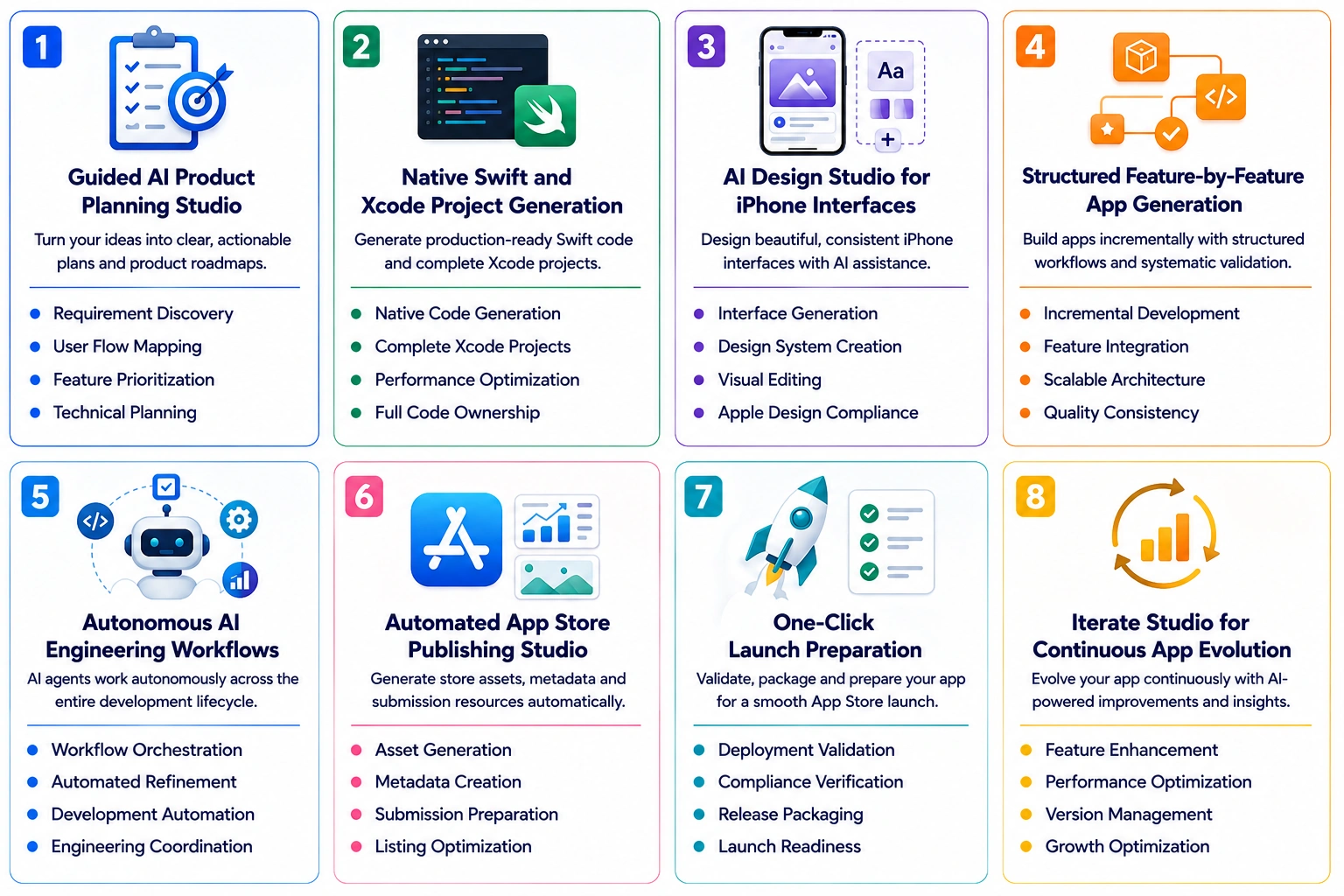
1. Guided AI Product Planning Studio
A guided AI product planning studio transforms raw ideas into structured development plans by defining business goals, user journeys, core features, and technical requirements. This ensures every project begins with a clear roadmap that minimizes development risks and improves execution quality.
- Requirement Discovery: Converts plain-English ideas into structured product requirements, feature specifications, and clearly defined development objectives.
- User Flow Mapping: Builds complete user journeys and navigation paths before interface design or application development begins.
- Feature Prioritization: Identifies essential MVP capabilities while organizing advanced features for future development milestones.
- Technical Planning: Creates scalable architecture recommendations, technology requirements, and implementation strategies before coding starts.
2. Native Swift and Xcode Project Generation
Generating production-ready Swift code and complete Xcode projects enables developers to build genuine native iOS applications instead of prototypes. This improves performance, maintainability, App Store compatibility, and scalability while preserving full ownership of the application source code.
- Native Code Generation: Produces clean Swift code following modern Apple development standards and architecture best practices.
- Complete Xcode Projects: Generates fully organized project structures ready for testing, customization, and App Store deployment.
- Performance Optimization: Delivers native execution speeds with efficient memory management and smooth iPhone user experiences.
- Full Code Ownership: Provides developers unrestricted access to source code for future customization and business flexibility.
3. AI Design Studio for iPhone Interfaces
An AI design studio accelerates interface creation by generating visually consistent layouts, reusable design systems, and intuitive user experiences. It helps teams produce professional iPhone interfaces aligned with Apple’s Human Interface Guidelines while reducing manual design effort.
- Interface Generation: Creates polished iPhone screens using intelligent layouts designed for usability and visual consistency.
- Design System Creation: Generates reusable components, typography, color palettes, and branding assets across the application.
- Visual Editing: Enables rapid interface refinements without rebuilding complete screens or disrupting existing design structures.
- Apple Design Compliance: Follows Human Interface Guidelines to improve usability and App Store acceptance readiness.
4. Structured Feature-by-Feature App Generation
Rather than relying on one-shot prompts, structured AI development builds applications incrementally through organized workflows and systematic validation. Each feature is generated, validated, and connected to produce scalable applications with improved code quality.
- Incremental Development: Builds application functionality through organized stages instead of generating complete applications in one prompt.
- Feature Integration: Connects navigation, APIs, business logic, and user interactions into a unified application architecture.
- Scalable Architecture: Organizes application modules for easier maintenance, future expansion, and efficient software updates.
- Quality Consistency: Validates generated functionality throughout development to improve reliability and reduce implementation errors.
5. Autonomous AI Engineering Workflows
Autonomous AI engineering workflows coordinate multiple development activities across the entire software lifecycle, including planning, coding, testing, and refinement. This reduces manual effort while accelerating development speed and consistency.
- Workflow Orchestration: Coordinates multiple AI tasks across planning, development, testing, refinement, and deployment activities.
- Automated Refinement: Continuously improves generated code through intelligent validation and iterative engineering processes.
- Development Automation: Reduces repetitive engineering work by automating common software development operations across the project.
- Engineering Coordination: Synchronizes multiple development stages to maintain consistency throughout the complete application lifecycle.
6. Automated App Store Publishing Studio
Publishing automation simplifies one of the most time-consuming stages of iOS development by generating App Store assets, metadata, and submission resources. This accelerates release preparation and improves compliance with Apple’s publishing requirements.
- Asset Generation: Creates screenshots, promotional graphics, icons, and branding materials optimized for App Store listings.
- Metadata Creation: Generates app descriptions, keywords, feature highlights, and optimized listing information automatically.
- Submission Preparation: Organizes publishing resources required for smoother App Store review and approval processes.
- Listing Optimization: Improves application discoverability through well-structured store content and optimized presentation assets.
7. One-Click Launch Preparation
A launch preparation system validates application readiness by checking configurations, compliance, packaging, and release requirements before deployment. This reduces launch errors and ensures smoother App Store submissions.
- Deployment Validation: Verifies application configuration, project settings, and release readiness before production deployment.
- Compliance Verification: Checks essential App Store submission requirements to minimize approval delays and rejections.
- Release Packaging: Prepares optimized production builds for distribution through Apple’s official publishing ecosystem.
- Launch Readiness: Identifies critical deployment issues before application submission to improve release confidence.
8. Iterate Studio for Continuous App Evolution
Continuous iteration enables applications to evolve after launch through AI-assisted improvements, performance optimization, and feature expansion. This helps businesses stay competitive and continuously enhance user experience.
- Feature Enhancement: Introduces new capabilities based on evolving business requirements and user feedback insights.
- Performance Optimization: Improves application responsiveness, efficiency, and overall user experience after deployment.
- Version Management: Supports continuous updates while maintaining application stability across future software releases.
- Growth Optimization: Uses analytics and product insights to guide long-term application improvements and scaling strategies.
How We Can Develop an AI iOS App Builder like x1
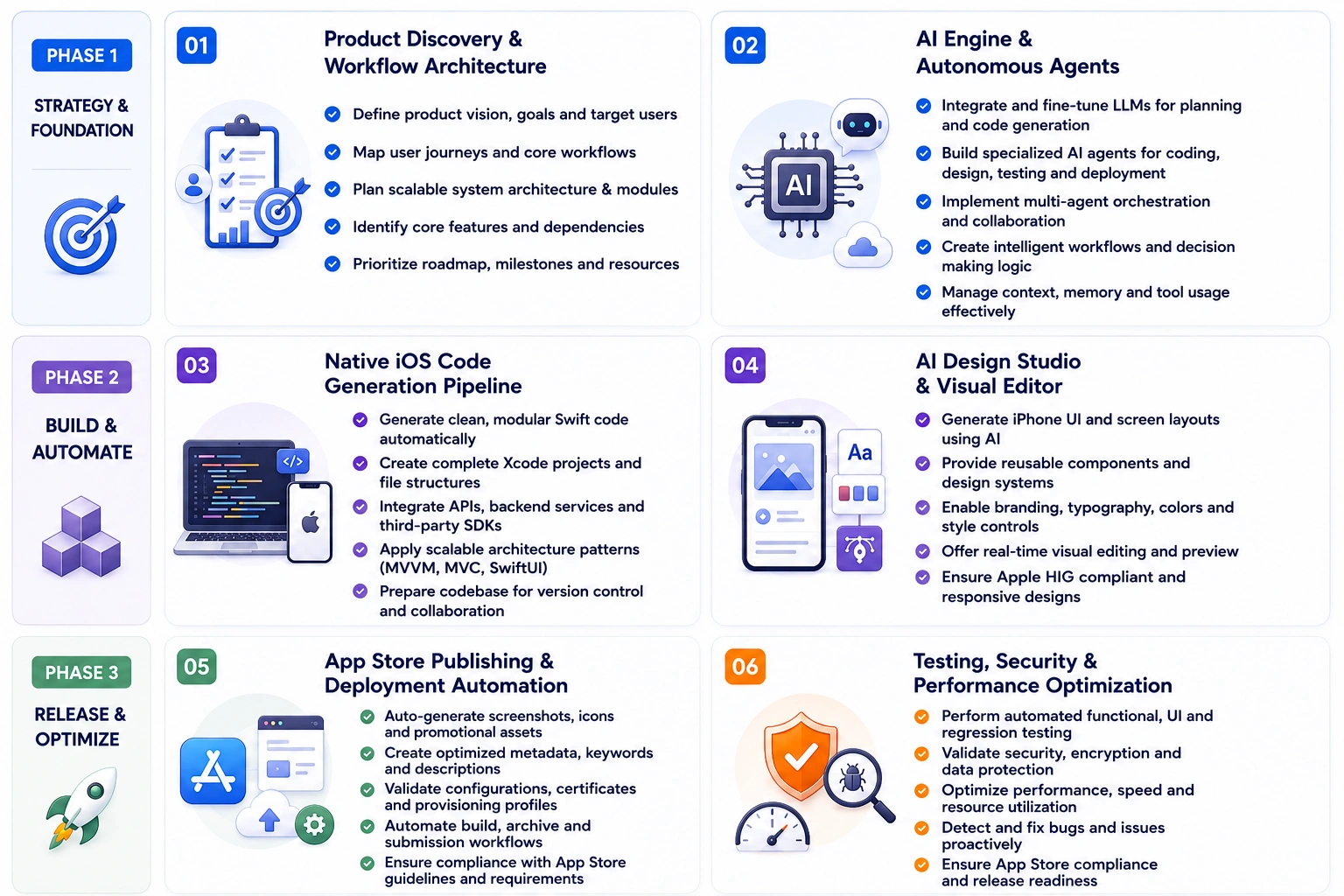
Building an AI iOS app builder requires more than integrating AI models. It involves designing intelligent workflows, native development pipelines, autonomous engineering systems, and scalable infrastructure that work together to transform ideas into production-ready iPhone applications with consistent quality and efficiency.
1. Product Discovery and Workflow Architecture
We begin by understanding the product vision, target users, business goals, and development workflow. Our team designs a scalable architecture that defines AI interactions, user journeys, system modules, and platform capabilities before implementation begins.
- Product Vision Alignment: Defines clear business objectives, target audience needs, and expected outcomes to guide development decisions effectively.
- User Journey Mapping: Outlines end-to-end user interactions, ensuring seamless navigation, intuitive flows, and meaningful engagement across the platform.
- System Architecture Planning: Establishes scalable backend, frontend, and AI integration layers to support long-term growth and performance.
- Workflow Definition Strategy: Structures how AI agents, user inputs, and system processes interact throughout the application lifecycle.
- Feature Prioritization Framework: Identifies core functionalities and development phases to ensure efficient resource allocation and faster time-to-market.
2. AI Engine and Autonomous Agent Development
We carefully select AI models, agent frameworks, mobile technologies, backend infrastructure, and cloud services that enable scalable custom AI agent development while delivering the performance, flexibility, and reliability required for production-ready AI app development platforms.
To give you a clear view of how these systems work together, here’s a breakdown of the core AI technologies powering the platform and their business impact:
| AI Technology | Recommended Technology | Role in the Platform | Why It Is Important |
| Large Language Models | OpenAI GPT-4, Claude, Gemini | Interpret user prompts, generate product plans, write Swift code, and explain application logic | Serves as the primary reasoning engine for the development workflow. |
| Swift Code Generation Agents | Custom LLM pipelines, Codex-based systems | Generate Swift files, project structures, architecture, and reusable components | Produces production-ready Xcode projects instead of prototypes or web wrappers. |
| Design Intelligence Models | Figma AI, Uizard, Stable Diffusion UI models | Generate UI layouts, design systems, branding, and screen hierarchies | Accelerates interface design while maintaining visual consistency. |
| Multi-Agent Orchestration Framework | LangChain, CrewAI, AutoGen | Coordinate planning, design, coding, debugging, testing, and deployment agents | Enables structured multi-agent development workflows. |
| App Store Automation AI | Fastlane, App Store Connect API, custom scripts | Automate screenshots, metadata, keywords, release assets, and app submissions | Simplifies App Store publishing and reduces manual release effort. |
3. Native iOS Code Generation Pipeline
We develop a native code generation pipeline that converts structured product requirements into production-ready Swift code and organized Xcode projects. This ensures generated applications remain scalable, maintainable, and fully compatible with Apple’s ecosystem.
- Automated Code Structuring: Converts AI-generated logic into clean, modular Swift code aligned with Apple development standards and best practices.
- Xcode Project Generation: Builds fully configured project files with dependencies, assets, and configurations ready for immediate development or deployment.
- Architecture Pattern Implementation: Applies scalable patterns like MVC or MVVM to ensure maintainability and future feature expansion.
- API Integration Handling: Connects backend services, third-party APIs, and data sources seamlessly within the generated application structure.
- Version Control Readiness: Prepares codebases for Git integration, enabling collaborative development, tracking changes, and managing releases efficiently.
4. AI-Powered Design Studio and Visual Editor
Our team builds an intelligent design environment where users can generate, customize, and refine iPhone interfaces visually. This combines AI-assisted UI creation with reusable design systems, branding controls, and interactive editing capabilities.
- AI-Powered UI Generation: Creates interface layouts based on user prompts, ensuring visually appealing and functional designs instantly.
- Customization Flexibility: Allows users to modify colors, typography, layouts, and components to match brand identity and preferences.
- Reusable Design Systems: Establishes consistent UI components and styles that can be applied across multiple screens and features.
- Real-Time Visual Editing: Enables instant preview and adjustments, helping users refine designs without technical complexity.
- Responsive Layout Optimization: Ensures designs adapt seamlessly across different iPhone screen sizes and orientations.
5. App Store Publishing and Deployment Automation
We automate the complete publishing workflow by generating App Store assets, preparing metadata, validating release configurations, and streamlining deployment processes. This significantly reduces manual work while accelerating application launch readiness.
- App Store Asset Generation: Automatically creates screenshots, icons, and promotional visuals aligned with Apple guidelines and branding requirements.
- Metadata Optimization Strategy: Generates titles, descriptions, and keywords to improve app discoverability and search rankings.
- Release Configuration Validation: Ensures all technical settings, certificates, and provisioning profiles are correctly configured before submission.
- Continuous Deployment Integration: Enables automated build and release pipelines for faster updates and version management.
- Compliance and Review Preparation: Prepares applications to meet Apple’s review standards, reducing rejection risks and delays.
6. Testing, Security, and Performance Optimization
Before deployment, we implement comprehensive testing, security validation, and performance optimization to ensure every generated application meets enterprise-quality standards, protects user data, delivers smooth experiences, and satisfies App Store expectations.
- Automated Testing Frameworks: Conducts functional, UI, and regression testing to identify issues early and ensure application reliability.
- Security Validation Measures: Implements data protection, encryption, and secure authentication to safeguard user information and system integrity.
- Performance Optimization Techniques: Enhances app speed, responsiveness, and resource usage for smooth user experiences across devices.
- Bug Detection and Resolution: Identifies and fixes errors efficiently to maintain application stability and reduce post-launch issues.
- App Store Compliance Testing: Verifies adherence to Apple guidelines, ensuring successful approval and seamless deployment.
Cost to Build an AI iOS App Builder Like x1
The development cost of an AI iOS app builder depends on its AI capabilities, workflow complexity, native iOS generation engine, automation features, and scalability requirements. The final AI iOS app builder like x1 development investment varies based on the platform’s scope, technology stack, and level of product maturity.
Building an AI-native platform involves multiple development phases that contribute to product quality, scalability, and business value. Below is an estimated cost breakdown aligned with the development process.
| Development Phase | Estimated Cost (MVP → Enterprise) | What the Phase Covers |
| Product Discovery & Planning | $8,000 – $15,000 | Defines product vision, business requirements, user journeys, technical architecture, feature roadmap, and development strategy. |
| UI/UX Design & Prototyping | $10,000 – $20,000 | Creates design systems, user flows, interactive prototypes, branding assets, and polished iOS interface designs. |
| AI Engine & Agent Development | $35,000 – $80,000 | Develops LLM integrations, autonomous agents, orchestration logic, prompt workflows, reasoning systems, and AI infrastructure. |
| Native Swift Generation Engine | $30,000 – $70,000 | Builds production-ready Swift generation pipelines, Xcode project creation, reusable components, and scalable application architecture. |
| Backend & Cloud Infrastructure | $20,000 – $45,000 | Develops APIs, authentication, databases, cloud services, storage, integrations, and scalable backend architecture. |
| App Store Automation System | $10,000 – $25,000 | Implements publishing automation, metadata generation, screenshot creation, release workflows, and deployment preparation tools. |
| Testing, Security & Optimization | $12,000 – $25,000 | Performs functional testing, security hardening, performance optimization, bug fixing, and App Store compliance validation. |
| Deployment & Post-Launch Support | $8,000 – $20,000 | Handles production deployment, monitoring, analytics integration, maintenance, updates, and continuous platform improvements. |
| Total Estimated Cost | $120,000 – $550,000+ | Combined cost of all development phases based on platform level (MVP to Enterprise) |
Note: The total estimated costs vary widely depending on whether you build an MVP or enterprise solution, influenced by AI complexity, platform scale, integrations, infrastructure needs, and automation level across development lifecycle.
Development Cost According to Platform Level
The overall AI iOS app builder like x1 investment also depends on the type of platform you intend to build. Businesses typically begin with an MVP before expanding into more advanced AI capabilities and enterprise-grade automation.
| Platform Level | Estimated Cost | Features Included |
| MVP | $120,000 – $180,000 | AI product planning, native Swift generation, basic UI generation, Xcode export, core App Store publishing features, essential backend services. |
| Mid-Level | $180,000 – $300,000 | Multi-agent workflows, advanced design studio, publishing automation, collaboration tools, analytics dashboard, integrations, enhanced AI reasoning capabilities. |
| Enterprise | $300,000 – $550,000+ | Autonomous AI engineering, enterprise security, advanced orchestration, monetization modules, scalable infrastructure, analytics, governance, and complete lifecycle management. |
Why MVP Cost Is Still High
Even at the MVP stage, building an AI iOS app builder requires significant investment due to the complexity of combining AI systems with production-ready mobile development capabilities. Unlike traditional MVPs, this type of platform must deliver real, usable outputs from day one.
- Core AI Infrastructure Is Non-Negotiable: Even a basic version requires LLM integration, prompt engineering, and orchestration logic to generate meaningful app outputs.
- Native Code Generation Complexity: Generating clean, functional Swift code and exportable Xcode projects demands advanced engineering and extensive validation.
- End-to-End Workflow Requirements: The MVP must cover the full journey from idea input to app generation, making it inherently more complex than feature-limited products.
- Backend & Cloud Setup: Authentication, storage, APIs, and scalable infrastructure are essential even at early stages to support real users.
- Quality & App Store Readiness: Outputs must meet Apple’s standards, requiring testing, optimization, and compliance checks from the start.
Because of these foundational requirements, MVP development focuses on building a strong, scalable core rather than a minimal feature set, which naturally increases initial costs.
Note: Choosing the right platform level depends on your business objectives, target users, and long-term product roadmap. Many successful AI platforms launch with an MVP and gradually introduce advanced AI capabilities as user adoption grows.
Factors That Influence Development Budget
Several real-world cost drivers directly impact the overall AI iOS app builder like x1 development and operational expenses These factors go beyond theoretical considerations and reflect actual spending patterns observed during development and scaling.
- AI API Usage & Token Consumption: Costs scale with token usage, prompt length, and multi-agent workflows, typically ranging from $1,000–$10,000+ per month.
- Cloud Hosting & Infrastructure Scaling: AWS, Google Cloud, or Azure hosting costs depend on compute, storage, bandwidth, and autoscaling, ranging from $500–$5,000+ per month.
- Third-Party Service Subscriptions: Services such as Firebase/Auth0, Stripe, analytics platforms, CI/CD pipelines, and monitoring tools typically cost $200–$2,000 per month.
- Continuous Maintenance & Feature Updates: Ongoing bug fixes, performance optimization, OS compatibility updates, and feature enhancements typically require 15–25% of the initial development cost annually ($20,000–$80,000 per year, depending on platform size).
- Security, Data Privacy & Compliance Requirements: Implementing encryption, secure authentication, GDPR compliance, and data protection measures typically adds $5,000–$20,000 to the overall project budget.
How AI iOS App Builders Make Money
AI iOS app-building platforms make money through premium high-tier SaaS subscriptions, usage-based generation credits, and automated App Store submission fees.
Unlike generic web-based prompt tools, native iOS AI platforms structure their business models around the entire lifecycle of an independent app business, from layout design to active App Store deployment.
| Revenue Stream | What It Covers | Why It Matters |
| Subscriptions (SaaS) | Monthly/annual plans with feature tiers | Predictable recurring revenue (~$99–$299/mo tiers) |
| Usage-Based Credits | AI prompts, simulations, generation tasks | Scales with user activity (e.g., 100 free credits + paid packs) |
| Publishing Services | App Store submission, assets, automation | Removes friction for non-technical users (often bundled or $10–$50 per submission) |
| BaaS Markups | Hosting, databases, backend infrastructure | Monetizes end-user app usage (usage-based billing on storage, bandwidth, and requests) |
With this high-level breakdown in mind, let’s explore each revenue stream in more detail to understand how AI iOS app builder like x1 platform structure pricing, scale usage, and maximize long-term monetization across different user segments.
1. Tiered Subscription Model (SaaS)
Native iOS development requires continuous maintenance, cloud processing, and framework updates. Most AI iOS app builders utilize aggressive monthly or annual pricing tiers instead of cheap developer tools.
- Builder Tier (~$66 to $99/month): Aimed at indie hackers or solo creators looking to move past simple chat-bot experimentation into a real visual canvas. This maps out screens, designs custom workflows, and handles basic feature generation.
- Pro Tier (~$133 to $199/month): Geared toward founders ready to launch live products. This tier typically unlocks the full build engine, seamless asset compiling, and advanced integration.
- Max Tier (~$200 to $299/month): Built for power users, serial creators, or small agencies managing multiple apps simultaneously, offering massive historical checkpoints and priority background queuing.
2. Usage-Based AI Tokens & Simulation Credits
Compiling native code, handling image generation, and testing layouts on remote devices is incredibly resource-heavy.
- Prompt Metering: Users usually get a small allocation of trial credits (e.g., 100 free credits). Beyond that, heavy iteration requires purchasing ongoing usage packs.
- Cloud Simulation Hours: Running virtual iPhone simulators in the cloud so non-technical users can test tap targets and user flows consumes expensive infrastructure, which is bundled into the paid limits.
3. Value-Add Launch & Publishing Services
A massive bottleneck for non-technical creators is navigating Apple’s ecosystem. AI app-building platforms monetize convenience features that bridge this gap.
- One-Click Submissions: Automated handling of bundle IDs, certificates, and code signing required to push builds to TestFlight or the App Store.
- Asset Generation: Charging extra or gatekeeping premium tiers for marketing utilities like automatic App Store listing text, localization, and mock screenshot generation.
4. Backend-as-a-Service (BaaS) Markups
Real production apps require user accounts, authentication, data persistence, and native payments. Many AI iOS app builders partner with infrastructure providers (like Supabase or Firebase) or operate their own backend infrastructure. They mark up the hosting, database rows, and cloud data bandwidth consumed by end users.
Challenges During AI iOS App Builder Like x1 Development
The AI iOS app builder like x1 development involves solving complex engineering challenges beyond traditional software development. Teams must ensure AI reliability, native code quality, workflow orchestration, and App Store compliance while maintaining scalability, performance, and a seamless user experience.
1. Production-Ready Swift Code Generation
Challenge: AI-generated Swift code may contain architectural inconsistencies, inefficient logic, or compatibility issues that prevent reliable deployment as production-ready iOS applications.
Solution: Our developers implement structured code generation pipelines, architecture templates, automated validation, and human-in-the-loop quality reviews to ensure every generated Swift project follows Apple best practices and remains scalable, maintainable, and deployment-ready.
2. Coordination of Multiple AI Agents
Challenge: Multiple AI agents handling planning, design, coding, and publishing can produce inconsistent outputs without proper orchestration and shared contextual understanding.
Solution: We build centralized orchestration frameworks with shared memory, task sequencing, context synchronization, and validation checkpoints, ensuring every AI agent collaborates efficiently throughout the complete application development lifecycle.
3. App Store Compliance Across Generated Apps
Challenge: Automatically generated applications may violate Apple’s submission guidelines, privacy requirements, or Human Interface Guidelines, increasing rejection risks during App Store review.
Solution: Our team embeds compliance validation, metadata verification, interface checks, and automated publishing safeguards throughout development, ensuring generated applications meet Apple’s latest technical and review requirements before submission.
4. AI Infrastructure Cost Management
Challenge: Large language models, code generation, cloud infrastructure, and design generation significantly increase operational costs as user activity and AI requests grow.
Solution: We optimize AI model selection, intelligent routing, response caching, token management, and cloud resource allocation to reduce infrastructure expenses while maintaining fast performance and consistent user experiences at scale.
Why Choose Idea Usher for AI iOS App Builder Development
IdeaUsher operates as an elite product engineering powerhouse and digital transformation catalyst, leveraging 11+ years of hyper-focused industry mastery to launch disruptive software ecosystems across 50+ countries. Fueled by an intellectual brain trust of 250+ niche developers, a portfolio of 1,000+ deployed assets, and a top-tier 4.9/5 Clutch credential, we build high-performing software generation networks from scratch.
We skip generic, off-the-shelf templates to handcraft premium SaaS platforms optimized with modular multi-studio AI generation pipelines, canvas-driven visual design editors, and automated native iOS compilation engines to safely expand your creation capabilities and capture undisputed market dominance.
Why Enterprises Partner With Us
Global SaaS brands and corporate networks choose us to pioneer next-generation text-to-iOS development engines because we turn chaotic prompt loops into a highly governed, consumer-ready application production studio.
- Safe and Secure App Testing: We build an isolated virtual sandbox into your platform. This allows your users to instantly test and preview their newly generated apps in real time without any risk of slowing down or crashing your main servers.
- Smart, Error-Free App Creation: Our system uses advanced filters to feed clean, well-organized instructions to the AI. This keeps the AI focused, dramatically speeds up how fast it writes the software, and stops it from making silly coding mistakes.
- Seamless Screen-to-Code Sync: We create a smart two-way bridge between the visual design tool and the actual code. If a user moves a button on the visual screen, the underlying code updates instantly without breaking anything.
- Ready-made Features and Easy Payments: We build instant setup blocks into your platform. This means any app generated by your users automatically comes with secure member logins, databases, and built-in Apple Pay options so they can make money right away.
Ready to revolutionize the mobile software industry with a guided, natural-language AI iOS app studio? Partner with IdeaUsher’s principal generative AI and mobile software architects to map your product build today.
Conclusion
AI-native iOS app builders are redefining how businesses transform ideas into production-ready applications by combining structured AI workflows with native Swift development and App Store automation. As demand for faster product launches continues to grow, investing in a platform that delivers scalability, code ownership, and enterprise-grade performance can create a significant competitive advantage. At IdeaUsher, our AI specialists and elastic engineering teams help businesses design, develop, and scaleAI iOS app builder like x1 tailored to their long-term product vision and growth goals.
FAQs
A.1. A competitive platform should include AI product planning, native Swift generation, design studios, autonomous AI workflows, App Store publishing automation, launch preparation, and continuous post-launch iteration capabilities.
A.2. Modern AI iOS app builders can generate production-ready Swift code and Xcode projects when supported by structured workflows, validation systems, and quality assurance processes that ensure scalability and App Store compatibility.
A.3. The AI iOS app builder like x1 development costs generally range from $120,000 for an MVP to over $550,000 for an enterprise platform, depending on AI functionality, infrastructure, integrations, automation, and long-term scalability requirements.
A.4. Most platforms generate recurring revenue through subscription plans, usage-based AI credits, App Store publishing services, backend infrastructure markups, and premium features designed for professional developers and growing businesses.