

Key Takeaways
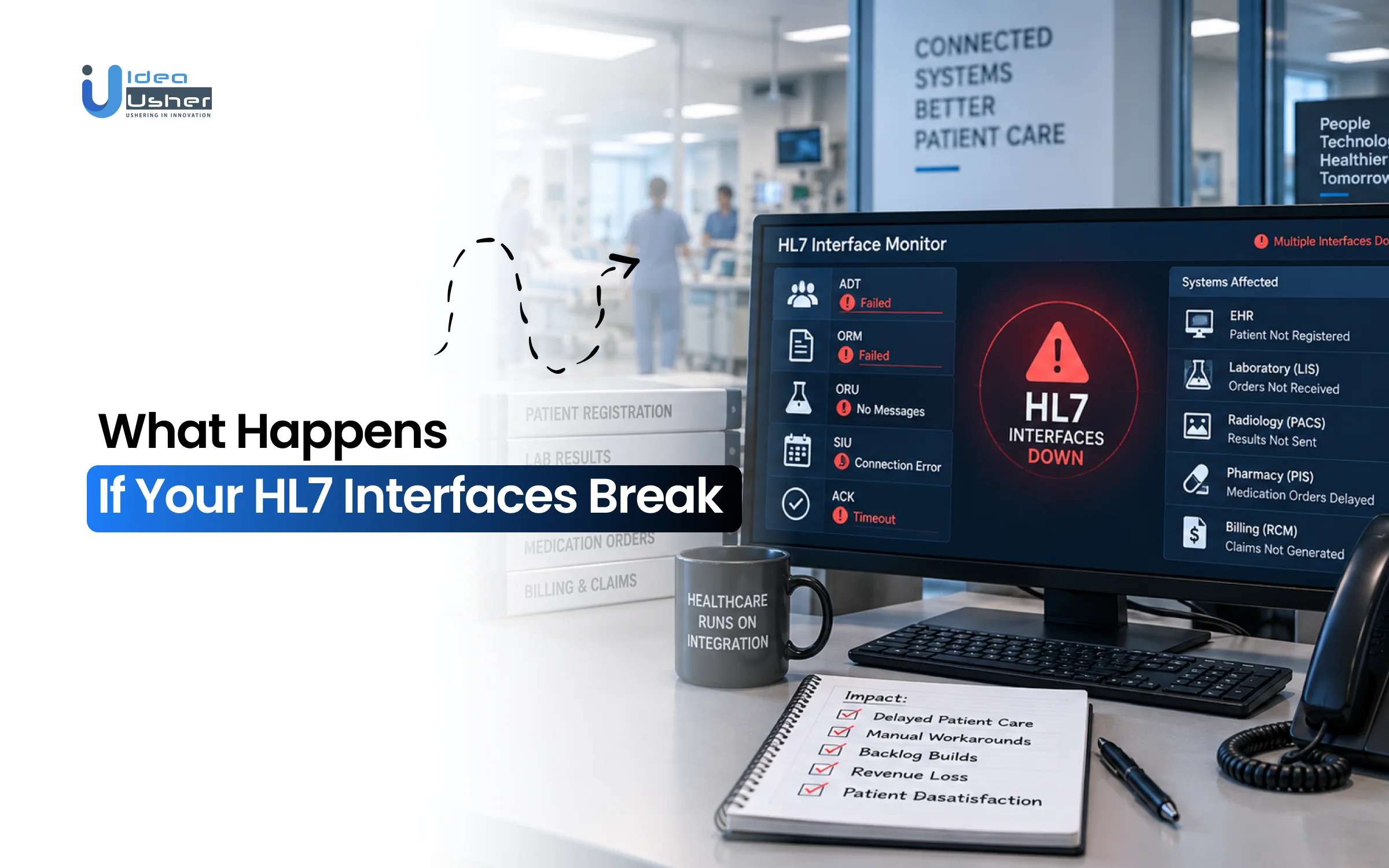
- HL7 interface failures can delay, reject, duplicate or send messages to the wrong place, affecting clinical and administrative work.
- Common broken HL7 interface warning signs include messages that get stuck, queues that keep getting longer, no ACKs coming back, transactions that get rejected, messages that show up more than once and data that goes to the wrong place.
- These HL7 interface problems can affect admissions, lab results, medication orders, radiology orders, clinical notes and billing and can eventually put patient safety in danger.
- Missing HL7 ACKs can cause blocked queues, repeated retries and duplicate transactions, so proper acknowledgments, deduplication and recovery processes are important.
- HL7 solutions can range from $10K–$30K per year for open-source support to $100K–$10M+ per year for enterprise platforms, while custom platforms may cost $100K–$500K+.
The HL7 interface can fail silently at a time when the user has not yet noticed that patient data is no longer being transferred as it should. An HL7 interface failure can cause messages to be delayed, rejected, duplicated or routed to the wrong place, which turns a technical problem into a disruption in clinical and administrative processes. As healthcare systems become connected, reliability of an HL7 interface is now a core need instead of a minor IT issue.
Traditional monitoring often focuses on whether an interface is technically online. That is no longer enough. Healthcare organizations need clear message tracking, automatic error alerts and recovery processes to spot problems early and fix them before they affect other systems. The opportunity is to build interoperability infrastructure that can detect problems early and recover without prolonged manual intervention.
In this blog, we will talk about what happens when HL7 interfaces break, common failure points, operational and financial consequences, detection methods, recovery strategies and how to build more resilient HL7 integration infrastructure that prevents recurring failures, speeds recovery, and maintains reliable data flow across systems.
What Happens When an HL7 Interface Fails?
An HL7 interface failure is rarely as simple as a severed network cable or an offline server. In modern clinical environments, a failure often occurs while the systems themselves appear fully operational.
When an interface breaks down, data can be delayed, rejected, duplicated, misrouted, or trapped indefinitely in processing backlogs. A message might leave an Electronic Health Record (EHR) without issue, only to fail silently during field transformation, drop out of sequential order, or bounce back with an unhandled rejection.
Because clinical care depends on real-time data exchange, an interface failure immediately disrupts downstream operations. It leads to the central diagnostic question clinical IT teams face during an incident: Did the interface fail, or did the data flow fail?
A socket connection may report “green” while the clinical data payload itself is corrupted, stalled, or rejected, leaving clinicians to work with incomplete or out-of-date patient records.
A. Healthcare Interoperability Is Becoming a Larger Market
The need for reliable healthcare data exchange is growing alongside the expansion of digital healthcare systems. Grand View Research estimates that the global healthcare interoperability solutions market was valued at $3.4 billion in 2023 and is projected to reach $8.57 billion by 2030, growing at a 14.15% CAGR from 2024 to 2030.
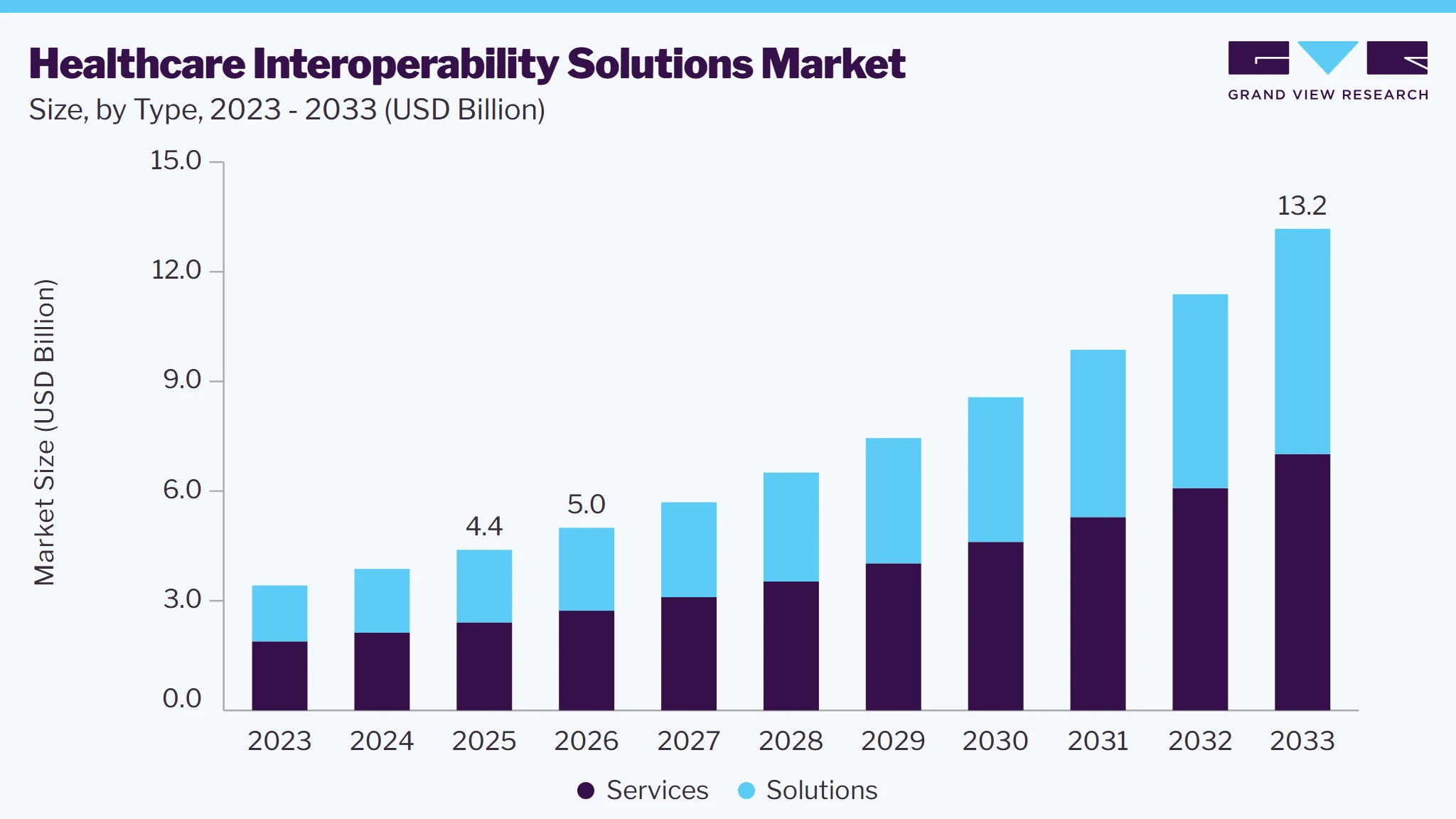
This growth reflects the need to connect EHRs, clinical systems, and healthcare organizations reliably. The average health system already runs 18 different EMR vendors and most organizations manage 10 to 50 active interfaces at once, so interface reliability, monitoring, and recovery now matter across far more connected workflows.

B. Where an HL7 Failure Can Interrupt Data Flow
HL7 data can encounter problems at different stages of a transaction. Looking at the complete journey helps identify where a breakdown begins and how it affects connected systems.
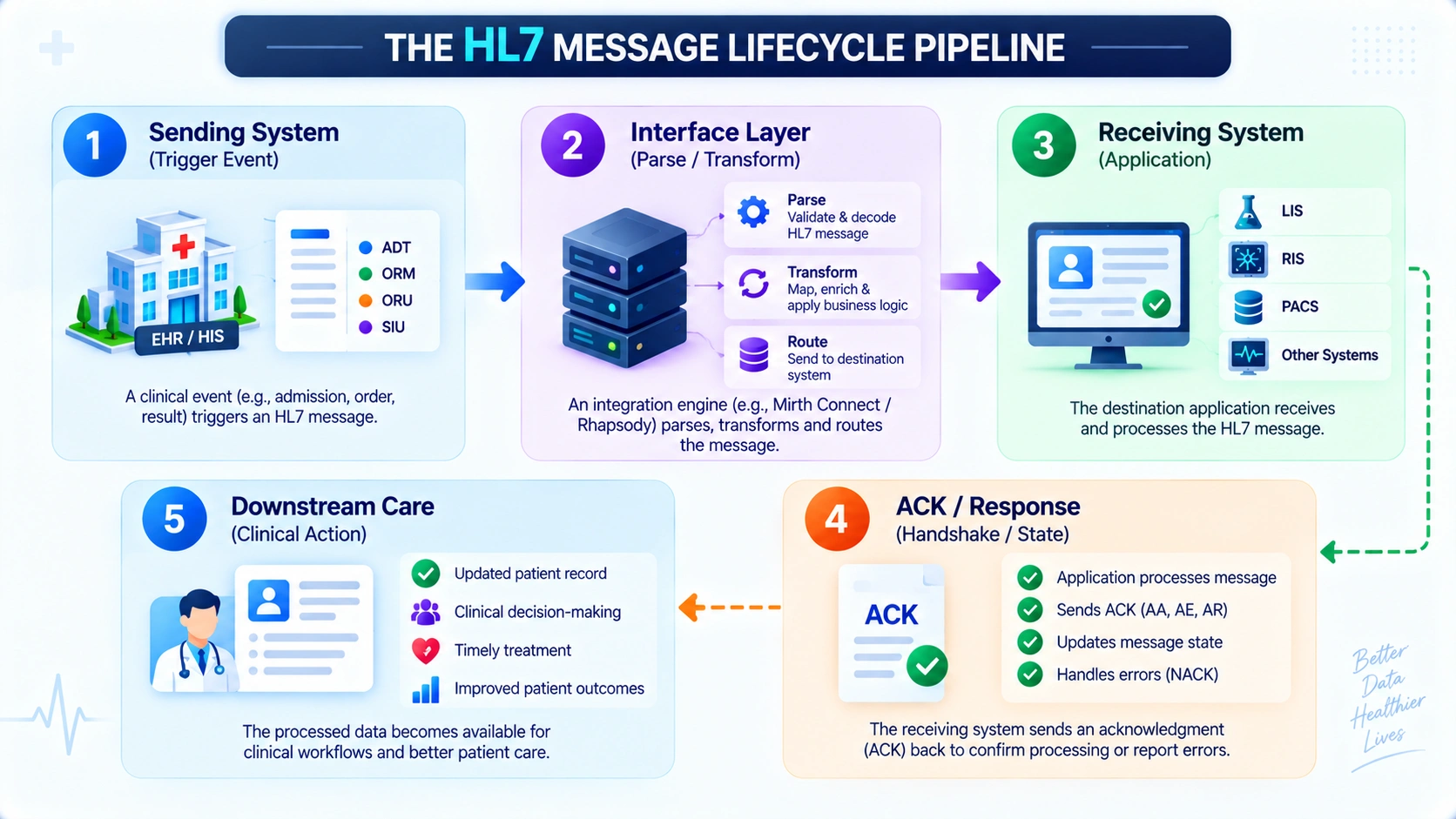
Understanding interface breakdowns requires tracing the end-to-end journey of an HL7 transaction across five potential points of failure:
1. The Sending System (Trigger Event)
A clinician admits a patient, places an order or signs a chart. If the sending system’s internal outbound queue stalls, uses incorrect message trigger logic, or encounters database locking, the HL7 payload is never assembled or dispatched.
2. The Interface Engine Layer (Transport & Transformation)
As the message moves via Minimal Lower Layer Protocol (MLLP) or HTTPS over a VPN, it passes through an integration engine (e.g., Mirth Connect, Rhapsody). Failures here stem from parsing errors on non-standard delimiters, unhandled custom Z-segments, script exceptions or thread pool exhaustion during volume spikes.
3. The Receiving System (Ingestion & Storage)
The destination endpoint (such as a Laboratory Information System or PACS) receives the message. If a required field is missing (e.g., missing patient identifier PID-3 or clinician ID), the receiving application’s database constraint rejects the transaction.
4. The Acknowledgment Loop (ACK / NACK)
The receiving system sends an acknowledgment back. If network latency triggers an MLLP timeout, or if the interface engine misinterprets a negative acknowledgment (NACK), the sending system may enter an infinite retry loop or silently stop sending further messages.
5. Downstream Clinical Workflows
The data is stored, but downstream routing rules fail. If observation results (OBX) are filed under an unindexed order number, the data exists in the database but never surfaces in the physician’s active review chart.
C. Why One Failed Interface Can Affect Multiple Workflows
In healthcare infrastructure, systems do not operate in isolation; they exist in an interdependent web. A single interface failure creates a cascade of operational breakdowns across multiple clinical and administrative departments:
| Failed Interface Feed | Upstream Root Event | Downstream Operational Impact |
| ADT (Patient Demographics) | Admission (A01) or Bed Transfer (A02) fails to process. | Ancillary systems miss patient records, causing incorrect bed assignments, failed barcode validation, and billing rejections from inaccurate demographics. |
| ORM (Clinical Orders) | Order message (O01) drops between EHR and LIS/RIS. | Diagnostic tests are delayed, specimen labels fail to print, and radiologists may lack clinical requisition details before scans. |
| ORU (Observation Results) | Diagnostic result (R01) stalls or abnormal flags drop. | Critical results and abnormal alerts may not reach physicians, delaying treatment decisions, discharge clearances, and increasing emergency department boarding. |
| SIU (Scheduling) | Appointment modification (S14 or S15) fails to sync. | Clinics double-book resources, patients arrive for canceled procedures, and prior-authorization windows expire because appointment dates fail to synchronize correctly. |
| MDM (Clinical Notes) | Operative notes or discharge summaries fail to transmit. | Post-acute facilities lack surgical histories, while care teams lose visibility into specialist consultations and other important clinical documentation. |
A failure in a single baseline feed most notably an ADT interface compromises every downstream departmental system relying on that patient’s identity.
What appears to IT as a simple message parsing failure translates into delayed treatments, compromised patient safety, and administrative gridlock on the hospital floor.
What Does an HL7 Interface Failure Look Like?
When an HL7 interface breaks, it rarely announces itself with a universal system crash. Instead, failures manifest as discrete operational anomalies across monitoring consoles, message queues, and clinical dashboards.
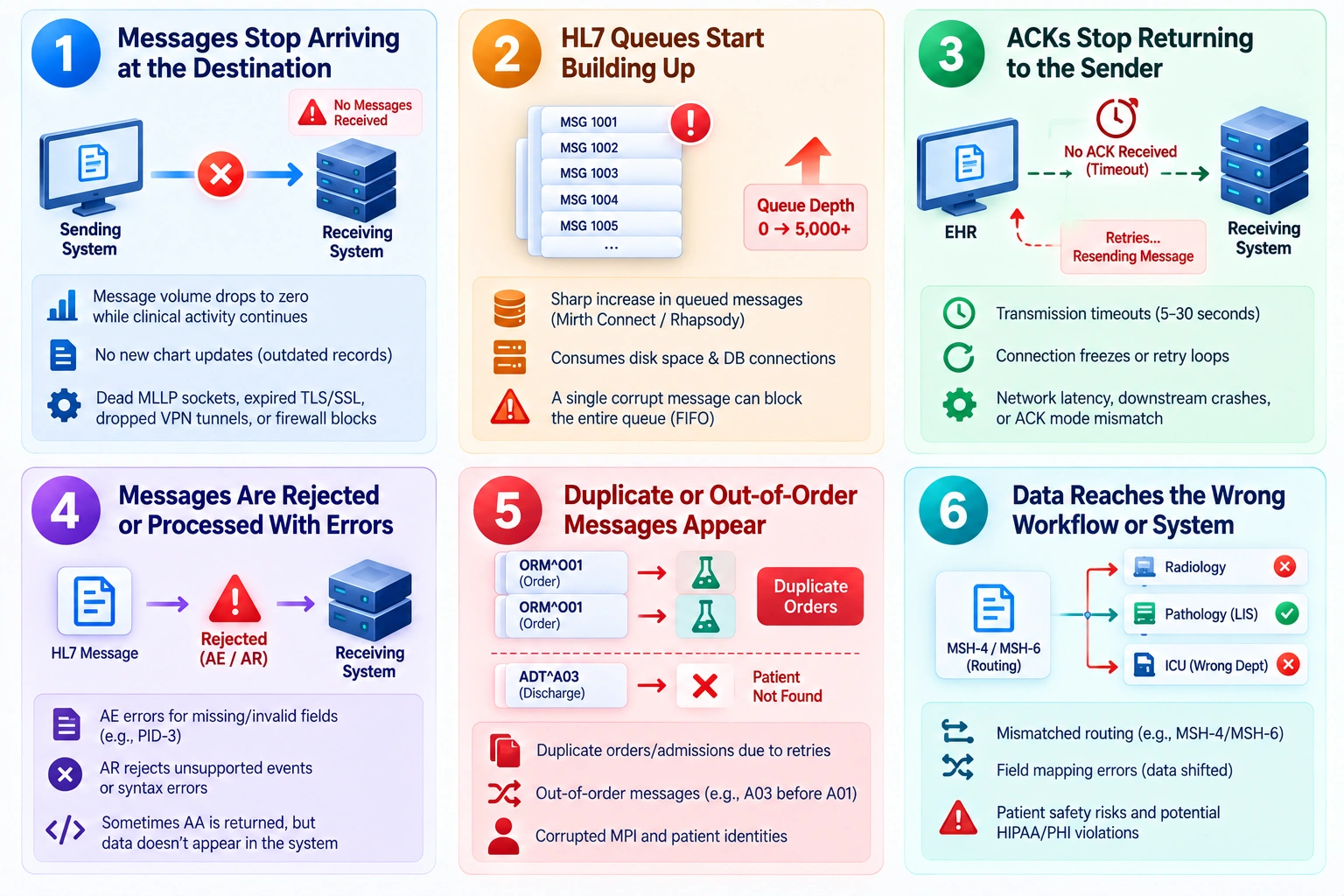
Recognizing these observable symptoms early allows healthcare IT and integration teams to isolate breakdowns before they interrupt patient care or corrupt hospital records.
1. Messages Stop Arriving at the Destination
The most immediate operational symptom is the sudden cessation of inbound traffic at a receiving system:
- Flatlined ingestion metrics: Message receipt volume drops to zero while clinical activity such as ER admissions or lab processing, continues normally.
- Missing chart updates: Downstream clinical systems stop populating new patient charts, leaving clinicians with blank or outdated records.
- Common underlying causes: Dead MLLP TCP/IP sockets, expired TLS/SSL certificates, dropped IPsec VPN tunnels, or firewall changes silently blocking traffic between facilities.
2. HL7 Queues Start Building Up
Queue growth is an early warning that an interface is struggling to keep pace with incoming transactions. Monitoring these changes helps teams spot performance problems before they affect connected systems.
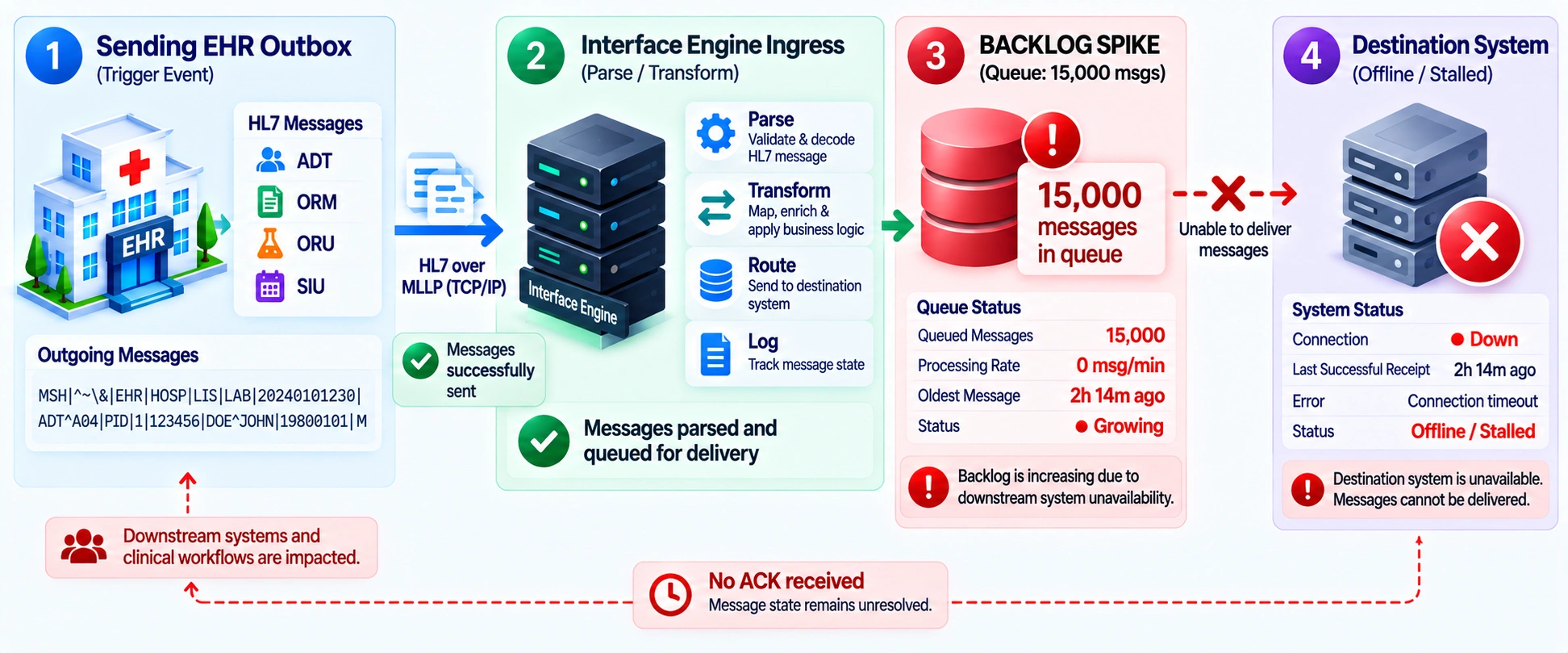
When an interface cannot deliver payloads or encounters downstream latency, unprocessed transactions accumulate in storage queues:
- Surging Queue Depths: Interface monitors such as Mirth Connect or Rhapsody show sharp increases in queued messages, often from zero to thousands of pending transactions.
- System Resource Exhaustion: Persistent backlogs consume disk space and database connections, increasing latency across unrelated channels on the same server.
- “Poison Pill” Payloads: A single corrupt or unparseable message at the head of a FIFO queue can block all subsequent transactions without automated dead-letter routing.
3. ACKs Stop Returning to the Sender
HL7 v2 relies on an explicit application acknowledgment handshake (ACK/NACK) to confirm message delivery:
- EHR transmission timeouts: The sending system dispatches an ADT or ORM message but receives no acknowledgment within the configured timeout window, typically 5–30 seconds.
- Connection freezing and retries: When ACKs fail to return, systems may freeze the active socket or enter retry loops, repeatedly resending messages and consuming network bandwidth.
- Common root causes: Network latency beyond socket timeouts, downstream application crashes after receipt but before ACK transmission, or mismatched Original vs. Enhanced acknowledgment modes.
4. Messages Are Rejected or Processed With Errors
Sometimes messages successfully reach the receiving endpoint but are rejected at the application or validation layer:
| Rejection Pattern | Observable Symptom | Technical Trigger |
| AE (Application Error) | Interface engine logs an AE response and halts the transaction. | Missing mandatory fields such as an empty PID-3 Patient ID, invalid data types, or receiver-side database constraint violations. |
| AR (Application Reject) | Receiving system explicitly refuses to process the message structure. | Unsupported trigger events, such as an unhandled A08 update, or severe segment syntax corruption. |
| Silent Processing Exceptions | An AA (Application Accept) is returned, but data never appears in the UI. | Downstream ingestion scripts crash during parsing and swallow exceptions without generating alerts. |
5. Duplicate or Out-of-Order Messages Appear
Message sequencing failures disrupt chronological patient histories and create conflicting clinical documentation:
- Duplicate Orders and Admissions: A network blip prevents an ACK from reaching the sender, triggering a retry. Without deduplication, ancillary systems process the same ORM order twice, creating duplicate lab or medication requisitions.
- Broken Chronology (FIFO Failures): A discharge (ADT^A03) or transfer (ADT^A02) may process before admission (ADT^A01) due to multi-threaded queue racing. The receiving system returns “Patient Not Found” and discards the discharge, leaving the patient actively admitted downstream.
- Corrupted Master Patient Index (MPI): Out-of-order ADT^A40 merge messages can split or cross-link medical records, corrupting historical patient identities.
6. Data Reaches the Wrong Workflow or System
Data mapping and routing bugs can deliver technically valid HL7 messages to completely incorrect endpoints:
- Mismatched departmental routing: Faulty MSH-4/MSH-6 headers can route radiology orders to the pathology LIS or pediatric admissions to an adult ICU worklist.
- Field cross-contamination: Flawed transformation scripts can shift fields by one delimiter, mapping vital signs to allergy fields or physician comments to billing diagnosis codes.
- Patient safety risks: Misrouted data can trigger alerts for the wrong care team, delay treatment, and create serious HIPAA/PHI compliance violations.
What Causes a Broken HL7 Interface?
Most HL7 failures are not random. Each one traces back to a specific point in the message journey, from the network layer to the receiving system’s database. Understanding where a failure originates makes it far faster to diagnose and fix.
Quick Diagnostic: Match Your Symptom to Its Cause
Start here if you already have a symptom in front of you. Find the closest match, then jump to that section for the full breakdown.
| Symptom you’re seeing | Most likely cause | Jump to |
| Messages never arrive; connection times out or resets | Firewall, TLS, or MLLP framing issue | Network and MLLP Connectivity Failures |
| Message arrives but the receiving system rejects it outright | Broken segment structure or wrong delimiters | Malformed HL7 Messages and Invalid Segments |
| Message is accepted but data lands in the wrong field | Field, component, or transformation logic error | Incorrect HL7 Field and Data Mapping |
| Message fails validation only on certain systems, not others | Version or Implementation Guide mismatch | HL7 Version and Implementation Guide Mismatches |
| Message rejected for “invalid” or “unrecognized” values | Empty required field or out-of-table value | Missing Required Fields and Invalid Values |
| Data attaches to the wrong patient, or duplicates appear | MPI/EMPI matching failure | Patient Matching and Identifier Errors |
| Lab or medication data looks structurally fine but is clinically wrong | Unmapped or outdated terminology code | Terminology and Code Mapping Mismatches |
| Everything was working, then messages stopped moving entirely | Interface engine crash or downstream outage | Interface Engine or Downstream System Outages |
These symptoms provide a quick starting point but identifying the actual failure requires looking deeper into each layer of the HL7 workflow. The following sections explain where these problems begin and how they affect message delivery.
A. Network and MLLP Connectivity Failures
The first place a message can fail is before it ever reaches an application, at the raw network and transport layer connecting two endpoints.
- MLLP framing errors occur when start/end block characters are malformed, causing the receiving system to reject or hang on the message.
- Firewall rules or closed ports can block TCP connections, often when a new interface is deployed without updating network access lists.
- TLS/mutual TLS certificate expiration breaks encrypted connections, sometimes going unnoticed until certificates have already lapsed.
- Missing or delayed ACK/NACK acknowledgments can trigger retries, timeouts, or indefinite queues, backing up the interface.
- VPN drops or unstable site-to-site tunnels interrupt message delivery, particularly across long-distance or high-latency connections.
B. Malformed HL7 Messages and Invalid Segments
A message can pass the network layer cleanly and still fail because its internal structure does not follow the HL7 syntax rules a parser expects.
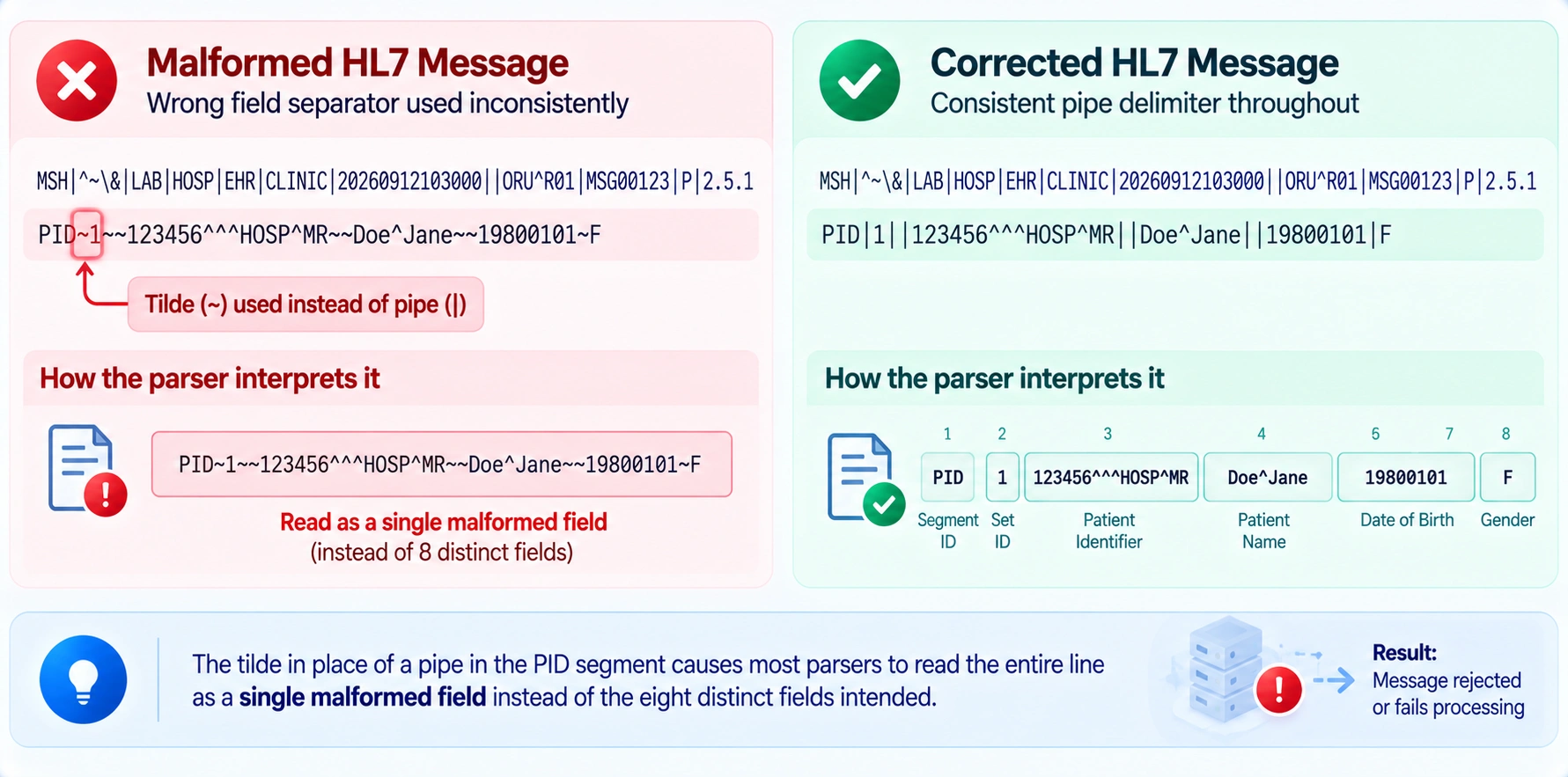
The tilde in place of a pipe in the PID segment causes most parsers to read the entire line as a single malformed field instead of the eight distinct fields intended.
- Missing or corrupted MSH headers prevent systems from identifying the message type, sending application, or encoding needed for parsing.
- Incorrect segment order such as OBX appearing before its parent OBR, can cause parsers to assign clinical data to the wrong context.
- Mismatched encoding characters in MSH-2, including field, component, subcomponent, and repetition separators, can break parsing between sender and receiver.
- Unexpected character encoding, such as non-UTF-8 data, can garble special characters in patient names, addresses, and clinical notes.
C. Incorrect HL7 Field and Data Mapping
Even a well formed message fails downstream if the data inside it lands in the wrong field, or the wrong value entirely, once translated between systems.
- Field position errors occur when mappings reference the wrong index, pulling data from an unintended field, component, or subcomponent.
- One-to-many or many-to-one mappings, often used when merging multiple source systems, can drop or overwrite values during transformation.
- Hardcoded default values can silently overwrite real data when source values differ from the original assumptions.
- Outdated source-to-target mapping specifications can break previously correct mappings after a system upgrade, even without code changes.
D. HL7 Version and Terminology Mismatches
HL7 v2.x is not one fixed standard. Version differences and vendor-specific implementation choices are among the most common causes of interface breakage.
- Different HL7 versions such as v2.3, v2.5.1, or v2.7, can create mismatches in segment structures, fields, and data types.
- Vendor-specific Z-segments may be misinterpreted or dropped when the receiving system does not recognize custom fields.
- Different Implementation Guides (IGs) can require different fields for the same message type, such as public health or lab reporting profiles.
- A conformance profile mismatch occurs when one system applies stricter validation, causing technically valid HL7 messages to fail integration testing.
E. Interface Engine or Downstream System Outages
Sometimes the message itself is flawless and the failure sits entirely with the infrastructure responsible for routing or receiving it.
- Interface engine crashes or restarts whether Mirth Connect, Rhapsody, Cloverleaf, or custom-built can halt message routing until recovery.
- Message queue backlogs develop when downstream systems slow or stop accepting messages, delaying processing and delivery.
- Downstream outages, including database maintenance without failover, leave inbound messages queued with nowhere to go.
- Lack of high availability or failover creates a single point of failure that can disrupt multiple connected interfaces at once.
- Dead-letter queues can silently lose failed messages when full or misconfigured, especially without regular monitoring.
Why Missing HL7 ACKs Create a Bigger Problem
A dropped response simply results in an HTTP 504 error and an end-user page refresh in standard web applications. In healthcare messaging, an unreturned or delayed acknowledgment (ACK) threatens the operational state of the entire clinical enterprise.
The HL7 acknowledgment loop is the gatekeeper of transaction integrity. When an ACK is delayed, malformed, or lost in transit, the sending system is plunged into clinical uncertainty: Did the receiving laboratory process the blood order and drop the response, or did the order never arrive at all?
Mishandling this handshake triggers aggressive retry storms, blocks outbound message queues, and risks duplicate treatments at the bedside.
A. What an HL7 ACK Tells the Sending System
The HL7 ACK is an explicit contract confirming receipt, syntax validity and downstream application acceptance. Under standard Original Acknowledgment Mode, every outbound transaction demands an immediate structural and operational receipt before the sender marks the record as delivered
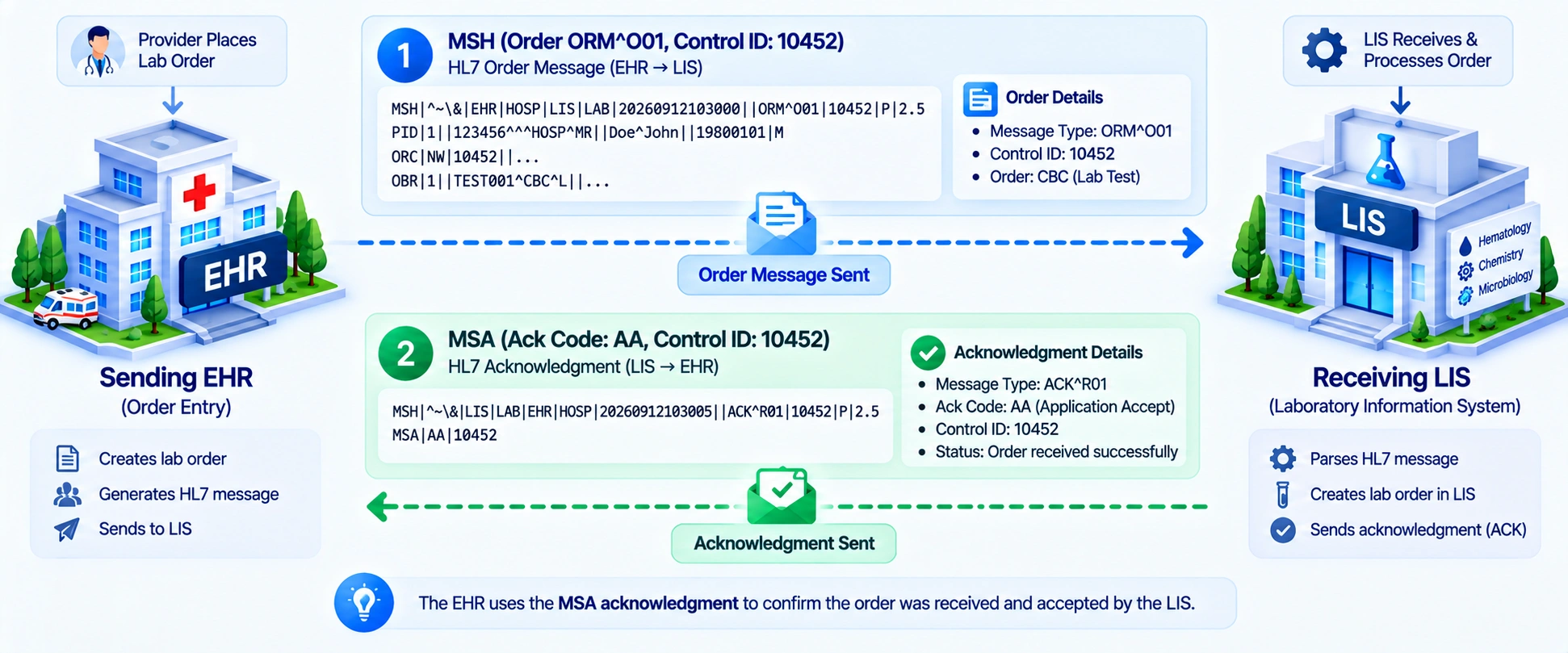
The payload’s MSA (Message Acknowledgment) segment tells the sending application one of three things:
- AA (Application Accept): The message is valid, required fields are populated, and the receiving application has committed the data or placed it in a durable queue. The sender can safely remove it from the retry buffer.
- AE (Application Error): The message arrived, but an application-level constraint failed such as an unknown patient ID, doctor ID, or invalid unit of measure. The data was not committed, so intervention is required.
- AR (Application Reject): The message was rejected due to a severe structural or protocol violation such as an unsupported HL7 version in MSH-12 or unrecognized trigger event in MSH-9. Resending the identical payload will not succeed.
B. What Happens When an ACK Times Out?
When a sending system transmits an HL7 message across an MLLP (Minimal Lower Layer Protocol) socket, it starts an internal countdown timer (typically configured between 5 and 30 seconds).
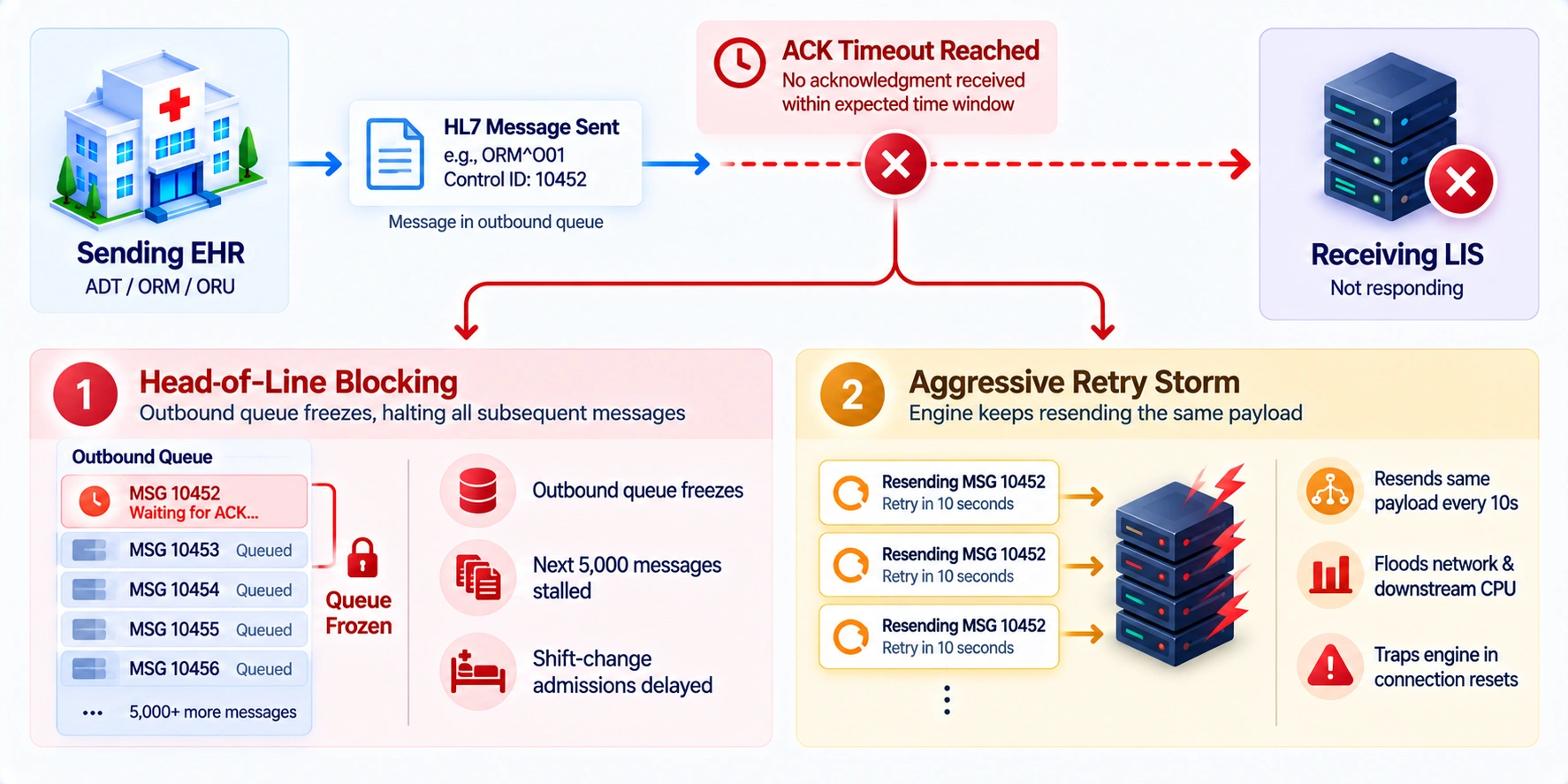
If that timer expires before an MSA segment returns, a cascade of automated and operational failures begins:
- Head-of-Line (HoL) queue blocking: EHR outbound queues often use strict FIFO delivery to preserve clinical chronology. If Message #101 times out waiting for an ACK, Messages #102–#5,000 including admissions, critical lab results, and discharge orders can remain blocked behind it.
- Aggressive retries and network thrashing: Timeouts trigger repeated payload delivery. If downstream database load caused the timeout, duplicate messages every 10 seconds can worsen CPU exhaustion and cause further MLLP connection drops.
- Operational escalation and false alarms: Persistent timeouts trigger IT alerts and emergency troubleshooting, even when the real cause is often a database issue, such as an unindexed SQL query or locked table, rather than a full interface outage.
C. How ACK Failures Can Create Duplicate Messages
The single greatest clinical danger stemming from missing ACKs is transaction duplication caused by blind message replay.
In distributed systems, missing ACKs rarely mean lost messages. Often, the receiving database ingests the order or result, but a network drop, firewall reset, or crash occurs just before returning the ACK.
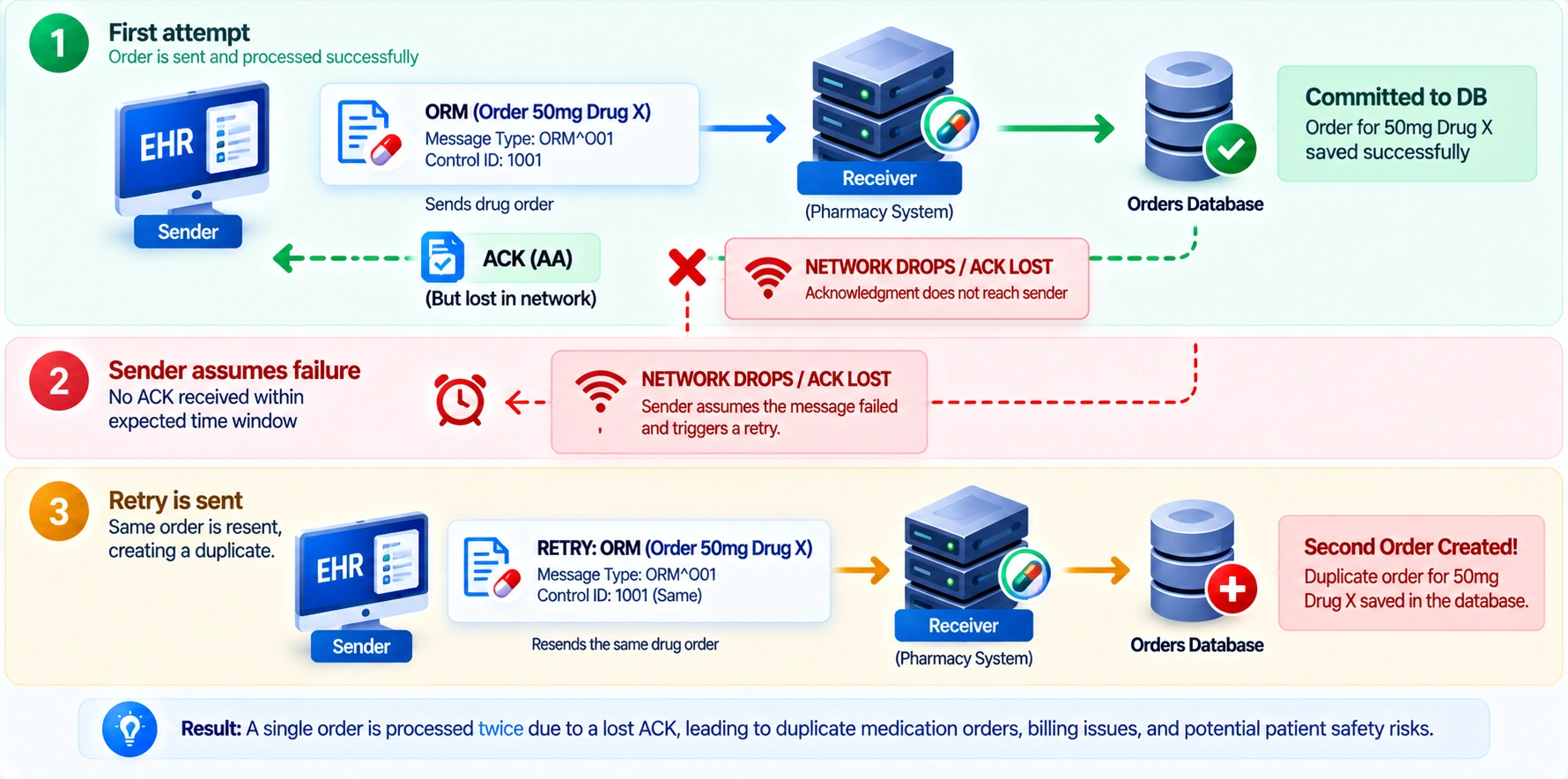
When the sending system assumes failure and blindly replays the transaction:
- Duplicate Diagnostic Orders: A patient receives two active lab requisitions for identical blood draws or is scheduled for two back-to-back CT scans.
- Double-Dosing Risks: Pharmacy systems lacking transaction deduplication may interpret the replayed ORM as an intentional additional dose rather than a retried transmission.
- Conflicting Financial Charges: Billing feeds (DFT^P03) that lack idempotent processing generate duplicate claims, triggering payer rejections and administrative audit penalties.
Preventing this requires idempotent message handling such as caching Message Control IDs (MSH-10) and Placer Order Numbers (ORC-2) so retried messages are recognized as duplicates, data is not duplicated, and an AA acknowledgment can be re-sent to clear the sender’s backlog.
D. ACK vs NACK: What the Interface Team Needs to Know
In daily operations, interface analysts must cut through HL7 theory and understand how the system treats distinct acknowledgment signals:
| Signal / Condition | What Actually Happened | What the System Does | Engineering Action |
| Missing ACK (Timeout) | Message was sent, but the handshake failed due to network loss or receiver latency. | Freezes the queue or retries repeatedly, risking buffer overflows and duplicates. | Check socket/VPN status, queue depth, and deduplication. |
| NACK (AE / AR) | The message was received but explicitly rejected by the destination. | Returns a structured rejection with error details in the ERR segment. | Parse ERR-3/ERR-8, fix the error, and quarantine in a DLQ; don’t blindly retry. |
| Premature ACK (AA) | The interface engine sends AA after ingestion, before confirming downstream persistence. | Sender marks the transaction complete and removes it from retry buffers. | Verify downstream persistence before ACK to prevent irreversible data loss. |
Understanding this distinction is the foundation of high-availability interface design. A missing ACK requires network and queue triage, whereas a structured NACK requires data mapping and schema correction. Treating both as generic “interface errors” guarantees recurring failures and downstream clinical confusion.
How an HL7 Interface Failure Affects Healthcare Workflows
A broken HL7 interface failure is not just a technical incident. Each HL7 message type supports a specific workflow, so an HL7 interface failure can disrupt critical hospital workflows when those messages fail to arrive. The sections below trace that connection directly.
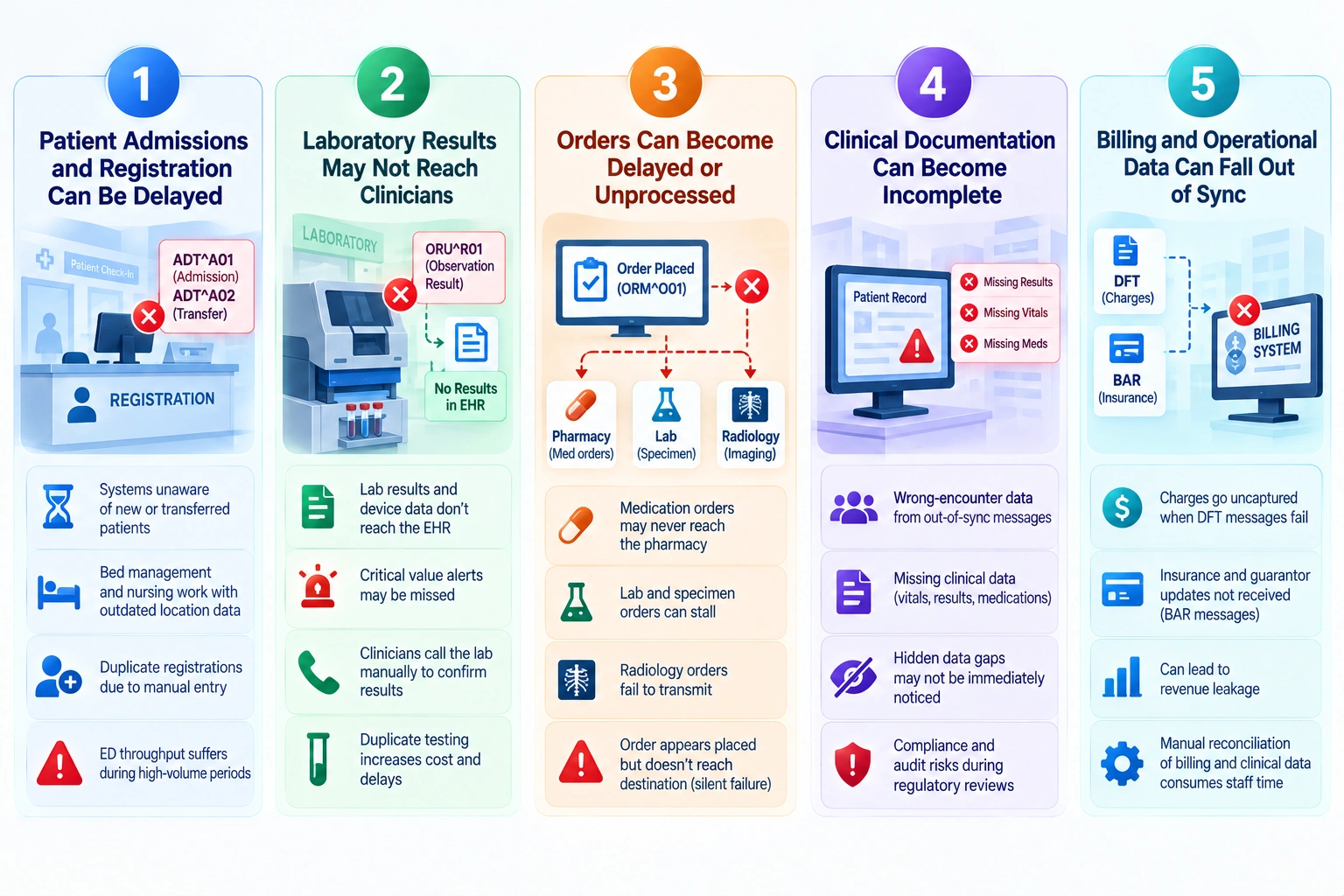
1. Patient Admissions and Registration Can Be Delayed
Registration is the first workflow HL7 touches, and it is also the one every downstream system depends on to know a patient exists.
- ADT A01 (admission) and A02 (transfer) messages notify connected systems when patients arrive or move; a failed interface leaves some systems unaware.
- Bed management, nursing, and ancillary teams may rely on outdated patient location data until manually corrected.
- Duplicate registrations can occur when staff manually re-enter patients after an ADT feed fails.
- Emergency department throughput suffers first, as ADT failures during high-volume periods quickly create registration backlogs.
2. Laboratory Results May Not Reach Clinicians
Lab data volume is enormous, and an interruption at the interface layer means clinicians are working blind at exactly the moment results matter most.
- ORU (observation result) messages deliver lab and device data to the EHR; a hospital may process 14,000+ HL7 messages daily, much of it lab results.
- Critical value alerts may fail to reach ordering physicians, delaying time-sensitive treatment decisions.
- Clinicians may call the lab manually to confirm results, adding work to an automated workflow.
- Duplicate testing may occur when clinicians cannot verify existing results, increasing patient cost and delays.
3. Orders Can Become Delayed or Unprocessed
Placing an order in the EHR is only the first step. The ORM (order) message is what actually moves that order to the department meant to act on it.
- Medication orders that never reach the pharmacy remain unfilled, often without immediate alerts to the care team.
- Lab and specimen orders can stall at the receiving lab, delaying diagnosis while appearing complete to the ordering system.
- Radiology orders that fail to transmit create scheduling gaps because imaging never receives the request.
- The most dangerous failure is silent: the order appears placed to the clinician but has stalled before reaching its destination.
4. Clinical Documentation Can Become Incomplete
Documentation is only as complete as the data feeding it, and a broken interface leaves gaps that are not always obvious until someone needs the missing piece.
- Wrong-encounter data: Out-of-sync ADT and ORU messages can attach notes and results to the wrong encounter, fragmenting the patient record.
- Missing clinical data: Failed transmission of vitals, results, or medication records leaves clinicians with an incomplete chart that may appear complete.
- Hidden data gaps: Downstream clinicians may not know information is missing unless they cross-check the source system.
- Compliance and audit risk: Interface-related documentation gaps can create risks during regulatory reviews or malpractice investigations.
5. Billing and Operational Data Can Fall Out of Sync
Revenue cycle systems depend on the same message flow as clinical care, which means a broken interface hits the balance sheet as directly as it hits the chart.
- DFT (Detailed Financial Transaction) messages carry charges from room fees to medication administration into billing; failures mean charges go uncaptured.
- BAR (Add/Update Billing Account) messages manage insurance and guarantor updates; failures can send claims with outdated or incorrect coverage.
- Automated HL7 billing workflows can reduce revenue loss by 2–5%, so interface failures can turn those gains into revenue leakage.
- Manual reconciliation of billing and clinical data after failures consumes staff time that functioning interfaces are designed to eliminate.
When Should You Build a Custom HL7 Integration Platform?
Commercial off-the-shelf (COTS) interface engines such as NextGen Mirth Connect, Rhapsody and Iguana are the standard starting point for healthcare interoperability, offering reliable point-to-point connectivity for established hospital environments with predictable message volumes.
As healthcare enterprises expand, adopt multi-tenant cloud architectures, or grow digital health platforms, traditional single-server engines hit limits. Scaling increases per-channel licensing fees, limits auto-scaling, and forces engineering teams to maintain fragile glue code over core product features.
Transitioning from a traditional boxed engine to an event-driven, custom integration platform becomes a clear architectural imperative when specific operational bottlenecks emerge.
A. Your Existing Interface Engine Cannot Scale
Traditional interface engines were designed for monolithic, on-premise datacenter deployments. When subjected to modern cloud throughput demands, their architectural limitations surface quickly:
- Resource contention on shared engines: Hundreds of channels on one VM can exhaust CPU and memory. A heavy ORU^R01 lab batch can choke thread pools and delay critical ADT^A01 admission messages.
- Lack of elastic auto-scaling: Traditional engines cannot dynamically add workers during peak shifts or scale down overnight; scaling requires manual provisioning, load-balancer changes, and additional licenses.
- Database bottlenecks in persistent queuing: Engines often persist transactions to a single relational DB (e.g., PostgreSQL or Derby). Peak disk I/O and locking can slow queues and cascade latency across the platform.
A custom-engineered integration backbone decouples ingress from processing using modern distributed streaming brokers (such as Apache Kafka or AWS Kinesis), allowing serverless compute workers to scale horizontally to match transaction spikes and prevent HL7 interface failures.
B. Your Team Lacks Message-Level Visibility
Legacy engines provide basic server monitors, but they rarely offer business-level or clinical-context observability:
- No distributed OpenTelemetry tracing: Standard engines cannot trace an HL7 message through transformations, downstream events, database enrichment, and multiple endpoints.
- Opaque error logs: Finding dropped transactions often requires SSH access and searching gigabytes of unstructured logs.
- Audit and compliance blind spots: Standard dashboards cannot answer clinical questions like “Did Dr. Smith’s clinic receive Patient X’s updated pathology report yesterday at 4:00 PM?” without custom database queries.
Building a custom platform allows you to automate dead-letter routing, implement self-healing circuit breakers, and expose safe administrative re-drive capabilities that free senior engineers from routine queue triage.
C. Your Workflows Require Custom HL7 Rules
Off-the-shelf engines excel at simple 1:1 mapping: read an HL7 pipe-delimited segment, change a code, and send it out over another socket. However, modern clinical applications frequently require sophisticated business logic:
- Real-Time Data Enrichment: Query external microservices, CDS algorithms, or demographic registries to augment inbound payloads before EHR dispatch.
- Dynamic Filtering & Redaction: Apply state privacy laws and 42 CFR Part 2 rules by stripping sensitive psychiatric, substance-use, or reproductive health data based on patient consent.
- Complex De-Duplication & Identity: Use deterministic and probabilistic algorithms to match patient identities across disparate, non-standardized clinic databases.
When custom business rules require thousands of lines of fragile scripting wedged inside an engine’s UI configuration panels, maintaining the codebase becomes a significant operational risk and can increase the likelihood of an HL7 interface failure.
Building a custom, cloud-native interoperability platform transforms healthcare data exchange from an operational bottleneck into a core, scalable asset for your business.
Build vs Buy: What Is Better for HL7 Integration?
This decision sits one layer below build versus switch. It is not about which partner to hire. It is about whether to run a packaged interface engine, build your own integration layer, or blend the two. The right answer depends on team structure, interface volume and how much of the roadmap you need to control.
HL7 Integration Engine Options
Different HL7 integration approaches offer different trade-offs in cost, deployment speed, scalability and control. Comparing these options helps organizations identify the model that best fits their technical and operational needs.
| Solution Type | Estimated Cost | Typical Time to Live | Best Fit |
| Open-source/community engine (OIE, BridgeLink, self-hosted forks) | Free; $10K–$30K/year for support | Days to weeks | Engineering-led teams, smaller organizations, tactical integrations |
| Commercial packaged engine (Corepoint, Rhapsody, paid Mirth) | $100K+/year + implementation | Weeks to months | Operations-led teams seeking vendor support and rapid deployment |
| Enterprise data platform (InterSystems HealthShare/IRIS) | $100K–$10M+/year, depending on scale | Several months to a year | Large health systems, HIEs, national-scale exchange |
| Custom-built integration platform | $100K–$500K+ one-time; no recurring license | 4–12 months | 5+ interfaces, unique workflows, long-term cost control |
| Hybrid architecture (packaged core + custom modules) | Core license + 10–20% for custom work | Core in weeks; modules over months | Most deployments balancing speed, cost, and differentiation |
The table provides a high-level comparison but the best option depends on how your organization operates and where its integration needs are heading. The following sections explain when each approach makes practical sense.
A. When an Existing HL7 Interface Engine Makes Sense
A packaged interface engine remains the fastest and lowest risk path for most organizations, particularly those without a dedicated integration engineering team.
- Your team is operations-led, not engineering-led. Packaged engines like Corepoint use configuration-based action libraries rather than custom code.
- Standard message types cover most needs. ADT, ORU, and ORM interfaces with common EHRs rarely require capabilities beyond commercial engines.
- Vendor support and SLAs matter more than full control. Commercial engines provide dedicated support, documentation, and maintained connectors.
- Speed to production is the priority. Packaged engines can often go live in weeks, faster than most custom builds.
- You need proven reliability at scale. Engines such as Corepoint have consistently ranked highly in KLAS for hospital IT satisfaction.
B. When Custom HL7 Development Makes More Sense
Custom development earns its cost when packaged engines start working against you instead of for you, usually once scale or workflow complexity passes a certain point.
- Your workflows exceed prebuilt connector capabilities. Specialty clinical logic, complex mappings, or proprietary data models may require custom code.
- Recurring licensing costs are too high. Commercial engines such as InterSystems, Rhapsody, and Cloverleaf can cost $100,000+ annually before implementation.
- You need full roadmap control as FHIR, TEFCA and evolving CMS interoperability rules change.
- Your team is engineering-led. Open frameworks like Apache Camel or a custom build suit teams with strong in-house development capabilities.
- You are already planning a migration. Legacy engines nearing end of maintenance can make this a natural time to move away from proprietary lock-in.
C. When a Hybrid Integration Architecture Works Best
Most real deployments do not choose one extreme. A hybrid model uses a proven engine as the backbone and reserves custom work for what actually needs it.
- Keep a packaged engine for most standard interfaces, where it is proven and reliable.
- Build a custom layer only for differentiated workflows that packaged connectors cannot support well.
- Use the hybrid model as a migration bridge, allowing gradual movement from legacy engines without a single cutover.
- Treat the split as a budget decision, with most spend on the core engine and a defined share on custom development.
D. What to Evaluate Before Choosing an HL7 Solution
Before signing a contract or committing engineering time, run the decision through a short list of criteria that actually predicts long term satisfaction.
- 3-year total cost of ownership: Evaluate more than sticker price; enterprise platforms can cost 5–10× more than lighter commercial engines.
- FHIR and TEFCA readiness: HL7 v2 support alone is insufficient as CMS interoperability requirements phase in.
- Vendor lock-in risk: Proprietary scripting languages and small hiring pools can increase long-term staffing costs.
- Message throughput and scalability: Confirm the platform can handle enterprise-level volumes, not just single-clinic workloads.
- Support model and SLAs: Check response times and whether ongoing support requires a paid tier after onboarding.
- Talent availability: Niche scripting languages can limit the pool of engineers available for long-term maintenance.
- End-of-life timelines: Assess legacy platforms for approaching maintenance or hard end-of-life cutoffs.
How IdeaUsher Can Help Build an HL7 Integration Platform
IdeaUsher operates as an enterprise product engineering partner and healthcare interoperability innovator, backed by 11+ years of software expertise, 250+ technical specialists and a 4.9/5 Clutch rating across 1,000+ completed builds.
Instead of rigid off-the-shelf middleware, we build custom, cloud-native HL7 integration engines. We create modular, event-driven data pipelines tailored to your clinical endpoints, throughput needs, and compliance standards for continuous data flow.
A. Design the Interface Architecture Around Your Workflows
We architect custom integration pipelines matched to the operational realities of your clinical environment rather than forcing your workflows into pre-packaged middleware templates:
- Event-driven messaging: Use decoupled, asynchronous publish-subscribe architectures with Apache Kafka, RabbitMQ, or AWS SQS/SNS for point-to-point and broadcast flows without bottlenecking senders.
- Hybrid connectivity pipelines: Support persistent MLLP TCP/IP sockets alongside HTTPS-based REST, Webhook, and WebSocket protocols.
- Custom channel orchestration: Isolate channels for clinical events such as admissions, vitals, scheduling, and billing so emergency alerts never compete with bulk reporting traffic.
B. Build Monitoring and Failure Recovery Into the Platform
Data loss in clinical environments carries direct patient safety risks. We engineer active safeguards to guarantee delivery and simplify exception handling:
- Automated ACK/NACK Adjudication: Generate and process acknowledgments instantly, with configurable parsing for custom vendor formats.
- Intelligent Dead-Letter Queuing & Re-Drive: Isolate malformed, rejected, or unroutable messages in dedicated DLQs, with one-click or programmatic re-queuing after resolution.
- Self-Healing Connection Handlers: Detect dropped VPN tunnels, latency spikes, and receiver timeouts, then safely queue transactions until endpoints recover.
C. Support HL7, FHIR, APIs, and Healthcare Systems
We build universal interoperability layers capable of translating between legacy protocol standards and next-generation clinical web services:
- Multi-format parsing engines: Native ingestion, parsing, and serialization for HL7 v2.3–v2.8, v3/CDA, X12 EDI (270/271, 837, 835), and FHIR R4/R5 JSON.
- Enterprise EHR & LIS connectors: Pre-engineered, bi-directional adapters for Epic, Cerner/Oracle Health, MEDITECH, and Athenahealth.
- SMART on FHIR API gateways: OAuth 2.0-secured gateways that expose legacy data as standards-compliant FHIR resources for third-party digital health apps.
D. Create Custom Mapping and Validation Workflows
We eliminate downstream processing errors by enforcing data integrity and semantic consistency at the integration boundary:
- Custom Z-segment & delimiter parsers: Configurable rules to ingest, preserve, and route hospital-specific fields without truncation.
- Clinical vocabulary normalization: In-flight mapping tables that harmonize codes with LOINC, SNOMED CT, ICD-10, CPT, and RxNorm.
- Pre-transmission schema validation: Automated checks for required segments, field lengths, and data types before messages leave the interface engine.
E. Build for Scalability, Security, and Observability
Our platforms are engineered to meet enterprise healthcare governance requirements while scaling effortlessly under peak hospital operational loads:
- HIPAA & SOC 2-ready runtimes: Kubernetes architectures on AWS, Azure, or GCP with TLS 1.3+, AES-256 encryption, and RBAC.
- Immutable audit logging: Cryptographically verifiable logs capture transaction metadata and transformations, supporting compliance without exposing unencrypted ePHI.
- Zero vendor lock-in: Deliver documented, auditable source code and IaC templates, giving your organization full IP and platform ownership.
Planning to build an enterprise-grade HL7 integration platform tailored to your clinical architecture? Partner with Idea Usher’s principal healthcare software architects to review your message specifications, target systems, and custom engineering roadmap today.
Conclusion
A reliable healthcare data exchange depends on more than keeping systems connected. When an HL7 interface failure occurs, delayed messages, missing acknowledgments, duplicate transactions, and workflow disruptions can quickly affect critical operations. The right architecture gives teams visibility into every message, clear failure signals, controlled retries, and safe recovery paths. Strong monitoring, ACK handling, validation, and reconciliation help turn unexpected interface problems into manageable incidents while protecting data integrity and continuity across connected healthcare systems.
FAQs
A.1. HL7 interface integration requires reliable message processing, field mapping, validation, ACK handling, queuing, monitoring, security controls, and recovery mechanisms to support consistent healthcare data exchange.
A.2. HL7 interface integration costs range from free to $10K – $30K annually for open-source engines, while commercial platforms can exceed $100K yearly. Custom platforms may cost $100K – $500K+, while enterprise solutions can reach $10M+.
A.3. HL7 interface integration failures commonly result from connectivity problems, malformed messages, incorrect mappings, incompatible versions, missing fields, terminology mismatches, interface engine errors, or downstream outages.
A.4. An HL7 integration platform should include message validation, ACK/NACK handling, queues, retries, logging, monitoring, alerts, duplicate detection, configurable mappings, replay controls, and recovery workflows.