

Key Takeaways
- While developing a credentialing platform, software developers should follow NCQA requirements around credential certification timelines, credential monitoring, and provider data collection.
- The software should help teams collect and verify provider credentials through reliable sources and maintain complete verification records.
- It should also support audit trails, credential expiration tracking, sanctions monitoring, and review workflows.
- Strong access controls and data security are important for protecting sensitive credentialing information.
- See how IdeaUsher’s experienced developers follow NCQA standards while developing credentialing platforms for businesses.
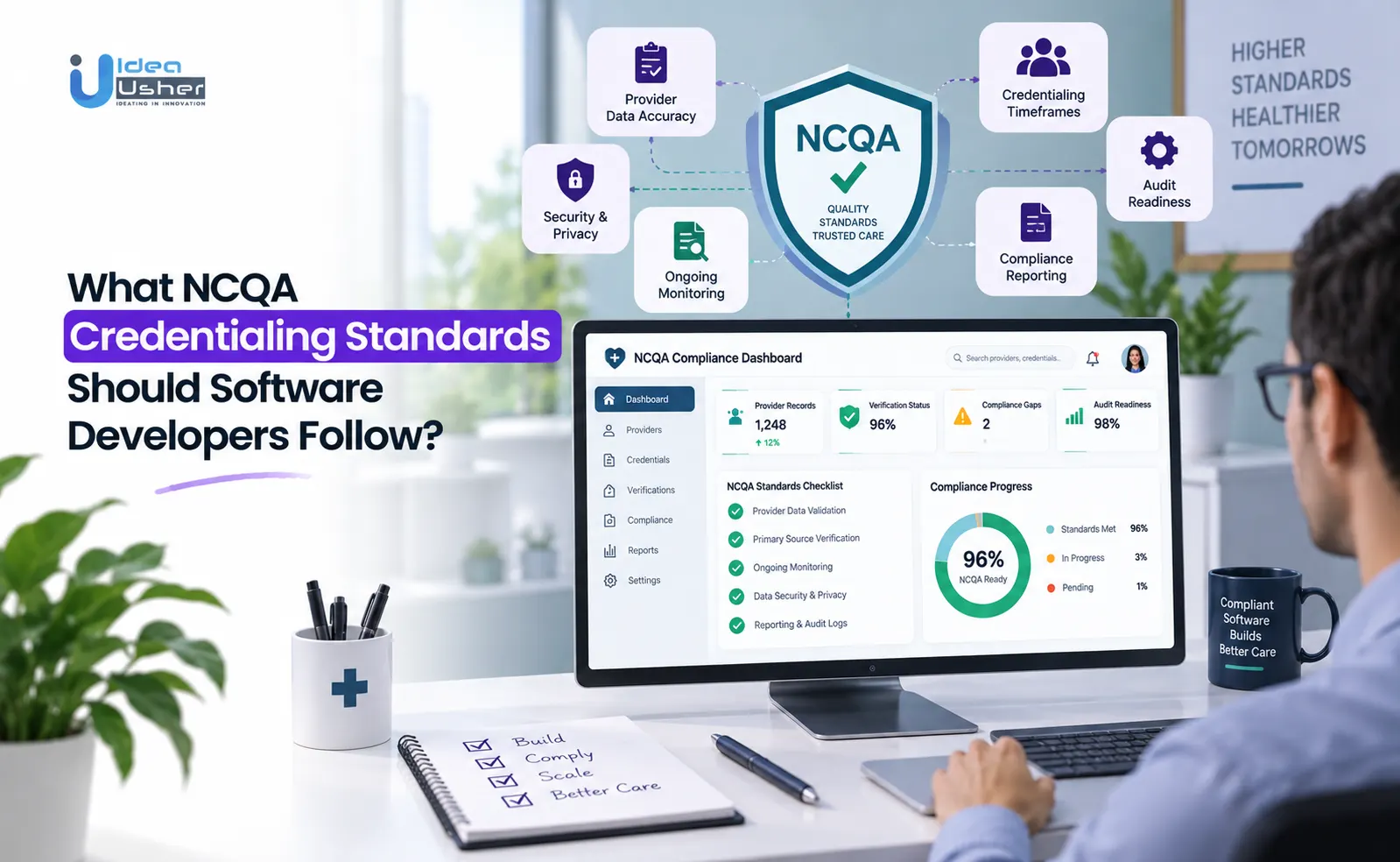
Software developers should build credentialing platforms around NCQA requirements for 120-day Credentialing Accreditation and 90-day CVO verification windows, automated primary source verification, monthly sanctions and exclusion monitoring, license-expiration alerts, and 36-month recredentialing cycles.
Founders who come to IdeaUsher to build credentialing software usually want a platform that can handle the hard parts of credentialing without creating more work for their teams. They often ask us to build automated verification, connect the platform with healthcare data sources, keep provider records organized, and make it easy to see what has been verified and what still needs attention.
Recently, a lot of healthcare startups and established organizations across the US have approached us to build custom credentialing and provider management platforms. This growing interest is exactly why we put this guide together: to help founders and decision-makers understand which NCQA credentialing standards their software needs to support and what to think through before building or upgrading a credentialing platform.
Is Building an NCQA-Aligned Credentialing Platform a Viable Business?
Yes, building an NCQA-aligned credentialing platform can be a viable business, supported by steady market growth. According to Wiseguy Reports, the Medical Credentialing Services Market was valued at $4.45 billion in 2024 and is expected to reach $4.66 billion in 2025 and $7.5 billion by 2035, representing a CAGR of about 4.9%. The demand is driven by an ongoing need for health plans and CVOs to verify, monitor, and recredential providers on fixed schedules.
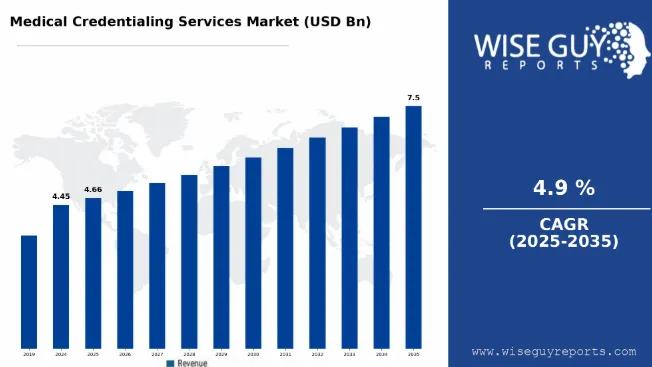
Source: Wiseguy Reports
Industry activity supports this trend. In March 2024, Noridian Healthcare Solutions partnered with Acorn Credentialing to strengthen provider enrollment and credentialing operations, showing that established healthcare organizations continue to invest in credentialing infrastructure.
NCQA Credentialing Platform Buyers
The financial pressure behind these purchases is significant. Providers are typically credentialed separately by an average of eight different payers, while payers spend $35 to $120 per credential every 24 to 36 months, according to Medallion’s payer network analysis. Neolytix also reports that inaccurate provider directory data costs the average healthcare organization $2.4 million annually, with about half of US directory records flagged as inaccurate.
| Buyer | What They Pay For |
| Health plans and payers | Automated PSV, ongoing monitoring, and CVO services |
| CVOs | White-label credentialing software for multiple clients |
| Hospitals and health systems | Provider onboarding, privileging, and compliance tracking |
| Group practices and staffing firms | Credentialing management across provider networks |
For Medicare Advantage plans, Verifiable cites research linking each Star Rating point to $200 to $500 per member per year in quality bonus revenue. Provider directory inaccuracies can also contribute to access-to-care complaints that affect these ratings.
Modio Health Example
Modio Health, a CHG Healthcare company, shows how this market translates into a real product. Its OneView platform pulls provider data from more than 100 primary sources, including the DEA and OIG, and serves hospitals, credentialing departments, group practices, and individual providers.
The company was rated by KLAS in its 2025 Credentialing Report for the fifth consecutive year, scoring 91.0 out of 100, and was also named the top-rated provider credentialing solution in Black Book Research’s Health Information Management vendor awards. These examples show that healthcare organizations continue to invest in specialized credentialing platforms.
Recurring Credentialing Revenue Models
Credentialing software can generate recurring revenue through subscription and service-based models rather than one-time development fees.
- Per-provider subscriptions for credentialing and monitoring
- Tiered CVO plans covering PSV, recredentialing, and reporting
- API and integration fees for payer, EHR, and HR systems
- Add-on modules for sanctions monitoring, license alerts, and analytics
Grand View Research projects the global software segment to grow at 8.7% annually, compared with 4.8% for services. This reflects the shift toward continuous monitoring and subscription-based credentialing infrastructure.
Verifiable Example
Verifiable offers another example of the subscription opportunity. The company has raised $47 million since its founding, including a $17 million funding round for its API-based verification platform. It ranked 27th among US software companies on the Inc. 5000 list and serves payers, dental service organizations, and provider networks including Humana Dental and Heartland Dental.
What Changed in the 2025 NCQA Credentialing Standards?
NCQA introduced major credentialing updates effective July 1, 2025, shifting the process toward continuous, technology-enabled oversight. Key changes include shorter verification windows, more frequent monitoring, new application data fields, the replacement of “System Controls” with Information Integrity, and the new Single Credentialing Program.
1. Shortened Primary Source Verification
NCQA reduced the primary source verification window from 180 to 120 days for Credentialing Accreditation and from 120 to 90 days for Credentialing Certification. These timelines apply to credentials such as licenses, board certification, work history, malpractice history, and sanctions. The change reflects faster access to approved primary sources and NCQA’s focus on using more current provider information.
2. Monthly Exclusion Monitoring
Under the 2025 standards, screening is at least monthly or within 30 calendar days of a new alert, using sources such as OIG LEIE, SAM.gov, and applicable state boards. All practitioners are covered, with licenses tracked continuously. For a health system with 2,000 providers, that can mean about 24,000 screening events annually, compared with around 8,000 under quarterly checks.
| Before July 2025 | Under the 2025 Standards |
| Screening frequency | Quarterly was common practice |
| Sources checked | OIG LEIE and state boards |
| Practitioners covered | Primarily primary care and high-volume behavioral health |
| License tracking | Mainly reviewed at recredentialing |
Under the 2025 standards, screening is at least monthly or within 30 calendar days of a new alert, using sources such as OIG LEIE, SAM.gov, and applicable state boards. All practitioners are covered, with licenses tracked continuously. For a health system with 2,000 providers, that can mean about 24,000 screening events annually, compared with around 8,000 under quarterly checks.
NCQA briefly changed “at least monthly” to “every 30 calendar days” in July 2025, then retracted that change in September after customer feedback.
MedTrainer built automated exclusion screening around this requirement, combining OIG and SAM checks with CAQH attestation dates and National Practitioner Data Bank information.
3. Updated Practitioner Application Data
Practitioner applications must now include race, ethnicity, and languages spoken. These fields are voluntary, but organizations must provide a non-discrimination statement explaining why the data is collected. NCQA also reduced the notification window for credentialing and recredentialing decisions to 30 calendar days, requiring faster review and provider communication.
4. New Information Integrity Requirements
NCQA replaced “System Controls” with Information Integrity, adding stronger expectations for credentialing data:
- Complete audit trails showing who changed what, when, and why
- Annual staff training on information integrity
- Annual audits with corrective-action re-audits within 3 to 6 months
- A temporary 2025 option to submit an implementation plan instead of a full delegation oversight audit
For software developers, this means audit history needs to be built into the platform’s data architecture. Atlas PRIME highlights full audit trails and audit-ready documentation as core capabilities.
5. Single Credentialing Program
NCQA has brought Credentialing Accreditation and the former CVO Certification under its Single Credentialing Program. “CVO Certification” is now called Credentialing Certification. Certification can also be earned for individual elements, such as License to Practice, rather than requiring an all-or-nothing certification.
NCQA President Margaret O’Kane said the changes followed public comments, customer interviews, and input from groups including the National Credentialing Forum and the National Association Medical Staff Services.
For buyers, this makes certification scope important. Vendors should specify which of the 11 CVO evaluation elements their certification covers, including state license verification, DEA registration, and sanctions monitoring.
NCQA Credentialing Standards Developers Should Build Around
Software developers building credentialing platforms need to address eight NCQA areas: credentialing policies, primary source verification, committee review, recredentialing, monitoring, practitioner rights, delegated credentialing, and information protection. Each translates into specific data models, integrations, workflows, and permissions.
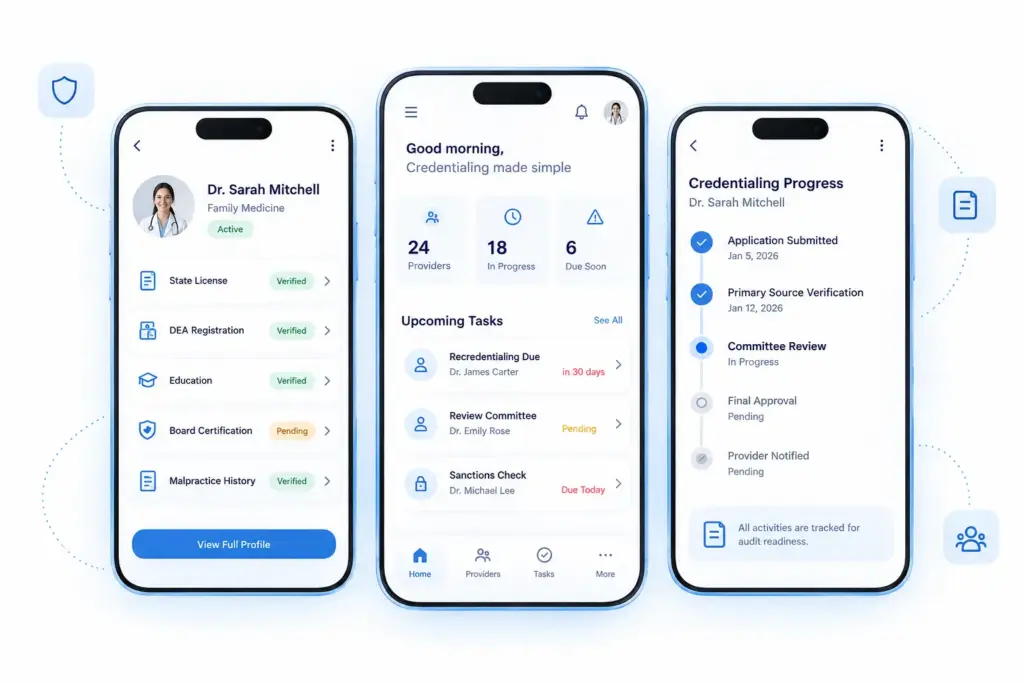
At Idea Usher, our developers map each CR standard to a specific system component. This makes workflows auditable and easier to update when NCQA requirements change.
1. Credentialing Policies and Workflow Rules
CR 1 requires documented policies covering practitioner eligibility, information collection, decision-making, notifications, and processing timelines. Software should therefore use a configurable policy layer instead of hardcoded rules, with policy changes tracked for audit purposes.
2. Primary Source Verification Requirements
NCQA requires key credentials to be verified through appropriate primary or recognized sources:
| Credential Element | Must Be Verified Through |
| State license | State licensing board |
| DEA or CDS registration | DEA or state registry |
| Education and training | Medical school or training program |
| Board certification | Certifying board or recognized equivalent |
| Work history | Practitioner-reported data, verified for gaps |
| Malpractice history | NPDB or state malpractice insurer |
| Sanctions and exclusions | OIG, SAM.gov, applicable state boards |
Software should distinguish verified and unverified credentials at the record level and show exactly which items remain pending.
3. Credentialing Committee Review
CR 2 requires a designated credentialing committee to formally review credentialing decisions. The platform should support role-based approvals, documented decisions, reviewer records, and delegated sign-offs. This creates a clear review trail and makes each credentialing decision easier to verify during an audit.
4. Recredentialing Requirements
NCQA requires recredentialing every 36 months, with the process initiated 90 to 120 days before the deadline. Software should track each provider’s individual cycle and automate 120-, 90-, and 30-day alerts. This helps credentialing teams start verification early and avoid missed renewal deadlines.
5. Sanctions and Complaint Monitoring
CR 5 requires ongoing monitoring of:
- Medicare and Medicaid exclusions through OIG LEIE
- Federal exclusions through SAM.gov
- State licensing and disciplinary actions
- Practitioner complaints and adverse events
These checks must be documented at least monthly, with findings routed for appropriate review. For developers, this requires external integrations, automated alerts, and review workflows.
6. Practitioner Rights and Appeals
NCQA gives practitioners rights to review information, correct errors, and appeal credentialing decisions. Software should provide provider-facing status visibility, correction workflows, notifications, and documented appeals. These features help ensure practitioners can respond to issues while keeping the entire process transparent and traceable.
7. Delegated Credentialing Requirements
Organizations that delegate credentialing must maintain written agreements, receive regular reports, and evaluate delegate performance. NCQA provides some simplified oversight when the delegate is itself NCQA-Accredited or Certified. symplr CVO is an example of this model. It provides clients with live file-status visibility, monthly exclusion checks, and audit-ready documentation. The company reports reducing credentialing and payer enrollment time by up to 75% through automation and more than 400 CVO specialists.
8. Credentialing Information Protection
Credentialing platforms handle sensitive data such as license numbers, malpractice history, board actions, Social Security numbers, and background checks. Software should therefore provide field-level access controls, secure data handling, and appropriate confidentiality controls.
Industry estimates have put the cost of provider data errors at around $2 billion annually, highlighting why data integrity matters.
CAQH ProView provides a real-world example, maintaining credentialing data for more than 1.4 million healthcare providers in a secure, access-controlled database. It uses a Tier 3 data center and structures its data to support NCQA, URAC, and The Joint Commission requirements.
How Should Credentialing Software Handle NCQA Primary Source Verification?
Credentialing software should treat primary source verification as a structured workflow, not a single lookup. It should verify each credential through an accepted source, record where and when verification happened, and route discrepancies for human review. NCQA allows verification through primary sources, recognized equivalents, or contracted agents, giving developers room to automate the process when the source and documentation are properly recorded.
1. Provider Credentials Requiring PSV
Sanctions require particular attention because NCQA expects information from the state Medicaid agency plus at least one additional listed source. The platform should therefore track each source separately rather than marking sanctions as simply “verified.”
| Credential Element | Accepted Verification Source |
| State license | State licensing board |
| DEA or CDS registration | DEA or state registry |
| Education and training | Medical school, residency program, or FCVS |
| Board certification | ABMS, AOA, or issuing specialty board |
| Malpractice history | NPDB, covering up to five years |
| Medicare and Medicaid sanctions | OIG LEIE, SAM.gov, and state Medicaid agency |
| Work history | Practitioner-submitted CV, verified for gaps |
2. API-Based Credential Verification
NCQA allows verification through primary sources, recognized sources, or contracted agents, which supports API-based PSV when the underlying source qualifies. Accepted documentation can include signed documents, checklists, automated credentialing systems, and certain web-crawling methods.
3. Verification Source Tracking
A “verified” flag is not enough. Software should record the source name and type, verification date, reviewer or automated process, and documentation method. This gives surveyors a clear record of how each credential was verified. It also makes it easier to trace errors and confirm that verification followed the required process.
4. Verification Date Tracking
Software needs to track both the credentialing cycle deadline and each credential’s individual validity. Required PSV must be completed within 120 days for Accreditation-track organizations or 90 days for Certification-track organizations. Individual credentials may have different tracking requirements, such as a five-year malpractice look-back and continuous license-expiration monitoring.
5. Verification Discrepancy Workflows
When primary-source information differs substantially from an application, the practitioner must be notified and given an opportunity to respond. Software should provide a dedicated discrepancy queue that tracks outreach, response deadlines, and escalation to the credentialing committee when issues remain unresolved.
6. Human Review for Automated Verification
Automation should support and not replace human credentialing decisions. Software should route application mismatches, sanctions or exclusion hits, expiring credentials, and missed PSV deadlines to the appropriate reviewer. Medallion follows this human-in-the-loop approach through checkpoint reviews for flagged files. The company reports more than 21 million primary source verifications at roughly 99.5% file accuracy.
What Should NCQA Credentialing Software Automate?
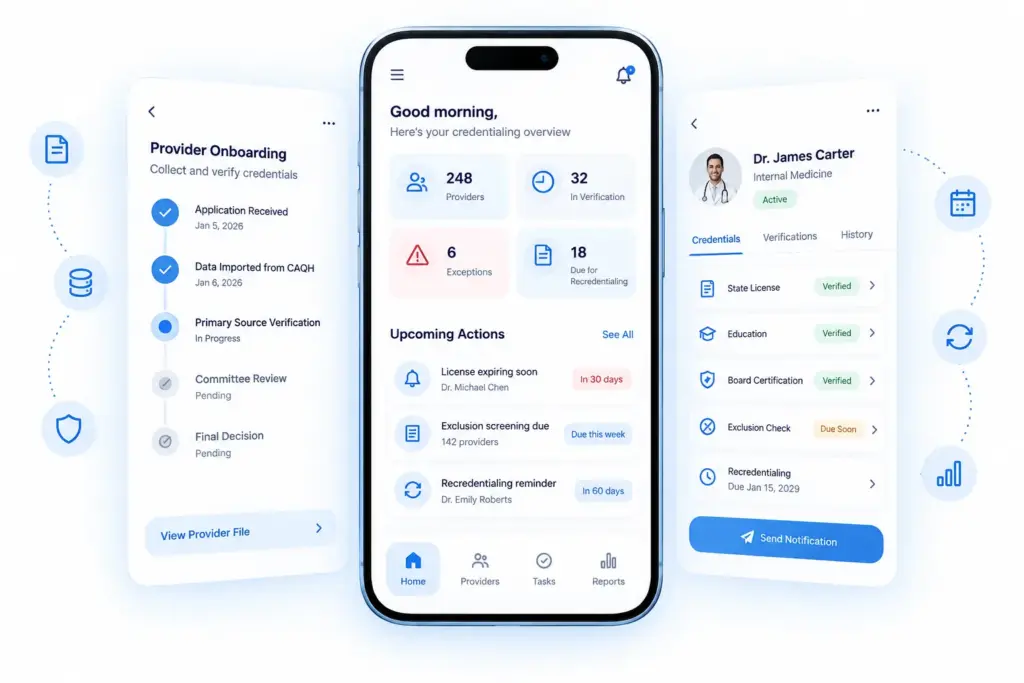
NCQA credentialing software should automate repetitive, rules-based tasks such as credential collection, primary source verification, license tracking, exclusion screening, recredentialing reminders, exception routing, provider notifications, and audit reporting. However, final approval or denial should remain with the credentialing committee or delegated medical director.
1. Automated Provider Credential Collection
Software should replace paper applications and email attachments with structured digital intake. It can pull data from CAQH, flag missing fields, and send providers secure application links. A widely cited MedTrainer poll found that most healthcare organizations spend 10+ hours credentialing one provider, with much of that time spent chasing incomplete applications.
Credentially addresses this with its Flexible Compliance feature, allowing organizations to create role-specific credential checklists for providers such as nurse practitioners and surgeons.
2. Automated Primary Source Verification
Automated PSV helps organizations meet the 120-day and 90-day verification windows. But speed is not enough. Software must also preserve the source, method, and date for each verification. A simple “verified” checkmark without this audit trail may not support a file-level NCQA review.
| What Software Should Automate | What Still Needs a Person |
| Pulling license, DEA, and board data | Reviewing flagged discrepancies |
| Logging source, date, and method | Deciding administrative vs. for-cause conflicts |
| Flagging mismatched fields | Approving or denying the file |
3. License Expiration Monitoring
License tracking should move beyond periodic recredentialing checks. Current standards require monthly tracking of license expiration dates for credentialed providers. Software should run background checks and send tiered alerts, commonly at 180, 90, and 30 days before expiration. Alerts can go to both providers and credentialing teams.
4. Monthly Exclusion Screening
Sanctions and exclusion checks against OIG LEIE, SAM.gov, and state licensing boards should run at least monthly. For a network with 2,000 providers, monthly screening creates about 24,000 checks per year, compared with roughly 8,000 under a quarterly schedule. MedTrainer automates exclusion checks, logs each screening, and sends notifications when a provider is flagged.
5. Recredentialing Reminders
Recredentialing follows a 36-month cycle from each provider’s last approval. Software should track each provider separately and start the process 90–120 days before the deadline. Credentially uses proactive alerts and follow-ups for providers and administrators. It also automates reference requests, which can otherwise slow the process.
6. Credentialing Exception Routing
Not every file will move smoothly through the workflow. Mismatched verification results, sanctions hits, or missed verification deadlines should automatically enter an exception queue. Industry analysts estimate that a single excluded provider who continues billing can create potential liability exceeding $1 million.
The exception queue should record the reason, outreach attempts, and resolution deadline so issues do not get overlooked.
7. Committee Review Workflows
Once a file is complete, software should present the committee or delegated reviewer with the full case. This includes verified credentials, sources, dates, flagged history, and supporting information. HealthStream’s V12 Enterprise uses a credentialing AI agent to assemble and pre-check files before committee review. Its architecture is HITRUST r2-certified and uses Salesforce and AWS.
8. Provider Notification Workflows
Software should support practitioner notifications for discrepancies, status updates, final decisions, and appeal rights. Each notification should be timestamped and linked to the provider’s response. This creates a clear record that required communication occurred. This also helps teams demonstrate that providers received the right information at each stage of the credentialing process.
9. Audit Report Generation
NCQA’s Information Integrity standard requires audit trails showing who changed a file, what changed, when, and why, along with annual audits and staff training records. Industry estimates put the cost of inaccurate provider directory data at more than $2 million annually for a typical healthcare organization. Software should generate both individual provider reports and network-level reports covering monitoring frequency, turnaround times, and exception rates.
What Credentialing Data Should the Platform Store?
A credentialing platform should store nine separate provider data categories: licenses, education and training, board certification, work history, malpractice records, sanctions and exclusions, provider attestations, verification evidence, and credential expiration dates.
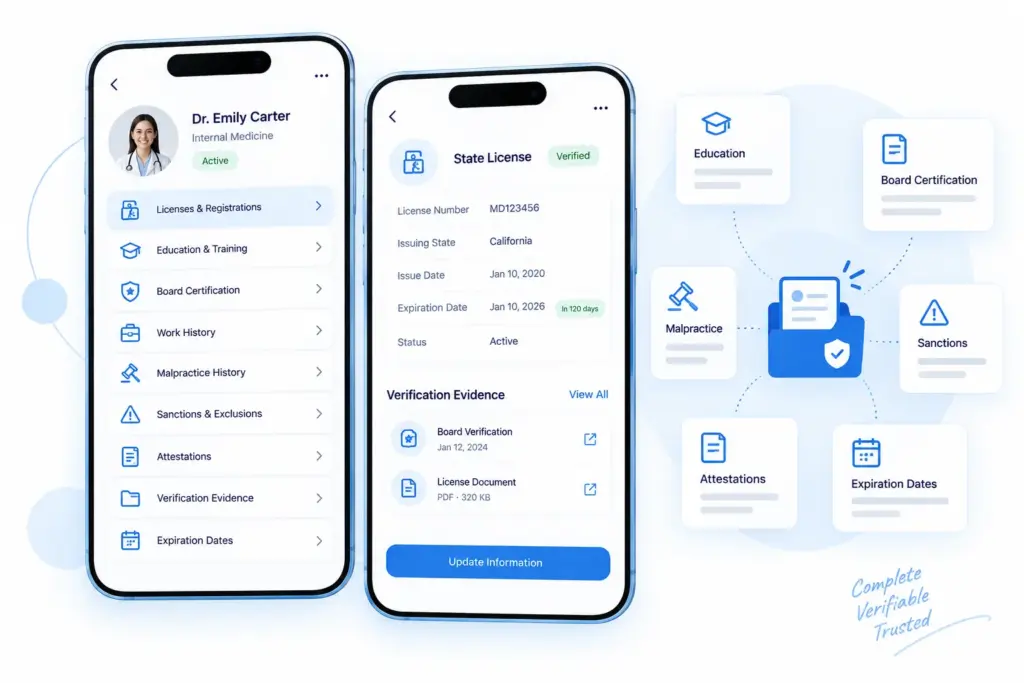
Each category should be stored as an independently verifiable record. NCQA evaluates whether each item was properly collected, verified, and documented, so the data model should reflect this structure rather than using one generic provider profile.
1. License and Registration Data
Software should store the license number, issuing state, issue date, expiration date, status, and disciplinary history. DEA or CDS registration should also be tracked when required. Verisys demonstrates this level of detail by pulling license data from boards across 56 US jurisdictions and 800+ professional taxonomies, including status, issue and expiration dates, and disciplinary actions.
2. Education and Training Records
Education records should include the medical school, attendance dates, degree confirmation, residency, and fellowship training. The platform should distinguish ACGME-accredited training from non-accredited programs. Organizations may also use the Federation Credentials Verification Service or FCVS and should record which verification path was used.
3. Board Certification Data
Store the certifying board, certification, initial certification date, and maintenance of certification status. Board status should be periodically reverified because certification can lapse when maintenance requirements are not met. NCQA requires confirmation from the issuing board, not simply a provider-submitted certificate.
4. Work History
Work history should cover the required lookback period, typically five years, with separate entries for each position and any unexplained gaps. The system should also record how gaps were verified or explained, such as a provider statement or confirmation from a previous employer.
5. Malpractice and Liability History
Store malpractice claims covering up to five years, including claims from residency or fellowship. The National Practitioner Data Bank or NPDB is an accepted verification source. Records should include the claim date, outcome or settlement status, and verification source. Because this is sensitive information, access should be restricted to authorized credentialing staff and committee members.
6. Sanctions and Exclusion Records
Software should track OIG LEIE, SAM.gov, and state Medicaid checks at least monthly. Each screening should record the source, date, result, and historical sanctions so flagged providers can be routed for review.
| Field | Why It Matters |
| Source checked | OIG LEIE, SAM.gov, state Medicaid agency |
| Last check date | Refreshed at least monthly |
| Result | Routes flagged records to exception review |
| Historical sanctions | Preserves past disciplinary actions |
Sanctions should be stored as individual screening events with the source and timestamp, rather than overwriting one status field.
7. Provider Attestations
Store signed provider statements confirming that application information is accurate and complete, along with disclosures related to impairments, felony convictions, or license loss. NCQA also requires voluntary fields for race, ethnicity, and languages spoken, along with a non-discrimination statement. The platform should retain the exact application version and attestation the provider signed.
8. Verification Evidence
The platform should store proof of how each credential was verified. This may include a signed document, checklist, API response, or licensing-board screenshot linked to the specific credential. Silversheet focuses on this type of evidence. The company cited a survey finding that about one in three physician personnel files at surgery centers were out of compliance, often because supporting documentation was missing, outdated, or difficult to locate.
9. Credential Expiration Dates
Each credential should have its own expiration date because licenses, DEA registrations, board certifications, and recredentialing cycles follow different schedules. The platform should connect these dates to automated alerts and monthly monitoring. This prevents expiration tracking from becoming disconnected from ongoing credential monitoring.
What Audit Trail Should NCQA Credentialing Software Maintain?
NCQA credentialing software should maintain a complete “who, what, when, why” audit trail for every credentialing file. It should track who changed a record, what changed, when and why it changed, who performed each verification, which source was used, what the committee decided, and how exceptions were resolved.
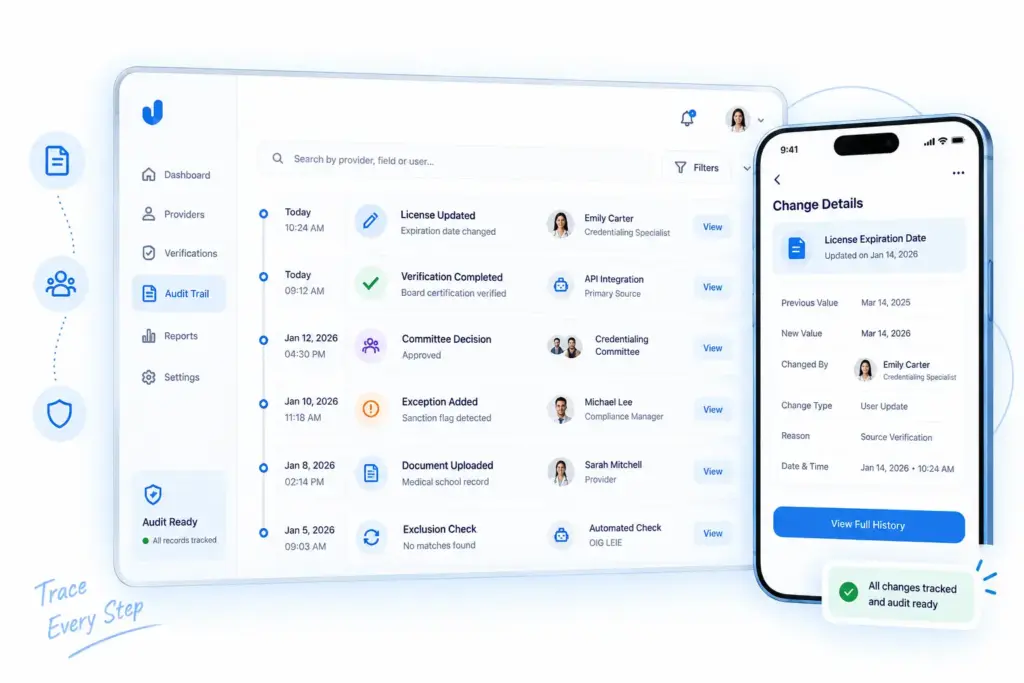
NCQA’s Information Integrity standard treats this traceability as a core requirement. Surveyors should be able to reconstruct these details for a specific file when needed.
Who Changed the Provider Record?
Every change should identify the user, role, or automated process that made it. The audit trail should distinguish between staff edits, delegated CVO actions, committee decisions, and automated integrations. This makes it easier to trace each action back to the responsible person or system during an audit.
What Was Changed?
The system should preserve the field name, previous value, and new value instead of simply recording that a change occurred. This allows teams to reconstruct the provider’s credentialing history during an audit.
| Audit Field | Example |
| Field name | License expiration date |
| Previous value | March 14 |
| New value | March 14 of the following year |
| Change type | Automated update from source system |
When Was It Changed?
Each change should have a precise date and time using a consistent timezone. This helps teams reconstruct the order of events and prove that verifications met the 120-day or 90-day windows and that monthly exclusion checks were completed on time. This also gives surveyors a clear timeline of every action taken on the credentialing file.
Why Was It Changed?
Every important edit should include a reason or justification, such as a practitioner correction, automated source update, or committee decision. NCQA’s annual internal audit requirements also make this useful for identifying unexplained or unauthorized changes. Corrective-action re-audits are generally expected within 3–6 months when issues are found.
Who Verified the Credential?
The audit trail should separately record who performed each verification. This could be a credentialing specialist, automated API, or delegated CVO. ProviderTrust reported finding 7,527 exclusions across its monitored population in a recent year. Its platform records the dataset and screening method behind each result, helping organizations document how findings were identified.
What Source Was Used?
The platform should record the source name, source type, and verification method. This could be a primary source, NCQA-recognized source, contracted agent, API, signed document, or public licensing database. ProviderTrust’s Instant to Ongoing feature screens providers when they enter a workflow and moves them into continuous monitoring. Its Dash dashboard records the source and timing of each check.
What Decision Did the Committee Make?
Committee decisions should be stored as permanent records showing the outcome, decision date, members involved, and supporting details. Andros developed AndrosCommittee to help organizations prioritize providers, surface risk indicators, and manage committee meetings. Keeping the decision within the credentialing system connects it directly to the underlying verification data.
How Were Exceptions Resolved?
Discrepancies, missed deadlines, and sanctions flags need their own resolution trail. The system should record outreach attempts, practitioner responses, deadlines, and the final outcome. A single excluded provider who continues billing can create potential liability exceeding $1 million, making dedicated exception tracking important for both compliance and risk management.
How Should Software Handle NCQA Ongoing Monitoring?
Credentialing software should treat ongoing monitoring as a continuous background process. It should automatically check exclusions, sanctions, and license status, track complaints and quality issues, and route findings for review. NCQA treats these as separate monitoring requirements with specific frequencies, sources, and documentation rules. Software should ensure that required checks never depend on manual reminders.
1. Medicare and Medicaid Exclusion Checks
Every credentialed provider should be screened against Medicare and Medicaid exclusion sources at least monthly. NCQA requires checking the state Medicaid agency plus at least one additional source, such as OIG LEIE or SAM.gov. Software should automate the checks, record the source and date, and flag results immediately. Sutherland SmartCred connects with CAQH, NPDB, and 40+ federal and state verification websites, helping automate these recurring checks.
2. License Expiration Monitoring
License status should be monitored monthly, rather than only during recredentialing. Software should check issuing state boards, record status changes, and update provider records automatically. This helps catch license lapses or disciplinary changes during the 36-month recredentialing cycle.
3. Sanction Monitoring
Sanction monitoring should cover more than federal exclusions. Software should separately track state disciplinary actions, probation, restrictions, and other regulatory findings using their relevant sources and schedules.
| Monitoring Category | Source Typically Checked | Frequency |
| Federal exclusions | OIG LEIE, SAM.gov | At least monthly |
| State Medicaid exclusions | State Medicaid agency | At least monthly |
| State board actions | State licensing boards | At least monthly |
| Medicare opt-out status | CMS opt-out registry | Ongoing |
4. Complaint and Quality Issue Tracking
Organizations must monitor complaints and adverse events for every practitioner type, expanding the requirement beyond earlier standards that focused mainly on primary care and high-volume behavioral health providers. IntelliCred combines OPPE and FPPE management with quality tracking and automated NPDB and OIG queries, keeping quality findings alongside credentialing data.
For Medicare Advantage plans, research has linked each Star Rating point to roughly $200–$500 per member per year in quality bonus revenue. Directory and quality tracking gaps can contribute to access-to-care complaints that affect ratings.
5. Monitoring Alerts and Escalation
Monitoring findings should be routed to a designated peer-review body. Software should provide automated alerts, clear ownership, routing rules, and review deadlines. This is especially important when an excluded provider continues seeing patients and billing. A single case can create potential liability exceeding $1 million, depending on billing volume.
6. Peer-Review Workflow for Findings
Peer-review findings should follow a structured workflow with a documented review, decision, and outcome. Software should record whether the result required no action, additional monitoring, corrective action, or a broader credentialing review. Each finding should remain tied to the provider’s file with a timestamp and reviewer details.
7. Evidence of Monitoring and Resolution
NCQA’s Information Integrity standard requires annual audits of monitoring processes, with corrective-action re-audits generally expected within 3–6 months when issues are identified. Software should provide a complete monitoring history showing every check, source, date, finding, and resolution. This gives teams evidence that required monitoring actually occurred and was properly handled.
Build Credentialing Platform With IdeaUsher
Build an NCQA-aligned credentialing platform with IdeaUsher. Our team brings 500,000+ hours of coding experience and includes ex-MAANG and FAANG developers who build scalable healthcare software with secure workflows and advanced automation. We help businesses turn complex credentialing requirements into reliable digital platforms.
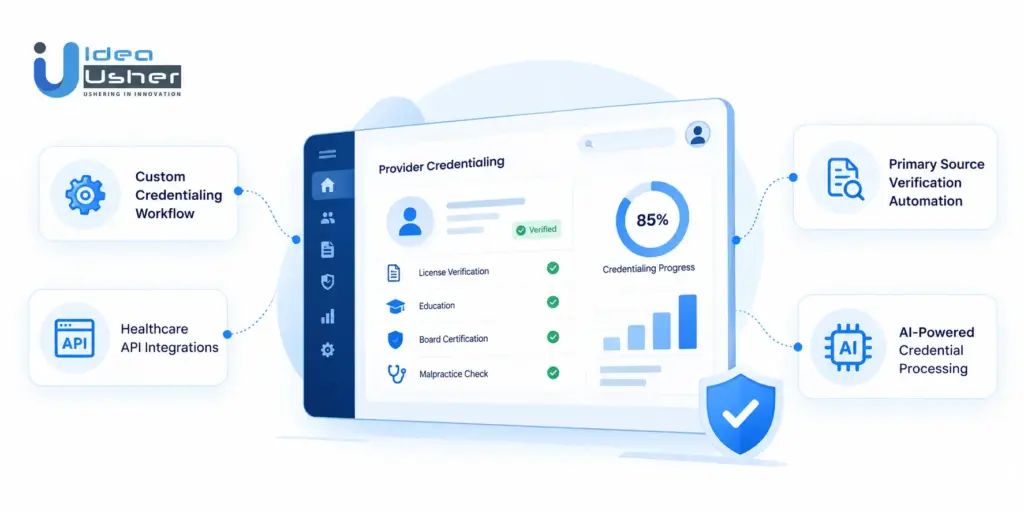
Custom Credentialing Workflow Development
We build custom workflows for provider onboarding, credential verification, committee review, recredentialing, and ongoing monitoring. Each workflow can be configured around your organization’s credentialing requirements. This gives your team greater control over how providers move through each credentialing stage.
Primary Source Verification Automation
Automate license, board certification, education, malpractice, sanctions, and exclusion verification. Our solutions can track verification sources, dates, discrepancies, and review outcomes. This helps credentialing teams reduce repetitive checks while maintaining clear verification records.
Healthcare API Integrations
Connect your platform with CAQH, NPDB, NPPES, OIG, SAM.gov, state licensing boards, and other healthcare data sources to streamline credentialing and reduce manual work. These integrations can keep provider information updated across different stages of the credentialing process.
AI-Powered Credential Processing
Use AI to extract credential data, identify missing information, detect discrepancies, and route exceptions for human review. This helps credentialing teams process provider files faster while keeping important decisions under human control. AI can also reduce manual data entry and help teams focus on cases that need closer attention.
Conclusion
Software developers should build credentialing platforms around NCQA standards. The software should make it easier to verify providers, track renewals and monitor changes over time. It should also keep a clear record of what happened in each file so teams can show their work during an NCQA review. A well-built platform takes care of the routine work and lets credentialing teams focus on the decisions that need human attention.
FAQs
A1: Current NCQA credentialing standards focus on provider verification, credentialing decisions, recredentialing, ongoing monitoring, practitioner rights, and information integrity. Software should help teams follow these requirements while keeping provider records complete and easy to audit.
A2: The 2025 updates introduced shorter primary source verification windows and more frequent monitoring. NCQA also updated practitioner application requirements and replaced the older System Controls language with Information Integrity. Credentialing Accreditation and CVO Certification were also brought under the Single Credentialing Program.
A3: NCQA allows 120 days for Credentialing Accreditation and 90 days for Credentialing Certification. Software should track these deadlines so teams know when verification must be completed and can act before a file falls outside the required window.
A4: Yes. NCQA requires ongoing monitoring of key provider information. Exclusion and sanction checks should be performed at least monthly, while license status also needs regular monitoring. Software can automate these checks and alert teams when something changes.
A5: Yes. NCQA allows verification through primary sources, recognized equivalents, and contracted agents. Software can automate data collection and verification while keeping the source, date, and supporting evidence. Cases with discrepancies or other issues should still go to a person for review.
A6: Yes. Credentialing software can use APIs when the connected source qualifies for NCQA verification. APIs can pull provider information from sources such as CAQH and NPPES and help reduce manual work. The platform should still record where the information came from and when it was verified.