


Key Takeaways
- Primary source verification software checks a provider’s credentials directly against trusted issuing organizations.
- It collects the required provider details and sends them to the right verification sources.
- The software compares the returned information with the provider’s records.
- If it finds missing or conflicting details, it flags them for further review.
- Once verified, the system stores the results for credentialing and future reference.
- Learn how Idea Usher can help you build a custom primary source verification software tailored to your needs.
Primary source verification software streamlines the confirmation of a healthcare practitioner’s qualifications by checking them directly with the organizations that issue or maintain them. The system gathers a provider’s details, queries sources such as state licensing boards, NPPES, OIG, and NPDB, along with other credentialing repositories, and compares the results against what the provider submitted. Each outcome is logged, and a complete, traceable record of every check is retained for audit purposes. At Idea Usher, healthcare founders come to us to build these types of software. They usually want a simple way to verify credentials, track their status, and catch problems early. Many also want AI to help process documents and make the whole process faster.
We have been approached by many healthcare startups and businesses across the US that want to build or modernize primary source verification and credentialing software. Organizations increasingly want to cut manual verification work and speed up provider credentialing. That growing demand, and the questions founders bring to us, are why we wrote this blog. It explains how primary source verification software works, what happens behind the scenes, which capabilities it needs, and what businesses should consider before building one.
Is There a Growing Market for Primary Source Verification Software?
Yes, the market is growing. Primary source verification software sits within the wider healthcare credentialing software market, which Grand View Research valued at $807.8 million in 2023 and projects to reach $1.42 billion by 2030, growing at an 8.3% CAGR. Three shifts are driving this growth: healthcare credentialing is moving toward automation, providers need faster verification, and AI is opening new opportunities for credentialing automation.

Source: Grand View Research
Credentialing Software Is Automating
Manual credentialing can take around 180 days, with much of that time spent collecting documents and confirming information with issuing sources. Software replaces calls, faxes, and portal logins with direct source connections and automated record matching. Grand View Research links market growth to greater adoption of credentialing solutions, cloud-based tools, improved healthcare IT infrastructure, and vendor initiatives. North America held more than 39.5% of the market revenue in 2023.
Vendor activity shows the same trend. Medallion raised $43 million to expand its AI platform and launch CredAlliance, bringing its total funding to $130 million. It also acquired Andros, an NCQA-certified credentials verification organization, expanding its platform to more than 1 million providers across nearly 400 healthcare organizations and health plans.
Demand for Faster Verification
Traditional provider credentialing typically takes 90 to 120 days, while more than 85% of applications may contain errors or missing information. Since payers rarely backdate approval, these delays can directly affect revenue.
A Sutherland analysis estimates that a 120-day delay can cost up to:
- $122,144 for a physician or surgeon
- $87,274 for a dentist
- $72,332 for a podiatrist
- $66,118 for a nurse practitioner or nurse anesthetist
- More than $900,000 in forgone annual billings for a group hiring 10 physicians with an average 90-day delay
Other estimates put hospital losses at $7,000–$8,000 per provider during the credentialing wait. The exact impact varies by specialty and methodology, but the financial pressure is clear.
Regulation is also tightening timelines. Updated NCQA standards took effect July 1, 2025, reducing the primary source verification window from 180 to 120 days for accreditation and 90 days for certification. They also require monthly exclusion checks and license expiration tracking. These requirements are increasing the need for software that supports faster verification and continuous monitoring.
AI Opens New Credentialing Opportunities
AI is moving credentialing software beyond digital forms toward systems that can handle repetitive tasks such as document review, provider matching, follow-ups, and audit logging. Verifiable launched CredAgent, which it describes as an autonomous AI agent for end-to-end credentialing. It can verify data, confirm applications, and document tasks while keeping a human in the loop. The company reports up to 10x productivity in early pilots. Its platform also reports connections to more than 3,200 sources, with 97% returning results instantly. These are vendor-reported figures and should be validated during evaluation.
Medallion is applying AI across another part of the workflow. Following its Andros acquisition, customers are expected to gain automated primary source collection, AI-powered provider outreach and follow-ups, and real-time status tracking alongside credentialing specialists.

What Happens Inside Primary Source Verification Software?
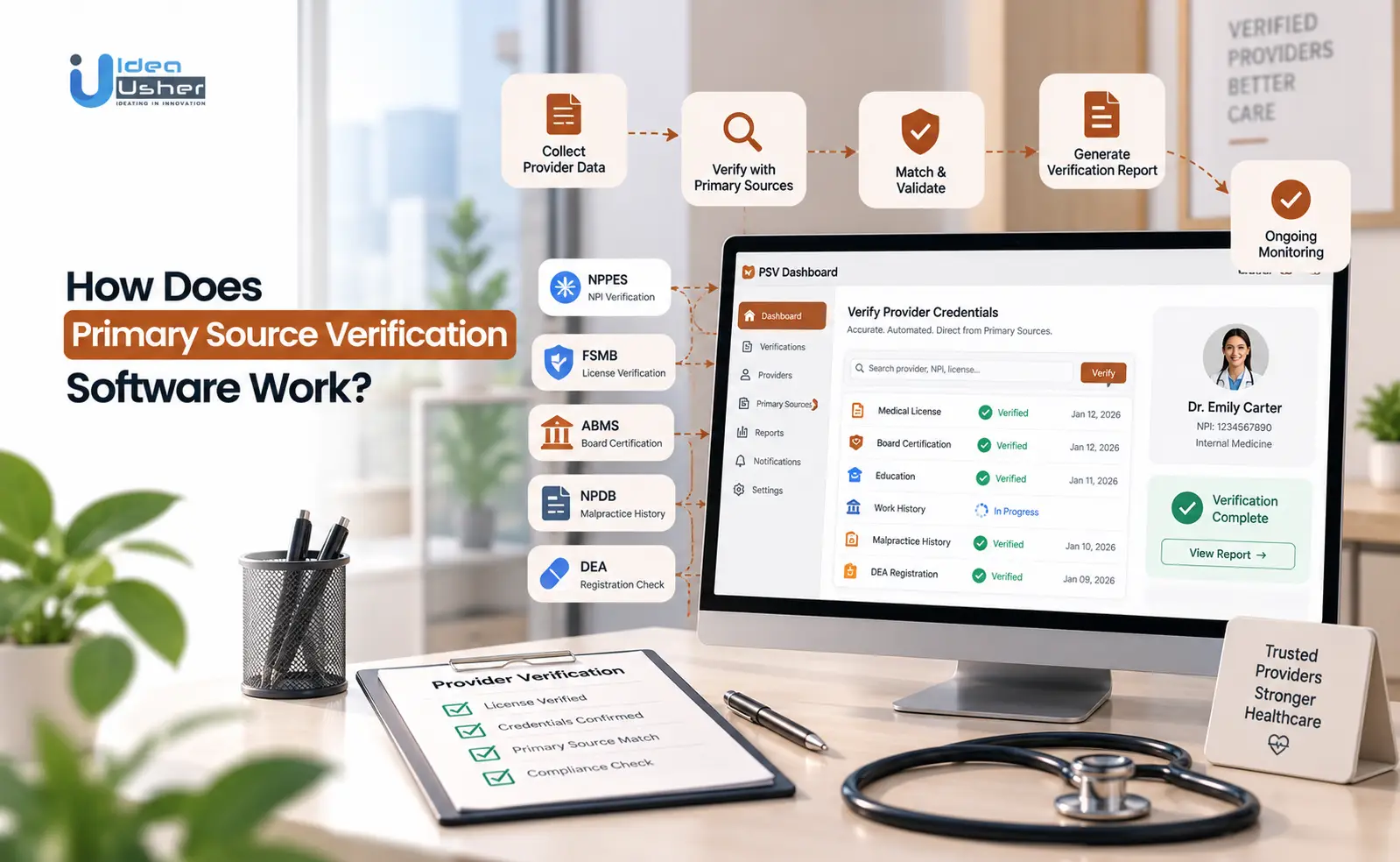
Inside primary source verification software, provider data moves through an automated workflow. The system collects credentials, identifies the right issuing sources, sends verification requests, and compares the returned information with the provider’s records. Any mismatch is flagged for review, while verified results are stored with the source and verification date for an audit-ready record.
1. Provider Data Enters the Workflow
Every verification starts with provider data. Missing documents or incorrect names and dates can slow the process. Modern software lets providers upload documents, complete forms, and e-sign paperwork, reducing back-and-forth with credentialing teams.
Typical information includes:
- Full legal name and NPI
- State license numbers
- Board certifications
- Medical education and training
- Work history and practice details
Atlas reports that provider data changes by 25% every 90 days, showing why credentialing platforms need to keep information updated.
2. Each Credential Finds Its Source
Once the data is collected, the software maps each credential to the organization that issued it. A medical license may go to a state licensing board, while board certification is checked with the relevant certifying body. Platforms such as Atlas PRIME connect with sources including NPPES, state licensing boards, ABMS, DEA, and OIG exclusion lists. Checking a provider-supplied document alone is not considered primary source verification.
| Credential | Typical source |
| Provider identity and NPI | NPPES |
| State medical license | State licensing board |
| Board certification | ABMS and specialty boards |
| DEA registration | DEA |
| Sanctions and exclusions | OIG and SAM |
| Malpractice and adverse actions | NPDB |
| Education and work history | Schools and past employers |
Not every source offers an API. The software therefore needs different ways to retrieve information, including portals, file submissions, APIs, or manual outreach.
3. Verification Requests Reach Sources
After mapping each credential, the software sends requests to the relevant sources and collects the responses. Automation can replace manual searches and back-and-forth communication while allowing multiple checks to run at the same time. CertifyOS, for example, pulls provider data through real-time APIs or batch uploads from more than 600 primary sources, EMRs, and claims. It is also NCQA-certified for 11 out of 11 verification services.
Timing also matters. Since July 1, 2025, NCQA requires primary source verification within 120 days for accreditation and 90 days for certification.
4. Returned Data Is Matched
When a source responds, the software compares the information with the provider’s record. It can check details such as the name, license number, status, expiration date, and disciplinary actions. A clean match moves forward. A partial or conflicting match is flagged for human review.
AI can also help clean and match provider data. CertifyOS, for example, uses AI to resolve duplicates, standardize addresses, and map taxonomies.
One symplr Payer customer reported that automated PSV helped it credential 60% more providers, from 3,000 to 5,000, while completing the work 30% faster with the same staff. This is a vendor-reported customer result rather than an industry benchmark.
5. Discrepancies Are Sent for Review
When the returned information does not match, the software creates an exception instead of approving the record automatically. The system identifies the issue, sends it to a review queue, allows a credentialing specialist to investigate, and then verifies the corrected information again before the record moves forward.
The workflow typically looks like this:
Detection → Routing → Outreach → Re-verification → Resolution
The same process can support continuous monitoring. Atlas and CertifyOS use alerts for events such as license expirations, sanctions, exclusions, and board actions. Updated NCQA rules also require monitoring of certain exclusion lists and action within 30 days of a finding.
6. Verified Results Become Credentialing Records
The final step is turning the verification into usable evidence. A record should show what was checked, where it came from, when it was verified, and who reviewed it.
| Record element | What it captures |
| Verification record | Source, date, and next due date |
| Visual proof | Timestamped verification evidence |
| Record update | Updated credential information |
| Committee file | Verified data and supporting documents |
| Expiration log | Alerts and renewal information |
| Monitoring record | Compliance events and resolutions |
Certemy supports verification schedules, automated notifications, audit trails, and real-time credential status updates. symplr’s CVO is NCQA-certified in all 11 verification areas and creates committee-ready credentialing files.
The stored information then supports future recredentialing. NCQA requires recredentialing every 36 months, while continuous monitoring helps identify changes between cycles.
Which Credentials Can PSV Software Verify?
PSV software can verify medical licenses, board certifications, education, residency and fellowship training, hospital privileges, work history, DEA registrations, and disciplinary or sanction records. It checks these credentials against trusted sources such as state licensing boards, ABMS, AOA, ECFMG, DEA, OIG, NPDB, and other authorized databases.

1. Medical Licenses and State Registrations
State licenses are a core part of credentialing and must be verified with the licensing board. Software checks the license status, provider identity, expiration date, and restrictions while also cross-checking identifiers such as the NPI. MedTrainer combines automated license verification with exclusion monitoring and records the name, date, time, and trusted URL for each verification. More than 3,000 organizations use its platform.
Multi-state licensing adds complexity. The Interstate Medical Licensure Compact includes 44 states, plus Washington, D.C. and Guam, with more than 200,000 licenses issued through it. Verisys supports license verification across 56 US jurisdictions and 800+ provider taxonomies through APIs, SFTP, batch files, or portals. Its claim of 40% more actionable licensure information than competitors is vendor-reported.
A license check typically confirms:
- License number and state
- Current status
- Expiration date
- Restrictions or board actions
2. Board Certifications
PSV software verifies board certification directly with the relevant certifying body. The main sources are ABMS and AOA. NCQA requires primary source verification when a provider claims board certification and may allow that verification to satisfy the education and training requirement.
Software should also support different verification rules for different provider types so teams only perform checks that are required.
3. Medical Education and Degrees
Education verification confirms that a provider completed the degree they claim. Depending on the credential and applicable rules, software may verify it through the school or an approved equivalent source.
| Credential | Accepted source |
| Medical school degree (MD) | School, state agency, specialty board, or AMA Physician Masterfile |
| Osteopathic degree (DO) | AOA Physician Profile or Database |
| International medical graduates | ECFMG |
| Closed programs | FCVS |
The AMA Physician Masterfile contains information on 1.4 million physicians. Software should record the source, verification date, and applicable accreditation rule to support audits.
4. Residency and Fellowship Training
Training verification confirms that a provider completed the required clinical education. NCQA generally considers the highest level of training, and board certification can satisfy the training requirement because specialty boards verify education and training.
Verification may come from:
- The training program
- A licensing agency or specialty board
- AMA Physician Masterfile or AOA profile
- ECFMG for eligible international graduates
- FCVS for closed programs
Because multiple sources may be accepted, software needs configurable rules that determine when additional verification is required.
5. Hospital Privileges and Work History
Work history requires different handling because NCQA does not require employers to verify it directly. Organizations generally document five years of work history, with gaps of more than six months explained. Software can scan CVs, identify gaps, and request explanations. For hospital privileges, platforms can track privilege dates and review schedules. Current Joint Commission guidance requires FPPE for newly granted privileges, while OPPE review intervals cannot exceed 12 months.
6. DEA and Other Registrations
DEA registration requires a separate verification from the state license or NPI. A DEA registration expires every three years, and some states also require separate controlled-substance permits.
Credentialing platforms commonly track:
- DEA registration and expiration
- State controlled-substance permits
- NPI records
- State-specific registrations
QGenda and MedTrainer both include these registrations in their credentialing workflows.
7. Disciplinary Actions and Sanctions
Sanctions require frequent monitoring because provider status can change at any time. Common sources include:
| Source | What it covers |
| OIG LEIE | Federal healthcare exclusions |
| SAM.gov | Federal exclusions and debarments |
| State Medicaid lists | State-level exclusions |
| NPDB | Adverse actions |
| FSMB | Medical board actions |
The OIG exclusion list is updated monthly, while NCQA requires plans to monitor SAM and Medicare and Medicaid exclusion lists and act within 30 days of a finding.
How Does PSV Software Access Primary Sources?
PSV software accesses primary sources through APIs, online databases, secure file exchanges, and automated web checks. It chooses the method based on how each source provides its data. When a source cannot be accessed automatically, the verification can be handled manually and recorded for audit purposes.

1. Direct APIs From Licensing Authorities
Direct APIs let software send a structured request and receive data without manual work. The NPDB, for example, offers its QRXS XML service for organizations that run credentialing queries from their own systems.
| Source | How software connects |
| NPDB | QRXS XML service |
| CAQH Provider Data Portal | Permission-based API |
| DEA | Registrant Dataset Access |
| State licensing boards | APIs or licensed data partners |
MedTrainer automates DEA and state license verification through source connections. Propelus also offers an API that queries controlling authorities at the time of each request and supports continuous monitoring with webhook alerts.
2. Online Provider Databases
Some primary sources provide searchable websites instead of APIs. Washington’s Department of Health, for example, says its Provider Credential Search pulls directly from its database and updates daily. Nursys provides primary-source-equivalent nursing license data from participating boards.
Common databases include:
- State licensing board portals
- Nursys
- OIG LEIE
- SAM.gov
- NPPES
Modio Health’s OneView uses hundreds of integrations to collect information such as NPI, DEA, licenses, education, and OIG status.
3. Secure Data Exchanges and Files
Some sources are better suited to bulk files than live queries. The OIG LEIE database is updated monthly by the 10th, while NPDB accepts imports in formats such as Excel, ASCII, and XML.
| File-based source | Frequency |
| OIG LEIE | Monthly |
| NPDB IQRS | Per submission |
| Washington Open Data Portal | Daily |
| Data provider deliveries | Per contract |
File-based verification can handle large volumes, but freshness can be an issue. Platforms should record the file date used for each check so the verification can be audited later.
4. Automated Web-Based Verification
When an API or bulk file is unavailable, software can automate the same website checks a person would perform. Atlas Systems notes that RPA can handle repetitive tasks such as filling verification forms.
A typical workflow is:
- Standardize the provider information
- Search the official portal
- Capture the verification evidence
- Compare and flag differences
- Schedule the next check
MedTrainer, for example, stores the source result, license image, trusted URL, and verification date.
What Happens When a Source Has No API?
Some sources still require phone calls, emails, or portal requests. MedTrainer and Atlas Systems support these manual paths alongside digital verification. QGenda notes that manual checks can take hours or days, compared with minutes through automated workflows.
What to ask a vendor: For sources that cannot be automated, ask who performs the check, how the result is documented, and how long it usually takes.
Platforms such as MedTrainer record the verifier, date, and trusted website even for manual checks. This keeps the process auditable while teams work within NCQA’s 120-day accreditation and 90-day certification windows.
How CAPTCHAs Affect Automation
CAPTCHAs can prevent automated access to public databases. Washington’s Department of Health uses CAPTCHA to prevent automated data mining, while its Open Data Portal supports high-volume searches. The Texas Medical Board also warns against unauthorized access.
| Restriction | Responsible approach |
| CAPTCHA | Open data, licensed partner, or human review |
| Terms-of-use limits | Authorized access |
| Registration requirement | Register or use an approved integration |
| Nursys participation gaps | Contact non-participating boards |
| Access fees | Negotiate verification agreements |
When evaluating PSV software, ask which sources it reaches by API, licensed partner, web automation, or human review. This shows how much of the verification process is genuinely automated and how the platform handles access limitations.
How Does the Software Know the Verification Result Is Correct?
The software checks the provider’s identity, compares credential details with the primary source, and verifies key information such as license status and expiration dates. It also flags missing or conflicting data for human review, so uncertain results are not accepted automatically.
1. Matching Provider Names and Identifiers
Names alone are not enough for reliable matching. Software also checks identifiers such as legal name, NPI, date of birth, and SSN where available. Fewer than five of the 44 state lists allow possible name matches to be confirmed by SSN, making additional identifiers important.
Streamline Verify uses the NPI as a core matching identifier across OIG LEIE, SAM, and state Medicaid lists. The platform lets reviewers investigate possible matches with notes and supporting documents and supports automated screening at hire and monthly.
2. Validating License Numbers and Status
After identifying the provider, the software checks the license with the issuing board. It verifies the license number, provider identity, status, expiration date, and accepted source. Nursys, for example, provides license status changes directly from participating nursing boards. HealthStream’s CredentialStream connects with almost 1,500 databases and supports real-time verification of licenses, certifications, sanctions, and exclusions.
3. Checking Issue and Expiration Dates
PSV software checks credential dates against the credentialing timeline and accreditation rules.
| Clock | Rule |
| Verification window | Within 120 days for accreditation or 90 days for certification |
| Attestation | Within 180 days of committee decision |
| CAQH profile | Attested within 120 days for NCQA accreditation |
| Recredentialing | Every 36 months |
| Monitoring | License and exclusion checks every 30 days |
| DEA registration | Expires every 3 years |
MedTrainer tracks license, DEA, board certification, and recredentialing dates and sends reminders. Its AI document workflow can also extract expiration dates and start renewal reminders.
4. Comparing Credential Data With Documents
A provider’s uploaded document supports a claim but does not replace primary-source verification. Software compares the document with the application and the issuing source.
The process typically involves:
- Extract credential details from the document.
- Compare them with the provider’s application.
- Retrieve the primary-source record.
- Flag differences in names, numbers, or dates.
- Store the source result and submitted document together.
MedTrainer uses automated extraction and field mapping and stores source license images with the verifier, date, and trusted URL. AI can flag issues, but human reviewers remain responsible for final approval.
5. Detecting Missing or Conflicting Information
Missing information and conflicting records can prevent a credential from being verified. Assured cites industry research suggesting more than 85% of credentialing applications contain errors or missing information. MedTrainer uses completion indicators and rules to flag missing documents and incomplete verifications. QGenda also flags differences in state licenses, DEA, NPI, SAM, OIG, Medicaid, and Medicare data. Software can also identify work-history gaps of more than six months, which require an explanation under NCQA rules.
Design principle: When two sources disagree, the software should show both values and let a person make the final decision.
6. Escalating Uncertain Results for Review
Unclear results are sent to a review queue with the supporting evidence. The system should record the rule that triggered the review, who handled it, and the final decision. Updated NCQA standards require monitoring of license expirations, Medicare and Medicaid exclusions, and sanctions every 30 days. Streamline Verify keeps reviewer notes, match decisions, screening events, and actions in an exportable audit record.
How Does PSV Software Fit Into the Credentialing Workflow?
PSV software fits into credentialing by verifying provider credentials at their original sources, flagging discrepancies, and preparing verified records for committee review. After approval, it continues monitoring licenses, sanctions, and other changes so providers remain compliant between credentialing cycles.
| Stage | What happens | PSV software role |
| Provider application | Application and documents are submitted | Validates fields and imports data |
| Credential collection | Licenses and certificates are uploaded | Extracts data and tracks missing files |
| PSV | Credentials are verified at the source | Queries sources and stores evidence |
| Discrepancy review | Issues are investigated | Flags and routes exceptions |
| Credentialing decision | Committee reviews the file | Organizes records and logs decisions |
| Approval | Decision and enrollment follow | Generates letters and next steps |
| Ongoing monitoring | Provider status is tracked | Sends alerts and starts recredentialing |
1. Provider Onboarding
Onboarding determines the quality of the provider record. A typical file includes the application, attestation, CV, signed PSV release, and supporting documents. Teams also check CAQH, NPPES details, and work-history gaps. NCQA requires CAQH attestation within 120 days for accreditation.
Madaket Health identifies unexplained work gaps, address mismatches, expired documents, and lapsed CAQH attestations as common causes of delays.
2. Initial Credentialing
Once the file is complete, verification begins. Since July 1, 2025, NCQA requires verification within 120 days for accreditation and 90 days for certification. The process includes:
- Confirm completeness
- Verify credentials at the source
- Run sanctions and exclusion checks
- Review discrepancies
- Prepare the committee file
Traditional credentialing can take 90 to 120 days, while discrepancies can add another 30 to 60 days. Software automates routine checks so specialists can focus on exceptions.
3. Credentialing Committee Review
The committee reviews the verified file and documents the reason for approval or denial. Committees generally meet monthly, and missing a meeting can add another month to the process. Simplify Healthcare’s Provider. Credentialing combines AI-powered PSV with electronic committee workflows, approval letters, continuous monitoring, and PowerBI analytics.
| File type | Typical trigger | Review |
| Clean file | No adverse findings | Expedited or medical-director review |
| Flagged file | Claims, sanctions, gaps, or board actions | Full committee discussion |
4. Recredentialing
NCQA requires recredentialing every 36 months, starting 90 to 120 days before the due date. Fresh verification is required for licenses, sanctions, and disciplinary actions, while attestation must be completed within 180 days of the committee decision. Hospitals may follow a shorter cycle, with one industry source reporting that privileging must be renewed every two years.
Where software helps: The platform tracks each provider’s deadlines and starts the next cycle early, turning recurring credentialing work into a scheduled process.
5. Continuous Credential Monitoring
Monitoring keeps provider information current between credentialing cycles. NCQA expects monitoring at least every 30 days, including license expirations, Medicare and Medicaid exclusions, SAM.gov, OIG, and applicable state sanctions.
| Source | What it monitors | Cadence |
| OIG LEIE | Federal exclusions | Monthly |
| SAM.gov | Federal exclusions | At least every 30 days |
| State Medicaid lists | State exclusions | Monthly |
| License status | Changes and expirations | Monthly |
| NPDB Continuous Query | New practitioner reports | 1–12 months |
| AMA Continuous Monitoring | Physician profile changes | Two-year term |
PSV software also connects with EHR, HRIS, CVO, and payer workflows. This makes it part of a larger process that runs from provider intake through enrollment, privileging, and ongoing monitoring.
What Makes Automated PSV Different From Manual Verification?
The verification standard is the same: a credential must be confirmed with its issuing source. The difference is how the work is handled. Manual PSV relies on staff to search sources, enter data, follow up, and track dates. Automated PSV moves these tasks into software that routes requests, centralizes provider data, tracks workflows, and flags exceptions.
| Manual PSV | Automated PSV |
| Staff searches individual sources | Software routes verification requests |
| Data entered manually | Provider data is centralized |
| Follow-ups tracked manually | Workflow status is tracked automatically |
| Expiration dates monitored manually | Automated alerts and monitoring |
| Evidence stored across systems | Centralized verification records |
| Exceptions identified manually | Exceptions can be routed automatically |
Source Searches vs. Automated Routing
Manual verification requires specialists to find sources, search websites or contact issuing offices, and wait for responses. QGenda says this can take hours or days versus minutes with software. Certemy also notes that fragmented databases make manual verification tedious and error-prone. MedTrainer says manual credentialing can take around 180 days.
Automation maps credentials to their sources and sends requests through APIs, databases, or files. Newgen connects with CAQH, NPPES, OIG, SAM.gov, and DEA using AI, machine learning, and RPA. It reports a 50% reduction in credentialing turnaround time and 30% fewer manual errors. These are vendor-reported figures. NCQA now expects verification within 120 days for accreditation and 90 days for certification.
What routing means:
- Software selects the source for each credential
- Multiple checks can run simultaneously
- Results include the source and date
- Unreachable sources are flagged
Manual Entry vs. Centralized Data
Manual PSV requires provider details to be entered across applications, credentialing files, payer forms, and spreadsheets. This creates duplicate work and errors. Automated platforms centralize provider data for multiple forms and checks. MedTrainer combines data extraction and field mapping with direct CAQH integration. Its permission-based CAQH API can automatically populate provider profiles.
CAQH estimate: A single platform could save physician practices at least $1.1 billion a year.
Manual Follow-Ups vs. Workflow Tracking
Manual follow-ups require staff to request documents, track responses, and remember to check back. Automated workflows assign statuses and owners to each task. MedTrainer sends electronic requests with reminders, while QGenda provides dashboards and alerts for credentialing, privileging, and payer enrollment.
Assured has taken this further with AI agents. After announcing a $19 million Series A led by Insight Partners, it says its agents verify provider data against 2,000+ primary sources, prepare state or payer applications, and flag gaps. It also claims providers are credentialed within days, get in-network 30% faster, and customers save dozens of hours per week. These are vendor claims and should be validated.
| Follow-up task | Manual approach | Automated approach |
| Missing document | Email, then re-check | Automated request and reminders |
| Source response pending | Staff re-checks | System tracks overdue requests |
| Application status | Spreadsheet or inbox | Provider-stage dashboard |
| Provider questions | Emails and calls | Self-service portal with live status |
Manual Expiration vs. Automated Alerts
Expiration tracking depends on staff checking spreadsheets and becomes harder as networks grow. NCQA now requires monthly license expiration tracking and checks for exclusions, sanctions, Medicare, and Medicaid at least every 30 days. Certemy provides real-time expiration updates, automated notifications, configurable verification schedules, and timestamped screenshots.
It updates credential records across hundreds of professions and all states. Manual checks show what was true at one point, while automated monitoring continues checking and alerts teams when something changes.
Scattered Evidence vs. Centralized Records
Verification must be supported by evidence. NCQA expects the method, source, and date to be documented and requires an annual information integrity audit. Manual evidence can sit across screenshots, PDFs, shared drives, and emails. Automated platforms keep records together.
| Evidence item | Manual approach | Automated approach |
| Who verified | Initials, if recorded | Verifier name logged |
| Where and when | Memory or notes | Date, time, and trusted URL |
| Proof of record | Screenshot stored separately | Source image stored in file |
| Change history | Overwritten cells | Timestamped update log |
| Audit response | File reconstruction | Exportable record |
MedTrainer logs the name, date, time, and trusted URL for each verification and stores an image of the license from the original source. Newgen also uses AI to generate audit trails and verification logs with dashboards aligned with NCQA and CMS requirements.
Manual Exceptions vs. Automated Routing
Manual processes rely on specialists noticing mismatches. Automated systems compare data, flag missing or conflicting information, and route exceptions to reviewers. QGenda automatically flags mismatches, while Newgen uses AI and machine learning to identify discrepancies and suggest corrections.
The workflow is:
- The system detects a mismatch, gap, failed check, or new sanction.
- The exception goes to a reviewer with source evidence.
- The reviewer resolves, corrects, or escalates it.
- NCQA-style sanctions go to the designated peer-review body.
- The decision and reviewer notes are stored.
Automation does not remove human judgment. AI can flag expired licenses, missing documents, or potential fraud, but final decisions remain with human reviewers. Specialists can then focus on cases that require judgment instead of routine checks.
Where Does AI Fit Into Primary Source Verification?
AI fits into primary source verification by automating repetitive tasks such as extracting credential data, matching providers, comparing records, routing workflows, and prioritizing discrepancies. It helps speed up verification, but the final confirmation must still come from the original issuing source, with human reviewers handling uncertain or high-risk cases.
1. AI for Credential Data
Credential data often arrives as scanned licenses, PDFs, certificates, and CVs. AI uses OCR and language models to turn these into structured fields. It can extract provider names, license numbers, and expiration dates while flagging missing or unclear information. CAQH’s latest Index, based on 600+ provider organizations and health plans, found that over half of health plans and a quarter of provider organizations use AI in administrative workflows. It also estimates a $21 billion remaining savings opportunity from full automation.
Common fields include:
- Full legal name and name variants
- License number, state, issue, and expiration dates
- NPI, DEA, and board certification IDs
- Medical school, graduation, residency, and fellowship dates
- Employment history and gaps
2. AI for Provider Matching
AI links extracted data to the correct provider and source record. This helps handle name changes, common names, suffixes, and multi-state licenses. Fuzzy matching can score multiple identifiers instead of relying only on exact names.
| Matching challenge | Example | What AI does |
| Name variation | “Jennifer A. Lee” vs. “Jen Lee-Park” | Compares name, NPI, and DOB |
| Common names | Two physicians with the same name | Uses secondary identifiers |
| Multi-state licensure | Provider licensed in five states | Links records to one profile |
| Outdated data | Old address or phone | Flags source conflicts |
CMS found that 48.74% of Medicare Advantage provider locations had at least one directory inaccuracy, while providers were not actually located at about 33% of reviewed locations. While this study focused on directories, it shows how provider data can drift across systems.
3. AI for Discrepancy Detection
AI compares provider-reported information with source data, including names, dates, license status, board certification, and disciplinary history. It can ignore harmless differences while flagging important ones such as a different graduation year or restricted license. This helps reviewers focus on meaningful discrepancies instead of checking every record manually.
4. AI for Workflow Routing
AI can decide which sources to query, which checks can run immediately, which need outreach, and which tasks require escalation.
Typical workflow:
- Identify the credential and generate a checklist.
- Query digital sources in parallel.
- Send automated outreach to slower sources.
- Escalate overdue or conflicting responses.
- Move completed files to committee review.
NCQA’s July 2025 update reduced the PSV window from 180 to 120 days for accreditation and from 120 to 90 days for certified CVOs.
5. AI for Exception Prioritization
AI can rank exceptions by risk so specialists handle the most serious issues first. NCQA expects monthly exclusion checks against sources such as OIG and SAM.gov, with issues escalated to a peer-review body.
| Priority | Example exception | Typical handling |
| Critical | NPDB report, exclusion, suspended license | Immediate escalation |
| High | Expiring license, lapsed certification | Provider outreach; hold enrollment |
| Medium | Work-history gap, name mismatch | Request documentation |
| Low | Formatting issue, minor date typo | Auto-resolve and log |
The NPDB’s Continuous Query service sends email notifications within 24 hours of a report and costs $2.50 per enrolled practitioner annually. NPDB says organizations receive notifications an average of 10 months sooner with Continuous Query.
Example: Verifiable. Verifiable connects to state boards, NPDB, and OIG through APIs where possible. Its CredAgent provides autonomous AI credentialing with human validation when needed. The company says early pilots showed up to 10x productivity compared with human specialists. This is a vendor claim that should be validated in a demo.
Why AI Still Needs Primary Sources
AI can read documents and compare data, but it cannot replace confirmation from the issuing authority. NCQA requires verification directly with the originating source. A license PDF may look valid, but only the state board can confirm whether it is genuine or was recently suspended.
AI output should therefore be treated as a lead that requires confirmation. The audit trail should record the source, method, and date of each verification.
A Stanford study of commercial legal research tools found hallucination rates between 17% and 33%. While the study was about legal research rather than credentialing, it shows why AI still needs reliable source data and human oversight. The Joint Commission and Coalition for Health AI also emphasize AI governance, local validation, and ongoing monitoring.
Develop a Primary Source Verification Software with IdeaUsher
Build a custom Primary Source Verification software with Idea Usher to automate credential verification, streamline provider workflows, and manage verification records. With 500,000+ hours of coding experience and a team of ex-MAANG and FAANG developers, we build scalable healthcare software tailored to your verification and compliance needs.
Custom PSV Workflows
We build workflows for provider onboarding, credential verification, discrepancy review, committee approvals, recredentialing, and ongoing monitoring. Your platform can be designed around your organization’s specific rules, approval steps, and verification requirements.
Healthcare Data Integrations
Connect your platform with state licensing boards, NPPES, NPDB, DEA, OIG, SAM.gov, CAQH, and other healthcare data sources through APIs, databases, and secure data exchanges. We can design integrations based on how each primary source provides and updates its data. This gives credentialing teams a more connected workflow with fewer manual verification steps.
AI-Powered Credential Processing
Use AI to extract credential data from licenses, certificates, CVs, and other documents, match provider records, and identify missing or conflicting information. AI can help reduce manual data entry and speed up document processing across large provider volumes. Human reviewers can remain involved when the system detects uncertain or high-risk information.
Automated Verification Handling
Automate verification requests, track responses, flag discrepancies, prioritize exceptions, and route complex cases to human reviewers with complete audit trails. The system can send alerts for pending checks, expired credentials, and unresolved discrepancies. This helps teams focus on cases that require review while keeping routine verification work moving.
Conclusion
Primary source verification software makes credential checks faster and easier by checking provider information directly with the right sources. It also helps teams spot problems early and keep verification records in one place. The biggest value is that staff spend less time on routine checks and more time handling cases that actually need their attention.
FAQs
A1: Primary source verification software helps healthcare organizations check a provider’s credentials with the original issuing source. It can verify licenses, certifications, education, training, and other records while keeping the results in one place for credentialing teams. This makes it easier to manage large numbers of provider records without relying on manual checks.
A2: The software collects provider information and identifies the right source for each credential. It then sends verification requests, compares the returned data with the provider’s records, and flags anything that does not match for review. Once the check is complete, the result can be saved for future credentialing and audits.
A3: PSV software can verify medical licenses, board certifications, education, residency and fellowship training, hospital privileges, work history, DEA registrations, and sanctions. The exact coverage depends on the sources and integrations supported by the platform. Organizations can also add more sources as their verification needs grow.
A4: The software checks a medical license directly with the relevant state licensing board or another authorized primary source. It can confirm details such as the license number, status, expiration date, and restrictions, then save the verification result for the credentialing record. This helps teams catch expired or restricted licenses before they create bigger problems.
A5: Yes. Many parts of primary source verification can be automated, including data collection, source lookups, record matching, follow-ups, expiration tracking, and discrepancy alerts. Cases that need judgment can still be sent to a human reviewer. This lets credentialing teams spend less time on routine verification work.
A6: AI can automate many supporting tasks in PSV, such as reading documents, matching provider records, finding discrepancies, and prioritizing exceptions. However, the final credential confirmation still needs to come from the appropriate primary source. AI works best as a support layer that speeds up the process while keeping people involved in important decisions.


