 (+971) 8007 4267
 (+91) 946 340 7140
 (+1) 628 432 4305

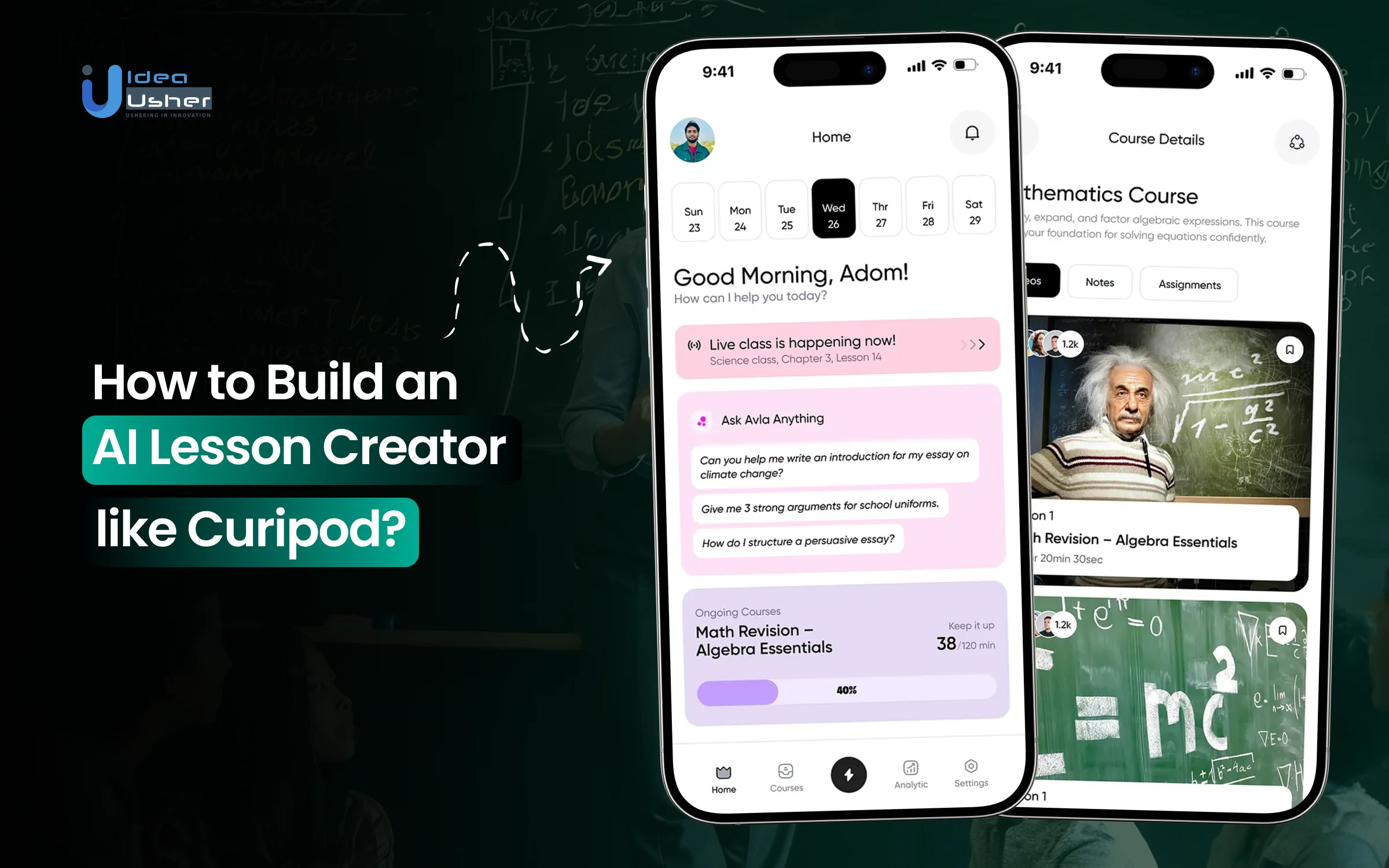
Crafting lessons that truly engage students has become more challenging as teachers navigate tight schedules and evolving curriculum requirements. Many educators spend hours shaping slides and activities when they could be focusing on instruction. That’s why the popularity of AI lesson creators is increasing. These systems can turn simple prompts into structured, ready-to-teach content and often include interactive elements such as quick polls, open-ended responses, and drawing tasks that boost participation.
They use automation and adaptive design to handle planning tasks with steady accuracy, and they can adjust activities to different learning levels without extra effort from the teacher. With these tools, teachers can reclaim time and focus on deeper learning goals.
Over the years, we’ve developed numerous EdTech solutions that leverage advanced technologies, including generative AI and learning analytics frameworks. Drawing on that expertise, we’re sharing this blog to discuss the steps involved in building an AI lesson creator like Curipod. Let’s begin.
Key Market Takeaways for AI Lesson Creators
According to MarketsandMarkets, the EdTech market is shifting rapidly, with AI education spending projected to rise from about USD 2.21 billion in 2024 to roughly USD 5.82 billion by 2030. This steady climb shows how schools are moving from experimenting with digital tools to relying on them as part of everyday instruction. Within that momentum, lesson-creation technology has become one of the most valuable areas, as it directly reduces the time teachers spend on planning.
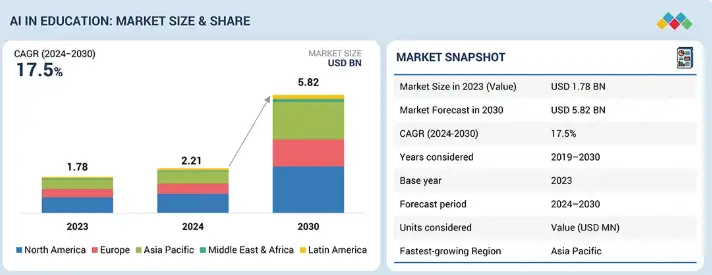
Source: MarketsandMarkets
By turning broad objectives into organized lesson flows, these tools help educators cut through the prep work that normally eats up hours each week. Teachers can shape ideas into clear activities, checks for understanding, and reusable materials, all without juggling multiple templates or starting from scratch.
The payoff is more time for real teaching as teachers can focus on working with students, adjusting instruction, and supporting learning.
Platforms like Khan Academy and Canva illustrate how this shift is taking hold. Khan Academy offers a planning assistant that helps outline lessons and adapt materials for different levels, while Canva pairs lesson outlines with ready-made visuals and slides. Both reflect a simple trend: when planning becomes lighter and more intuitive, teachers have more time to focus on what actually happens in the classroom.
What Is the Curipod Platform?
Curipod is an interactive lesson-creation platform designed for K–12 classrooms. It uses AI to help teachers build engaging, teacher-led lessons that blend slides, activities, and instant feedback. Educators can generate new lessons in seconds or upgrade their existing slide decks, while keeping instruction aligned to academic standards.
The platform supports subjects such as English language arts, math, science, and social studies, and does not require students to sign in. The goal is simple: make it easier for teachers to spark discussion, check understanding, and increase participation every day.
Here are some of its key features,
Teacher-Facing Features
AI Lesson and Activity Generation
Teachers can create complete lessons from a topic, learning goal, grade level, or academic standard. They can also choose from a library of ready-made templates such as check-ins, quizzes, project starters, and exit tickets, and then customize them.
Existing slides in PowerPoint, PDF, or Google Slides can be imported and “Curified,” which means the platform enhances them with interactive activities or automatically translates them into other languages.
Standards-Aligned Test Preparation
Curipod can generate practice activities tied to major instructional frameworks such as Common Core, TEKS, and NGSS. It also supports preparation for state assessments such as STAAR and ACT, including reading, writing, and constructed-response practice with rubrics.
Teacher-Paced Live Control
During a live session, the teacher directs the pace. They can move the class through slides, adjust timers, pause activities, add new tasks while teaching, and choose whether students appear with real names or anonymous labels. This structure keeps the class running synchronously and avoids students jumping ahead.
Monitoring and Insights
A real-time dashboard shows student participation, individual responses, and AI-generated scoring. After the lesson, teachers can view class trends connected to learning objectives. Lessons can be saved, organized into folders, shared with colleagues, or downloaded as PDFs for offline use or for students who were absent.
Student-Facing Interactive Features
Easy Access Without Accounts
Students join with a simple code on any device, including laptops, tablets, Chromebooks, or phones. After entering the session, their screen stays in sync with the teacher’s slides and activities.
Polls and Multiple-Choice Checks
Teachers can create polls with up to 10 answer choices. Options can be added, removed, or reordered instantly. Results appear on the main display, making them useful for quick checks for understanding, social-emotional prompts, warm-ups, and exit tickets.
Live Word Clouds
Students submit short responses that appear in a growing word cloud visible to the class. This makes it easy to surface common ideas, misconceptions, or prior knowledge. Teachers can adjust word limits or require a follow-up voting step.
Open-Ended Responses
For longer written tasks such as ELA prompts, science explanations, or historical analysis, students submit text-based answers within teacher-set character or word limits. These responses can be used for AI feedback or peer voting, depending on the activity.
Drawing Tools and the AI Whiteboard
Students can draw on a blank canvas or annotate an image provided by the teacher. Tools are intentionally simple to keep the focus on the task. In certain templates, Curipod’s AI evaluates drawings across traits such as accuracy, creativity, and clarity.
Voting and “Best Answer” Activities
Many activity types end with a voting round in which students select the strongest explanation, drawing, or idea. Teachers can customize the voting window and labels. This social layer increases motivation and supports challenges, missions, and collaborative problem-solving.
How Does the Curipod Platform Work?
Curipod turns lesson planning into a fast, interactive, and highly engaging workflow. The platform operates through a simple three-phase cycle: Create, Deliver, and Engage.
Each phase supports teachers and students in different ways, and together they form the core of Curipod’s classroom experience. This three-part structure ensures that teaching and learning flow smoothly from preparation to classroom execution to reflection.
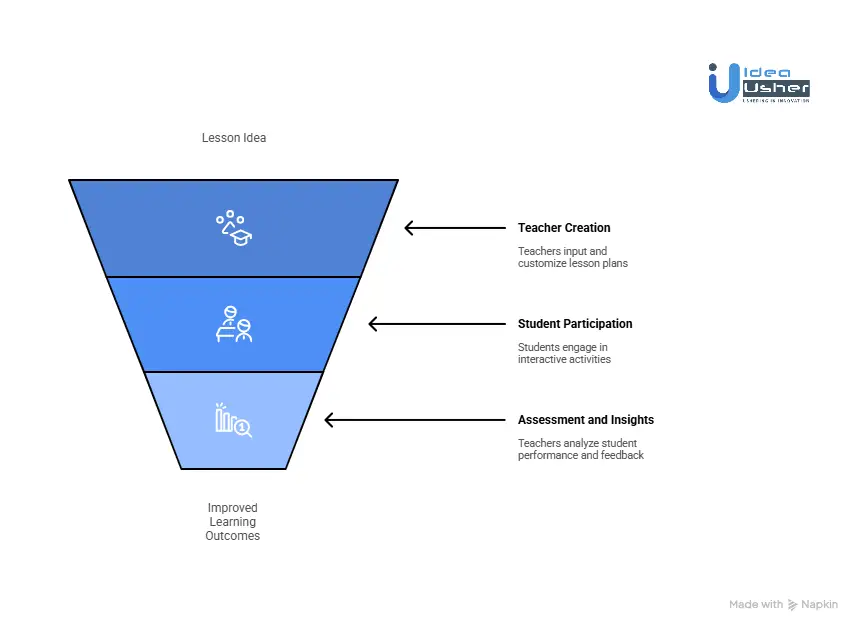
Phase 1: Teacher Creation
This is the stage where Curipod drastically reduces planning time. What once took hours can now be completed in minutes. The goal is to let teachers focus on instruction while the platform manages the busywork.
Step 1: Enter the Lesson Idea
Teachers begin by typing a prompt into Curipod’s generator. This can be short or highly detailed.
Each prompt acts as a starting point that Curipod expands into a full instructional sequence.
Examples:
- “Water cycle for 5th grade”
- “Causes of the American Revolution for 8th grade aligned to Common Core standard RH.6-8.4 including primary source analysis”
- “Spanish vocabulary for food and restaurants for high school beginners”
Curipod processes the prompt using its pedagogical retrieval system, gathering relevant standards, age-appropriate expectations, and instructional patterns before building anything.
This ensures that lessons remain developmentally appropriate and aligned to best practices.
Step 2: Curipod Builds the Interactive Lesson
Within seconds, a full lesson deck appears with curiosity-building opening slides, clear content slides, and interactive activities such as word clouds, polls, drawing tasks, open-ended prompts, peer feedback, and exit tickets. This gives teachers a ready-to-deliver lesson that blends instruction with participation and maintains a smooth, engaging flow.
Step 3: Customize and Refine
Teachers can personalize the lesson by:
- Rearranging slides
- Editing any text
- Adding or removing activities
- Uploading their own images or resources
- Using the Curify tool to transform existing PowerPoints or PDFs
Most teachers reduce planning time from several hours to only a few minutes. This flexibility allows every lesson to match the teacher’s style and classroom needs.
Phase 2: Student Participation
Once teaching begins, students participate through their own devices. This setup encourages active involvement rather than passive listening.
Step 1: Join the Session
Students connect by:
- Visiting curipod.com/join
- Entering the session code shown by the teacher
- Typing their name or a nickname
No accounts are required, which keeps access simple. This simplicity makes the platform accessible even in classrooms with limited tech experience.
Step 2: Participate in Real Time
As the teacher moves through the slides, each student’s device updates instantly. Interactive activities invite immediate responses. This real-time mirroring helps maintain focus and classroom rhythm.
Polls and Word Clouds
Students see a question such as, “What is the most important part of the water cycle?”. They choose an option or type a brief response. Live results appear on the main display for discussion. These quick interactions provide rapid insight into student thinking.
Drawing Activities
Students respond to prompts like, “Draw how energy moves through an ecosystem.”Their drawings appear in a gallery view for comparison and reflection. Visual responses often reveal misconceptions that text responses miss.
Open-Ended Questions
Students type longer responses that appear anonymously. This encourages full-class participation without social pressure. Anonymous displays also make it easier for shy students to contribute confidently.
Step 3: Peer Learning and Feedback
Curipod promotes collaborative learning by allowing students to:
- View anonymized class responses
- Vote on strong ideas
- React to peers’ thinking
- Engage with teacher-selected examples
This structure raises participation levels far beyond the handful of students who typically speak up. It also builds a classroom culture where all ideas are valued and explored.
Phase 3: Assessment and Insights
Curipod gives teachers a clear view of student understanding as it develops.
This continuous feedback helps guide instructional decisions in real time.
Real-Time Teacher Dashboard
During the lesson, teachers can see:
- Participation counts
- Trends in student choices
- Indicators for individual responses
- Word cloud themes
- Emerging patterns across the class
Teachers can hide inappropriate submissions, highlight excellent responses, or pause the activity flow at any time. This combination of visibility and control helps teachers manage both content and classroom behavior.
AI Feedback for Writing and Reflection
For extended written tasks, Curipod offers immediate feedback. Students may see comments such as:
- “Your evidence is clear. Try explaining how it supports your main point.”
- “Consider adding an example to strengthen this section.”
Students can revise their responses and improve their writing skills through repeated practice. This iterative process encourages deeper thinking and stronger communication.
Post-Lesson Analytics
After the session, teachers can review whole-class performance summaries, individual student progress, challenging concepts revealed through response trends, and exportable data for gradebooks or team discussions. This reflection stage helps teachers see how well the lesson met its goals and supports long-term instructional planning across units and grade levels.
What is the Business Model of the Curipod Platform?
Curipod operates as an AI-driven engagement platform for K–12 classrooms, providing teachers with quick lesson-building tools and students with active, collaborative learning experiences. The business model blends freemium virality with institutional licensing, creating both rapid adoption and long-term recurring revenue.
The platform succeeds because it turns everyday lesson planning, typically a time sink, into a fast, interactive AI-powered workflow.
A. Freemium Tier (Product-Led Growth Engine)
The free plan includes unlimited class participants, essential activity formats, reporting tools, and a capped AI generation limit. Its purpose is to drive adoption, encourage team-level sharing, and let teachers experience the platform’s value before committing to paid upgrades.
By lowering the barrier to entry, the free tier fuels viral spread within schools and serves as Curipod’s primary, cost-efficient distribution strategy.
B. Premium Subscription (Individual Teachers)
The premium plan, priced at approximately $7.50 per month annually or $9 per month on a monthly basis, unlocks longer AI feedback responses, richer templates, and expanded AI-driven lesson creation. It targets teachers who use the platform heavily or want advanced instructional tools without waiting for their school to buy a site license.
This model works because motivated teachers are willing to personally invest in tools that noticeably improve classroom quality and planning efficiency.
C. Enterprise Licensing (Schools and Districts)
Curipod sells district-level licenses offering unlimited AI, SSO, shared workspaces, onboarding, and priority support, features aligned with school IT, data security, and collaboration needs. This converts enthusiastic teacher use into budget-backed institutional partnerships that provide predictable ARR and meaningful scaling potential.
District contracts also deepen platform stickiness by building long-term adoption across departments and grade levels through shared libraries and training.
3. Strategic Evolution
Curipod initially operated as a B2C homework-help service, charging NOK 35 per session. Early traction in classroom use shifted the company toward a teacher and school-focused model. Today, viral teacher usage drives bottom-up discovery while enterprise offerings capture budget at the institutional level.
This evolution reflects a classic EdTech maturity pattern in which teacher value is proven first and then transformed into systemwide adoption.
4. Funding and Growth Trajectory
Curipod’s financial backing highlights confidence in AI-driven pedagogy:
$4.6M Seed Round (Sept 2023)
- Led by Reach Capital, joined by Edovate Capital, Emerson Collective, Sondo Capital
- Valuation around $20M pre-money
Earlier support in Norway
- NOK 2M from StartupLab/Sagene Tech Ventures
- NOK 1.5M in grants (Innovation Norway, Skattefunn)
Funding is now used to scale in the US, expand curriculum coverage, improve AI feedback models, and grow enterprise sales.
5. Usage, Reach, and Partnerships
Curipod reported more than 1 million monthly active students, approximately 1,000 daily active teachers, and collaborations with 11 Norwegian institutions, including NHH, BI, and NTNU, in 2023.
- The platform continues to expand in the United States and into Denmark and Finland.
- Teachers report gains in participation, critical-thinking skills, and test readiness through the platform’s interactive and cooperative learning activities.
These engagement outcomes strengthen Curipod’s case in district evaluations because measurable impact often influences purchasing decisions.
How to Build an AI Lesson Creator Like Curipod?
A Curipod-style AI lesson creator begins with a structured pedagogy engine that retrieves standards and shapes each output with precise instructional logic. A multi-agent pipeline can then generate lesson flows and refine content so the system maintains accuracy and responds efficiently under load.
We have developed numerous AI lesson creators like Curipod for our clients over the years, and this is how we consistently do it.
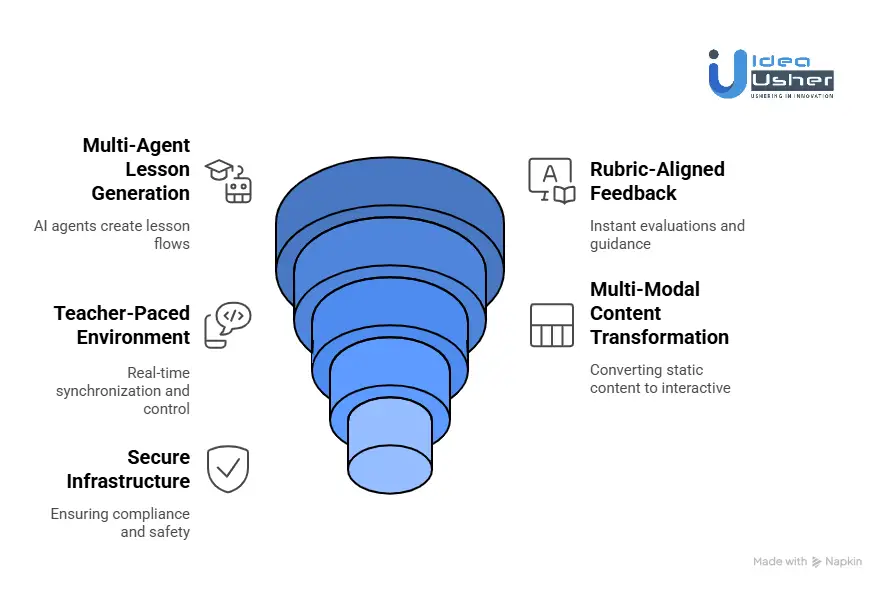
1. Pedagogical Knowledge Graph
We begin by constructing a pedagogy graph that integrates standards (Common Core, NGSS, state frameworks) with instructional models such as 5E, UDL, and GRR. These elements are embedded and connected to a high-performance retrieval layer, so every AI output is grounded in standards alignment and proven teaching practices.
2. Multi-Agent Lesson Generation
We deploy a coordinated set of AI agents for standards retrieval, lesson structuring, slide and activity creation, and instructional review. Similar to FanDuel’s optimized data pipelines, we streamline model calls to keep lesson generation fast, accurate, and cost-efficient.
3. Rubric-Aligned Feedback System
We integrate dynamic rubric generation and lightweight scoring models that deliver instant evaluations. Students move through a Write → Feedback → Revise workflow and receive specific guidance, such as adding evidence or clarifying reasoning, all based on task-aligned rubrics.
4. Teacher-Paced Synchronous Environment
Using WebSockets and robust state management layers, such as Redis or message queues, we enable real-time synchronization across all student devices. Teachers can control slides, polls, timers, and drawing activities with broadcast-level responsiveness, creating a fluid and interactive classroom experience.
5. Multi-Modal “Curify My Slides” Engine
The platform ingests PDFs and PowerPoint files via OCR and text extraction, identifies themes using topic modeling, and automatically generates interactive questions for each slide. This process transforms static teacher content into engaging and ready-to-teach lesson experiences.
6. K–12 Safe, Compliant Infrastructure
We ensure FERPA and COPPA compliance through zero-storage policies, automated data wiping, encrypted LLM routing, and a no-student-accounts approach. This provides districts with a secure and classroom-ready system designed specifically for K–12 environments.
Most Successful Business Models for AI Lesson Creator
A strong AI lesson creator will typically use a simple freemium model that lets educators try core tools before upgrading to full capacity. It may then scale through direct licensing, where schools gain controlled access, secure data flow, and reliable support.
A platform could also grow through a marketplace model that enables creators to build and sell advanced resources, while the system manages quality and distribution.
1. Freemium & Tiered SaaS Subscriptions
A tiered SaaS model is still the most effective way for AI education platforms to scale. Teachers try the tool for free, see its value, and upgrade when they want more power.
How It Works
Free plans usually allow a limited number of lessons or quizzes. Paid tiers unlock unlimited creation, customization tools, student-facing features, analytics, and collaboration. School and district tiers add admin dashboards, centralized billing, and secure integrations.
Examples
- MagicSchool.ai offers many tools at no cost, with paid upgrades and district privacy options.
- Curipod provides a free plan and a premium tier with unlimited private lessons and LMS integrations.
2. Institutional & District-Wide Licensing
This model focuses on selling directly to school systems rather than to individual teachers. Sales cycles are longer, but contracts are larger and provide stable annual revenue.
How It Works
Districts purchase licenses on a per-teacher, per-student, or per-school basis. These packages usually include onboarding, LMS integrations, professional development, analytics, and full compliance with privacy requirements.
Examples
- Nearpod relies heavily on district licensing, with fees ranging from $3,000 to $10,000 per school per year.
- Khanmigo piloted pricing at $4 per student per month, totaling nearly $50,000 annually for a 1,000-student school.
3. Marketplace & Creator Monetization
This model positions the platform as both an AI creation tool and a place for teachers to sell classroom-ready materials.
How It Works
Educators create lessons, units, or assessments with AI and list them for sale. The platform earns a percentage of each transaction. Over time, this builds a constantly expanding library of resources created by teacher-authors.
Why 68% of Teachers Use AI for Lesson Planning?
Many teachers are turning to AI because it helps them plan lessons more efficiently, and it reduces repetitive tasks that used to consume hours. According to reports, 68% of teachers use generative AI at least once a week to prepare lessons, and they often gain more time for analysis and instructional design.

1. The Crushing Weight of Administrative Tasks
Ask any teacher what they need most, and the answer comes fast: more time.
Between grading stacks of work, preparing tomorrow’s lesson, and responding to endless emails, the job often spills into evenings and weekends.
AI is becoming essential because it helps teachers win back hours they have already lost.
AI Removes the Repetitive Work
Tasks that previously consumed entire planning periods, such as drafting lesson outlines, generating worksheets, creating rubrics, or writing discussion questions, can now be completed in moments.
The “45% Rule.”
Some industry analyses show that AI-supported grading tools can cut assessment time by up to 45%. That regained time goes directly into what matters most:
- Giving meaningful feedback
- Meeting with students
- Refining instructional strategies
- Protecting the teacher’s well-being
When busywork decreases, the human side of teaching finally gets the attention it deserves.
2. The Push for Personalization
Today’s classrooms are academically and linguistically diverse. Teachers understand the value of differentiated instruction, but preparing multiple versions of lessons for 30 or more students is nearly impossible without support. AI bridges that gap.
Instantly Customizable Content
A single prompt can produce:
- A simplified reading passage for a student who needs extra support
- An advanced set of questions for students ready for enrichment
- Targeted practice based on common misconceptions
This ability to personalize at scale turns individualized learning from an aspiration into a routine part of daily planning.
Smarter Planning Through Data
Many AI tools interpret performance data to highlight trends before they become problems. Teachers can identify who needs reinforcement, who is ready to move ahead, and which skills require whole-class attention before the next lesson begins.
3. A New Creative Partner
Despite fears that AI might make classrooms feel mechanized, many teachers report the opposite. AI frees them to be more creative. The bottleneck in lesson planning is rarely imagination. The obstacle is time. With tedious tasks handled, teachers can finally channel their energy into creativity and experimentation.
Jump-Starting Ideas
Instead of staring at a blank screen, teachers can ask AI to generate:
- Role-play scenarios
- Project ideas
- Debate prompts
- Thematic units
From there, the teacher edits, shapes, and personalizes the content, just as a designer would refine a draft.
Expanding the Resource Pool
Teachers no longer spend hours searching for materials. AI can locate relevant videos or articles, adapt them for different learners, or translate them for multilingual students. This expands the instructional toolkit in ways that were not possible with traditional planning.
4. The Modern “Teaching Assistant.”
Large class sizes and limited staffing mean teachers often work without adequate instructional support. AI is filling part of that gap, not by replacing teachers but by handling the background tasks that used to overwhelm them.
On-Demand Support for Students
Teachers can quickly create materials that include:
- Sentence starters
- Visual aids
- Simplified explanations
- Enrichment extensions
These supports once required hours of work, but AI produces them in minutes.
Reducing the Mental Overload
Planning involves more than writing lessons. It includes aligning to standards, sequencing content, maintaining pacing, and checking coverage. AI tools can compare lesson plans to state standards, identify gaps, and suggest adjustments, so teachers do not have to juggle every detail on their own.
Challenges to Build an AI Lesson Creator like Curipod
Creating an AI-powered lesson builder is highly effective, but it also presents technical and pedagogical hurdles. After developing similar systems for multiple clients, we’ve identified the most common challenges teams face and the proven solutions that keep your product accurate, scalable, and reliable.
1. Ensuring Pedagogical Accuracy
AI can generate content quickly, but without proper guardrails, the educational quality may vary. This is especially risky when lessons must follow academic standards, age-level expectations, or specific learning outcomes.
Solution:
- Integrate expert review points (lightweight checkpoints, not heavy workflows).
- Use structured lesson templates such as learning objectives, success criteria, activities, and assessments to guide AI generation.
- Encode pedagogical rules directly into prompts or system instructions.
This ensures every output remains consistent, age-appropriate, and aligned with instructional best practices.
2. Managing AI Cost at Scale
As user volume grows, so do inference costs. Running large models for every small task can quickly become unsustainable.
Solution:
- Use lightweight or distilled models for classification and evaluation steps.
- Implement aggressive caching for repeated requests such as rubric scoring or standard definitions.
- Fine-tune models to reduce prompt length and cost per generation.
This approach keeps performance high while lowering monthly AI expenses, which is critical for long-term sustainability.
3. Preventing Latency During Live Sessions
Platforms like Curipod rely on real-time interaction. Any lag in content generation disrupts the classroom experience and causes teachers to disengage.
Solution:
- Distribute requests across multiple model instances to avoid bottlenecks.
- Use edge caching to pre-deliver predictable content such as templates and lesson scaffolds.
- Implement token streaming so the UI displays content as it is being generated.
With these optimizations, the platform feels instant even under heavy load.
4. Handling Multi-Modal Parsing Errors
Teachers upload PDFs, images, worksheets, slides, and handwritten notes. These inconsistent inputs often lead to extraction failures and misinterpreted prompts.
Solution:
- Cascade OCR and parsing tools so if one fails, another steps in.
- Use template-based preprocessing to clean and normalize inputs before AI processing.
- Add a diagnostic layer that identifies when the input is incomplete or low-quality and prompts the user for clarification.
This increases robustness and ensures the AI generates accurate, context-aware lessons regardless of input variability.
Tools & APIs for an AI Lesson Creator like Curipod
After creating several AI lesson platforms, we learned that early technical choices will shape the entire project and may even determine whether the system is usable in real classrooms. Curipod works because each part of its stack fits together in a practical way that supports real teaching.
Here is the kind of technology we usually rely on when building tools with the same level of instructional depth.
1. AI, Machine Learning, and NLP
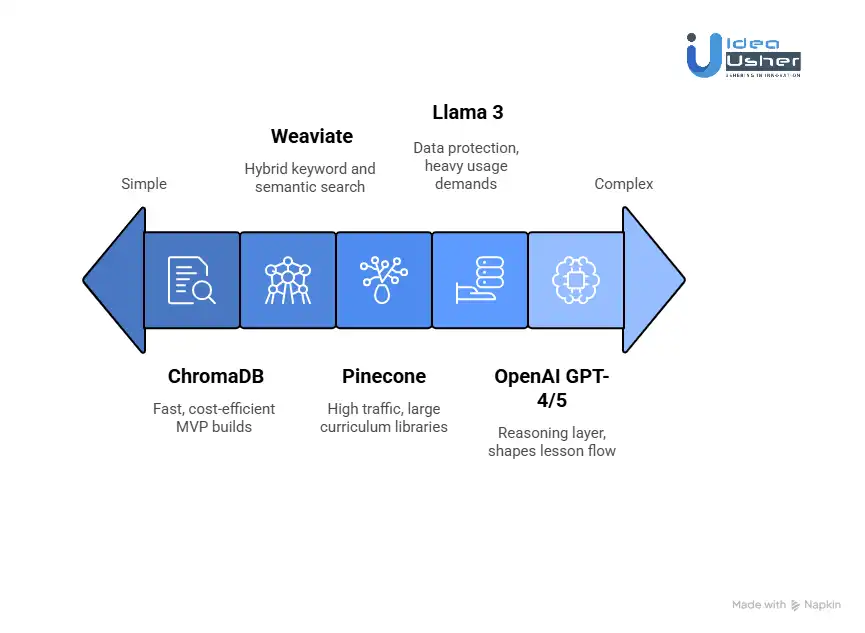
OpenAI GPT-4 or GPT-5 and Claude Opus
These models provide the reasoning layer that shapes lesson flow, assessments, discussions, and activities. The key is not just generating paragraphs of text. It is guiding the model to follow instructional structures so the output feels like an experienced educator created it.
We create system prompts that lock in instructional patterns. For example, prompts that require adherence to the 5E Model, that specify the number of formative checks within a segment, or that enforce the inclusion of collaborative tasks.
Specialized Fine Tuning
For teams that need alignment with academic standards, we prepare tailored datasets based on frameworks such as Common Core, NGSS, state standards, and district blueprints. This ensures that generated lessons match the language and expectations of real classrooms.
Llama 3 as a Self-Hosted Option
Clients with data protection requirements or heavy usage demands often choose a privately hosted model.
We deploy Llama 3 on Kubernetes clusters with optimized GPU settings to reduce operational cost while preserving output quality. Costs typically fall far below API-based solutions and data never leaves the client’s environment, which supports FERPA and HIPAA compliance needs.
LangChain or LlamaIndex for Retrieval-Augmented Generation
The RAG layer is where instructional intelligence truly forms. Instead of asking the AI to invent lessons from scratch, we feed it standards, templates, misconceptions, and teacher-provided materials.
A typical pipeline looks like this.
- User requests a lesson, for example “7th grade photosynthesis.”
- Retrieve the NGSS standard associated with the topic.
- Retrieve a 5E model template.
- Retrieve known student misconceptions.
- Retrieve recommended formative assessment strategies.
- Combine all context and generate a structured, standards-aligned lesson.
Vector Databases
Semantic search enables teachers to upload resources and instantly incorporate them into lessons.
We use:
- Pinecone for platforms with high traffic and large curriculum libraries.
- Weaviate when a hybrid keyword and semantic search is required.
- ChromaDB for fast prototyping and cost-efficient MVP builds.
Our standard approach is to begin with ChromaDB and scale to Pinecone when user load reaches approximately 50,000 active users.
2. Multi-Modal Document Processing
AWS Textract and Google Vision
When educators upload PowerPoints, worksheets, or PDFs, these services extract text, diagrams, and structure. Textract handles complex academic content well, and Google Vision excels at reading handwriting from scanned documents.
Our Processing Pipeline
Uploaded documents undergo OCR, content chunking, and semantic embedding, then are stored in the vector database. Once indexed, they become searchable building blocks for lesson generation.
PyMuPDF and Tesseract OCR
For cost-conscious projects, we combine PyMuPDF with Tesseract to extract text and images while preserving layout. We also apply custom filters to clean old textbook scans, improving OCR accuracy on aged documents by more than 40%.
3. Real-Time Infrastructure
WebSockets with Socket.io
This is the real-time communication layer for teacher-paced activities. When the teacher advances a slide or launches a poll, every connected student device must update immediately.
We use one namespace per classroom and broadcast teacher actions to all active clients.If a school district blocks WebSockets, our system automatically falls back to long polling to maintain functionality.
Firebase Realtime Database or AWS AppSync
- For small to mid-size deployments or rapid development cycles, these services provide instant synchronization with minimal configuration.
- Firebase is ideal for early prototypes, and AppSync is recommended for large-scale environments that require granular security.
- Once usage grows, we transition to a custom WebSocket service paired with Redis for performance.
Redis for Session State
Redis stores short-lived classroom state, such as the current slide, poll results, timers, and open activities. This makes transitions nearly instantaneous and enables the system to support thousands of concurrent classrooms without slowing.
4. Backend and Deployment
Node.js, Python, and Go
We use multiple languages so each service can operate at peak efficiency. Node.js handles real-time APIs, Python handles AI pipelines and data processing, and Go powers microservices that require very high throughput, such as analytics or question generation.
Serverless Functions
AI requests, document processing, and large analytics tasks often run in unpredictable bursts. Using AWS Lambda or Google Cloud Functions allows the system to scale automatically during peak times and drop to zero cost when idle, which reduces hosting expenses significantly.
Kubernetes
For predictable scaling at enterprise scale, we deploy Kubernetes with automated scaling rules, zero-downtime updates, and multi-region support for large school districts.
5. Frontend
React and Next.js
Next.js improves performance through server-side rendering and supports static exports for districts with limited bandwidth. We create a suite of reusable educational components, including interactive polls, collaborative boards, drawing spaces, and controlled-reveal steps.
Real-Time Synchronization
Teachers get a control panel that displays student progress and allows them to feature student work during discussions.
Students receive a clean, focused interface with clear prompts and simple navigation. Collaboration features provide group discussions, anonymous voting, and shared whiteboards.
Mobile-First Progressive Web App
Teachers and students can install the app on their home screens and continue working offline. Push notifications support reminders for upcoming lessons or assignments. The interface adapts naturally to tablets and Chromebooks, which are common in schools.
Conclusion
Building an AI lesson creator like Curipod is now a serious opportunity, as demand for adaptive pedagogy and real-time feedback continues to rise. You could use PRAG systems with a live sync engine to deliver structured content generation at scale. Our team at Idea Usher can build the full stack using strong AI engineering to ensure your platform performs reliably and meets modern EdTech standards.
Looking to Develop an AI Lesson Creator like Curipod?
IdeaUsher can help you build an AI lesson creator like Curipod, featuring a modular engine that adapts quickly to diverse content workflows. Our team would integrate PRAG-driven retrieval and a live-sync layer to ensure the system consistently generates lessons.
Why partner with us?
- 500,000+ hours of coding expertise across our team of ex-MAANG/FAANG developers, ensuring robust, scalable, and innovative AI integration
- Specialized in Pedagogical RAG systems—making AI lessons instructionally sound, not just AI-generated
- Expertise in real-time rubric-aligned feedback engines that drive measurable learning outcomes
- K-12 compliant architecture built from day one (FERPA/COPPA-ready)
End-to-end development: from AI/ML model orchestration to interactive frontends and secure cloud deployment.


FAQs
A1: The cost could vary widely, depending on the depth of adaptive logic, how you design multi-agent feedback, and the level of real-time synchronization you want. Plan a phased build to keep the architecture efficient and predictable.
A2: It can work smoothly because the same core engine may scale across higher ed and enterprise use cases where structured content flows and controlled assessments matter, and you can extend modules to match domain-specific needs.
A3: You do not need your own model; you can start with OpenAI or Anthropic APIs and later move to a fine-tuned open-source model if you want greater control while keeping latency and inference rules stable.
A4: Compliance is manageable, as you can define strict data boundaries with event-level audits and secure storage rules, and this setup will likely support secure identity management without slowing the learning workflow.