 (+971) 8007 4267
 (+91) 946 340 7140
 (+1) 628 432 4305


Universities rarely struggle because of academics, but because administrative systems quietly slow operations behind the scenes. Procurement approvals stretch, transcript reviews pile up, and compliance checks demand greater documentation as enrollment cycles accelerate. Manual workflows across disconnected platforms create delays that staff cannot sustainably manage.
That is why universities are looking to automate a large portion of back-office tasks with AI, because operational pressure is rising, regulatory requirements are tightening, service expectations are increasing, and budgets no longer support proportional headcount growth.
We’ve helped several universities automate their back-office tasks using our expertise in agentic AI orchestration architectures and robotic process automation frameworks. As IdeaUsher has this expertise, we’re sharing this blog to discuss how institutions can systematically automate the majority of back-office functions with AI.
Key Market Takeaways for Back-Office Automations
According to Cognitive Market Research, the global back-office automation market has grown from approximately 3.8 billion dollars in 2021 to an estimated 8.25 billion dollars by the end of 2025, and it is projected to surpass 41 billion dollars by 2033, expanding at a CAGR of over 22 percent. In higher education, universities are under increasing pressure from enrollment volatility and regulatory complexity. As a result, AI-driven back-office automation is no longer optional.
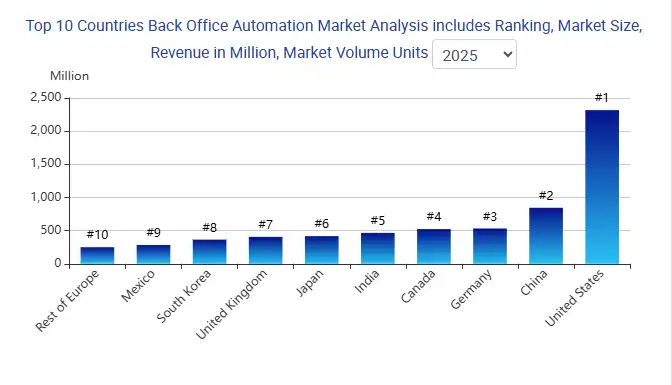
Source: Cognitive Market Research
Universities are adopting automation to streamline high-volume tasks such as transcript processing, procurement approvals, financial reconciliation, and compliance documentation. Instead of relying on manual workflows across disconnected systems, institutions are implementing intelligent automation layers that execute repetitive tasks with speed and consistency.
Real-world implementations demonstrate measurable impact. The University of Auckland partnered with UiPath to automate student transcript requests, supplier onboarding, compliance checks, and purchase orders, reducing supplier processing time from nearly two weeks to just a few days while saving tens of thousands of staff hours annually.
Similarly, AI-powered operational copilots have been deployed to automate course scheduling via historical data analysis and to accelerate transcript evaluation via OCR-based credit mapping.
Why Universities Must Automate Back-Office Operations with AI?
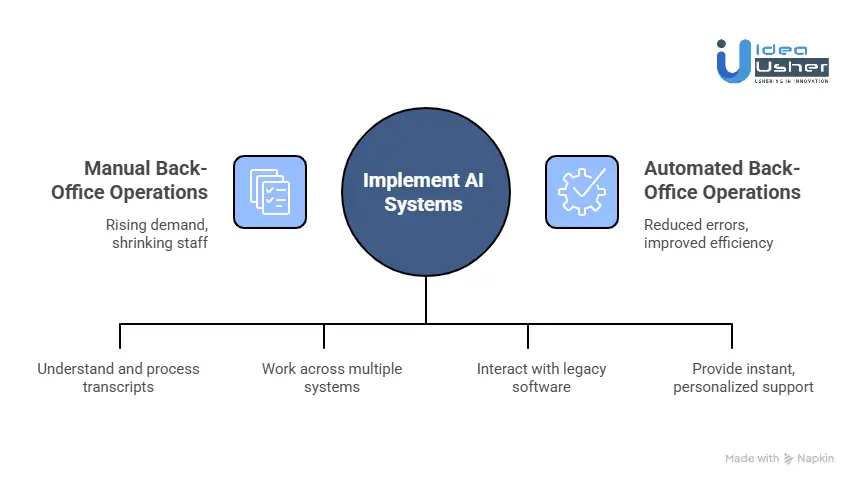
Universities must automate back-office operations with AI because administrative demand is rising while staff capacity is steadily shrinking. AI systems can quickly process data, reduce errors, and improve turnaround times. This shift can strategically free staff to focus on complex decisions that require human judgment.
1. The Enrollment Cliff
Demographics do not lie. The pool of traditional 18-year-old college students is shrinking. To balance budgets and maintain enrollment targets, universities must aggressively recruit non-traditional students: transfer students, graduate students, and online learners.
The Manual Bottleneck:
Right now, when a transfer student applies, their transcripts often sit in a queue for weeks waiting for a human evaluator. That student is not waiting patiently. They are enrolling at a competitor who gave them an answer in 24 hours.
The AI-Powered Solution:
Modern Intelligent Document Processing IDP does not just scan transcripts. It understands them. Using computer vision and contextual AI, these systems can:
- Read a transcript from a foreign university, regardless of format.
- Convert foreign grading scales to your institution’s GPA standard.
- Map previous coursework to your current curriculum.
- Generate a preliminary credit evaluation in seconds, not weeks.
The Bottom Line: In a shrinking market, speed is everything. Universities that automate the admissions intake process will win the battle for every floating student.
2. The Staffing Crisis
We often hear about the “Great Resignation” in corporate America, but higher education administration has been hit just as hard. Skilled registrars, financial aid counselors, and data entry specialists are retiring in waves, and there are not enough young professionals entering the pipeline to replace them.
The Burnout Problem:
For every student you see in a classroom, there are dozens of invisible data points being moved manually behind the scenes. Matching purchase orders, reconciling payroll discrepancies, manually entering grades, and verifying enrollment for loan deferments. This work is repetitive, tedious, and highly prone to human error. It drains the morale of your best people.
The AI-Powered Solution:
Agentic AI fundamentally changes the nature of work. Unlike simple automation that follows a rigid script, AI “agents” can:
- Work across multiple software systems simultaneously, including SIS, CRM, and HR platforms.
- Handle exceptions and edge cases without human intervention.
- Learn from past decisions to improve accuracy over time.
Instead of a human spending 20 hours a week copying and pasting data from a PDF into an ERP system, a “Digital Employee” handles the entire workload.
The human shifts from being a “data entry clerk” to a “case manager,” overseeing the AI’s work and handling only the nuanced exceptions that require genuine human judgment.
The Bottom Line: Automation is not about replacing your staff. It is about replacing the burnout cycle. It makes the jobs you have left more sustainable, strategic, and fulfilling.
3. The “Legacy Tax.”
Let us address the elephant in the room: university technology infrastructure.
Most institutions are trapped by their past technology decisions. You are likely running on systems designed in the 1980s and 90s, mainframes and client-server architectures like Ellucian Banner, PeopleSoft, or homegrown COBOL systems.
These platforms were never built for the mobile, instant-access, API-driven world of 2026.
The Integration Nightmare:
IT departments often spend 70 to 80% of their budgets simply maintaining the status quo. They patch legacy code, manage security vulnerabilities, and manually move data between systems that refuse to communicate.
The AI-Powered Solution:
Here is the breakthrough that changes everything. Modern AI does not require you to rip and replace your core systems.
Using Semantic RPA Robotic Process Automation enhanced with computer vision, AI agents can interact with your legacy software exactly as a human does. They log in. They navigate menus. They read data from screens. They click submit buttons.
This creates a “Cognitive Layer” that sits on top of your existing infrastructure, giving you modern, automated workflows without the $5 million to $10 million price tag of a full system overhaul.
4. Student Expectations Have Fundamentally Shifted
Today’s students are digital natives raised in the Amazon era. They expect instant answers, 24/7 service availability, and hyper-personalized experiences.
When they encounter a university back office that operates on “9-to-5 hours” and “check your email in 3-5 business days,” they lose patience. They feel frustration. And frustration leads to attrition.
The Experience Gap:
A student who cannot get a clear answer about a financial aid hold does not blame the “understaffed bursar’s office.” They blame the university as a whole. Increasingly, they will transfer to an institution that respects their time.
The AI-Powered Solution:
Conversational AI Agents have evolved far beyond simple FAQ chatbots. Modern agents can:
- Authenticate the student’s identity securely.
- Access multiple backend systems in real time.
- Take action on the student’s behalf.
A student can ask, “Why is my account on hold?” The AI checks the bursar’s system, identifies an outstanding balance, cross-references their financial aid award, finds available funds, and sets up a payment plan, all within the same chat session, without a single human intervention.
The Bottom Line: The back office is the front office. A slow, opaque, bureaucratic back office is the fastest way to tank your student retention rates.
5. The 60% Automation Target.
Let us move from theory to practice. When we talk about automating “60% of back-office tasks,” what does that actually mean?
We are not talking about automating the nuanced judgment of a counselor or the strategic thinking of a Dean. We are talking about the repetitive, rules-based, high-volume tasks that dominate the daily workflow.
Here is a realistic, department-by-department breakdown of what 60% automation looks like in practice:
| Department | High-Impact Automation Targets | Realistic Potential |
| Admissions | Transcript data entry, application status updates, ID verification, communication follow-ups. | 85-90% |
| Registrar | Enrollment verification, transfer credit articulation (first pass), degree audit checks, transcript requests. | 70-75% |
| Finance/Bursar | Invoice matching, payment reconciliation, delinquent account follow-up, purchase order processing. | 75-80% |
| Financial Aid | Document collection, verification of tax data, award letter generation, deadline reminders. | 65-70% |
| Human Resources | Payroll reconciliation, new hire onboarding paperwork, benefits enrollment, and timesheet auditing. | 50-60% |
| Student Affairs | Housing assignment sorting, basic conduct report logging, orientation scheduling, and event coordination. | 55-60% |
(Note: These estimates are based on current AI capabilities deployed in higher education institutions as of 2026.)
Types of Automatable Back-Office Functions in Universities
Universities can automate admissions, registrar tasks, finance, HR, IT support, and compliance using AI-driven workflows. These rule-based processes could be streamlined to reduce manual effort and errors. With proper implementation, operations may run faster and more accurately.
1. Admissions & Enrollment Administration
Admissions offices handle thousands of applications, eligibility checks, and communications each cycle. Automation reduces manual review time, eliminates repetitive data entry, and speeds up applicant responses. It also enhances the applicant experience by enabling faster, more consistent communication.
Automatable functions:
- Application data extraction and validation
- Document verification and completeness checks
- Eligibility screening based on program rules
- Offer letter generation
- Admission decision notifications
- Enrollment confirmation workflows
2. Student Records & Registrar Operations
Registrar’s offices manage academic records, course registrations, credit evaluations, and graduation processing. These rule-based tasks are ideal for intelligent automation and system integration. Automation ensures the accuracy of academic data while minimizing processing delays.
Automatable functions:
- Transcript generation and delivery
- Degree audit automation
- Course add and drop approvals
- Academic standing calculations
- Graduation eligibility checks
- Program change processing
3. Financial Aid & Scholarships Management
Financial aid departments process complex eligibility rules, income documentation, and regulatory compliance. AI can standardize evaluations while maintaining fairness and transparency. This reduces administrative burden during peak scholarship and aid cycles.
Automatable functions:
- Income and tax document validation
- Scholarship scoring and ranking
- Financial aid eligibility checks
- Award letter generation
- Disbursement scheduling
- Compliance documentation tracking
4. Finance & Accounts Payable
University finance teams manage high volumes of invoices, purchase orders, and vendor payments. Automation accelerates approvals and reduces human error in financial processing. It also improves financial visibility and audit readiness.
Automatable functions:
- Invoice scanning and validation
- Purchase order approvals
- Supplier onboarding workflows
- Budget reconciliation
- Expense auditing
- Payment release processing
5. Human Resources & Faculty Administration
HR departments oversee hiring, contracts, payroll, and compliance for faculty and staff. Many workflows are structured and policy-driven, making them ideal for automation. This allows HR teams to focus more on talent strategy and faculty engagement.
Automatable functions:
- Faculty onboarding documentation
- Contract creation and renewal
- Payroll processing
- Leave and attendance tracking
- Benefits administration
- Performance documentation workflows
6. Course Scheduling & Timetabling
Scheduling involves balancing faculty availability, room capacity, and student demand. AI systems can resolve conflicts and optimize timetables using historical and real-time data. Dynamic scheduling improves resource utilization across campus facilities.
Automatable functions:
- Conflict detection across rooms and faculty
- Classroom allocation optimization
- Capacity planning based on enrollment trends
- Automated timetable generation
- Real-time schedule adjustments
7. Compliance & Accreditation Management
Universities must comply with regulatory, accreditation, and reporting standards. Automation ensures continuous monitoring and accurate documentation preparation. This reduces compliance risk and prevents last-minute reporting stress.
Automatable functions:
- Regulatory reporting automation
- Accreditation data compilation
- Policy version control tracking
- Audit documentation preparation
- Risk flagging for non-compliance
8. IT Helpdesk & Service Management
Campus IT teams handle large volumes of repetitive support requests. AI-driven ticketing systems can efficiently triage, resolve, or escalate issues. Faster resolutions improve both staff productivity and student satisfaction.
Automatable functions:
- Ticket classification and routing
- Password reset automation
- Access provisioning workflows
- FAQ resolution via chatbots
- Service-level tracking and reporting
How to Automate University Back-Office Tasks with AI?
Automating university back-office tasks with AI starts by identifying repetitive workflows that can be handled by rule-driven agents. A secure integration layer should connect core systems so data can move without manual effort.
We have supported higher education institutions in transforming back-office tasks with AI, and this is our method.
1. Identify Repetition
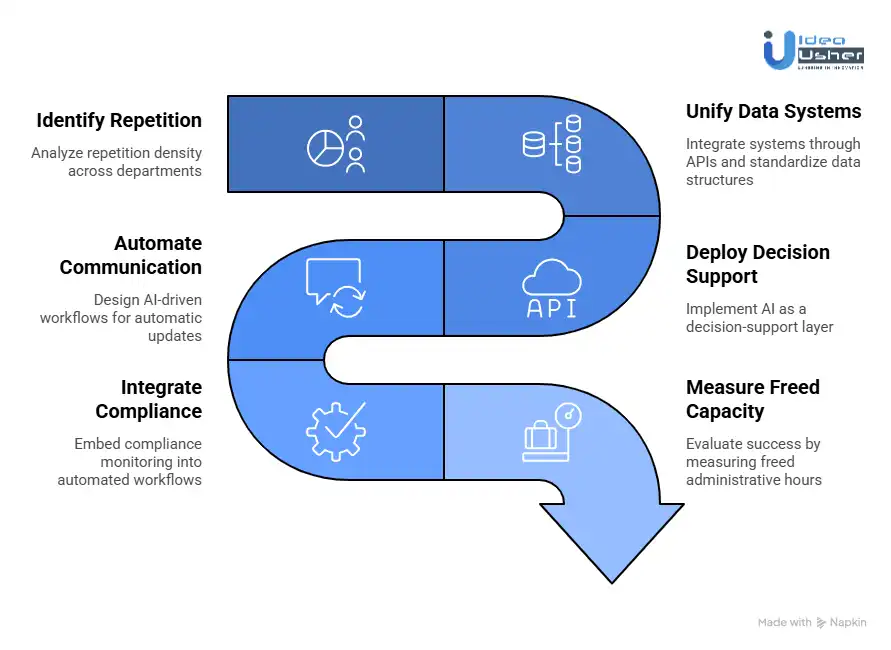
We begin by analyzing repetition density across departments. Instead of simply mapping workflows, we measure how frequently tasks like admissions screening, invoice matching, transcript validation, and manual data entry occur. High-volume, rule-based tasks become the first automation targets.
2. Unify Data Systems
Before deploying AI, we prepare the data environment. Universities often operate across disconnected platforms, which creates inefficiencies and inconsistencies. We integrate systems through APIs and standardize data structures to build a unified data layer.
3. Deploy Decision Support
Rather than replacing processes immediately, we implement AI as a decision-support layer. Our systems flag incomplete applications, detect anomalies in financial records, and prioritize internal requests. This reduces manual workload while maintaining human oversight.
4. Automate Communication
Administrative communication consumes significant time. We design AI-driven workflows that automatically send updates, reminders, and status notifications triggered by real-time system events. This reduces repetitive email handling and accelerates response times.
5. Integrate Compliance
Compliance monitoring is embedded directly into automated workflows. We configure AI systems to track documentation completeness, policy adherence, and regulatory deadlines. Automated alerts and reporting reduce risk exposure.
6. Measure Freed Capacity
We evaluate success by measuring freed administrative hours, reduced turnaround times, and improved accuracy. By quantifying the operational capacity released through automation, universities gain visibility into how resources can be redirected toward strategic initiatives.
How to Prevent AI Hallucinations in Critical Back Office Workflows?
To prevent AI hallucinations in critical university back-office workflows, the system must be grounded in verified institutional data and should avoid open-ended generation. It must apply deterministic rule engines and may enforce strict confidence thresholds to route uncertain outputs to human review.
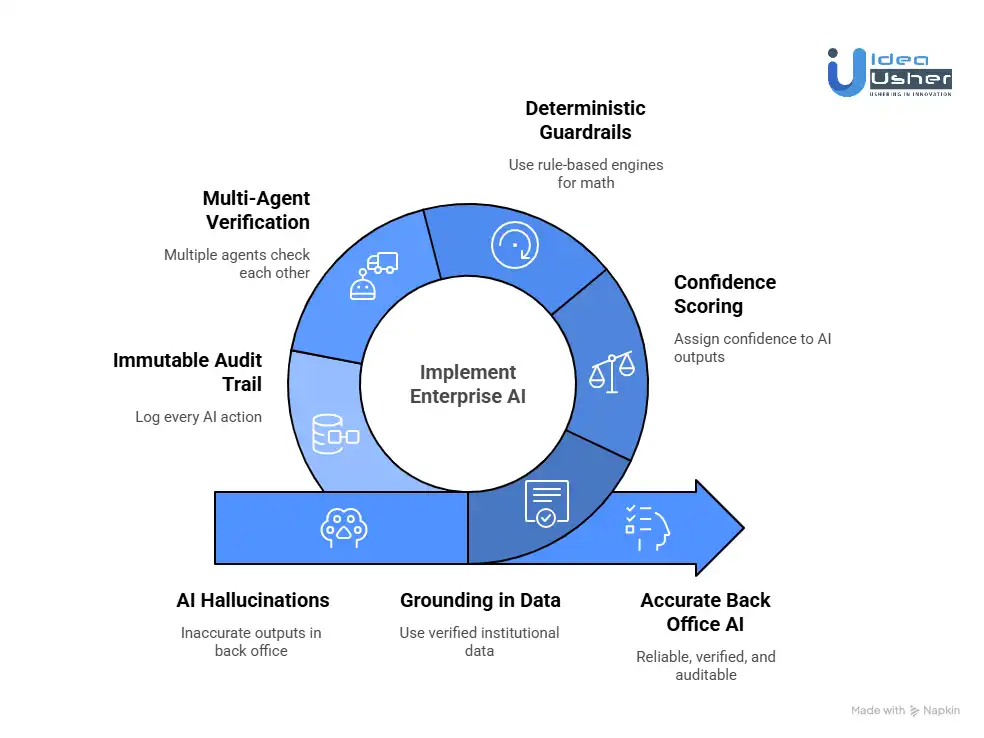
1. Grounding in Your Data
The most fundamental protection against hallucinations is ensuring the AI never has to guess.
Consumer AI tools like public ChatGPT rely on their general training data, which may or may not include accurate information about your specific university’s policies.
The Enterprise Solution:
Retrieval-Augmented Generation ensures the AI grounds every response in your institution’s verified data. Instead of relying on generalized training knowledge, the system retrieves relevant policies, catalogs, and official documents in real time before generating an answer.
Without RAG: The AI relies on memory. It might recall that “most universities require 120 credits for graduation” and tell a student that, even if their specific program requires 128 credits.
With RAG: When a question comes in, the AI first retrieves relevant information from your actual, approved university documents, your course catalog, your policy handbook, and your financial aid procedures. It then generates its response based only on that retrieved information.
What This Means for Your Back Office
The AI cannot invent a policy because it is not allowed to answer without first consulting your policy documents.
If the information is not in your approved sources, the AI is trained to say, “I cannot find that information in the official university documentation. Please contact the Registrar’s office.”
2. Confidence Scoring
Even with RAG, there are situations where the information might be ambiguous. A scanned transcript might have smudged ink. A student’s handwritten appeal might be difficult to read.
The Enterprise Solution:
Every time an AI processes a piece of information, whether reading a document or answering a question, it assigns itself a confidence score. This is an internal measure of how sure it is about its output.
| Confidence Level | Example Range | System Action | Human Role |
| High Confidence | e.g., 98% | Proceeds automatically. | No review needed. |
| Medium Confidence | e.g., 75–97% | Flags for review. | Human validates and confirms. |
| Low Confidence | e.g., below 75% | Stops automation. | Human handles completely. |
What This Means for Your Back Office
You set the rules. If you want 99% confidence before an AI touches a financial aid award, you can configure that. Tasks that fall below the threshold are simply handed to your staff with all the context pre-assembled. The AI does the prep work. The human does the decision-making.
3. Deterministic Guardrails
Some university tasks are not open to interpretation. A GPA calculation is a mathematical formula. A financial aid award is determined by a specific set of rules. An account balance is a simple number.
For these tasks, allowing an AI to generate an answer is the wrong approach.
The Enterprise Solution:
In a well-designed AI system, the LLM is used for tasks it excels at: understanding language, reading documents, and summarizing information. But for tasks that require absolute, deterministic accuracy, the LLM is not allowed to do the math.
Instead, the architecture works like this:
- AI Reads: The AI extracts the raw data from a document, e.g., “Course: BIOL 101, Grade: A, Credits: 4”.
- AI Hands Off: The AI passes this raw data to a rule-based engine, a simple piece of software that applies mathematical formulas and logical rules.
- Engine Calculates: The engine calculates the GPA, applies the financial aid formula, or updates the account balance using hard-coded, audit-proof logic.
- AI Communicates: The AI uses the result to generate a plain English explanation for the student or staff member.
What This Means for Your Back Office
The AI never guesses a number. It reads and writes words. The math is handled by deterministic systems that cannot hallucinate. This is the digital equivalent of having a human clerk handle data entry while a calculator handles the arithmetic.
4. Multi-Agent Verification
In complex workflows, a single AI agent might miss nuance. A powerful architectural pattern for critical tasks is to use multiple AI agents that check each other’s work.
The Enterprise Solution:
Imagine processing a complex transfer credit appeal. Instead of one AI handling the whole task, the system might deploy:
| Agent | Role | Function |
| Agent A | The Extractor | Reads the transcript and extracts course names, credits, and grades. |
| Agent B | The Policy Expert | Reviews the transfer credit policy and identifies the applicable rules for the case. |
| Agent C | The Auditor | Validates extracted data and policy interpretation against source documents, and flags discrepancies for human review. |
| Agent D | The Writer | Drafts the final response only after validation and consensus from other agents. |
What This Means for Your Back Office
This is the AI equivalent of having four or eight eyes review a critical document. It creates a system of checks and balances within the machine, dramatically reducing the chance of an error slipping through.
5. The Immutable Audit Trail
Even with all these protections, you need one more thing: proof.
When an auditor asks, “Why was this student’s financial aid adjusted?” you cannot say, “The AI did it.” You need a detailed, unchangeable record of every decision.
The Enterprise Solution:
Every action an AI agent takes in a university’s back office must be logged in an immutable audit trail. This log should capture:
- Input: What document or query was received?
- Reasoning: What sources did the AI consult, which policy documents, which database records?
- Confidence: How confident was the AI at each step?
- Action: What specific action was taken? Data entered, email sent, flag raised?
- Human Review: If a human intervened, what did they change?
What This Means for Your Back Office
When a regulator or auditor comes calling, you can produce a complete, human-readable transcript of exactly what happened, why it happened, and who or what authorized it. The black box becomes a glass box.
Deciding Agent-Led vs Human-Led University Back-Office Tasks
The goal of AI automation is not to replace humans. The goal is to elevate humans. It is to strip away the repetitive, rules-based, high-volume work that drains energy and morale, so your staff can focus on the work that requires genuine human capability.
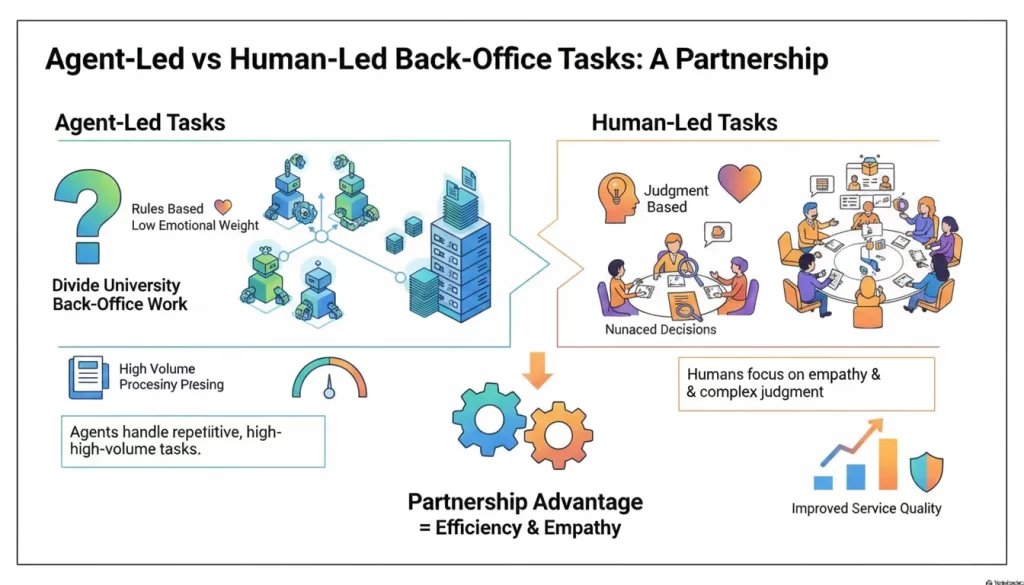
Think of it as a partnership:
| AI Agents Excel At: | Humans Excel At: |
| Speed | Nuance |
| Consistency | Judgment |
| Volume | Empathy |
| Rule-following | Exception-handling |
| Data processing | Relationship-building |
| 24/7 availability | Creative problem-solving |
The task of leadership is to divide the workload accordingly.
When evaluating any back-office task, ask these four questions. The answers will tell you whether the task should be agent-led, human-led, or something in between.
1. Rules-Based or Judgment-Based
Rules-Based Tasks: These tasks follow a clear, predictable path. If X happens, do Y. If the document is missing, send a reminder. If the GPA is above 3.5, send the honors application. These tasks have right and wrong answers. They are deterministic.
Judgment-Based Tasks: These tasks require interpretation. They involve weighing multiple factors, considering context, and making decisions where reasonable people might disagree. Should this student’s unique circumstances warrant an exception to the late fee policy? Is this transfer course truly equivalent to our required curriculum?
The Guideline:
- If the task is purely rules-based → Agent-Led.
- If the task requires nuanced human judgment → Human-Led.
Example:
Agent-Led: Verifying that a student has submitted all required financial aid documents. The system either has the documents or it does not.
Human-Led: Reviewing a student’s appeal letter explaining why they cannot submit a required document due to homelessness. This requires empathy and contextual judgment.
2. Emotional Stakes of the Interaction
University work is not just about processing transactions. It is about guiding young people through transformative life experiences. Some interactions are purely transactional. Others are deeply emotional.
Low Emotional Stakes: A student checking their account balance. A vendor submitting an invoice. A faculty member is updating their office hours. These interactions are functional. Efficiency is the primary value.
High Emotional Stakes: A first-generation student receiving their acceptance letter. A student explaining why they are struggling academically. A family navigating the financial aid process after a parent’s job loss. These moments matter. They shape how students feel about your institution.
The Guideline:
- Low emotional stakes → Agent-Led.
- High emotional stakes → Human-Led or at least Human-Monitored.
Example:
Agent-Led: Sending a routine deadline reminder email to 5,000 students.
Human-Led: A phone call to a student who has been identified by AI as showing signs of severe academic disengagement and possible depression. The AI can flag the risk. Only a human can provide the care.
3. Cost of Being Wrong
In some tasks, an error is a minor inconvenience. In others, an error is a compliance violation, a financial loss, or a life-altering mistake for a student.
Low-Cost Errors: Sending an email with a typo. Posting an event on the wrong date. These are easily corrected and cause minimal harm.
High-Cost Errors: Miscalculating financial aid. Incorrectly denying a transfer credit that delays graduation. Releasing student data in violation of FERPA. These errors have serious consequences.
The Guideline:
- Low cost of error → Agent-Led with minimal oversight.
- High cost of error → Human-in-the-Loop oversight, even if the agent does the work.
Example:
Agent-Led with Audit: Processing routine enrollment verifications for loan deferments. The AI handles the volume, but a monthly audit checks a sample for accuracy.
Human-in-the-Loop: Approving a change to a student’s official transcript. The AI can prepare the change and check for policy compliance, but a human must click approve.
4. Cross-System Complexity
Some tasks live entirely within one system. Others require pulling information from multiple sources, interpreting it, and taking action across different platforms.
Simple Tasks: Updating a phone number in the SIS. Generating a standard transcript request. These involve a single system and a single action.
Complex Orchestration: Investigating a student’s eligibility for retroactive withdrawal. This might require pulling data from the academic record system, the health center for medical withdrawals, the financial aid system, and the student conduct database, then synthesizing that information into a recommendation.
The Guideline:
- Simple, single-system tasks → Agent-Led.
- Complex, multi-system orchestration → Agent-Led orchestration with Human review of the synthesis.
Example:
Agent-Led: A student requests a transcript. The AI verifies identity, checks for holds, processes payment, and triggers the transcript generation. All systems operate in one seamless flow.
Human Review: The same student requests a retroactive withdrawal due to medical reasons two years after leaving. The AI gathers all relevant records and presents a summary dashboard to a human advisor. The advisor makes the final determination.
Conclusion
Automating university back office work is about adding an intelligent layer that can process data, enforce rules, and reduce manual delays across departments. Institutions that adopt AI-driven automation will likely operate more efficiently and scale enrollment without increasing overhead. For enterprise builders, this can become a strong infrastructure opportunity as universities increasingly need secure AI systems to modernize legacy operations.
Looking to Automate University Back-Office Tasks with AI?
IdeaUsher can design AI agents that integrate with university systems and automate tasks such as admissions and financial processing. We would embed compliance controls and human oversight to ensure decisions remain accurate and explainable.
With 500,000+ hours of coding experience and a team of ex-MAANG/FAANG developers, we do not just talk about AI. We build the cognitive layer that connects your legacy systems, such as Banner, PeopleSoft, and Colleague, to a fully autonomous future.
What We Actually Do:
- Legacy Integration Experts. We wrap AI around your 30-year-old systems. No $5M database overhaul required.
- Action Agents, Not Just Chatbots. We automate the full workflow from transcript intake to financial aid disbursement.
- FERPA Compliant by Design. Private cloud deployments with military-grade data sovereignty.
- Human in the Loop Architecture. 95% confidence equals auto approve. Edge cases are flagged for your team with AI-generated summaries.
- Explainable AI. Full audit trails for every decision because university compliance is non-negotiable.
Check out our latest projects.


FAQs
A1: Yes, it is realistic because a large portion of university administrative work is repetitive and rule-driven. Automating university back office work is about adding an intelligent layer that can process data, enforce rules, and reduce manual delays across departments.
A2: No, full ERP replacement is not required in most cases. A cognitive AI layer can integrate through APIs and semantic RPA to orchestrate workflows across existing systems without disrupting core infrastructure.
A3: It can be compliant when implemented within secure private environments. Encryption, strict access controls, audit trails, and role-based permissions help ensure that student data is protected in accordance with FERPA guidelines.
A4: Most platforms follow a subscription-based SaaS model priced per active student or by workflow volume. This creates predictable budgeting for institutions while aligning revenue with usage.